-
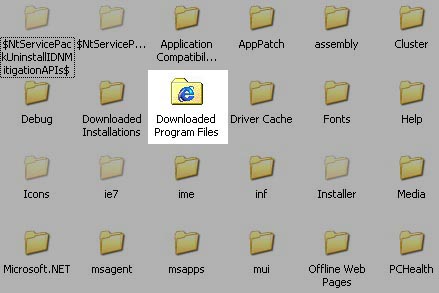
I tried new Reshacker runs under x64 native, but it seem like this old folder icon is in some place too. I replaced both in sys32 and syswow64 folders but the old icon remains there. I open those files in reshacker again and it has the icons changed, i don-t know what-s wrong, any help?
-
But it doesn't under x64. I replace both in wow64 & system32
-
It works!! I have to test in x64 at home. Now another question, can i save the modified .dll file (occache.dll) for replacing file directly in case of reinstall OS (same OS version of course), maybe i've to do it in safe mode? This way i haven't to install Restorator and do the process again.
-
Can u help me how can i do this please
-
Yes, but i want to change that old icons to new of default xp like icons
-
Sorry but where i've to run the install, i create a new file called OffWebPage.inf, paste that content, run install from it but nothing happen. What I'm doing wrong?
-
This is the "Bad" icon, so isn't a common folder, that any program can replace his icon, it contains activex archives for internet explorer. Any help?.
-
No no, you misunderstood me. I meant, change the title of this thread, making it more specific. Yes, i do No One??
-
No no, you misunderstood me. I meant, change the title of this thread, making it more specific. Yes, i do
-
Is a joke?
-
Hi, i tried XPize time ago, but i didn't use no more cause no x64 support. That's because i want to change this folder icon "manually". Thanks for your reply
-
Hi, i don't know if this is the correct place to ask, but maybe can help me. I want to change de default (OLD) "Downloaded Program Files" icon folder inside windows folder. It's an w2k era icon and want to have a new xp like icon. Is it possible?. Thanks in advance
-
I'll try in my home computer, thanks a lot for your time
-
Sorry but just paste that in a txt and rename to .reg file and merge?. That's all? Sorry for noob question.
-
Any idea how to fix the Tahoma missing fonts in win, like Xpize do, but without installing it. (Because x64 os).