Everything posted by Jolli
-
in your included english.lng is no changes to version number: stay always on 1.2 rc! here the german translation ... German.lng.v1.3.rc.7z
-
I was wrong, sorry
-
Hi there a new QuickTime Lite Version ist out: QT Lite 4.1.0 at Free-Codecs.com
-
Perhaps someone can take it, but did you see the date of the post? Just over 6 years ago....
-
Rigth, i see and once more, its only 1 Developer of both K-Light Codec pack and the QuickTime ligt pack! ok, ok. If was only a question whether somebody knows the code! However, is probably a touch too much! A few more than in my post #6, i thought. New QuickTime version is out now, 7.6.9 !
-
Ah ok! Yes. I read on the K-Lite Codec Pack Site what codec files are updated, but Quicktime is not listed as updated!? K-Lite Codec Pack Homepage
-
Thank you all for the solutions, but I had fancied something else! Stuff like this thread only working with the new files! @GrofLuigi I think you had to put also the new plugin 'npqtplugin7.dll' in '%programfiles%\QuickTime\\Plugins\npqtplugin7.dll', isn´t it?
-
Thanks, i´m using the old one, but there is an new QuickTime version, you´ve seen? My browser never has this plugin need to use, so i think its useless for me! This is wy i asked. If anybody found out, please tell us, which files do we need. It would be great, if it came with in a Codec pack!
-
Hi, is there anybody who knows, which Codec files are necessary for 'only' playing QuickTime files? No need the browser plugin files. I won´t the whole unnecessary stuff that comes with the QuickTime installer!
-
look to this site 7z SFX Modified Module and Tools so about in the middle, so you will find it, if this it, what you are searching!
-
Please, puts these questions in the right columns, I don´t know - can´t help you!
-
Sorry my fault, the image are to small to say this! Your colour palette is still wrong! kernel.exe exept only MS-palette! But i don´t know how to change this with out any App! this is the mistake.If you don´t want MS pal. look here Boot Screen changing at msfn-unattented.com But i don´t know whether this still functions! It exists since 2001 or so ... Another opportunity is with TuneUp Utilities, see this thread: I could imagine that it still a free version gives anywhere in the net, just google around. I found for me TuneUp Utilities 2009 portable for free in German, with just 20MB or so... Move the Progress Bar in XP (SP2) If you don´t wont a progressbar read this thread and scroll down. Customize your boot screen! info-on-editing-xp-sp2-boot-screen Have fun ...
-
No, your bootskin is more than 16 colour! You hat to save for "optimized 4bit" and 16 colour, or so, look in your App!
-
How did you edit the 4 krnl...exe files, with what bitmaps are?? How did you changed in your system? Picture rules for .bmp are: 640 x 480 pixel, 150kb and 16 MS-colour palette, 4 bit.
-
-
I have changed the boring Icons with the resource Hacker to my like, see the picture. Except the folder Icons!!
-
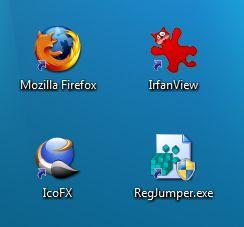
By no Arrow, you can´t make the difference between system and shortcuts icon! One´s again, i like the shortcuts icon, but not to big! So, after long search, i make from the original shell32.dll (icon #16769) in Windows7 my own little icon. My favorite one with shades, the other one without. Little_Arrows.zip Little_Arrows.zip on Uploaded.to Jolli
-
Well, that did the trick. Thank you.
-
Wrong string, these reg strings does´nt exist in Windows7! So what´s now? Your icon are from the old WinXP, only black! The new one are blue, more designed - but to big! Any Ideas to change the icons in Win7, so please tell us. Jolli
-
Hi out there Is there a reg tweak in Windows 7, where i can choose the little arrow from the shortcut icon instead of huge one? Tweak in Windows XP: ;little shortcut icon [HKEY_LOCAL_MACHINE\SOFTWARE\Microsoft\Windows\CurrentVersion\Explorer\Shell Icons] "29" = "C:\\WINDOWS\\system32\\TweakUI.exe,2" Jolli

-
I would like to install with a dos Instruction and wondering how it goes: here the cmd: copy /y "%WINDIR%\system32\Adobe\Director\np32dsw.dll" "%ProgramFiles%\Mozilla Firefox\plugins\" and my 7z cmd, is this correct with the DOUBLE backslashes (\\) and the double quotes (\") especially at the end of my code (...plugins\\\")? RunProgram="hidcon:cmd /c copy \"%WINDIR%\\system32\\Adobe\\Director\\np32dsw.dll\" \"%ProgramFiles%\\Mozilla Firefox\\plugins\\\" /y " Thanks for input.
-
Link restored B)
-
So worst! Hope you get help g-force for the new forum, to get it soon. You and the Mods made defently a good job. But what we can do is, to spread it in other forums, to get the people to the other forum! I will post it in Winfuture.de Jolli aka Olivio
-
You can make a registry key, with your exported key from your own regitry: Windows Registry Editor Version 5.00 ;Language modifikation (German ) [HKEY_CURRENT_USER\Software\Foxit Software\Foxit Reader\LANGUAGE] @="40816d" ;remove the ads banners in right upper corner [HKEY_CURRENT_USER\Software\Foxit Software\Foxit Reader\MainFrame] "ShowEditorAd_908"="0" "ShowReaderAd_908"="0" "ShowTypewriterAd_908"="0" "ShowPOAd_908"="0" "ShowSDKAd_908"="0" And for all the translater in any Language, here is the new lang_en_us.xml file. Quit released. so have fun.
-
Have anyone seen a tranlation file for the new build? There are things who are not tranlated! Thanks.