Leaderboard


Popular Content
Showing content with the highest reputation on 03/24/2026 in all areas
-
Thank you but really not possible without your collaboration! Collaborate, fill the gaps, benefit for the community. I hope one day it will all be of use. Watler is hopefully proud that his work carries on today. Using F000C verb you can determine output capable pins and headphone capable. Then with F1C verb, you are able to determine, fixed internal/speaker and jack external/headphones outputs. Once established you can find the shortest path backwards to the DAC using F02 through the connection lists until output path is established. As I am only testing on laptops, I need to run tests on PC with non-fixed speakers to see if still operational in that condition. I have a feeling external jack in that situation and possibly identified as Line Out? Hmmm that is interesting, I seem to recall in earlier development that volume was indeed set to $57 and I couldn't figure out why.. seems you are correct and running codec reset sets 0dB automatically! I will look further into this thank you! Certainly! Attached below. I had a quick look at your chart and can see you will indeed be able to update some of the cells. Apologies for the crudeness I have not had time to clean it up yet. Excellent glad this will be of use! For my current beta testing it simply logs in HDALOG file when there is a change and indicates either headphones or speaker active. Still new so some tweaking to do but promising so far and zero annoying pop ups.. unless you would like one? Excellent thank you for this list I will have a go at all of them! Your updated INF file will come in handy. Stability so far no issues but I am yet to 'pressure test' everything. VLC player is next on my list.. from memory I need kernelex for the latest possible version 2.x? Any tips here appreciated. The force codec index is relatively easy as I will just convert my initial codec index selector that popped up at boot into the hdacfg file. Although with the timing fixes I implemented I currently do not have an issue with correct codec index. A volume slider is definitely high on my list! Vendor specific widgets, if you are able to provide any info on those then i'm happy to look into it. I believe they are filters attached to different widgets but have never looked into them. Full compliance to HDA spec eventually will be awesome! Currently much work to be done HDAICIN_ALL_IDT92HD75B3X5.TXT1 point
-
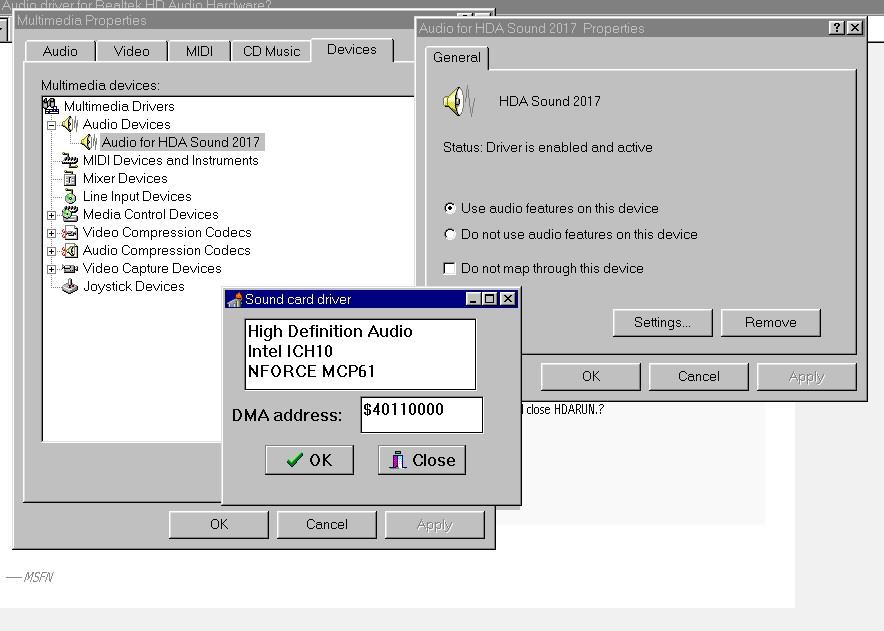
WOW, you are realy the new HDA2-San How did you 'get' the right Line-out Pin-Widget? Once you have established this, I can understand finding the Playback-path is possible with your Widget-parser. In my Excel-notes I had to make a - hopefully (more or less) educated - guess, if no experimental results were available. And even IF available, wiring of Ports of a Codec Integrated Circuit is still a choice of the Manufaturer, although some Datasheet's give (preferred) default Ports... Lately I searched Intel's High Definition Audio Specification during traffic, because this was one of your earlier questions I still didn't adress so far. I found following interesting statement in Section 7.3.3.7: 'Gain is a 7-bit “step” value specifying the amplifier gain, the actual dB value of which is determined by the “StepSize,” “Offset,” and “NumSteps” fields of the Output Amplifier Capabilities parameter for a given amplifier. After codec reset, this “Gain” field must default to the “Offset” value, meaning that all amplifiers, by default, are configured to 0 dB gain. If a value outside the amplifier‟s range is set, the results are undetermined.' I am not saying your mod is 'not good' or something like that! I was just wondering if above could be the case on your available codec's? Because you are the only one with a real IDT-codec in this thread so far (I found IDT bought three Audio-lines from STAC in 2006), could you provide one of your BIG HDAICOUT.HDA => HDAICIN.TXT's? So I can compare with the Datasheet. This would be quite nice. Because of my current projects I am constantly switching my headphones between computers. The (Realtek-driver) Dialog on Windows 10 is realy annoying: 'Which Device you just plugged in?'. Although Headphones are suggested, this is still a mess in my personal opinion: we live in 2026, not 2006, even no sound if a choice is not made (but maybe sound in full screen?)... Of course this doesn't apply to HDA2. On the other hand, if auto-switching give any problems a nice Delphi Dialog-screen in Windows 10' Realtek-driver style will be not so bad. There are many. Without any special order of preference: 1) Enabling Audio-CD input, if loopback is available. Personally I like analog CD-Audio more than digital. Especially useful if the CD/ DVD drive has no separate headphones-jack. I don't know how to find out which Port should be used. Once I made an example as a surprise to Dave-H, based on the Datasheet. Can be eanbled in HDAICOUT.HDA - see https://msfn.org/board/topic/178295-audio-driver-for-realtek-hd-audio-hardware-testing-thread/page/9/#findComment-1162932 2) Inserting a database of HDA-controllers. Currently there is always the same one showed (from Dave-H's system, April 7 2019 in this thread): Once I delivered my GENHDA16.INF, made a long time ago, modified after Watler criticized initial versions: https://msfn.org/board/topic/178295-audio-driver-for-realtek-hd-audio-hardware-testing-thread/#findComment-1161697 Earlier I started HDAWIN16.INF to include specific HDA-Controllers for read-out in Device Manager. I never published this version on MSFN, there doesn't seem to be any demand. I can't remember if I realy finished the INF-file, at least it worked on my - at that time two - available systems. Below the idea, maybe you can use the values, if you want to work on this part: ;; HDAWIN16.INF ;; 2017/12/30 ;; "Watlers World" 16-bit High Definition Audio Driver ;; Win3x/Win9x only ;; (c) Copyright 2017 Deomsh (...) [Manufacturer] %GEN%=GEN.Mfg %ATI%=ATI.Mfg %AMD1%=AMD1.Mfg %SIS%=SIS.Mfg %NVAMD%=NVAMD.Mfg %ULI%=ULI.Mfg %VIA%=VIA.Mfg ;%RDCS%=RDCS.Mfg ;%Teradici%=Teradici.Mfg %INTEL%=INTEL.Mfg [GEN.Mfg] %GEN_HDA.DeviceDesc%=HDA2,PCI\CC_0403 [ATI.Mfg] %ATI_SB450_HDA.DeviceDesc%=HDA2,PCI\VEN_1002&DEV_437B ;%ATI_SB600_HDA.DeviceDesc%=HDA2.Install,PCI\VEN_1002&DEV_4383 %ATI_SB600_HDA.DeviceDesc%=HDA2,PCI\VEN_1002&DEV_4383 %ATI_RS600_HDA.DeviceDesc%=HDA2,PCI\VEN_1002&DEV_793B %ATI_RS690_HDA.DeviceDesc%=HDA2,PCI\VEN_1002&DEV_7919 [AMD1.Mfg] ;%AMD_HDA_768/8111.DeviceDesc%=HDA2,PCI\VEN_1022&DEV_7445 ; AC97 (HDA unknown) %AMD_HDA_17h.DeviceDesc%=HDA2,PCI\VEN_1022&DEV_1457 [SIS.Mfg] %SIS_966_HDA.DeviceDesc%=HDA2,PCI\VEN_1039&DEV_7502 [NVAMD.Mfg] %NFORCE_HDA_MCP51.DeviceDesc%=HDA2,PCI\VEN_10DE&DEV_026C %NFORCE_HDA_MCP55.DeviceDesc%=HDA2,PCI\VEN_10DE&DEV_0371 %NFORCE_HDA_MCP61a.DeviceDesc%=HDA2,PCI\VEN_10DE&DEV_03E4 %NFORCE_HDA_MCP61b.DeviceDesc%=HDA2,PCI\VEN_10DE&DEV_03F0 %NFORCE_HDA_MCP65a.DeviceDesc%=HDA2,PCI\VEN_10DE&DEV_044A %NFORCE_HDA_MCP65b.DeviceDesc%=HDA2,PCI\VEN_10DE&DEV_044B %NFORCE_HDA_MCP67a.DeviceDesc%=HDA2,PCI\VEN_10DE&DEV_055C %NFORCE_HDA_MCP67b.DeviceDesc%=HDA2,PCI\VEN_10DE&DEV_055D %NFORCE_HDA_MCP72/78.DeviceDesc%=HDA2,PCI\VEN_10DE&DEV_0774 ;%NFORCE_HDA_MCP78b.DeviceDesc%=HDA2,PCI\VEN_10DE&DEV_0775 ; unknown ;%NFORCE_HDA_MCP78c.DeviceDesc%=HDA2,PCI\VEN_10DE&DEV_0776 ; unknown ;%NFORCE_HDA_MCP78d.DeviceDesc%=HDA2,PCI\VEN_10DE&DEV_0777 ; unknown %NFORCE_HDA_GF108.DeviceDesc%=HDA2,PCI\VEN_10DE&DEV_0BEA [ULI.Mfg] %ULI_HDA.DeviceDesc%=HDA2,PCI\VEN_10B9&DEV_5461 [VIA.Mfg] %VIA_VT82xx_HDA.DeviceDesc%=HDA2,PCI\VEN_1106&DEV_3288 [RDCS.Mfg] ;%RDCS_HDA.DeviceDesc%=HDA2,PCI\VEN_17f3&DEV_ ; DEV is unkown! [Teradici.Mfg] ;%Teradici.DeviceDesc%=HDA2,PCI\VEN_6549&DEV_1200 ; TERA1200 PC-over-IP Host [INTEL.Mfg] %C200_HDA.DeviceDesc%=HDA2,PCI\VEN_8086&DEV_1C20 %C600_HDA.DeviceDesc%=HDA2,PCI\VEN_8086&DEV_1D20 %C126_HDA.DeviceDesc%=HDA2,PCI\VEN_8086&DEV_1E20 %ICH6_HDA.DeviceDesc%=HDA2,PCI\VEN_8086&DEV_2668 %ESB_HDA.DeviceDesc%=HDA2,PCI\VEN_8086&DEV_269A %ICH7_HDA.DeviceDesc%=HDA2,PCI\VEN_8086&DEV_27D8 %ICH8_HDA.DeviceDesc%=HDA2,PCI\VEN_8086&DEV_284B %ICH9_HDA.DeviceDesc%=HDA2,PCI\VEN_8086&DEV_293E %ICH10a_HDA.DeviceDesc%=HDA2,PCI\VEN_8086&DEV_3A3E %ICH10b_HDA.DeviceDesc%=HDA2,PCI\VEN_8086&DEV_3A6E %3400_HDA.DeviceDesc%=HDA2,PCI\VEN_8086&DEV_3B56 (...) [Strings] (...) GEN = "Generic" ATI = "ATI Technologies Inc" ;AMD1 = "Advanced Micro Devices Inc." SIS = "Silicon Integrated Systems" NVAMD = "NVIDIA Corporation" ULI = "ULi Electronics Inc." VIA = "VIA Technologies, Inc." RDCS = "RDC Semiconductor, Inc." Teradici= "Teradici Corp." INTEL= "INTEL Corporation" GEN_HDA.DeviceDesc = "High Definition Audio Controller" ATI_SB450_HDA.DeviceDesc = "ATI SB450 HD-Audio Controller" ATI_SB600_HDA.DeviceDesc = "ATI SB600 HD-Audio Controller" ATI_RS600_HDA.DeviceDesc = "ATI RS600 HD-Audio Controller" ATI_RS690_HDA.DeviceDesc = "ATI RS690 HD-Audio Controller" ;AMD_HDA_768/8111.DeviceDesc = "AMD 768/8111 AC97 Controller" AMD_HDA_17h.DeviceDesc = "AMD 17h HD-Audio Controller" SIS_966_HDA.DeviceDesc = "SIS 966 HD-Audio Controller" NFORCE_HDA_MCP51.DeviceDesc = "NFORCE MCP51 HD-Audio Controller" NFORCE_HDA_MCP55.DeviceDesc = "NFORCE MCP55 HD-Audio Controller" NFORCE_HDA_MCP61a.DeviceDesc = "NFORCE MCP61a HD-Audio Controller" NFORCE_HDA_MCP61b.DeviceDesc = "NFORCE MCP61b HD-Audio Controller" NFORCE_HDA_MCP65a.DeviceDesc = "NFORCE MCP65a HD-Audio Controller" NFORCE_HDA_MCP65b.DeviceDesc = "NFORCE MCP65b HD-Audio Controller" NFORCE_HDA_MCP67a.DeviceDesc = "NFORCE MCP67a HD-Audio Controller" NFORCE_HDA_MCP67b.DeviceDesc = "NFORCE MCP67b HD-Audio Controller" NFORCE_HDA_MCP72/78.DeviceDesc = "NFORCE MCP78a HD-Audio Controller" ;NFORCE_HDA_MCP78b.DeviceDesc = "NFORCE MCP78b HD-Audio Controller" ;NFORCE_HDA_MCP78c.DeviceDesc = "NFORCE MCP78c HD-Audio Controller" ;NFORCE_HDA_MCP78d.DeviceDesc = "NFORCE MCP78d HD-Audio Controller" NFORCE_HDA_GF108.DeviceDesc = "NFORCE F108 HD-Audio Controller" ULI_HDA.DeviceDesc = "ULI HD-Audio Controller" VIA_VT82xx_HDA.DeviceDesc = "VIA VT82xx HD-Audio Controller" ;RDCS_HDA.DeviceDesc = "RDCS HD-Audio Controller" ;Teradici.DeviceDesc = "Teradici HD-Audio Controller" ; ?? C200_HDA.DeviceDesc = "INTEL C200 HD-Audio Controller" C600_HDA.DeviceDesc = "INTEL C600 HD-Audio Controller" C126_HDA.DeviceDesc = "INTEL C126 HD-Audio Controller" ICH6_HDA.DeviceDesc = "INTEL ICH6 HD-Audio Controller" ICH7_HDA.DeviceDesc = "INTEL ICH7 HD-Audio Controller" ESB_HDA.DeviceDesc = "INTEL ESB HD-Audio Controller" ICH8_HDA.DeviceDesc = "INTEL ICH8 HD-Audio Controller" ICH9_HDA.DeviceDesc = "INTEL ICH9 HD-Audio Controller" ICH10a_HDA.DeviceDesc = "INTEL ICH10r HD-Audio Controller" ICH10b_HDA.DeviceDesc = "INTEL ICH10 HD-Audio Controller" 3400_HDA.DeviceDesc = "INTEL 3400 HD-Audio Controller" (...) 3) Adressing stability issues of HDA2.DLL on Windows 9x. You never reported any, as far as I remember. Are your three systems FULLY stable? 4) Making a better version of WAVEOUT.EXE, without the annoying hickup's while moving the volume-sliders. Also a more logarithmic scale would be nice. My personal prefence would be to have ONE Volume slider, and another one for Balance, like in 'Options' of Windows 98' Mplayer2. 5) If available: making the Volume Knob Widget working. I never 'saw' one, will be most useful on laptops, I presume. My only avaiIable laptop is from work, but even using cmd as non-administrator is blocked for me, not to mention booting from an USB drive. 6) Enabling Vendor Specific Widgets. If you want to try, I can assist searching on the Internet in Linux- and other forum's. 7) Last but not least: full compliance to Intel's High Definition Audio Specification. Earlier I delivered a Report, made by pi (I believe at that time GLM 4.5). Although it is 'only' AI, can still be useful as suggestions for testing/ developing hypotheses. I think there is more, but can not remember currently. P.S. This morning I remembered the most important: 8) Make a setting in HDACFG.INI to force Codec index. For instance: 'Force Index=$0/1/2'.
 1 point