All Activity
- Past hour
-

Win10 LTSC IoT lag issues. How to resolve?
NotHereToPlayGames replied to DeathAdderSF's topic in Windows 10
<del> testing [co de] inside [spo iler] -
Win10 LTSC IoT lag issues. How to resolve?
NotHereToPlayGames replied to DeathAdderSF's topic in Windows 10
Step 4: Disable "smartscreen", disable the search APP, and disable nonessential services. Reminder: don't disable SPOOLER [set first line to auto instead of disabled) if you have a printer installed. Note: for those that want to INTENTIONALLY break some GUI "dialogs" (BS things like "toast notifications", "badges", and "live tiles"), set the two Wpn services from auto to disabled. Source: none, just standard "public knowledge" across multiple tech forums Save the below as a <name>.bat file then right-click and Run as administrator. -
Win10 LTSC IoT lag issues. How to resolve?
NotHereToPlayGames replied to DeathAdderSF's topic in Windows 10
Step 3: Remove "Get Started", "Windows Backup", and "Edge". Forum software kept "double-indenting" when posting as a "spoiler" so I had to post as a "code inside a spoiler" instead. Source: forgot, it's two or three scripts all merged into one and edited to REMOVE where the original author threw in Firefox BS, will add after I reinvent that wheel. Save the below in a <name>.ps1 file then right-click and select Run with PowerShell. -
Win10 LTSC IoT lag issues. How to resolve?
NotHereToPlayGames replied to DeathAdderSF's topic in Windows 10
Step 2: Disable "search indexing". Note: this is technically only HALF of Win10's "search" and the APP is disabled in Step 4. Top Half Source: copied out of one of Chris Titus Tech's scripts but I forget the actual source. It allows me to simply right-click "Run with PowerShell" and it AUTOMATICALLY elevates to ADMIN. Just a helluvalot easier than the way that Win10's PowerShells are normally "ran as administrator" compared to how command prompts can be "ran as administrator". Bottom Half Source: https://github.com/PowerShellLibrary/Hacker-Scripts/blob/master/system-setup/disable-windows-search-indexing.ps1 Save the below in a <name>.ps1 file then right-click and select Run with PowerShell. -
Win10 LTSC IoT lag issues. How to resolve?
NotHereToPlayGames replied to DeathAdderSF's topic in Windows 10
Step 1: Disable the "Action Center". To be honest, I've never really tracked how (or if?) the "Action Center" consumes a ton of resources or not, I just have ZERO use for it. Source: https://www.tenforums.com/tutorials/6004-enable-disable-action-center-windows-10-a.html Obtain from above link or save the below in a <name>.reg file and double-click to add to your registry. -
Win10 LTSC IoT lag issues. How to resolve?
NotHereToPlayGames replied to DeathAdderSF's topic in Windows 10
Guide for Half Baked Phase 2: FOUR posts below. (multiple spoilers in one post weren't working correctly, didn't want to debug "why") -
Win10 LTSC IoT lag issues. How to resolve?
NotHereToPlayGames replied to DeathAdderSF's topic in Windows 10
<del> mishap with multiple spoilers in one post -
ok here u go brute force delete.bat @echo off setLocal EnableDelayedExpansion :: SCRIPT PARAMETERS SET USRNAM=Administrator SET DRVNAM=j SET SRCFIL=BFDel_List.txt ::SET SRCFIL=%~1 SET BACKUP=N ::SET BAKDST=Z:\BFDel_Backup SET TKOWN=Y SET SILENT=Y SET LOGDST=%BAKDST% SET LOGFIL=%LOGDST%\BFDel.log SET BAKLOG=%LOGDST%\BFDel.bak.log SET ERRLOG=%LOGDST%\BFDel.err.log :: CHECK BACKUP AND LOG PATHS IF /I "%BACKUP%" EQU "Y" ( IF NOT EXIST "%BAKDST%\" MKDIR "%BAKDST%\" IF NOT EXIST "%BAKDST%\" ECHO. & ECHO ERROR BACKUP PATH DOES NOT EXIST & ECHO. & EXIT ) IF NOT EXIST "%LOGDST%\" ECHO. & ECHO ERROR LOG PATH DOES NOT EXIST & ECHO. & EXIT IF EXIST "%LOGFIL%" DEL /f /q "%LOGFIL%" IF EXIST "%ERRLOG%" DEL /f /q "%ERRLOG%" :: CHECK SOURCEFILE PATHS IF NOT EXIST "%SRCFIL%" ECHO. & ECHO ERROR SOURCE PATH DOES NOT EXIST & ECHO. & EXIT cls @echo off :again echo. echo Brute Force Delete files on vol %DRVNAM%:\ echo Files List "%SRCFIL%" echo. IF /I "%SILENT%" EQU "Y" ECHO NOTE: SCRIPT IS RUNNING SILENTLY & ECHO. & TIMEOUT 2 > NUL & GOTO continue echo Choose continue or edit volume letter or quit. echo. set /p answer=Type [C]ontinue, [E]dit or [Q]uit? if /i "%answer:~,1%" EQU "C" goto continue if /i "%answer:~,1%" EQU "E" goto edit if /i "%answer:~,1%" EQU "Q" exit /b goto again :edit echo. & echo. echo SET THE CORRECT VOLUME: %DRVNAM% echo. set /p "DRVNAM=Enter Volume Letter or just ENTER for default [%DRVNAM%]: " goto again :: START DEL PROCEDURE :continue For /F "tokens=*" %%L in ('type "%SRCFIL%"') do ( Set LINE=!DRVNAM!:%%L Set LINE=!LINE:USRNAM=%USRNAM%! :: CALL :CheckPathAttr "!LINE!" for /f "tokens=*" %%A in ("!LINE!") do set ATTR=%%~aA set ATTR1=!ATTR:~0,1! ::PROCESS DIRECTORY IF /I "!ATTR1!" EQU "d" ( IF /I "%TKOWN%" EQU "Y" TAKEOWN /F "!LINE!" /R /A /D Y IF /I "%TKOWN%" EQU "Y" ICACLS "!LINE!" /T /L /GRANT *S-1-1-0:F IF /I "%BACKUP%" EQU "Y" ( XCOPY /s /y /c /h /e "!LINE!" "%BAKDST%!LINE:~2!\" IF EXIST "%BAKDST%!LINE:~2!" echo COPIED DIR: "!LINE!">>"%BAKLOG%" IF NOT EXIST "%BAKDST%!LINE:~2!" echo COPY.ERR DIR: "!LINE!">>"%ERRLOG%" ) :: REMOVE DIR COMMAND rmdir /s /q "!LINE!" IF NOT EXIST "!LINE!" ( echo DELETED DIR: "!LINE!">>"%LOGFIL%" ) ELSE ( echo DEL.ERR DIR: "!LINE!">>"%ERRLOG%" ) ) ::PROCESS FILE IF /I "!ATTR1!" EQU "-" ( IF /I "%TKOWN%" EQU "Y" TAKEOWN /F "!LINE!" /A /D Y IF /I "%TKOWN%" EQU "Y" ICACLS "!LINE!" /T /L /GRANT *S-1-1-0:F IF /I "%BACKUP%" EQU "Y" ( echo F|XCOPY /y /c "!LINE!" "%BAKDST%!LINE:~2!" IF EXIST "%BAKDST%!LINE:~2!" echo COPIED FILE: "!LINE!">>"%BAKLOG%" IF NOT EXIST "%BAKDST%!LINE:~2!" echo COPY.ERR FIL: "!LINE!">>"%ERRLOG%" ) :: DEL FILE COMMAND del /f /q "!LINE!" IF NOT EXIST "!LINE!" ( echo DELETED FILE: "!LINE!">>"%LOGFIL%" ) ELSE ( echo DEL.ERR FILE: "!LINE!">>"%ERRLOG%" ) ) ) ECHO. ECHO SCRIPT COMPLETED ECHO. ::https://9to5answer.com/how-to-get-attributes-of-a-file-using-batch-file :CheckPathAttr SET "sPATH=%1" SET "sATTR=%~a1" SET "sATTR1=!sATTR:~0,1!" IF /I "!sATTR1!" EQU "d" ECHO "D" %sATTR% IF /I "!sATTR1!" EQU "-" ECHO "F" %sATTR% ::EXIT /B 0 now brute force zero byting.bat @echo off setLocal EnableDelayedExpansion :: SCRIPT PARAMETERS SET USRNAM=Administrator SET DRVNAM=j SET SRCFIL=BFZB_List.txt ::SET SRCFIL=%~1 SET BACKUP=N ::SET BAKDST=Z:\BFZB_Backup SET TKOWN=Y SET SILENT=Y SET LOGDST=%BAKDST% SET LOGFIL=%LOGDST%\BFZB.log SET BAKLOG=%LOGDST%\BFZB.bak.log SET ERRLOG=%LOGDST%\BFZB.err.log :: CHECK BACKUP AND LOG PATHS IF /I "%BACKUP%" EQU "Y" ( IF NOT EXIST "%BAKDST%\" MKDIR "%BAKDST%\" IF NOT EXIST "%BAKDST%\" ECHO. & ECHO ERROR BACKUP PATH DOES NOT EXIST & ECHO. & EXIT ) IF NOT EXIST "%LOGDST%\" ECHO. & ECHO ERROR LOG PATH DOES NOT EXIST & ECHO. & EXIT IF EXIST "%LOGFIL%" DEL /f /q "%LOGFIL%" IF EXIST "%ERRLOG%" DEL /f /q "%ERRLOG%" :: CHECK SOURCEFILE PATHS IF NOT EXIST "%SRCFIL%" ECHO. & ECHO ERROR SOURCE PATH DOES NOT EXIST & ECHO. & EXIT cls @echo off :again echo. echo Brute Force Zero Byting files on vol %DRVNAM%:\ echo Files List "%SRCFIL%" echo. IF /I "%SILENT%" EQU "Y" ECHO NOTE: SCRIPT IS RUNNING SILENTLY & ECHO. & TIMEOUT 2 > NUL & GOTO continue echo Choose continue or edit volume letter or quit. echo. set /p answer=Type [C]ontinue, [E]dit or [Q]uit? if /i "%answer:~,1%" EQU "C" goto continue if /i "%answer:~,1%" EQU "E" goto edit if /i "%answer:~,1%" EQU "Q" exit /b goto again :edit echo. & echo. echo SET THE CORRECT VOLUME: %DRVNAM% echo. set /p "DRVNAM=Enter Volume Letter or just ENTER for default [%DRVNAM%]: " goto again :: START ZEROBYTING PROCEDURE :continue For /F "tokens=*" %%L in ('type "%SRCFIL%"') do ( Set LINE=!DRVNAM!:%%L Set LINE=!LINE:USRNAM=%USRNAM%! :: CALL :CheckPathAttr "!LINE!" for /f "tokens=*" %%A in ("!LINE!") do set ATTR=%%~aA set ATTR1=!ATTR:~0,1! ::PROCESS DIRECTORY IF /I "!ATTR1!" EQU "d" ( IF /I "%TKOWN%" EQU "Y" TAKEOWN /F "!LINE!" /R /A /D Y IF /I "%TKOWN%" EQU "Y" ICACLS "!LINE!" /T /L /GRANT *S-1-1-0:F IF /I "%BACKUP%" EQU "Y" ( XCOPY /s /y /c /h /e "!LINE!" "%BAKDST%!LINE:~2!\" IF EXIST "%BAKDST%!LINE:~2!" echo COPIED DIR: "!LINE!">>"%BAKLOG%" IF NOT EXIST "%BAKDST%!LINE:~2!" echo COPY.ERR DIR: "!LINE!">>"%ERRLOG%" ) :: REMOVE AND ZERO BYTE DIR COMMANDS rmdir /s /q "!LINE!" IF NOT EXIST "!LINE!" FSUTIL FILE CREATENEW "!LINE!" 0 for %%x in ("!LINE!") do if %%~zx==0 ( echo ZBYTED DIR: "!LINE!">>"%LOGFIL%" ) ELSE ( echo ZB.ERR DIR: "!LINE!">>"%ERRLOG%" ) ) ::PROCESS FILE IF /I "!ATTR1!" EQU "-" ( IF /I "%BACKUP%" EQU "Y" ( IF /I "%TKOWN%" EQU "Y" TAKEOWN /F "!LINE!" /A /D Y IF /I "%TKOWN%" EQU "Y" ICACLS "!LINE!" /T /L /GRANT *S-1-1-0:F echo F|XCOPY /y /c "!LINE!" "%BAKDST%!LINE:~2!" IF EXIST "%BAKDST%!LINE:~2!" echo COPIED FILE: "!LINE!">>"%BAKLOG%" IF NOT EXIST "%BAKDST%!LINE:~2!" echo COPY.ERR FIL: "!LINE!">>"%ERRLOG%" ) :: DEL AND ZERO BYTE FILE COMMANDS del /f /q "!LINE!" IF NOT EXIST "!LINE!" FSUTIL FILE CREATENEW "!LINE!" 0 for %%x in ("!LINE!") do if %%~zx==0 ( echo ZBYTED FILE: "!LINE!">>"%LOGFIL%" ) ELSE ( echo ZB.ERR FILE: "!LINE!">>"%ERRLOG%" ) ) ) ECHO. ECHO SCRIPT COMPLETED ECHO. ::https://9to5answer.com/how-to-get-attributes-of-a-file-using-batch-file :CheckPathAttr SET "sPATH=%1" SET "sATTR=%~a1" SET "sATTR1=!sATTR:~0,1!" IF /I "!sATTR1!" EQU "d" ECHO "D" %sATTR% IF /I "!sATTR1!" EQU "-" ECHO "F" %sATTR% ::EXIT /B 0 now brute force junction standalone.bat @ECHO off SETLOCAL EnableDelayedExpansion IF /I "%PROCESSOR_ARCHITECTURE%"=="x86" (SET "DU=Tools\DU\du32.exe") ELSE (SET "DU=Tools\DU\du64.exe") SET "DUCK=Tools\DUCK\duck_a.exe" :: SCRIPT PARAMETERS ::-------------------------- SET "DEPTH=1" SET "TKOWN=Y" SET "SRCVOL=j" SET SILENT=Y SET "SRCFIL=BFJnctn_List_StandAlone.txt" ::SET "SRCFIL=%~1" SET "ERRLOG=%~dp0BFJnctn_List_StandAlone.errors.txt" ::GET SRCVOL FROM SCRIPT NAME FOR /F "tokens=2 delims=%%" %%v IN ('ECHO %~n0') DO SET "SRCVOL=%%v" ::ECHO %SRCVOL% :: SOURCE VOLUME VALIDATION ::-------------------------- CLS @ECHO off :again ECHO. ECHO Brute Force Junctioning folders on vol %SRCVOL%:\ ECHO Files List "%SRCFIL%" ECHO. IF /I "%SILENT%" EQU "Y" ECHO NOTE: SCRIPT IS RUNNING SILENTLY & ECHO. & TIMEOUT 2 > NUL & GOTO continue ECHO Choose continue or edit volume letter or quit. ECHO. SET /p answer=Type [C]ontinue, [E]dit or [Q]uit? IF /i "%answer:~,1%" EQU "C" GOTO :continue IF /i "%answer:~,1%" EQU "E" GOTO :edit IF /i "%answer:~,1%" EQU "Q" exit /b GOTO :again :edit ECHO. & ECHO. ECHO SET THE CORRECT VOLUME: %SRCVOL% ECHO. SET /p "SRCVOL=Enter Volume Letter or just ENTER FOR default [%SRCVOL%]: " GOTO :again :continue :: FIND AVAILABLE USERS IN SRCVOL ::-------------------------------- CLS & ECHO. & ECHO Looking for users in folder "!SRCVOL!:\Users" & ECHO. SET /A i=0 ECHO 0. Press "0" or "Q" to Quit FOR /F "tokens=*" %%u IN ('DIR "!SRCVOL!:\Users" /B 2^>nul ^| findstr /v "Public" ^| findstr /v "Default" ^| findstr /v "All Users"') DO ( SET item=%%u SET /A i+=1 ECHO !i!. Select user "!item!" SET "option[!i!]=!item!" ) IF !i!==0 CLS & ECHO. & ECHO NO USERS FOLDERS FOUND IN "!SRCVOL!:\Users". PLEASE CHECK SOURCE VOLUME LETTER. & ECHO. & ECHO Press "Q" to Quit & ECHO Press "C" to Continue IF !i!==1 SET "USRNAM=%option[1]%" & CLS & ECHO. & ECHO USER FOLDER "!SRCVOL!:\Users\!USRNAM!" FOUND & ECHO. IF /I "%SILENT%" EQU "Y" ECHO NOTE: SCRIPT IS RUNNING SILENTLY & ECHO. & TIMEOUT 2 > NUL & GOTO SkipUser ECHO Press "Q" to Quit & ECHO Press "C" to Continue :getChoice ECHO. SET /P choice="Enter desired choice: " || SET choice="" IF /i "%choice%" EQU "0" EXIT IF /i "%choice%" EQU "q" EXIT IF /i "%choice%" EQU "c" GOTO :SkipUser IF "!option[%choice%]!" EQU "" ECHO ERROR: No such option & GOTO :getChoice SET "USRNAM=!option[%choice%]!" :SkipUser IF DEFINED USRNAM CLS & ECHO. & ECHO User selected is "%USRNAM%". & TIMEOUT 1 > nul & CLS :: START JUNCTIONING PROCEDURE ::----------------------------- FOR /F "tokens=*" %%L IN ('type "%SRCFIL%" ^| findstr /v "#"') DO ( SET "SKIP=" SET "LINE=%%L" REM ECHO "!LINE!" ::GETS DESTINATION ROOT FROM STRING SET "DSTROOT=!LINE:~0,2!" :: SET SOURCE PATH FROM SOURCE VOLUME SET "LINE=!SRCVOL!:!LINE:~2!" SET "LINE=!LINE:USRNAM=%USRNAM%!" :: EVALUATE JUNCTION PATH IF "%DEPTH%" EQU "1" ( CALL :GetDirName "!LINE!" DSTPATH ) ELSE ( SET "DSTPATH=!LINE:~3!" ) ECHO. & ECHO CREATING JUNCTION & ECHO - SOURCE PATH: "!LINE!" && ECHO - JUNCTION PATH: "!DSTROOT!\!DSTPATH!" & TIMEOUT 1 > nul IF NOT EXIST "!DSTROOT!\" ECHO ERROR DESTROOT PATH "!DSTROOT!" DOES NOT EXIST & TIMEOUT 1 > nul & SET "SKIP=1" :: CALL :CheckPathAttr "!LINE!" IF EXIST "!LINE!" IF NOT DEFINED SKIP ( FOR /f "tokens=*" %%A IN ("!LINE!") DO SET ATTR=%%~aA SET ATTR1=!ATTR:~0,1! SET ATTR8=!ATTR:~8,8! ::PROCESS DIRECTORY IF /I "!ATTR1!" EQU "d" IF "!ATTR8!" NEQ "l" ( SET RESTCHK=1 ::GET OWNERSHIP (OPTIONAL) IF /I "%TKOWN%" EQU "Y" TAKEOWN /F "!LINE!" /R /A /D Y IF /I "%TKOWN%" EQU "Y" ICACLS "!LINE!" /T /L /GRANT *S-1-1-0:F ::COPIA DIR NELLA DESTINAZIONE SET COPYCHECK=KO rem XCOPY /s /y /c /h /e "!LINE!" "!DSTROOT!\!DSTPATH!\" ROBOCOPY "!LINE!" "!DSTROOT!\!DSTPATH!" /E /XC /XN /XO /R:0 /W:0 ::CALCOLA DIMENSIONI SRCDIR E DSTDIR FOR /f "tokens=2" %%i IN ('%DU% "!LINE!" ^|findstr /c:"Size:"') DO SET "SRCSIZE=%%i" FOR /f "tokens=2" %%i IN ('%DU% "!DSTROOT!\!DSTPATH!" ^|findstr /c:"Size:"') DO SET "DSTSIZE=%%i" ::VERIFICA COPIA PRIMA DI CANCELLAZIONE IF "!SRCSIZE!" NEQ "!DSTSIZE!" ECHO ERROR: ErrCopy "!LINE!" >> "%ERRLOG%" IF "!SRCSIZE!" EQU "!DSTSIZE!" ( ::REMOVAL AND JUNCTIONING DIR COMMANDS IF EXIST "!LINE!" rmdir /s /q "!LINE!" && SLEEP -m 10 2>nul IF EXIST "!LINE!" ECHO ERROR: NotEmpty "!LINE!" >> "%ERRLOG%" IF NOT EXIST "!LINE!" ( mklink /j "!LINE!" "!DSTROOT!\!DSTPATH!" IF %ERRORLEVEL%==0 ECHO JUNCTION CREATION COMPLETED & TIMEOUT 1 > nul IF %ERRORLEVEL%==1 ECHO ERROR CREATING JUNCTION & TIMEOUT 1 > nul ) ) ) ) ) ECHO. ECHO SCRIPT COMPLETED ECHO. ::https://9to5answer.com/how-to-get-attributes-of-a-file-using-batch-file :CheckPathAttr SET "sPATH=%1" SET "sATTR=%~a1" SET "sATTR1=!sATTR:~0,1!" IF /I "!sATTR1!" EQU "d" ECHO "D" %sATTR% IF /I "!sATTR1!" EQU "-" ECHO "F" %sATTR% EXIT /B 0 :GetParent :: USAGE EXAMPLE: ::SETLOCAL EnableDelayedExpansion ::CALL :GetParent "%CD%" CDPAR && ECHO "!CDPAR!" SET "PARDIR=%~dp1" IF "%PARDIR:~-1%"=="\" SET "PARDIR=%PARDIR:~0,-1%" ::ECHO "%PARDIR%" SET "%2=%PARDIR%" EXIT /B 0 :GetDirName :: USAGE EXAMPLE: ::SETLOCAL EnableDelayedExpansion ::CALL :GetDirName "%CD%" CDNAME && ECHO "!CDNAME!" SET "DIRNAME=%~nx1" ::ECHO "%DIRNAME%" SET "%2=!DIRNAME!" ::EXIT /B 0
- Today
-
If you don't mind, sure.
-
want each script for each list as well?
-
Curious to see that script too. Not everyone always needs the gui for everything, like a kiosk for example.
-
Win10 LTSC IoT lag issues. How to resolve?
NotHereToPlayGames replied to DeathAdderSF's topic in Windows 10
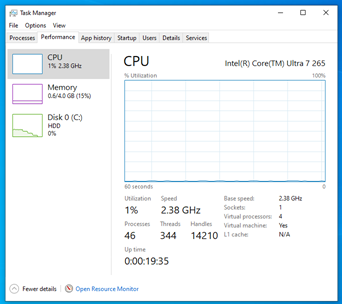
Before: 92 processes, 693 threads, 29102 handles, 1.1 GB RAM (ie, this is a normal as-is Win10 IoT install without doing any tweaking, just running as-is [with all of the install questions set to "no"]). After: 46 processes, 344 threads, 14210 handles, 0.6 GB RAM (the threads and handles counts is a better quantifiable measurement of "bloat" than the process count) This has seemed to be a good Rule of Thumb for every version of Windows (including XP!). A tweaked and optimized runs at *HALF* the resources when compared to a "normal as-is" install. I have additional tweaks that gets me down to 34 processes! But it (intentionally!) breaks some of Win10's GUI so those should probably be eliminated from this discussion. I don't even run those tweaks on my "everyday" computers, just in some VMs that were more for testing my tweaks before realizing I squeezed the turnip a little too hard for everyday use. -
Win10 LTSC IoT lag issues. How to resolve?
NotHereToPlayGames replied to DeathAdderSF's topic in Windows 10
This is where my Half Baked Phase 2 dials in at, this is the first minute at startup: 48 processes, 535 threads, 14904 handles, 1.0 GB RAM (note that RAM will be higher on real hardware based on drivers for that hardware) This is after letting it sit idle and monitoring where everything "settled" after the startup process fully completes: 46 processes, 344 threads, 14210 handles, 0.6 GB RAM
-
Fair. Ill try the script and see what happens.
-
Win10 LTSC IoT lag issues. How to resolve?
NotHereToPlayGames replied to DeathAdderSF's topic in Windows 10
Possible. But I'll let somebody else undertake that endeavor. I prefer the WinReducer EX-100 route over the winntsetup route. -
Yea nothing in Microsoft works 100%, if at all 🤣
-
Win10 LTSC IoT lag issues. How to resolve?
NotHereToPlayGames replied to DeathAdderSF's topic in Windows 10
I'll paste into a "spoiler tag" here and see if it works. It's part of my Phase 2 process so I'll post that shortly. -
Win10 LTSC IoT lag issues. How to resolve?
NotHereToPlayGames replied to DeathAdderSF's topic in Windows 10
That's not the portable version that I use. I don't have the source for mine at the moment. I'll compare the two one of these days. So far, I'm happy with the one that I am using. It too has an "updater" and it too uses "chrome++" (which has never really worked 100% in any Edge variant). And I'm not familiar with the "chrome-next-mini" enhancements that this one references. Personally, I generally "boycott" anything that a MARKETING department gave the name of "enhancements". -
Perfect, happy to try them all.
-
Thank you for this. Perhpas its possible to turn in into a minwin list for winntsetup
-
Can you post a link someplace to it? Maybe pastezen?
-
Or you can delete searchindexer.exe along with the assorted files I see with voidtools and I delete it with unlocker 1.9.2
-
Thanks for posting this. Someone made a portable edge: https://github.com/bibicadotnet/edge-portable-chrome-next-mini
-
well, much more than preinstallation enviromemnt, pls allow for that. this is the minimal install of windows which is stripped of all things u do not need. but still an autonomously persistent system. the characteristic philosophy behind it is the following: there are 3 types (orders) of system files: 1) those that allow for the system to reach the desktop interface; 2) system files that the system wants to be on C:\ (program files (some subfolders have to reside on c:\) and files from programdata\microsoft, system32, syswow64; 3) whatever system files that can physically reside on another disk and be junctioned back to C:\ (which means logically still on C: for the system to work). one instance of these 3rd-type files can be the pletoric nvidia drivers collected in driverstore, which can be junctioned back to c:\ from another drive where they physically reside. to achieve all this 3 scripts by Virgus will run: 1) a brute force delete script which will take out all superfluous files and folders from whatever according to a list which I can provide u with if u wish to have it; 2) a brute force zero byting script which will "raise to the ground" all files and folders that we want nobody to write on and the system does not need, according to another list which I can provide u with if u wish to have it; 3) a brute force junction stand alone script which will send all files that can reside on any drive other than c: with no hindrance to the system according to yet another list which I can provide u with if u wish to have it. I can anticipate that an important role is played by a z:\ drive which is a ramdisk collecting all temporary and unneeded files; another important role is the one played by C:\, which is a vhd (the d drive is actually the first physical drive, but the second logical drive. this makes for a clean system (u may have a score windows os's, each on a vhd, but the material on d:\ serves them all). VHD's are a couple gigs in used space, and another couple of gigs is a slack space pletoric nvidia driver folder needs in order to allow for smooth updates.
-
 A new version of Watler's Win3x HDA-driver already: HDADRV9Q Download from: https://watlersfiles.netlify.app/ New: software volume; possible to set volumewidgetmax in HDACFG.INI, section Volume (default is $007F007F); four HDA-controllers added with auto-setting of pcipatchB; pcipatchB should be supported in HDAICOUT.HDA too; Export of functions sglinf, setbvalue and strlog (API).