Skip to content
View in the app

A better way to browse. Learn more.

MSFN

A full-screen app on your home screen with push notifications, badges and more.

To install this app on iOS and iPadOS
  1. Tap the Share icon in Safari
  2. Scroll the menu and tap Add to Home Screen.
  3. Tap Add in the top-right corner.
To install this app on Android
  1. Tap the 3-dot menu (⋮) in the top-right corner of the browser.
  2. Tap Add to Home screen or Install app.
  3. Confirm by tapping Install.

jamielboyd

Member
  • Joined

  • Last visited

  • Country

    United States
  1. I had the same problem. I had a few folders with different versions. One I used had SP2 already integrated, others had this or that. Somewhere along the line, apparently I corrupted the WinXP w/ SP2 folder I had been using as a source for my other versions . Anyway, I created a new source directory from an original CD (that I knew had worked when I first started using NLite), integrated the SP2 and all the stuff I love, and BINGO . Maybe you've already tried that, but it worked for me. NLite has saved me countless hours in building laptops so good luck! B)

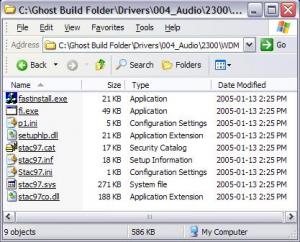
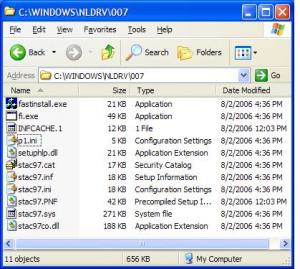
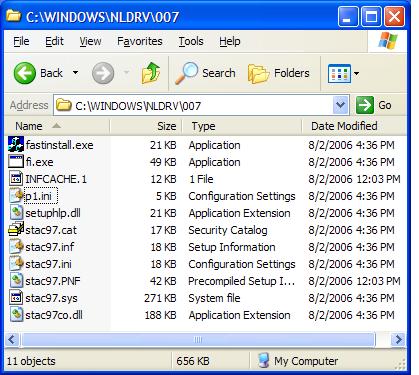
  2. I have an audio ini file that is being overwritten after the installation. Everything appears okay after nLiting. Somewhere during the installation, the 1KB ini file gets overwritten by the 18KB inf file and becomes a copy of it, with the ini extension. The file is Stac97.ini. Please see attachments. This appears to be the only file that does it. WIN XP SP2. RyanVMUpdatePack. Any help would be appreciated. If more info is needed, please let me know. Jamie WINNT.SIF

Account

Navigation

Configure browser push notifications

Chrome (Android)
  1. Tap the lock icon next to the address bar.
  2. Tap Permissions → Notifications.
  3. Adjust your preference.
Chrome (Desktop)
  1. Click the padlock icon in the address bar.
  2. Select Site settings.
  3. Find Notifications and adjust your preference.