maxXPsoft
Content Type
Profiles
Forums
Events
Everything posted by maxXPsoft
-
Hide Bing Desktop and other Windows Updates
maxXPsoft replied to maxXPsoft's topic in Unattended Windows 7/Server 2008R2
I've had no dealing with ConfigMgr so it would be up to someone that uses that to invent a workaround. -
These are the ones won't inject for me, I put all in one folder and watch the command output and if one fails you can see it real easy Your mileage may vary but these are known fails for me [No_Inject] List=971033,2506143,2533552,2607047,2647753,2791765,2809215,2809900,2823180,2835174,2912390,2917500
-
Change a User Tile with Setupcomplete.cmd
maxXPsoft replied to maxXPsoft's topic in Unattended Windows 7/Server 2008R2
I update original post Use latest .NET you have for this C:\Windows\Microsoft.NET\Framework\v4.0.30319\csc.exe works for me -
Extracting the cab files there are 3 but thats only part of the update so it best to just silent install that later with /quiet /norestart
-
'Se7en_UA.exe 8.2.1 August 26, 2014, 6:10:43 PM' Fix not adding No Inject files to cleanup.cmd by jbmI don't know why it was not working if it had any files in the list. 3=KB971033-x64.msu 4=Windows6.1-KB2533552-x64.msu Ow well I just changed what it read and it fixed it. REM No_Inject CMD /C start /wait %systemdrive%\Install\KB2647753-v4-x64.msu /quiet /norestart CMD /C del /F /Q %systemdrive%\Install\KB2647753-v4-x64.msu CMD /C start /wait %systemdrive%\Install\KB2791765-x64.msu /quiet /norestart I had gone back and using the right click .wim I put all in the package folder and still had about 7 would not inject. That leaves my package count now at 195. We need Service pack 2 but it probably not going to happen http://news.softpedia.com/news/Microsoft-Suggests-That-No-Windows-7-Service-Pack-2-Is-Coming-389947.shtml
-
Ok see what you talking about. It not adding them to cleanup right? I just restored an acronis image and I seen that 8.1.6 even didn't add. I'll look into it.
-
'Se7en_UA.exe 8.2.0 August 24, 2014, 8:25:26 PM' Fix minor cleanup.cmd error by jbm' Fixed rollback error found by jbm. I was removing entire ini section where I only needed to remove just 2 entries' from [Se7en_UA_Image]You can add back that section like this. This is for a Windows 7 64 bit [Se7en_UA_Image]Count=41=Windows 7 HOMEBASIC2=Windows 7 HOMEPREMIUM3=Windows 7 PROFESSIONAL4=Windows 7 ULTIMATEThis is for a Windows 7 X86 [Se7en_UA_Image]Count=51=Windows 7 STARTER2=Windows 7 HOMEBASIC3=Windows 7 HOMEPREMIUM4=Windows 7 PROFESSIONAL5=Windows 7 ULTIMATE
-
Fixed the cleanup. Had that other thing happen 1 time to me and didn't look into it. Where are you at when you done that? OK found where it happens with critical end of file error. Looking into it.
-
'Se7en_UA.exe 8.1.9 August 20, 2014, 7:54:17 PM' Fix imagex remove other images.My image has grown rather large with so many updates injected so I removed the extra images so could write to a dvd-rw. Discovered it not working because of "" around certain things. So I fixed and then couldn't upload because my inet down for issues with the thing down the street until today.
-
I use an auotit like this and call it in Firstlogoncommands REM .themepack CMD /C start /wait %systemdrive%\Install\maxXPsoft_Wallpaper.exe WinWaitNotActive ("Personalization")Run(@ComSpec & " /c " &@ScriptDir&"\maxXPsoft.themepack", "", @SW_HIDE)WinWaitActive ("Personalization")Sleep (5000)send ("!{F4}")Exit
-
'Se7en_UA.exe 8.1.7 August 18, 2014, 5:33:28 PM' Fix error during sources copy' Add several tweaks'Se7en_UA.exe 8.1.8 August 18, 2014, 8:32:23 PM' Fix themepack not applying on Windows load at Firstlogon1 tweak which works for me very well I mean I connect to pages more now than before is a DNS tweak. Before I would get the white error pages occasionally. Don't understand since I'm on 10mb DSL but can't argue with what works.. Make sure you back up this key before adding this. EDIT: Discussion on this http://windowssecrets.com/forums/showthread.php/162438-DNS-reliability-and-performance [HKEY_LOCAL_MACHINE\SYSTEM\CurrentControlSet\Services\Dnscache\Parameters]"MaxNegativeCacheTtl"=dword:00000000;1 1 1 10 10 0"DNSQueryTimeouts"=hex(7):31,00,00,00,31,00,00,00,31,00,00,00,31,00,30,00,00,\ 00,31,00,30,00,00,00,30,00,00,00,00,00
-
Hide Bing Desktop and other Windows Updates
maxXPsoft replied to maxXPsoft's topic in Unattended Windows 7/Server 2008R2
Only edit this with notepad if you don't have a vbs editor Updated 1st Post with my latest ' 05/02/2014 By adding KB and Bing Bar it gets them all and so far has not come back Wish Bing Desktop would do same. -
Hide Bing Desktop and other Windows Updates
maxXPsoft replied to maxXPsoft's topic in Unattended Windows 7/Server 2008R2
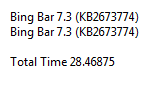
that Bing Bar keeps coming back every month. I've hidden it several times same KB2673774 number so I tried this hideupdates(10) = "KB2673774" 'Bing Bar 7.3 hideupdates(11) = "Bing Bar" and got this in results Will see next month
-
How big is windows 7 before installation
maxXPsoft replied to koden's topic in Unattended Windows 7/Server 2008R2
always a good place with languages http://www.askvg.com/direct-download-links-download-official-original-and-untouched-windows-7-iso-32-bit-and-64-bit/ -
Hide Bing Desktop and other Windows Updates
maxXPsoft replied to maxXPsoft's topic in Unattended Windows 7/Server 2008R2
Used to have same printer. All you can do is just make sure latest update is installed. In this case even if it is one from MS I do this Search this location for TLP 2844 and save hardware updates from here: C:\Windows\System32\DriverStore\FileRepository\ found the c7112964.inf.xxxx folder, and copied it for use. -
1st post if you don't have the iso Then extract it to a folder and copy that folder or burn iso to dvd and copy the dvd. Means copy them with Se7en_UA program, don't copy manually I do that so if I mess up I can go back to first box and start over and don't mess up my original extracted sources. Disabling services means a GREENER PC to me I guess
-
Hmmm now why didn't I think of that? oops I did, look at Post # 4 Click one of the Help buttons and select the UXP_Vista_7_UA.exe in the Se7en_UA\help folder Its old but still applies. I keep unattend.chm, waik.chm, Microsoft Deployment Toolkit linked in mine. You can find those in the Program Files (x86)\Windows Kits\8.1\Assessment and Deployment Kit\Docs
-
I try very hard to make sure things are right. I don't want to put up a 15mb file when not needed. So I step through things and remove anything thats not needed on a sources install. A couple of things I have to include like the ocx The 2 files in ? were dated back in 2004, I was installing a service pack and MS updated them to 2010 Microsoft installer stuff didn't even catch that Yep you only the 2nd person with an install problem exceeding 25,000 downloads. The first person had Lited his system so things were missing. Not my problem. But I;ll try to help best I can Step through it 1 checkbox at a time. Copy the seven or 8.1 sources (extracted iso) and move on from there. This is a learning app where it shows how to add things in order. Click the text next to the checkbox and it explains what it is.
-
Uninstall previous version Se7en_UA and install this. It starts back where you was. videobruce you should delete everything and start over.'Se7en_UA.exe 8.1.6 December 13, 2013, 2:57:28 PM' Updated ocx file's with latest version. Security update' Changed to run Dos boxes in HIGH PRIORITY.' Fix if add Wallpapers adds a .theme file to apply.' Fix Rollback to Here if iso was moved.' Added PowerShell ExecutionPolicy to setupcomplete.cmd
-
jbm said it all If you are trying to do do XP or Vista then use the Se7en_UA6.3.33 final for XP Vista.zip I looked and realized the comdlg32.ocx I was including is outdated. It was not installing over the one on my system though. Actually in syswow64 dir cause i'm running 64 bit. I'm makling a new version today sometime.
-
Install to root like C:\Se7en_UA or D or E Reasoning is dism is very finicky so early on I just went with it. I think thats a word maybe not, anyways it used to be a pain in folders with spaces. Perhaps not anymore but I'd spend a lot of time fixing things to make it work that way and the pay is not that great If that don't work, delete the Se7en_UA.ini if exists and restart, attach here or msg me the contents
-
My jumplists get real messy after looking through a bunch of folders. I've been just opening my Notes and paste the cmds in a dos prompt. Delete or Clear Jumplist Recent Items in Windows 7 + 8.1 echo Y | del %appdata%\microsoft\windows\recent\automaticdestinations\* echo Y | del %appdata%\microsoft\windows\recent\* So I added this to the System Tools cmd /c Echo Y | DEL "%userprofile%\AppData\Roaming\Microsoft\Windows\recent\automaticdestinations\*" | cmd /c Echo Y | DEL "%userprofile%\AppData\Roaming\Microsoft\Windows\Recent\*"[HKEY_LOCAL_MACHINE\SOFTWARE\Classes\Directory\ContextMenus\system\shell\Sys107]"icon"="%windir%\\system32\\Shell32.dll,-16769""MUIVerb"="Clear Jumplists"[HKEY_LOCAL_MACHINE\SOFTWARE\Classes\Directory\ContextMenus\system\shell\Sys107\command]@=hex(2):63,00,6d,00,64,00,20,00,2f,00,63,00,20,00,45,00,63,00,68,00,6f,00,20,\ 00,59,00,20,00,7c,00,20,00,44,00,45,00,4c,00,20,00,22,00,25,00,75,00,73,00,\ 65,00,72,00,70,00,72,00,6f,00,66,00,69,00,6c,00,65,00,25,00,5c,00,41,00,70,\ 00,70,00,44,00,61,00,74,00,61,00,5c,00,52,00,6f,00,61,00,6d,00,69,00,6e,00,\ 67,00,5c,00,4d,00,69,00,63,00,72,00,6f,00,73,00,6f,00,66,00,74,00,5c,00,57,\ 00,69,00,6e,00,64,00,6f,00,77,00,73,00,5c,00,72,00,65,00,63,00,65,00,6e,00,\ 74,00,5c,00,61,00,75,00,74,00,6f,00,6d,00,61,00,74,00,69,00,63,00,64,00,65,\ 00,73,00,74,00,69,00,6e,00,61,00,74,00,69,00,6f,00,6e,00,73,00,5c,00,2a,00,\ 22,00,20,00,7c,00,20,00,63,00,6d,00,64,00,20,00,2f,00,63,00,20,00,45,00,63,\ 00,68,00,6f,00,20,00,59,00,20,00,7c,00,20,00,44,00,45,00,4c,00,20,00,22,00,\ 25,00,75,00,73,00,65,00,72,00,70,00,72,00,6f,00,66,00,69,00,6c,00,65,00,25,\ 00,5c,00,41,00,70,00,70,00,44,00,61,00,74,00,61,00,5c,00,52,00,6f,00,61,00,\ 6d,00,69,00,6e,00,67,00,5c,00,4d,00,69,00,63,00,72,00,6f,00,73,00,6f,00,66,\ 00,74,00,5c,00,57,00,69,00,6e,00,64,00,6f,00,77,00,73
-
RunOnceEx failing on Windows 7 SP1
maxXPsoft replied to kingshawn's topic in Unattended Windows 7/Server 2008R2
Your FOR %%i IN should work as its same as this in xml http://www.msfn.org/board/topic/139572-ask-your-seven-xml-here/?p=953464 you could place the apps in $OEM$\$1\Software and it will be copied over really early on then just do %systemdrive%\Software Your not executing RunOnceEx so it only adds to the registry so I don't know if that is transferring to the user profile. Never done it but I will experiment myself. To execute it you must add after last app rundll32.exe iernonce.dll,RunOnceExProcess RunOnceEx still works with Win 8.1 -
RunOnceEx failing on Windows 7 SP1
maxXPsoft replied to kingshawn's topic in Unattended Windows 7/Server 2008R2
It don't matter. If you don't use start /wait on each item then 1 starts, then next, then next. It will run them one after the other and you have a mess Commands in the Setupcomplete.cmd file are executed with local system privilege. HKLM Reg tweaks can be ran here but not HKCU which are user specific. Therefore if any of your programs need to write to HKCU like 7-zip [HKEY_CURRENT_USER\Software\Classes\.7z] then it probably crashing. Not just reg but adding things to userprofile also. Programs are best executed after Firstlogoncommands I only add a few updates and Directx in Setupcomplete. Things can't be injected -
No you can login with Administrator but I don't recommend it. http://www.msfn.org/board/topic/139572-ask-your-seven-xml-here/?p=1058103 That account is good for logging into and fixing things like lost password. I do password protect this admin account.