seskanda
Content Type
Profiles
Forums
Events
Everything posted by seskanda
-
I know Windows 10 Home does not have Group Policy Editor, but some tweaks out there allow it. The one I used is a .bat file from this website that enables gpedit.msc to work. Now, I like to undo or disable what that .bat did, but not sure how to do that. I've attached the .bat file below. Some help would be great. Thanks in advance gpedit-enabler.bat
-
Good to know IE no longer needs anything from system32. I will be trying this out soon, and hope it works out Thanks in advance
-
Appreciate the links, abbodi1406. The first one is 11.0.20 as I already tried that. The last one is an .msu file which will not work without IE 11.0.17 or below installed first AFAIK. As for the .cab files, have not tried them yet, but can probably use the files inside to replace 11.0.20. I'm still not sure where to put all the files anyways. Which Internet Explorer folder? The one in Program Files(x86) or Program Files? Yes, i'm using Windows 7 x64 so IE is x64 also. Are you sure no need to replace files or folders elsewhere, i.e. in /Windows/System32?
-
Not sure why nobody responded to this thread. But, does anyone know which files must be copied over from the PC that has IE 11.0.18 to the one with IE 11.0.20? I'm thinking if I replace them it will turn IE 11.0.20 into 11.0.18, right?
-
Hello Anyone know a way to get a specific version of Internet Explorer 11 for Windows 7? The problem for me is the one on Microsoft's site 11.0.20 refuses to work with an ActiveX plug-in I use. I tried with a clean install and no other add-ons, and it still gives me "an add-on for this website failed to run." But, on another PC with IE 11.0.18 it installs fine. How to find IE 11.0.1 to 11.0.19 instead? Thanks in advance
-
How to get rid of battery icon in systray when on AC Power?
seskanda posted a topic in Windows Vista
I recall in XP, there was a way to have the battery icon ONLY appear in systray if on battery, and when plugged in, it would, disappear. Can this be done in Vista/7, if so, how? Some help would be great. Thanks in advance. -
I'll stuck with tryin to get the burn to DVD option in Windows Movie Maker. Is there some way it can be done?
-
bump
-
I have XP Media Center 2005 SP2, and would like to upgrade my XP Pro SP2 to it. But, i need to know if this will wipe out all my Windows security updates, etc. If so, will i be able to install them again? Actually, is there some way i can ONLY install the option to save/burn a movie to DVD via Movie Maker? Then, i could just leave everything else alone. Some help would be great. Thanks in advance.
-
I created a new limited account user, and whenever i toggle Single-click on via Folder Options-->General-->'Single-click to open an item (point to select)' the underline that appears on icons, files, folder will NOT go away. Of course, i ticked the option to 'Underline icon titles only when i point at them' but the underline STILL remains there, even after a logout or restart! It only seems to work for Administrators, how about for a limited, NON-admin user?? Some help would be great. Thanks in advance.
-
I found a better way to allocate files/folders by adding 'Move To' and 'Copy To' to Win Explorer, instead. Now, i can NOT uninstall Send To Powertoy in XP from Add/Remove programs. How do i get rid of it?
-
I'm wondering if there's a way to add "browse" in the 'Send To' menu? That way, i can send a file or folder to anywhere on my drive. I'm using XP Pro, btw. Thanks in advance.
-
Ah, you see, that's what confused me. I thought RAID and IDE are two different technologies, how would RAID mode somehow emulate IDE? How does Windows 98 even support RAID?? Do i have to setup a RAID array? Or can i leave the drive as JBOD
-
Where in the BIOS do i set a SATA drive(s) in IDE mode on an ASrock 4Coredual-SATA2 R2 board? Thanks in advance.
-
That worked. Thx!
-
How do I edit the Menu bar of My Computer?
seskanda replied to seskanda's topic in Customizing Windows
Anyone ever figure this out? Is it even possible in Reshack? -
Unforunately, these guides just tell you how to modify or change the text, but i want NO text on the Start button. What is the correct syntax or format? Do the quotation marks still need to be there?
-
Most guides just explain how to edit or change the text, what about getting rid of it completely? I'm using Resource Hacker. Thanks in advance.
-
I want to edit the Menu bar in XP (where 'File' 'Edit' 'Tools' etc. are) it's also in Control Panel and Windows Explorer,too. How would go about doing this in Reshack? Thanks in advance.
-
The link to that SFCFILES.DL_ file is broken. Could someone point to me the one that works? Please PM/e-mail me or attach it in this thread. I need a SFCFILES.DLL that ONLY contains the necessary files Windows needs to run correctly. Unless, of course, someone knows how to edit the SFCFILES.DLL file. I'd be willing to know how to do that too. Thanks in advance.
-
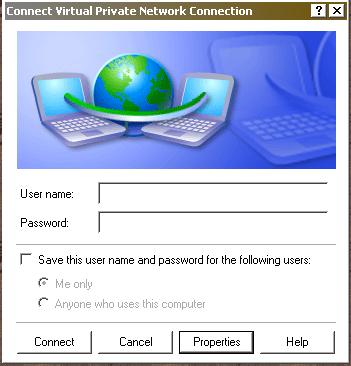
Do you mean the first screen that comes up after you open the connection? I've attached a pic of it below. That box ONLY saves the user name and/or password for a specific user. That's all i could find, the Properties button has nothing to make the connection solely for an admin.

-
bump Could this feature have been removed from XP Pro SP2? My other two PC's have the same problem. If nobody knows how to fix this, then is there any other way i can make a new connection NOT accessible to another user? I can't find anything in Group Policy either.
-
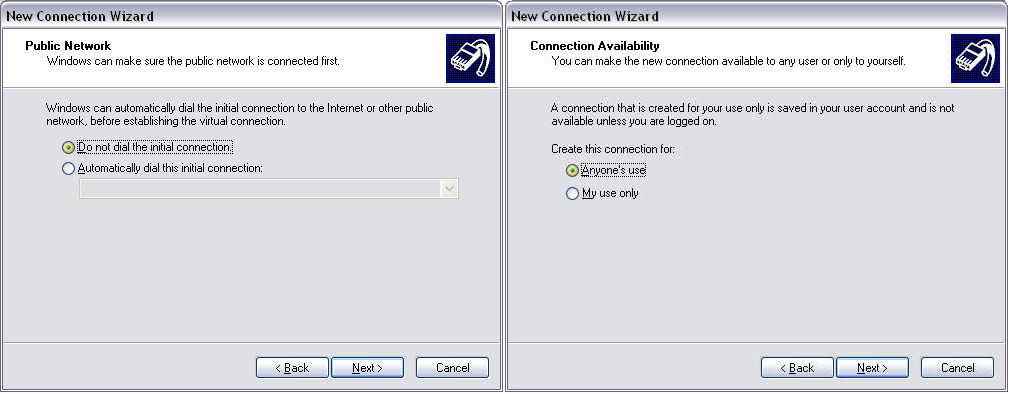
This is rather strange. Whenever i make a new connection (e.g. 'connect to the internet' or a Dial-up/VPN connection) via the wizard, it bypasses TWO parts the: 'Public Network' & 'Connection Availablity' screens. I not sure what the first window is for, but the latter is important to me, since it lets everyone or only the admin use the connection. I'm attaching a picture the missing windows. I have two users on my PC, it ihas XP Pro SP2. Any idea why this happens and what's wrong? Thanks in advance.
-
rdummy.sys? What a retarded name! Actually, i want to install XP x64 to the USB HDD NOT install it on a regular HD from the USB HDD. Of course, this would entail booting from the USB HD. So far, i haven't had time to copy and modify the contents of the CD on the USB Hd and install from there. I'll post back as soon as i do that.....
-
I recall at one time installing Windows 98SE fine on a USB HD, but XP just won't. When i try to install XP Pro x64 it gives me a BSOD after copying files in the 1st section of setup that says; "UNMOUNTABLE_BOOT_VOLUME" What gives? Why does this happen? I found a guide here that tells me what to do. But, although i haven't tried it yet, it requires to burn a new copy of XP CD. Can I modify the contents of the XP CD from the USB HD and install from there? I'm using a Western Digital Passport 120 GB, and my BIOS fully supports booting from USB, it's listed as 'USB Device.' Some help would be great. Thanks in advance.