Everything posted by D8TA
-
I have created a sysprep image for Windows XPsp3 that will pull the BIOS asset tag and enter it for the Computer Name and join my domain. This image is dual purpose, for users who get the full blown Office 2007 (Word, Excel, PowerPoint and Outlook) and users who only get certain full components of Office 2007 (Outlook, the other components are just viewers, Excel Viewer, Word Viewer, Power Point Viewer). I have a bat file that works manually but when I place it in the sysprep GUIrunonce section of my sysprep file the bat file launches both entries. Probably a little confusing...ok, alot confusing so I'll elaborate. I have a file on the drive a batch file that needs to be ran so the user can specifiy what they should get regarding the Office suite. This also installed some hard drive encryption software. The batch files goes something like this: REM Simple Menu System CLS :start echo . echo . echo This is the image for such and such users echo Image 3bc echo Choose what type of user you are echo ==================================== echo . echo 1. Full Office User echo 2. Viewer Office User echo . echo Enter option (1 or 2) Reply if errorlevel 50 goto Office if errorlevel 49 goto Viewer rem beep :Office C:\path to install batch file :Viewer C:\path to install batch file end When the machine starts up and goes through sysprep everything is fine and I can login to the domain with my AD credentials. Then the runoncegui launches, this batch file and stars installing Office and doesn't give me an opportunity to hit 1 or 2. If I run this manually it works like it is suppose to. Is the reply causing the issue. Any suggestions on how to fix or an alternative solution? Thanks.
-
Thanks Tripredacus, so far everything looks good.
-
So I can use this method if the machine is already joined to the Domain? I don't see where that reads the BIOS Asset Tag to make that field the Computer Name.
-
I am trying to completely automate a Windows XP installation for re-imaging purposes. I found a tool called mysysprep which says it will read the BIOS and I can extract certain fields from the BIOS and use for my sysprep file. I've tried this several times and it isn't working. I want to take the BIOS asset tag and have it applied to the Computer Name during the sysprep process and then join the AD domain. I can get the AD join stuff to work alright but the Computer Name is my issue. I thought I could use the UIU (Universal Imaging Utility) from Binary Research but even then I can't get the BIOS asset tag to get applied to the Computer Name. Any suggestions from the pros?
-
Yes, I burned the iso to a CD and it does boot and run with no issues. I am wondering if there is something wrong with my startrom.0, ntdetect.com or ntldr file? I copied them from Server 2003 R2. It seems like it wants to but runs out of gas.
-
First of all, your startrom.n12 should be renamed to startrom.0. The entry for winPE should look like this: label winpe kernel startrom.0 If your iso is in root directory, your winnt.sif should look like this: [SetupData] BootDevice = "ramdisk(0)" BootPath = "\I386\System32\" OsLoadOptions = "/noguiboot /fastdetect /minint /rdexportascd /rdpath=winpe.iso" Architecture = "I386" Getting a little further along. Now no error but it just sits there. Not sure what is wrong. Maybe I need to try and create WinPE 2.0 image file, iso. Does this method work for booting other iso's?
-
I have PE 2.0 and 1.6 booting from my pxe server using pxelinux as a boot menu. To get 1.6 to work, you need the following files: \ <--- root of your pxe boot folder ntldr ntdetect.com startrom.0 (renamed startrom.n12) winnt.sif \sources\winpe2005.iso Your winnt.sif file should look something like this: [SetupData] BootDevice = "ramdisk(0)" BootPath = "\I386\System32\" OsLoadOptions = "/noguiboot /fastdetect /minint /rdexportascd /rdpath=sources\winpe2005.iso" Architecture = "I386"Note that you can put the iso wherever you want and name it whatever you like. Then just point your DHCP server to boot from startrom.0 (option 67). The only thing I don't like is that you have to hit F12 once your startrom.0 kicks off. I never have been able to figure out how to get rid of that prompt, but I rarely use 1.6 for one old prototype server that doesn't meet the requirements for PE2.0. Thanks for this information. When I attempt to boot I am getting an Invalid of corrupt kernel image. What should my pxelinux.cfg file look like? Mine looks like this. LABEL winpe KERNEL startrom.n12 APPEND initrd=winpe.iso I have my winpe.iso in the root of my tftpboot directory.
-
I have the PXE server up and running and it works well for most of the desktops and laptops except the newer HP nc6910p notebooks. Most of our network drivers are .com extensions for use with our Netware file servers. We have our Ghost images sitting on these servers. Anyways, I have a WinPE iso, about 150MB in size I am trying to get to boot from the PXE server. I have searched high and low on Google trying to figure out how I can PXE boot an iso image and the items I've tried don't seem to work. Has anyone gotten WinPE or an ISO to boot from a PXE server? The closest I have been was getting the booting............................ message but it just sat there forever and I manually killed it.
-
I am not real sure how to go about this scenerio. I currently have a DHCP server that put out IP addresses for our organization but is managed by a different department. I am getting tired of walking around with CD/USB in order to boot up a workstation and Ghost it when the PC gets hosed. My question is does anyone know how I can just setup a PXE server without DHCP, use the primary DHCP in the organzation. We do use Symantec and it looks like it could do it but I need to research more and was wondering if anyone is doing this type of thing and if so what are you using and how difficult was it to setup and maintain. Thanks!
-
I'm also looking for a solution to reinstall beep driver.
-
I have tried this three times and everytime Windows wants to add the IPX/SPX protocols and the Qos Packet Scheduler to the networking components after my image gets syspreped. I have in my sysprep.inf file, [Networking]InstallDefaultComponents=NO Can anyone tell me how to install just the Microsoft Client, File and Print Sharing and TCP/IP? I cannot figure out what I am doing wrong to not install these components. Any help would be appreciated it. Thanks!
-
I got this hand-me-down Server 2000 box that has two drives. The primary boot disk is about 20 gigs but the previous owner only made the system partition 5.13GB but I have an application partition around 13 GB. What I have done is shrinked the application partition to the 5GB and want to enlarge the primary system partition but I cannot claim the unallocated free space. I've tried GPart but that didn't work and Partition Magic doesn't work on Servers. Any other suggestions or utilities I can try, free or open source tools would be great, to enlarge by 5GB system partition to 11 GB? I am trying to prevent having to rebuild this server. Thanks!
-
My IT department has set the Macro security levels to medium on all Office 2003 applications. I have scheduled tasks setup within Windows to fire off different jobs that pull data into my Access 2003 databases. Is there a quick and easy way around this? I've tried to changed the macro security level but it returns back to medium I'm guessing group policy. I need a way to run this task without Access waiting for the user to allow the macro. Any advice?
-
USB flash drives also display the same messages.
-
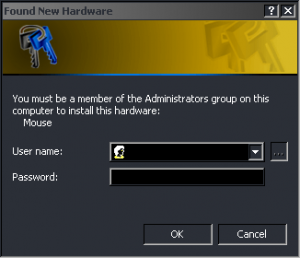
Here is a screenshot of the two messages I receive. When I plug in the device and it is recognized and then when I click Cancel I receive the second one about not having permission. All the USB devices work I just would like to prevent these messages from appearing for the user. I also checked my local security policy and Admins, Power Users and Users have rights to load and unload device drivers so I cannot figure out why Windows has to display this messages. Any other comments or suggestions?

-
I'll try to see if I can get some screenshots tomorrow when I get in the office. Do you happen to have a template or something that you are using for AD?
-
I am trying to prevent over 100 laptop users from being Admins on the laptops but the USB devices are becoming a show stopper. I found a tool on Novell's website, This tool works great and allows the USB device to function however the user's still receive the Windows Found New Hardware dialog box along with a login box for an Admin to log into. If the user clicks Cancel they receive a message that they don't have rights to use this device. After they clear out of these messages they can utilize the USB device until they restart. Is there a way to remove these messages so that they can use the device and not recieve these non-admin messages? Once an Admin logs in and the device is recognized under an Admin user they never receive the message again until a new device is plugged in. I have searched for two weeks and cannot find a solution but I hate to have to make them Admins on the laptop. Any other suggestions or ways to remove these messages that Windows presents? The notebooks are HP nc6400 running Windows XP sp2 in an Active Directory domain. I looked through some Group Policy settings but still cannot find a resolution to my problem. Like I stated above, the device works using the script on Novell's website but the user still receives an annoying message which is not something management will accept. I mentioned the security aspect but still no use. If I cannot make it so user's can install and use USB devices without receive any messages I may have to make them Admins. What are others doing to prevent making user's Admin on their PCs? Any suggestions, solutions or comments would be greatly appreciated. Thanks!
-
I am using Windows XPsp2 Pro and in the System Properties dialog box it does say Physical Address Extension. So even though it says 2.99GB I am using all 4 GB of RAM? I was wondering if it wouldn't be better to re-image my PC and use Windows Server R2.
-
I added just the /PAE but still it only shows up as 2.99GB of RAM. The BIOS shows 4GB but it is not showing up in Windows XPsp2. Any other suggestions?
-
I just added 4 GB to my Dell GX280 Windows XP sp2 PC but it appears the PC only sees 3GB. I've tried the /3GB and /PAE on the boot.ini file but one, both, or the other just blue screens and restarts. I read on Techne where Windows XP supports 4GB so is there some other switch I need to use or what else do I need to do so my PC will see this other 1GB of RAM. I have 4 - 1GB sticks all the same and the system properties shows up as 2.99GB.
-
Is this PC running service pack 2? I had a problem similiar to this where when I tried to connect the remote screen was just black. I basically went to the PC I was trying to connect to and reinstalled service pack 2 and checked and unchecked and then rechecked the allow remote connections check box. I rebooted after every check and uncheck and then I was able to connect.
-
Thanks! However, the PC in question is using Windows Classic and all themes have been removed and the service disabled.
-
I have a PC that whenever I goto Adjust Date/Time|Time Zone the display in the dialog box is blank. If I reboot it will come back providing me with the globe view and the option to use the drop down to change time zones but then disappear again. Where the drop down is it is blank and where usually the globe appears it is all blue, no green to represent the land. I have reports that uses the PCs date time and it constantly throws my reports off. I have restarted the Windows Time service and that did nothing. I cannot find anything that is stopping the display or why after a reboot it works for a period of time. The time it works varies from 30 minutes to half a day. I've ran virus and crapware scan and both come up clean. Any other ideas or how to correct this issue? Thanks in advance.
-
Well, that didn't work. I noticed in nLite I could remove Windows Default Sounds. How can I do that once Windows is already installed? I want to remove the sound when a user first logs into the PC and when the shutdown. I would like to disable all of the sounds just so other user's nearby don't get annoyed. Any other advise?
-
I have three services for our HP Radia software distribution product. I noticed that many users who are admins, we are working on locking the workstations down, have disabled these services or have stopped the services. I now I can re-start the services by using net start or sc start but how can I re-enable the disabled service and set it back to automatic? Is there a command line to do this? We have a bat file that we have in everyone's Novell login script that I would like to use if possible to re-enable and set to Automatic and then start these services. Any advice? Thanks!