

-
windows 11 iot enterprise does not have all these restrictions and etc. and bloatware free. you can install "windows 11 iot enterprise"
-
@Tihiy How can I do that? I am using startallback. Also I dont want my notepad becoming black I only want the top bar becoming mica
-
my windows media player legacy top bar is always white. anyway to blend it or make it darker?
-
in startallback in windows filebrowser when you hover cursor on up arrow button there are some extra padding in right side, when you hover on taskbar open program icons and you see the close button you hover on it and the extra padding is in the botton of the button.
.png.77a77c7b7ced1ccd578c54689edf393a.png)
-
Will this replace "startallback"? Or is this tool will be used alongside startallback?
-
-
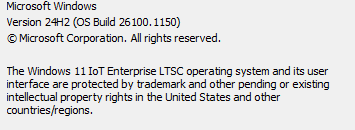
My experience is different. I somewhat agree with @Andromeda43 , the w11 feels slower because of its animation but the drivers are working better than w10 in my case (haswell i5 laptop). I shifted from w10 iot ltsc to w11 iot ltsc enterprise and not going back! changed the look(start menu, taskbar, tray options , file browser) using "startallback" there are other options like openshell, explorer patcher.
-
HI @Tihiy does the new test release solve the windows spotlight button right click problem on desktop? Can I get a full changelog? using 24h2 26100
-
Sparkling changed their profile photo
-
OS: Windows 11 iot enterprise ltsc ; OS version: 24H2 26100 And using Startallback to customize but when I right click on "learn about this picture" it says open and if I open it it opens ms edge and search similar photos. Before( pre Startallback installation behavior) when I right clicked on it it used to show me 4 total photos to choose, I liked it. Photo attached
.png.1fc38f741024c46bc5457a54c210b72e.png)