



Skip to content
View in the app

A better way to browse. Learn more.

MSFN

A full-screen app on your home screen with push notifications, badges and more.

To install this app on iOS and iPadOS
  1. Tap the Share icon in Safari
  2. Scroll the menu and tap Add to Home Screen.
  3. Tap Add in the top-right corner.
To install this app on Android
  1. Tap the 3-dot menu (⋮) in the top-right corner of the browser.
  2. Tap Add to Home screen or Install app.
  3. Confirm by tapping Install.

MS-Russia

Member
  • Joined

  • Last visited

  • Country

    Tunisia
  1. @Koishi Komeiji @win32 I am not the owner of the image and I dont have XP. I just wanted to learn how to handle this error , because these errors can appear at any time
  2. MS-Russia started following Koishi Komeiji
  3. I have unofficial SP5 and extended kernel , This means NetFX35W2KRC3a will not work ?
  4. Yes , Try the download link at blacwingcat, it does not work
  5. I am looking for a few days for a link to Net Framework 3.5SP1 for windows 2000, but i only found a link on BlackWingCat, but it doesn't work. Any Help ?
  6. In this example could you explain it to me please how to change the name to equal ?
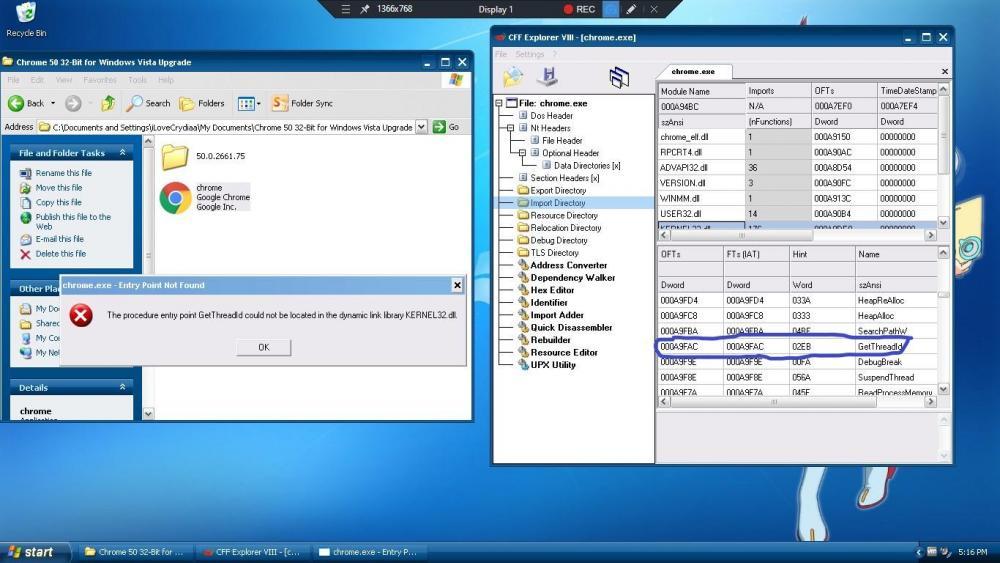
  7. Can you explain more please? I didn't understand what you mean by " the name must be of equal or lesser length" , does this mean that something should be changed in kerne32.dll ? the name must be of equal or lesser length of what?

Account

Navigation

Configure browser push notifications

Chrome (Android)
  1. Tap the lock icon next to the address bar.
  2. Tap Permissions → Notifications.
  3. Adjust your preference.
Chrome (Desktop)
  1. Click the padlock icon in the address bar.
  2. Select Site settings.
  3. Find Notifications and adjust your preference.