-
hci memtest? http://hcidesign.com/memtest/
-
I keep reading over the internet that people are seeing the OS is overall much faster than Vista is with SP1. mostly hype m8 i was running server 2008, but switched back to v64 and i'm not seeing much of a difference, if any tbh
-
the P35 chipset is better suited for quad cores (especially if thinking about overclocking) plus the improved memory controller makes it easier to fill the slots and achieve higher memory speeds
-
there are boards for either DDR2, or DDR3... or even boards that take both (but not at the same time)
-
if buying a new board, personally i'd much rather get the latest P35 chipset with improved memory controller etc.
-
*bump* anybody have any suggestions for workarounds or any ideas at all?
-
Hi cluberti, thanks for the reply Yes, DVD2SVCD is only a 32bit app I did kinda have an idea that it was to do with the app. being 32bit and the extra memory addresses available. I just wondered if there was any way to limit only DVD2SVCD to below 2GB, or limit it to certain addresses or something. Instead of having to use the MAXMEM command and rebooting each time I want to convert a video, and then rebooting again after to remove MAXMEM. I won't even try to pretend to know exactly how it works, but I thought that 32bit apps were limited to 2GB automatically *shrug*
-
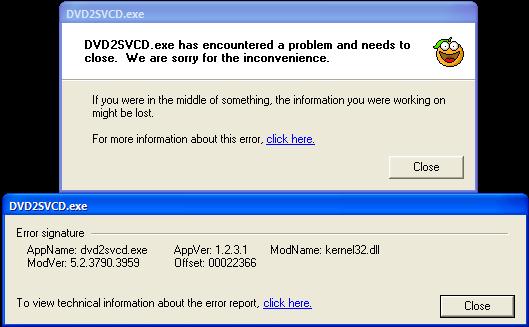
Hi all, I'm hoping some bright spark might be able to help me My problem is this: I've been testing running my Windows XP x64 PC with 4x1GB sticks of DDR2 and the system passes Memtest etc. with no errors whatsoever. Pretty much everything is working how it should be, except for one app... DVD2SVCD http://www.dvd2svcd.org/ If I have the 4 sticks installed, when I try to open DVD2SVCD it gives me an error Take out two sticks and it works as it should Rather than taking out 2 of the sticks each time I want to use DVD2SVCD I was hoping somebody might be able to offer another workaround So far, (apart from removing memory) the only method I've been able to find that works is to use the boot.ini, MAXMEM command, but this obviously requires a reboot in-between So would anybody happen to know how I might be able to limit the amount of memory available to DVD2SVCD, or maybe how I can get it to work with the full 4GB ??? Many thanks in advance -P
-
i found the -ms switch worked for me with the default installer
-
there's no etfsboot.com on the x64 disc will a 32bit bootdisc definitely work?
-
would anyone have a solution for doing the same thing with an x64 version please?
-
or you could make yourself a bartpe cd with ghost or acronis http://www.nu2.nu/pebuilder/
-
there should be no need to alter the iso in any way, using nero, in the 'Recorder' menu, select burn image, find your iso, and burn it :thumbsup:
-
you could always try the files and setting transfer wizard <shrugs>
-
try nod32 http://www.esetsoftware.com/download/downbeta.htm beta64 for username and pass