deomsh
Content Type
Profiles
Forums
Events
Everything posted by deomsh
-
These are two unrelated problems in my humble opinion. If you agree, let's first try to address the chipset with the NoSnoop bit set: if I am right this is the one with HDA-Controller 8086:0F04. Are you sure about the datasheet, or am I wrong? I have no opinions about NoSnoop as such: this is far above my level, members like @Drew Hoffman and especially @SweetLow should be able to comment on this. Through the years I did some preliminary investigations in PCI-mechanisms, if I remember well NoSnoop has something to do with use of the processor cache (?). First I looked in this thread for the phrase 'cold', indeed there are a few posts regarding differences of boot-behavior. In my (fully empirical) taxonomy I have: 1) Fully cold boot, after shutdown unplugged the power cable, then the power button pressed to unload capacitors/ emptying buffers and waiting at least two minutes before plugging the power cable back and booting; 2) Normal cold boot; 3) Hard reset, only possible if a reset-switch is available. Better not used from inside Windows, but safe if rebooted to MS-DOS command-line first; 4) Warm reboot with Ctrl+Alt+Delete from MS-DOS command-line; 5) Same from inside Windows, should be considered as safe. I your case I'd like to add: 6) Restart Windows after Exit to MS-DOS and restart Windows with 'WIN' (only ONE time loaded again - so two WIN's visible with 'MEM /a/c/p' afterwards in a MS-DOS Windows inside Windows); 7) Restart Windows after Exit to MS-DOS and restart Windows with 'Exit'. In my imagination you can try these Options 1-7, but in reverse order. Checking with headphones the Microsoft Starting sound, a small sound file with MPlayer2 of CD-equality, then a big one and in the end your last file (you didn't mention if this one was 'CD-quality = 44.1 kHz or 48 kHz?). Better write down everything. You also can try playing a fully empty WAV-file before, length ONE minute. They should be here or there on the web. In the past I did some experiments in this direction if Watler's driver crashed during playing a soundfile or if restarted not played as it was supposed to be. As a second pass I would suggest a PRECISE searching inside the HDA-Controller Registers with WPCREDIT (in 8-bits view) for differences. If you find nothing, then other registers mentioned in your chipset's datasheet which are 'looking' DMA-related. I am afraid there are too many... Maybe you can use Craig Hart's PCI32 tool to dump registers: https://www.majorgeeks.com/files/details/pci32.html . Then comparing the text-files with some tool. BTW better use a more recent pcidevs.txt, like this one: http://rh-software.com/index_pci.html I 'did' PCI-dump almost nine years ago for the last time, maybe you will have to try a bit to get it working... In my idea you are supposed to be able to be handle this sort of things. But if not, or you run into some problem, I will of course search and experiment on my system to provide as much assistance as possible. ; ------------------------------------------ P.S. hopefully you will get some idea's after the 'first pass', avoiding the 'second pass' - which will probably bring 'nothing'. I would bet the problem has something to do with not fully emptying the DMA buffer (1 MB?), so maybe the problem is withing *some* HDA2-mechanism. But this is just a non-educated guess.

-
Xnview classic 2.13 full version support on windows 95
deomsh replied to cov3rt's topic in Windows 9x/ME
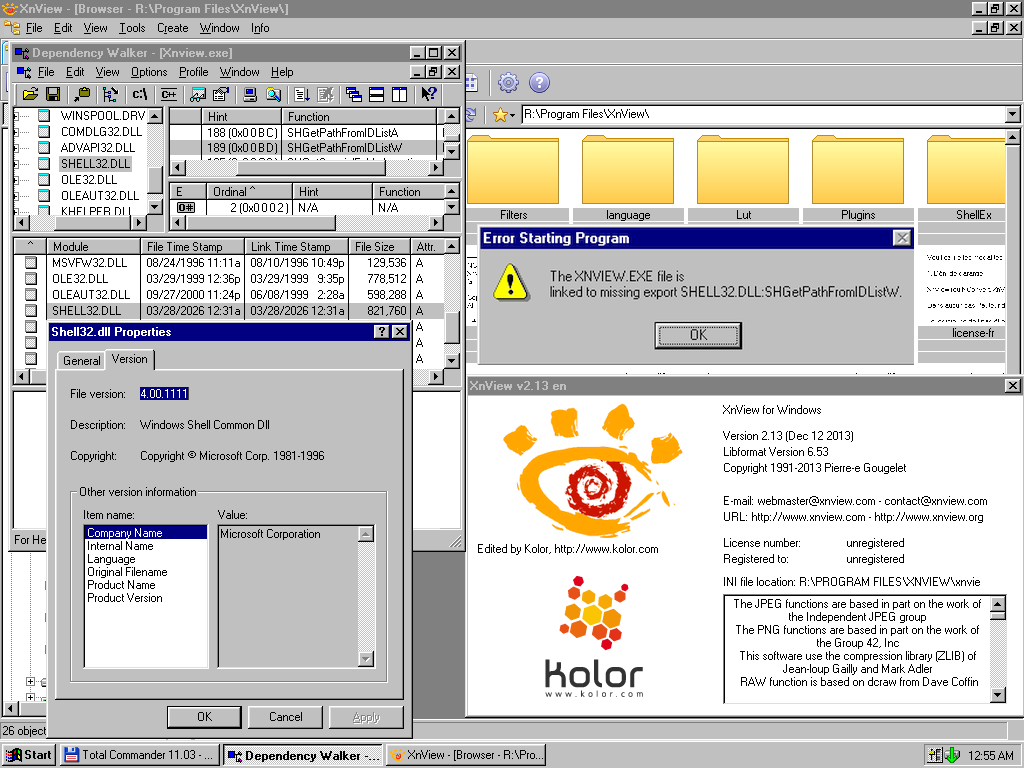
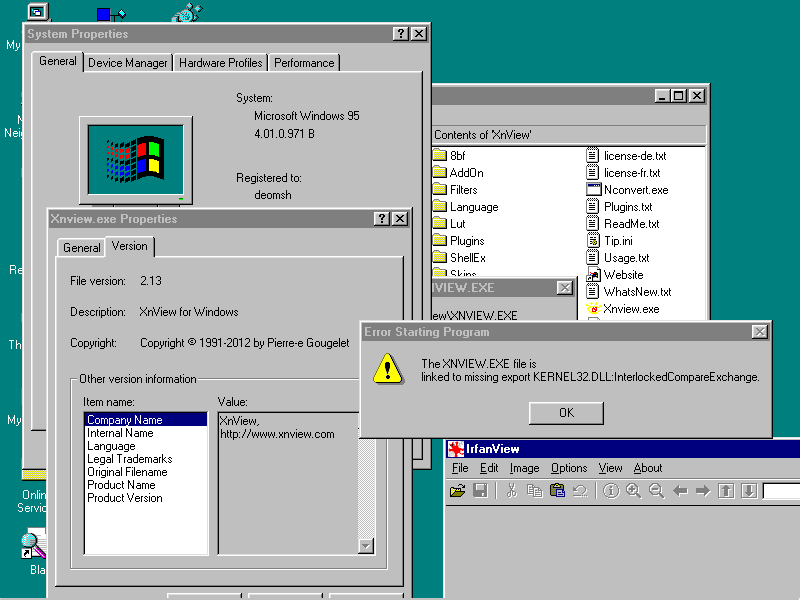
Hi @ABCDEFG very nice job! Although it took me a long time to surpass next missing export (no IE4 on my system, and installation on my non-XMS Ramdrive gave problems). But in the end I succeeded with help of SH95UPD, version 007:
-
EX58-UD4 motherboard - Can't start Win98 setup from CD - no drive detected
deomsh replied to sk9392's topic in Windows 9x/ME
Thanks for the info. If you have used RLoew's SATAPTCH to patch your version of ESDI_506.PDR you should be 'good'. Otherwise better use original/ updated ESDI_506.PDR and patch again from command-line. About Setup: I assume you run Setup from MS-DOS command-line, so Setup is the using the Dos drivers, until Windows 'takes over'. If your Hard drive is SATA too, check if your CD-drivers are mentioned in CONFIG.SYS/ AUTOEXEC.BAT, with REM before is okay, even better. Sometimes Win9x needs these names as a 'hint' to 'find' a CD-ROM, even they are not loaded. Especially MSCDEX shouldn't be loaded before starting Windows of course. -
EX58-UD4 motherboard - Can't start Win98 setup from CD - no drive detected
deomsh replied to sk9392's topic in Windows 9x/ME
Please be specific: which RLoew drivers, mention filenames. -
Found this one archived: https://web.archive.org/web/20230506001046/https://kernelex.sourceforge.net/mediawiki/index.php?title=Category:Compatible_applications&redirect=no And: https://web.archive.org/web/20221206050710/https://kernelex.sourceforge.net/wiki/VLC_Media_Player
-
There are good topics on MSFN: https://msfn.org/board/topic/152471-kernelex-apps-compatibility-list-new/ Don't forget https://msfn.org/board/topic/105936-last-versions-of-software-for-windows-98se/ , https://en.namu.wiki/w/KernelEX and https://retrosystemsrevival.blogspot.com/p/list-of-working-windows-98me-kernelex.html?m=1 . There used to be a wiki from Schwups, can't find it anymore?
-
Xnview classic 2.13 full version support on windows 95
deomsh replied to cov3rt's topic in Windows 9x/ME
Maybe of use to you the print-screen of xnview v1.90 RC3, same as IPF in xnview v1.90.1: If you need the last part too: just ask, my RLoew non-XMS ramdrive installation is still available on my small USB-drive.
-
I will look into it, will take some time. Yesterday a project I am working at seemed to be going well, but later I discovered an error in my mod of grldr bootcode - so a drawback....
-
Xnview classic 2.13 full version support on windows 95
deomsh replied to cov3rt's topic in Windows 9x/ME
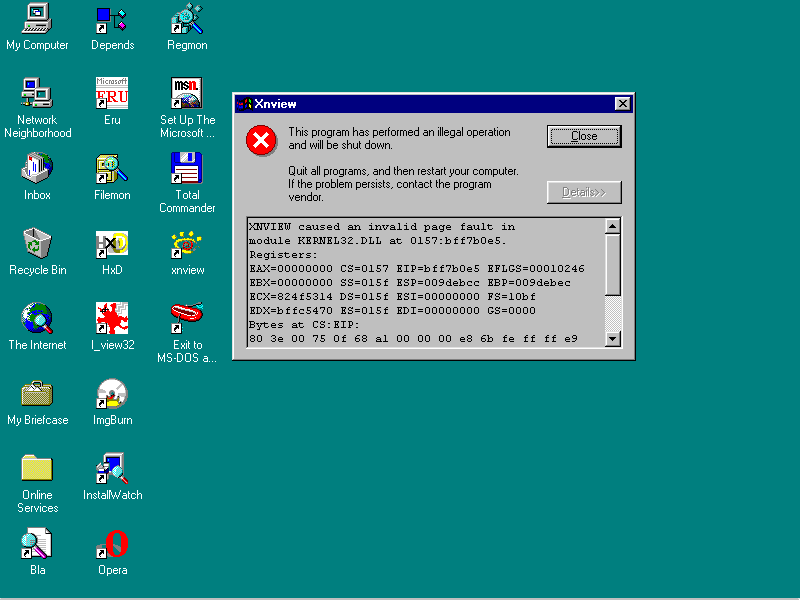
Not yet, but I tested today: v1.90 beta 1, beta 2 and beta 3 asked for STI.DLL, not part of Windows 95 as far as I can see (Imaging). But if I copied the three STIxx.DLL's I found somewhere to the xnview directory, xnview started normally. v1.90 beta 4 and beta 6 started without asking for STI.DLL, same for RC1 and RC2. But RC3 gave Invalid Page Fault in KERNEL32.DLL, like final v1.90 as reported earlier. -
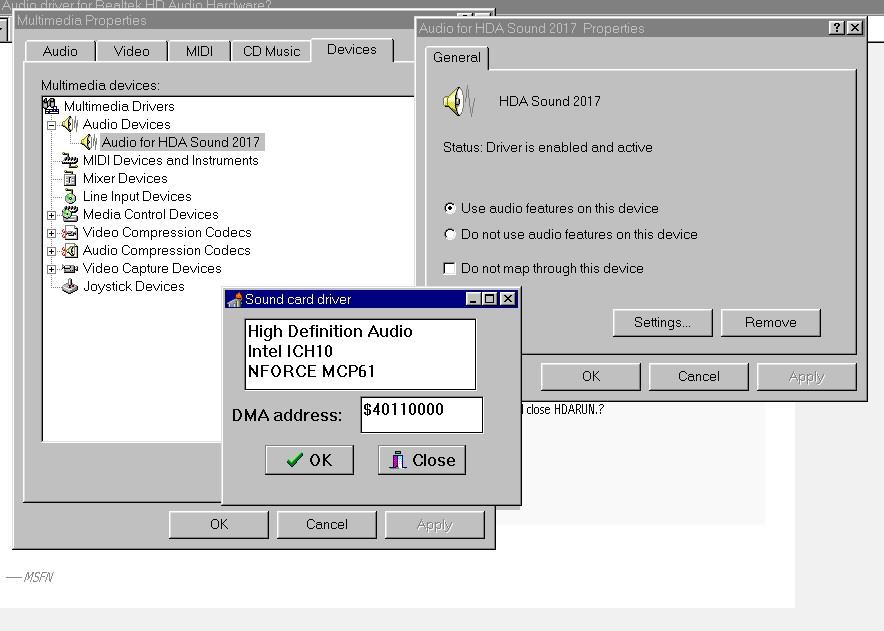
WOW, you are realy the new HDA2-San How did you 'get' the right Line-out Pin-Widget? Once you have established this, I can understand finding the Playback-path is possible with your Widget-parser. In my Excel-notes I had to make a - hopefully (more or less) educated - guess, if no experimental results were available. And even IF available, wiring of Ports of a Codec Integrated Circuit is still a choice of the Manufaturer, although some Datasheet's give (preferred) default Ports... Lately I searched Intel's High Definition Audio Specification during traffic, because this was one of your earlier questions I still didn't adress so far. I found following interesting statement in Section 7.3.3.7: 'Gain is a 7-bit “step” value specifying the amplifier gain, the actual dB value of which is determined by the “StepSize,” “Offset,” and “NumSteps” fields of the Output Amplifier Capabilities parameter for a given amplifier. After codec reset, this “Gain” field must default to the “Offset” value, meaning that all amplifiers, by default, are configured to 0 dB gain. If a value outside the amplifier‟s range is set, the results are undetermined.' I am not saying your mod is 'not good' or something like that! I was just wondering if above could be the case on your available codec's? Because you are the only one with a real IDT-codec in this thread so far (I found IDT bought three Audio-lines from STAC in 2006), could you provide one of your BIG HDAICOUT.HDA => HDAICIN.TXT's? So I can compare with the Datasheet. This would be quite nice. Because of my current projects I am constantly switching my headphones between computers. The (Realtek-driver) Dialog on Windows 10 is realy annoying: 'Which Device you just plugged in?'. Although Headphones are suggested, this is still a mess in my personal opinion: we live in 2026, not 2006, even no sound if a choice is not made (but maybe sound in full screen?)... Of course this doesn't apply to HDA2. On the other hand, if auto-switching give any problems a nice Delphi Dialog-screen in Windows 10' Realtek-driver style will be not so bad. There are many. Without any special order of preference: 1) Enabling Audio-CD input, if loopback is available. Personally I like analog CD-Audio more than digital. Especially useful if the CD/ DVD drive has no separate headphones-jack. I don't know how to find out which Port should be used. Once I made an example as a surprise to Dave-H, based on the Datasheet. Can be eanbled in HDAICOUT.HDA - see https://msfn.org/board/topic/178295-audio-driver-for-realtek-hd-audio-hardware-testing-thread/page/9/#findComment-1162932 2) Inserting a database of HDA-controllers. Currently there is always the same one showed (from Dave-H's system, April 7 2019 in this thread): Once I delivered my GENHDA16.INF, made a long time ago, modified after Watler criticized initial versions: https://msfn.org/board/topic/178295-audio-driver-for-realtek-hd-audio-hardware-testing-thread/#findComment-1161697 Earlier I started HDAWIN16.INF to include specific HDA-Controllers for read-out in Device Manager. I never published this version on MSFN, there doesn't seem to be any demand. I can't remember if I realy finished the INF-file, at least it worked on my - at that time two - available systems. Below the idea, maybe you can use the values, if you want to work on this part: ;; HDAWIN16.INF ;; 2017/12/30 ;; "Watlers World" 16-bit High Definition Audio Driver ;; Win3x/Win9x only ;; (c) Copyright 2017 Deomsh (...) [Manufacturer] %GEN%=GEN.Mfg %ATI%=ATI.Mfg %AMD1%=AMD1.Mfg %SIS%=SIS.Mfg %NVAMD%=NVAMD.Mfg %ULI%=ULI.Mfg %VIA%=VIA.Mfg ;%RDCS%=RDCS.Mfg ;%Teradici%=Teradici.Mfg %INTEL%=INTEL.Mfg [GEN.Mfg] %GEN_HDA.DeviceDesc%=HDA2,PCI\CC_0403 [ATI.Mfg] %ATI_SB450_HDA.DeviceDesc%=HDA2,PCI\VEN_1002&DEV_437B ;%ATI_SB600_HDA.DeviceDesc%=HDA2.Install,PCI\VEN_1002&DEV_4383 %ATI_SB600_HDA.DeviceDesc%=HDA2,PCI\VEN_1002&DEV_4383 %ATI_RS600_HDA.DeviceDesc%=HDA2,PCI\VEN_1002&DEV_793B %ATI_RS690_HDA.DeviceDesc%=HDA2,PCI\VEN_1002&DEV_7919 [AMD1.Mfg] ;%AMD_HDA_768/8111.DeviceDesc%=HDA2,PCI\VEN_1022&DEV_7445 ; AC97 (HDA unknown) %AMD_HDA_17h.DeviceDesc%=HDA2,PCI\VEN_1022&DEV_1457 [SIS.Mfg] %SIS_966_HDA.DeviceDesc%=HDA2,PCI\VEN_1039&DEV_7502 [NVAMD.Mfg] %NFORCE_HDA_MCP51.DeviceDesc%=HDA2,PCI\VEN_10DE&DEV_026C %NFORCE_HDA_MCP55.DeviceDesc%=HDA2,PCI\VEN_10DE&DEV_0371 %NFORCE_HDA_MCP61a.DeviceDesc%=HDA2,PCI\VEN_10DE&DEV_03E4 %NFORCE_HDA_MCP61b.DeviceDesc%=HDA2,PCI\VEN_10DE&DEV_03F0 %NFORCE_HDA_MCP65a.DeviceDesc%=HDA2,PCI\VEN_10DE&DEV_044A %NFORCE_HDA_MCP65b.DeviceDesc%=HDA2,PCI\VEN_10DE&DEV_044B %NFORCE_HDA_MCP67a.DeviceDesc%=HDA2,PCI\VEN_10DE&DEV_055C %NFORCE_HDA_MCP67b.DeviceDesc%=HDA2,PCI\VEN_10DE&DEV_055D %NFORCE_HDA_MCP72/78.DeviceDesc%=HDA2,PCI\VEN_10DE&DEV_0774 ;%NFORCE_HDA_MCP78b.DeviceDesc%=HDA2,PCI\VEN_10DE&DEV_0775 ; unknown ;%NFORCE_HDA_MCP78c.DeviceDesc%=HDA2,PCI\VEN_10DE&DEV_0776 ; unknown ;%NFORCE_HDA_MCP78d.DeviceDesc%=HDA2,PCI\VEN_10DE&DEV_0777 ; unknown %NFORCE_HDA_GF108.DeviceDesc%=HDA2,PCI\VEN_10DE&DEV_0BEA [ULI.Mfg] %ULI_HDA.DeviceDesc%=HDA2,PCI\VEN_10B9&DEV_5461 [VIA.Mfg] %VIA_VT82xx_HDA.DeviceDesc%=HDA2,PCI\VEN_1106&DEV_3288 [RDCS.Mfg] ;%RDCS_HDA.DeviceDesc%=HDA2,PCI\VEN_17f3&DEV_ ; DEV is unkown! [Teradici.Mfg] ;%Teradici.DeviceDesc%=HDA2,PCI\VEN_6549&DEV_1200 ; TERA1200 PC-over-IP Host [INTEL.Mfg] %C200_HDA.DeviceDesc%=HDA2,PCI\VEN_8086&DEV_1C20 %C600_HDA.DeviceDesc%=HDA2,PCI\VEN_8086&DEV_1D20 %C126_HDA.DeviceDesc%=HDA2,PCI\VEN_8086&DEV_1E20 %ICH6_HDA.DeviceDesc%=HDA2,PCI\VEN_8086&DEV_2668 %ESB_HDA.DeviceDesc%=HDA2,PCI\VEN_8086&DEV_269A %ICH7_HDA.DeviceDesc%=HDA2,PCI\VEN_8086&DEV_27D8 %ICH8_HDA.DeviceDesc%=HDA2,PCI\VEN_8086&DEV_284B %ICH9_HDA.DeviceDesc%=HDA2,PCI\VEN_8086&DEV_293E %ICH10a_HDA.DeviceDesc%=HDA2,PCI\VEN_8086&DEV_3A3E %ICH10b_HDA.DeviceDesc%=HDA2,PCI\VEN_8086&DEV_3A6E %3400_HDA.DeviceDesc%=HDA2,PCI\VEN_8086&DEV_3B56 (...) [Strings] (...) GEN = "Generic" ATI = "ATI Technologies Inc" ;AMD1 = "Advanced Micro Devices Inc." SIS = "Silicon Integrated Systems" NVAMD = "NVIDIA Corporation" ULI = "ULi Electronics Inc." VIA = "VIA Technologies, Inc." RDCS = "RDC Semiconductor, Inc." Teradici= "Teradici Corp." INTEL= "INTEL Corporation" GEN_HDA.DeviceDesc = "High Definition Audio Controller" ATI_SB450_HDA.DeviceDesc = "ATI SB450 HD-Audio Controller" ATI_SB600_HDA.DeviceDesc = "ATI SB600 HD-Audio Controller" ATI_RS600_HDA.DeviceDesc = "ATI RS600 HD-Audio Controller" ATI_RS690_HDA.DeviceDesc = "ATI RS690 HD-Audio Controller" ;AMD_HDA_768/8111.DeviceDesc = "AMD 768/8111 AC97 Controller" AMD_HDA_17h.DeviceDesc = "AMD 17h HD-Audio Controller" SIS_966_HDA.DeviceDesc = "SIS 966 HD-Audio Controller" NFORCE_HDA_MCP51.DeviceDesc = "NFORCE MCP51 HD-Audio Controller" NFORCE_HDA_MCP55.DeviceDesc = "NFORCE MCP55 HD-Audio Controller" NFORCE_HDA_MCP61a.DeviceDesc = "NFORCE MCP61a HD-Audio Controller" NFORCE_HDA_MCP61b.DeviceDesc = "NFORCE MCP61b HD-Audio Controller" NFORCE_HDA_MCP65a.DeviceDesc = "NFORCE MCP65a HD-Audio Controller" NFORCE_HDA_MCP65b.DeviceDesc = "NFORCE MCP65b HD-Audio Controller" NFORCE_HDA_MCP67a.DeviceDesc = "NFORCE MCP67a HD-Audio Controller" NFORCE_HDA_MCP67b.DeviceDesc = "NFORCE MCP67b HD-Audio Controller" NFORCE_HDA_MCP72/78.DeviceDesc = "NFORCE MCP78a HD-Audio Controller" ;NFORCE_HDA_MCP78b.DeviceDesc = "NFORCE MCP78b HD-Audio Controller" ;NFORCE_HDA_MCP78c.DeviceDesc = "NFORCE MCP78c HD-Audio Controller" ;NFORCE_HDA_MCP78d.DeviceDesc = "NFORCE MCP78d HD-Audio Controller" NFORCE_HDA_GF108.DeviceDesc = "NFORCE F108 HD-Audio Controller" ULI_HDA.DeviceDesc = "ULI HD-Audio Controller" VIA_VT82xx_HDA.DeviceDesc = "VIA VT82xx HD-Audio Controller" ;RDCS_HDA.DeviceDesc = "RDCS HD-Audio Controller" ;Teradici.DeviceDesc = "Teradici HD-Audio Controller" ; ?? C200_HDA.DeviceDesc = "INTEL C200 HD-Audio Controller" C600_HDA.DeviceDesc = "INTEL C600 HD-Audio Controller" C126_HDA.DeviceDesc = "INTEL C126 HD-Audio Controller" ICH6_HDA.DeviceDesc = "INTEL ICH6 HD-Audio Controller" ICH7_HDA.DeviceDesc = "INTEL ICH7 HD-Audio Controller" ESB_HDA.DeviceDesc = "INTEL ESB HD-Audio Controller" ICH8_HDA.DeviceDesc = "INTEL ICH8 HD-Audio Controller" ICH9_HDA.DeviceDesc = "INTEL ICH9 HD-Audio Controller" ICH10a_HDA.DeviceDesc = "INTEL ICH10r HD-Audio Controller" ICH10b_HDA.DeviceDesc = "INTEL ICH10 HD-Audio Controller" 3400_HDA.DeviceDesc = "INTEL 3400 HD-Audio Controller" (...) 3) Adressing stability issues of HDA2.DLL on Windows 9x. You never reported any, as far as I remember. Are your three systems FULLY stable? 4) Making a better version of WAVEOUT.EXE, without the annoying hickup's while moving the volume-sliders. Also a more logarithmic scale would be nice. My personal prefence would be to have ONE Volume slider, and another one for Balance, like in 'Options' of Windows 98' Mplayer2. 5) If available: making the Volume Knob Widget working. I never 'saw' one, will be most useful on laptops, I presume. My only avaiIable laptop is from work, but even using cmd as non-administrator is blocked for me, not to mention booting from an USB drive. 6) Enabling Vendor Specific Widgets. If you want to try, I can assist searching on the Internet in Linux- and other forum's. 7) Last but not least: full compliance to Intel's High Definition Audio Specification. Earlier I delivered a Report, made by pi (I believe at that time GLM 4.5). Although it is 'only' AI, can still be useful as suggestions for testing/ developing hypotheses. I think there is more, but can not remember currently. P.S. This morning I remembered the most important: 8) Make a setting in HDACFG.INI to force Codec index. For instance: 'Force Index=$0/1/2'.
-
Alpha-018.1 just tested on Asrock N68C-S UCC with HDA Controller 10DE:03F0 and codec 1106:4397 (i.e. VT1705) & Windows 98SE. Same problems as reported earlier.
-
Xnview classic 2.13 full version support on windows 95
deomsh replied to cov3rt's topic in Windows 9x/ME
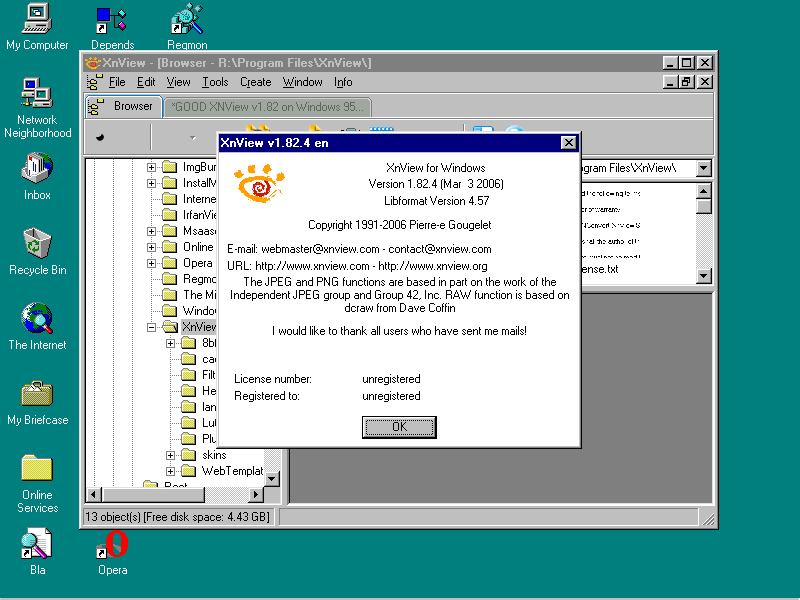
Because I can't stand if 'things' are not working, I first checked the missing Export KERNEL32.DLL:InterlockedCompareExchange. It seems it is NOT available on Windows 95. Then I went down: highest version working on my installation is xnview v1.82.4. Version 1.90/ 1.90.1 and 1.90.2 didn't work: Invalid Page Faults in KERNEL32.DLL.
-
That's sad. Do you want to proceed with this driver, or are you finished? On the other hand there is WDMHDA in development of @Drew Hoffman(Windows 98 SE).
-
Xnview classic 2.13 full version support on windows 95
deomsh replied to cov3rt's topic in Windows 9x/ME
Sorry to say, but same missing Kernel32.dll export as above with 'XnView_Classic-1.99.6-win-full.exe' on (my installation) of Windows 95 OSR2. -
Xnview classic 2.13 full version support on windows 95
deomsh replied to cov3rt's topic in Windows 9x/ME
I was just testing because I was curious about your question. I remember using XnView in the past, but later I became a 'hardcore' IrfanView user, although not everthing is 'good'. Do you want me to test "XnView_Classic-1.99.6-win-full.exe"? -
Xnview classic 2.13 full version support on windows 95
deomsh replied to cov3rt's topic in Windows 9x/ME
-
I did more tests with HDA2.DLL and INTELHDA.EXE (AHDAO) on N68C-S UCC with VT1705. First with CORB from cold boot. This time more had to be done with Pin Widget 1Ch and DAC 10h. All in all it was as expected, only default timing (25) was a bit to low (first response zero's). Some highlights: OUTPUT WIDGET POWER $010F0500 => 00=$0000000000000033 $01070500 => NO SOUND $010F0500 => 00=$0000000000000000 OUTPUT WIDGET GAIN $010B8000 => 00=$0000000000000000 $010BA000 => 00=$0000000000000000 $0103B02A => NO SOUND OR CRACKLES $010B8000 => 00=$000000000000002A $010BA000 => 00=$000000000000002A Second I changed to Verbinterface=$0 and did a fully cold boot, Because I forgot to set al Widgets in HDACFG.INI to $FF, I made the changes and did a full reboot. Afterwards I started with the Immediate Command interface from INTELHDA.EXE. Most things where fully as expected, but not all. I copied all response messages. I have no idea what to do with the extra information besides the Verb response, but you will (I assume): OUTPUT WIDGET POWER $010F0500 CODEC 0 forgot Order 23 times! Codec 0 Was Busy 851 times! Codec 0 Sent Data ($00000000) Probably the earlier Power state survived the reboot (through the BIOS)? Enabling music while Mplayer2 was playing, was more or less as expected. But I couldn't get the 'good' response to the Stream format Verb after using the appropiate SET Verb: OUTPUT STREAM: $010F0600 CODEC 0 forgot Order 46 times! Codec 0 Was Busy 1674 times! Codec 0 Sent Data ($00000000) $01070610 => REASONABLE SOUND, LEFT ONLY $010F0600 => SOUND STOPPED CODEC 0 forgot Order 96 times! Codec 0 Was Busy 3467 times! Command 0 Valid but CODEC still busy! Codec 0 Sent Data ($00000000) AFTER EXIT MPLAYER2: INTELHDA NOT CLEAR YET AFTER CLEAR IC NEEDED AGAIN TO GET RESPONSE: $01070610 $010F0600 CODEC 0 forgot Order 256 times! Codec 0 Was Busy 9274 times! Codec 0 Sent Data ($00000010) OUTPUT FORMAT: CODEC 0 forgot Order 95 times! Codec 0 Was Busy 3444 times! Codec 0 Sent Data ($00000031) $01024011 CODEC 0 forgot Order 107 times! Codec 0 Was Busy 3903 times! Codec 0 Sent Data ($00000000) $010A0000 CODEC 0 forgot Order 57 times! Codec 0 Was Busy 2065 times! Codec 0 Sent Data ($00000000) RESTARTED MPLAYER2: NORMAL STEREO MUSIC But with CORB I had no problems to read out Stream format just set. After using CORB 'good' response with Immediate Command too. So maybe you can make some version with CORB? I am willing to test. Full description of all tests in the two attached files. VT1705_CORB_VERB.txtVT1705_IC_VERB.txt
-
EX58-UD4 motherboard - Can't start Win98 setup from CD - no drive detected
deomsh replied to sk9392's topic in Windows 9x/ME
Nice, maybe try xdvd2.sys too (newer). 2018-16-12 version: https://web.archive.org/web/20181020053006/http://optimizr.dyndns.org/dos/drivers.html Oeps, link is 2018-10 now, will make no difference in case of xdvd2.sys -
I'd run some tests. The good news is with an old headphone with only two isolating bands in the jack, everything was normal with Watler's driver on VT1705. Balance button of Mplayer2 worked as expected. The bad news is: if I only installed your driver (MSFN version 018) indeed only Left Channel produced sound. I tried to send Verbs with INTELHDA.EXE (from Watler's AHDAO) using CORB, but this gave a blue screen and unresponsive computer. Then I tried INTELHDA.EXE together with HDA2.DLL and not much was needed to get good sound. From my notes: ======================================================================================== PLAYBACKPATH: 1C [PW3] - 16 [MW0] - 10 [AW0] ACTIVATED AFTER FULL RESET - MPLAYER2 IS PLAYING FIRST: $01070610 => HEAVY NOISE LIKE SOUND, WITH VOLUME SLIDER LOW SOME MUSIC HEAVILY DISTORTED THEN: $01024011 => NORMAL MUSIC - BOTH CHANNELS OR: $01020011 => NORMAL MUSIC - BOTH CHANNELS (NEEDS RESTARTING MUSIC) WITH CHECK: $010A0000 => 00=$0000000000000011 EAPD NOT NEEDED: $01CF0C00 => 00=$0000000000000000 IF SET NO DIFFERENCE NOTHING MORE NEEDED IN CASE OF HEADPHONE AT REAR GREEN JACK ========================================================================================= You can read the whole story in the attachment if you like. N68CSUCC.INTELHDA.ZIP P.S. I am nut fully sure about the Mixer 16h, I expected somehow the inputs must be opened because after codec reset: GAIN INPUT AMP: $016B0000 => 00=$0000000000000097 $016B2000 => 00=$0000000000000097 But if, it will make probably no difference in case of your driver. And now I am tired of testing with the CORB.
-
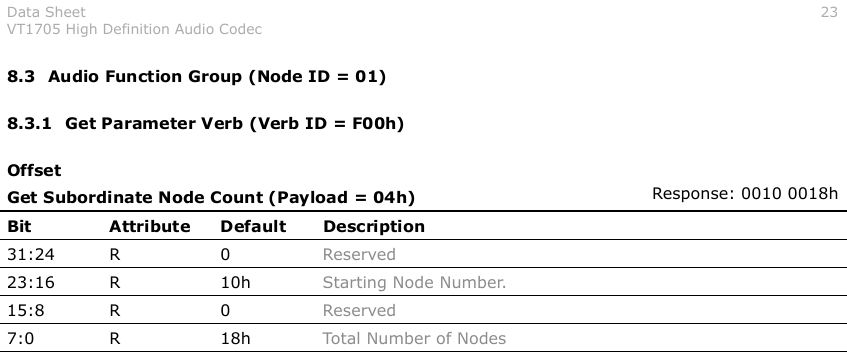
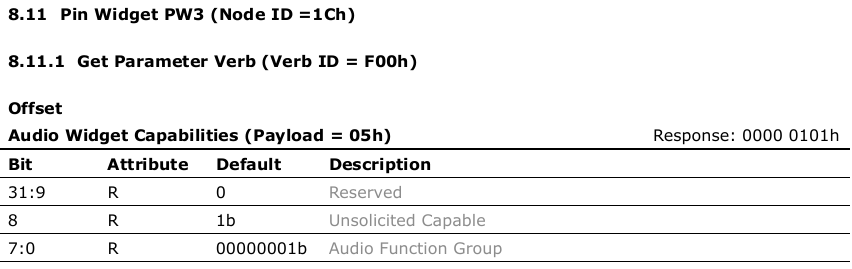
Great progress! Regarding pcipatchB: maybe Linux sources can be used to make additions to your list (search for 'pci quirks'). Why strange? Widgets will sent unsolicited responses (if this is enabled). Same widgets noted in the Datasheet of VT1705: seven Port's and one (unknown) Vendor Widget. I don't see your math: highest node number will be 10h + 18h - 1 = 27h (highest mentioned in the Datasheet is actually 27). I don't know wich mechanism the codec will use to translate and sent the unsolicited response to the RIRB. Only 'Software' (i.e. the driver) can do something with it. I never 'reached' this level, but you will (soon). Better ask Copilot or study Intel's High Definition Audio Specification. P.S. maybe I mis-read your question about why these other Widgets identifies themselves as AFG too. I looked into it for Widget 0x1C (on VT1705) I am currently investigating to find something useful for @Drew Hoffman . So I looked for an explanation in Intel's High Definition Audio Specification: '7.3.4.4 Function Group Type The Function Group Type parameter returns a value describing what the type of node is being addressed. This parameter is primarily useful for identifying the type of Function Group a node represents (such as Audio versus Modem) but can also be used to identify the type of “Other” or vendor specific nodes. Parameter ID: 05h' And so on... Maybe of interest if searching with other Codec ID than already established as AFG? To be honest, I can't remember I ever realy thought about it. In my humble opinion bytes [0:7] give no useful information here, but byte [8] does in case of targeting 'Software' (I suppose). BTW if some MSFN-members - reading this thread - are still not convinced of the usefulness: each print-screen selection made with WinKey+Shift+S and mouse and directly pasted above, without any extra (visible) use of other programs (Windows 10 , Windows 11 is different - maybe possible to change to 'old' style?).
-
So working on a Widget parser? Just double checked on Windows 3.1 and Windows 98 SE with your latest HDAICOUT.HDA and the change in HDA2.DLL. I added the lines of my quasi-universal HDAICOUT.HDA to check with sound. On Windows 3.1 no difference, in HDAICIN.TXT 254 lines, so same as earlier (no sound of course). On Windows 98 SE first the desktop seems to freeze, but it took simply a long time to start/ write HDAICIN.TXT. After next test with Verbinterface=$1 same behaviour, delay was about 30 seconds on my stopwatch. Sound and music afterwards where good (on a non-XMS Ramdrive!). Total 3189 lines in HDAICIN.TXT, fully up to the end of HDAICOUT.HDA - quite impressive. I will look in my datasheet-collection if ConnectionList 4-7 exists. HDAICOUT.HDA_BIG_TEST_WIN31&WIN982_on_VT1705.ZIP
-
I have the impression my output is mono too (same with Watler's driver, where sound is 'good' as such), but I thought my 'extra' headphone cable was the culprit. I will try to test.
-
You provided more information than I can currently process, because I am rather busy with another project (which is going quite bad, so needs much attention). I will response to one at a time. I compiled HDADRV9L with: function HDAloadcommands(url:string):boolean; {...} while(ICommands.count>0)do begin {while(ICommands.count>0)and(x<255)do begin} First I tested on Windows 3.1 on my Asrock board with VT1705 codec after compiling with Delphi 1: sound worked and my latest quasi-universal HDAICOUT.HDA too. But if I added a bunch of GET Verbs I found in another old HDAICOUT-file in the Windows directory, HDAICIN.TXT was maximized to last Verb sent from 'absolute' line 255 (as seen earlier lines with Begin/ End or starting with ;; are counting too. Verbinterface=$1/$0 made no difference in this respect But if same HDA2.DLL was tested on my Windows 98 SE installation on the same board, in HDAICIN.TXT all 357 Verbs in HDAICOUT.HDA (total 383 'absolute' lines) where logged, with their response. Only difference: with Verbinterface=$1 'ticks' at the end, with Verbinterface=$0 the '+ w g' or '+ !g' too. Was my simple-minded change 'enough'?
-
Hope so, I will keep you posted. Thanks for the code snippets, I will at least try 'For unlimited verbs in HDAICOUT:' as soon i have more time. Difficult to say. On my main testing system (already in use for almost ten years) Verbinterface=$0 never worked, neither with AHDA0 (which gives choice between both interfaces). So i only have experience with Verbinterface=$1. This is my HDALOG.TXT: $000F0000=$10EC0662 $000F0004=$00000000 $000F0005=$00000000 First IRS change $10EC0662 First IRS change $10EC0662 First IRS change $10EC0662 No sound at all, never! Currently I am working on Asrock N68C-S UCC board with NVidia chipset and Via VT1705 codec. Lately I tested Verbinterface=$0 which gave sound on this board! I did run some first tests with HDADRV9J/K/L and HDACFG.INI wait1/2 in range $25-$500: no real difference found/ heard, but it is just a first start. The content of HDALOG.TXT is still unfamiliar to me: $000F0000=$00000000 $000F0000=$00000000 $000F0004=$00000000 $000F0005=$00000000 CODEC busy again after finishing $00000000 Is this the wrong CODEC ID? First IRS change $11064397 CODEC busy again after finishing $000F0000 First IRS change $00100000 First IRS change $00010001 First IRS change $40000001 First IRS change $18490397 First IRS change $0000000F CODEC busy again after finishing $01070610 How is your HDALOG.TXT? About Headphone output: my memory about 0x1E was wrong, the Headphone playback path is my Excel table was already 'in line' with your earlier findings (0x1E will be SPDIF-out). Of course you can use DAC 0x3 too by changing Connection Select: As you can see I am currently reorganizing my table, plan is to add (max) gain en EAPD. I am not sure about this, I did some reading in a Realtek datasheet, also in Chapter 7 about the Link Reset and Power Management. But these subjects are far from clear to me. 'Close reading' will need much time however. I do not have any real need currently, but if you want to use Unsollicited Response in your code (for instance disable Speaker if Headphone jack is inserted) this can be of more interest if Power saving is een issue too (Battery!). But you seem to be much better equiped in this respect. At least: did you tested Verbinterface=$0/1 with SleepingWidget disabled in HDACFG.INI, i.e. set to $00 or $FF? I wrote 'About Volume: why not set to the max gain available (...)' but I am not a native speaker and I have no idea how a native speaker will read this. Ment is not 7F, but your actual max gain, i.e. 0x57. I still think setting THIS value to 80% is not a good idea, sometimes sound is recorded at a low volume level. That's why I suggested using WAVEOUT.EXE or setting a max volume in HDACFG.INI by default. P.S. if using the second DAC for your headphones output, more is needed (unless the headphones have a physical volume slider).
-
Alpha-018 msfn version just tested on Asrock N68C-S UCC with HDA Controller 10DE:03F0 and codec 1106:4397 (i.e. VT1705) with Windows 98SE. At first I got loud scratchy noise, Master Volume slider is not working. But the Volume Slider in Mplayer2 is working. If the slider is set to absolute minimum (just not muted), I could hear music from my HELLER.MP3 which corresponds to the music actually recorded in this file. Only much lower 'transposed' and very, very slow. I clocked one minute of music with my stopwatch, this took about 3m40s.