



Skip to content
View in the app

A better way to browse. Learn more.

MSFN

A full-screen app on your home screen with push notifications, badges and more.

To install this app on iOS and iPadOS
  1. Tap the Share icon in Safari
  2. Scroll the menu and tap Add to Home Screen.
  3. Tap Add in the top-right corner.
To install this app on Android
  1. Tap the 3-dot menu (⋮) in the top-right corner of the browser.
  2. Tap Add to Home screen or Install app.
  3. Confirm by tapping Install.

elrombios

Member
  1. Thank you for the information, but i think it will be complicated because you need to know where to search for button images and how to change them. I found that this is not dependent on theme. I think it can be changes if we add some spaces in the word "Sleep", so a think the variable is "Sleep", but can be " Sleep ". And that's it. But i can't find or maybe don't know where to search for this variable?
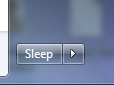
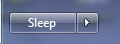
  2. Have a little problem with Startisback 1.6.2 for win 8.1u1. The size of sleep button on start menu is smaller then in original windows 7. Can somebody please explain how to change the size of sleep button on start menu in Startisback? It's not dependent on menu style. Please see attached files. Startisback sleep button Windows 7 real sleep button in menu Thank you!
Account

Navigation

Configure browser push notifications

Chrome (Android)
  1. Tap the lock icon next to the address bar.
  2. Tap Permissions → Notifications.
  3. Adjust your preference.
Chrome (Desktop)
  1. Click the padlock icon in the address bar.
  2. Select Site settings.
  3. Find Notifications and adjust your preference.