-
I have installed all the updated for Windows 7 SP1 and Superfetch started to work again. Then I tried to speed up the boot process, but an error occurred at the last step (I think), then I followed the steps presented here: http://social.msdn.microsoft.com/Forums/en/wptk_v4/thread/447f8512-9a33-43bd-a1cf-f0ca25b4b33a and the process worked fine! But bootDoneViaPostBoot shows -1 on both xml files.
-
Oh, btw... I can't see to open Local Group Policy Object Editor either...
-
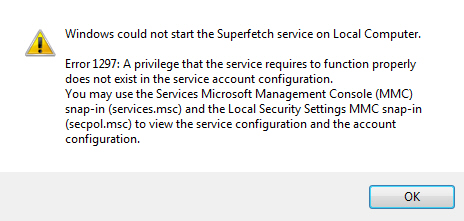
@MagicAndre1981: did that and it didn't help. But I did find a problem: the ImagePath of SysMain was incorrect, so I fixed that and I am not getting the "Error 2" error, but I am getting another error: Any thoughts on this?
-
@MagicAndre1981: The setting were already like that. @compsavvy: done that and tried "defrag C: -b" and it worked, then tried "xbootmgr -trace boot -prepSystem -verboseReadyBoot" and it failed after the 1st restart.... ARGHHH! Oh, and now layout.ini is missing. Btw... when I try to start the Superfetch service it says: "Window could not start the Superfetch service on Local Computer. Error 2: The system cannot find the filed specified.".
-
There is only one folder, ReadyBoot, which contains a few files with these extensions: .avail, .dqpafm, .dqpafmsg, .dqpa, .dqpaf and .etl, but I`m guessing this ain't good, eh?
-
No, I doesn't work. I get this error: Boot optimization could not run because the prefetch layout file is missing or invalid. <0x8900001B>
-
It just finishes straight away. No messages, not nothing. Is it the normal behavior?
-
@MagicAndre1981: Any thoughts on my problem?
-
Oh, I thought you were talking about that, but wasn't sure. Yes, it is enabled.
-
I'm sorry to ask so many questions, but how do I see that?
-
Yes, I can run defrag from the command line. What do you mean by automatic disk defrag?
-
Yes, Superfetch Service is running. I also followed those steps and with no luck. I get the same error at step 6
-
Enable: Y LcnEndLocation: 998169 LcnStartLocation: 0 OptimizeComplete: No OptimizeError: Missing Registry Entries
-
Hello guys, My name is Marian and I am new to this forum. I have tried to speed up my boot, but I get an error at step 2 (or 3 ): [2011/06/07-11:52:48.509] Preparing system... [2011/06/07-11:52:48.509] Launching attempt #1 to defragment disk... [2011/06/07-11:53:09.990] ProcessIdleTasks returned. [2011/06/07-11:53:09.990] Failed to defrag - status key is 'No', error description is 'Missing Registry Entries'. Retrying. [2011/06/07-11:53:09.990] Launching attempt #2 to defragment disk... [2011/06/07-11:53:29.865] ProcessIdleTasks returned. [2011/06/07-11:53:29.865] Failed to defrag - status key is 'No', error description is 'Missing Registry Entries'. Retrying. [2011/06/07-11:53:29.865] Launching attempt #3 to defragment disk... [2011/06/07-11:53:50.644] ProcessIdleTasks returned. [2011/06/07-11:53:50.644] Failed to defrag - status key is 'No', error description is 'Missing Registry Entries'. Retrying. [2011/06/07-11:53:50.644] Launching attempt #4 to defragment disk... [2011/06/07-11:54:11.439] ProcessIdleTasks returned. [2011/06/07-11:54:11.439] Failed to defrag - status key is 'No', error description is 'Missing Registry Entries'. Retrying. [2011/06/07-11:54:11.439] Launching attempt #5 to defragment disk... [2011/06/07-11:54:33.263] ProcessIdleTasks returned. [2011/06/07-11:54:33.263] Failed to defrag - status key is 'No', error description is 'Missing Registry Entries'. Retrying. [2011/06/07-11:54:33.263] Failed to defragment disk after 5 attempts. [2011/06/07-11:54:33.263] PrepareSystem failed. [2011/06/07-11:54:33.263] Stopping trace... [2011/06/07-11:54:33.310] Couldn't find kernel logger in active logger list. [2011/06/07-11:54:33.310] Couldn't find user-mode logger in active logger list. [2011/06/07-11:54:33.310] Unregistering auto-run... [2011/06/07-11:54:33.310] Completed auto-run change. What's wrong?