click-click
Content Type
Profiles
Forums
Events
Everything posted by click-click
-
yes, the flash is formatted ntfs, How would I start the loader manually: \EFI\Boot\bootx64.efi from the flash?
-
I'm still somewhat confused how the BIOS option ALL in WinNTSetup is supposed to work. When I boot a VHD from a USB stick and run powershell $env:firmware_type It always returns 'Legacy' when running on my Thinkpad that has CSM support for both UEFI and BIOS. Apparently setting ALL still boots in BIOS mode. If I set the BIOS for the Thinkpad to UEFI only, the VHD won't boot. What else needs to be done or toggled with WinNTSetup so either mode for booting will work?
-
FYI: I ended up using Hasleo Disk Clone portable to copy partition to vhd which took about 5 min compared to the 19 by wimlib as previously stated.
-
Good find. I can leave everything as is and use bootems (Yes/No) to toggle the menu as needed. Thanks ...
-
I understand what you are saying. If I leave the BCD the way it is, shouldn't the boot disk be showing the standard boot menu instead of the legacy one? How would I get the standard boot menu back?
-
Note: the legacy menu replaced the standard after adding Win7 to the BCD via WinNTSetup. It stayed enabled after deleting the Win7 entry with Bootice. bcd.txt
-
Ok, I'm using native boot for VHD. Do you know why the legacy boot selection menu is used when booting from the physical disk's boot partition and how is this related to the individual application objects that don't show legacy? Just trying to understand
-
OK, I missed it in professional mode. All entries are standard, but when I boot from the volume, I get the legacy menu which I want, but this only happened after adding a Win7 VHD to the BCD via WinNTSetup (no install media, boot drive, VHD install drive). I deleted the Win7 entry later from the BCD and booting still uses legacy. I don't see legacy in any of the elements. If I add a Win8 VHD via WinNTSetup as I did for Win7, the boot menu goes back to standard. This is what I want to avoid. I'm having a hard time understanding the uses of the volume BCD and the BCD within the VHD.
-
Sorry, I must be blind, but I don't see anything in Bootice where to set the BootMenuPolicy to legacy
-
I am using Windows Boot Manager for booting VHDs. The new Boot Manager from W8 onward has the disadvantage in that it does an additional reboot when selecting an entry following the 1st one from the list. How do I replace the boot manager on the drive containing the VHDs with the one from W7 which boots any entry directly without an additional reboot?
-
Sorry, I was using a batch file to create the vhdx and to do the Wincopy. As it turns out I did not consider diskpart not finishing its' script if it could not create the vdisk. This was causing the wimlib error because nothing got mounted by diskpart. I finally got it working by deleting the vhdx before running the batch, but the copy takes extremely long to finish. 19 min. compared to 7 min. doing a restore.
-
Not sure what I did wrong. Also, I've always used WimScript.ini when running capture after a sysprep. Is it necessary to do this when copying the partition? D:\ThinApps\WinNTSetup\Cpy2VHD.cmd 23:53 WinCopy Q:\ --> Z: config: D:\ThinApps\WinNTSetup\WimScript\WimScript.ini Failed to copy Windows installation. WIMHost (wimlib) error 0x44: The requested operation is unsupported Total elapsed time: 1:14 mins 23:54
-
What would the command line syntax for WINCOPY or WINCOPY-CLI be, to copy the partition to the mounted vhd? I keep getting the normal WInNTSetup GUI.
-
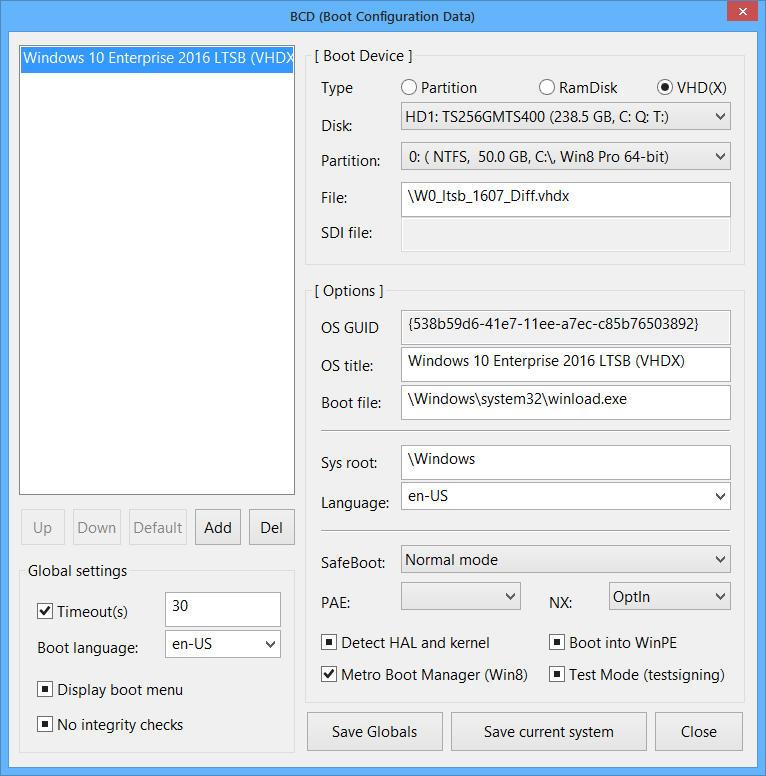
What's the best way to add an additional vhdx to a partition that already has another bootable vhdx? I created a vhdx with disk2vhd from sysinternals and added it to the current BCD used to boot my other vhd with Bootice. I get the Bootmgr Menu that shows both vhd entries, but only the original vhd will boot. The new one doesn't and returns with a blue screen cannot Start message. I have a feeling Disk2VHD doesn't create a vhd that can be used for what I want to do. I only need a vhd of the partition and not the entire disk. I'll try the Copy windows Installation.
-
If anyone is interested, I made a PDF which JFX kindly added to the frontpage that gives you an idea how the saved .ini settings from WinNTSetup relate to the different GUIs. I tend to preset the ini when installing different Systems and I did not always know which ini entry is set by the GUI. If anyone finds any mistakes or a missing GUI not in the PDF, let me know and I'll update the PDF.
-
I sent you a PM ...
-
I am a bit confused by the ini that you get when saving with WinntSetup and the WinNTSetup.ini.txt delivered with each release. Some entries from the saved ini do not appear and explained in the WinNTSetup.ini.txt. Some reflect GUI and Tweak entries, but not always self-evident to which ini entry the GUI or Tweaks relate to. Others are in the help. I thought WinNTSetup.ini.txt was a reference for everything WinNTSetup related. Some examples: [WinNT6] Edition=1 [WinNT6\TWeaks] noonedrive=0 DISM= [VHD] (VHD entries below explained in the help file) index=0 TxF=0 Log=0 8x3=0 Compress=0 [WinCopy] Mode=0 MergeIDE=0 Shrink=0 [WimCapture] Engine=1 Compress=2 CompressLevel=0 [Diskpart] Script= Disk=4294967295 If you want, I could create a txt file for the ini saved via WinNTSetup and comment the entries and to what part of WinNTSetup they relate to. This could be an additional help along with the WinNTSetup.ini.txt. Some comments would be missing that I don't know, but most of the work would be done.
-
Ah ok. I wasn't sure if backup/restore of/on a mounted VHD would work the same way as with local partitions.
-
OK, I wasn't aware that the growth rate would be that high. No sense in pursuing this further. I need to find a better way of getting a reasonable file diff of the VHD. A full backup of a big VHD each time doesn't seem to be the way either. Any recommendations how to best backup VHDs or is everyone just using them as throw-away systems without doing backups for them?
-
I did not edit from Bootice. I will try starting over from scratch later. Does a diff vhd boot for you like we discussed?
-
Sorry for being such a pain. The BCD I ended up with to boot the diff had an error. There is an invalid object in the Boot Configuration Data store Error 0xC0000000f

-
I get this and resumeobject seems to be the logical choice for the GUID to use, correct? Also, is the 1st -store even needed to update the BCD or was this just to see the current setting for the GUID? c:\>bcdedit -store Q:\Boot\BCD Windows Boot Manager -------------------- identifier {bootmgr} device partition=Q: description Windows Boot Manager locale en-US inherit {globalsettings} default {default} resumeobject {538b59d5-41e7-11ee-a7ec-c85b76503892} displayorder {default} toolsdisplayorder {memdiag} timeout 30 Windows Boot Loader ------------------- identifier {default} device vhd=[Q:]\W0_ltsb_1607.vhdx path \Windows\system32\winload.exe description Windows 10 Enterprise 2016 LTSB (VHDX) locale en-US inherit {bootloadersettings} recoverysequence {ee407104-4233-11ee-a481-fb52bd7f26e4} recoveryenabled Yes allowedinmemorysettings 0x15000075 osdevice vhd=[Q:]\W0_ltsb_1607.vhdx systemroot \Windows resumeobject {538b59d5-41e7-11ee-a7ec-c85b76503892} nx OptIn bootmenupolicy Standard
-
I'm using MBR for my VHDs and I'm not sure where to get the %GUID% from. This is what I ended up with, but still missing GUID. Is that the value that shows up in the mountvol cmd: \\?\Volume{32034eb7-3cd4-11ee-825d-806e6f6e6963}\ Q:\ or do i need to use something else like the OS GUID (Windows Boot Loader id)? bcdedit -store Q:\Boot\BCD bcdedit -store Q:\Boot\BCD -set ????? device vhd=[C:]\W0_ltsb_1607_Diff.vhdx bcdedit -store Q:\Boot\BCD -set ????? osdevice vhd=[C:]\W0_ltsb_1607_Diff.vhdx
-
From what I've read and what you said, if I merge the diff to the base, the diff is no longer usable. I tested this with diskpart, but it did not delete the diff after the merge so I guess this needs to be done manually too. I would like to automate creating a diff, changing the BCD to boot that file and merging the vhd later when needed. How would I change the BCD from the command line to use the diff ?
-
When I create a diff vhd, does Winntsetup update the BCD to use the diff vhd or does this need to be done manually?