Team929
Content Type
Profiles
Forums
Events
Everything posted by Team929
-
Login/Registration Help
Team929 replied to Bloodrun's topic in Web Development (HTML, Java, PHP, ASP, XML, etc.)
a few day old question, not all that familiar with php or mysql (is it?) but what the heck. If that ID field is what I think it is (auto counter which is automatically added for you) then you wouldn't need to set that variable when inserting a new value. Just set the variables for the other two columns and the ID should be added for you. Meaning "Insert into username, password values ('newname', 'newpw')" should be enough. Or did I miss you question? -
All I can think of is making an mdb and seeing if that works. Again. try recreating the back-end as well if you have not already, although compacting and repairing should help too. If you have a Form on open, then focus on that. If you have a table opening, check the linked table. It could be an MDE issue so try using an MDB to debug. Unfortunately, other that that, I'm out of ideas....
-
You usually see invalid argument errors when a query, sub, function, etc. is not being properly fed the correct number of inputs. For example, if you have a query to Insert 10 field names into a table that has 9 fields, that would give you an invalid argument. Calling functions and subs in vba without passing the correct number of variables will give the same error. It would help if you could be more specific when (on Form open? on query execute?) and where (vba editor? behind form?) the error occurs along with the exact message again. Hope the above helps.
-
I remember pounding my head with Access on more than one occasion, I feel you! It's a good program but obviously, it has its drawbacks as well. I don't mind messages but I think it would benefit the greater whole if we kept the discussions here so that others may learn of your fix as well.
-
Let me see if I understand your problem: -You have the back-end on a network folder. -You have the front-ends on the clients' local drive. -The linked tables from the front-end to the back-end gives you an error. -You mentioned an error in the original post, could you confirm or rewrite what the error exactly says? Some things you can try if you haven't already to hopefully narrow down the root problem: 1. Open and see if you can open the linked tables at all manually inside the table section of the front-end. See if this at least works. 2. Try relinking the tables in the front-end inside one of the user's logins (or a temp user account with the same rights), perhaps the links are off or corrupted. 3. Try recreating a new mdb (i.e. temp.mdb) and link the tables again to see if works. If it works, then there's an issue with the front end. If it doesn't, more likely a connection problem. 4. Browse through Windows explorer to the back-end folder to see if you can even see it. Try opening the back-end file to see if it opens, etc. If it gives you errors, this might give you the hint you need. 5. Try compacting and repairing both files. 6. I have seen cases where linked tables to an Access back-end just does not open, even if you can see the mdb in the network drive. I have had to recreate the folder with the same name in order for it work. If the network folder is located on a client OS (Windows XP) and not on a Server OS (win 2000 server, 2003 server, etc.), it may be the case. 7. Does each client installation of Access fully installed or just the typical installation? Perhaps you made the front-end using a component that is not installed with just a typical installation of Access. Hope this helps.
-
I'm mainly VB.net, C# to a lesser degree but recently, i see far more .net positions than anything else (C++, C, Java, etc.) but that may be because I'm in my own little world. Breaking down the .net world, it looks like 4:1 in favor of C# over VB. That's the ratio I get after looking through a quite of bit of job postings these past few weeks, even though all the .net languages are pretty much the same thing!
-
1. Do the users have access to this network drive? MS Access needs rights to create a temp file (*.ldb) in the network folder and without sufficient rights, they will not be able to open them. try creating a text file in the network drive using one of the users' logins to troubleshoot. 2. If you have split up the back-end and front-end, why not just place the front-end on each client instead? Link tables as needed to the backend, however, you will need network access as in #1 above. Having multiple users connect to the same front-end is asking for trouble... Is this even possible? Never tried it... Hope this helps.
-
I think you may be missing the point of Access... Tables are just to hold the data, not for viewing. Tables should (almost) always be indexed (primary keys). You should always use a query to "view" the data, even if you can just simply open up the table and view it. Also, even if you update the data in a table using a query imbedded in a form, the query should show the correct order of a table with a refresh as long as the tables are indexed properly. With that said, everyone has their own reasons for wanting something a certain way. However, the way you are describing is just not a "best practice" to try to add something in the middle of a table (which is not possible). Insert at the bottom and refresh the form/query/table to view the correct order. Hope this helps.
-
asp.net submit
Team929 replied to xarzu's topic in Web Development (HTML, Java, PHP, ASP, XML, etc.)
Not fully sure what you want to do but I guess you have your reasons. However, from a development point of you, is the opening of notepad necessary? I only ask because if you want to take that information inside notepad back to the server side, you're going to have one heck of a time doing that. Anything's possible but I don't know if you want to maintain that. It may be best to just keep everything on the server-side (i.e. just a multiline textbox in the IE screen) and when the client clicks "submit", you can have a very easy time tansporting that information elsewhere. You can store it to a db or export it to the users' machine, etc. >> We are on an intranet and each user has an alias. How do I snag this information? You will need to learn about asp.net membership for this. Hope this helps. -
hmm... not quite sure if this is the answer you're looking for but since you're having a very specific issue, how about some workarounds like: 1. putting the batch file lines inside the code itself. 2. Stream read the lines of the batch file (being a text file) through a loop inside your code and running it that way. This way, you also have the flexibility of just modifying the batch file instead. 3. Try older methods of doing this, not necessarily the .net way. I believe there's some examples out there for "ShellWait". Hope the above helps.
-
http://aspnet.4guysfromrolla.com/articles/052307-1.aspx The link is for a WSAT, probably waaaay overkill for your needs. Perhaps you can strip it down for just for what you need.
-
Shutdown scripts
Team929 replied to Bigtime5000's topic in Programming (C++, Delphi, VB/VBS, CMD/batch, etc.)
Don't know if all OS's have shutdown.exe so you can google and download it as the previous thread says. I believe the one I have used is a stand-alone executable that shuts down the PC and can be called through a script. Or a batch file called from a scheduled task, etc., whichever you like. -
Yahoo BB in japan, 12M service for about US$30-ish.
-
Are you constantly being told to get off your PC?
Team929 replied to gamehead200's topic in The Poll Center
Substitute Mr for Mrs, and I'm in the same situation. In Rob's case, it's wrestling. LMAO!!!! Substitute Mr and Mrs for gf and then you got me... Oh, also, 30 for 25. -
ummm.. starcraft anyone? what's it 6 yrs since it came out?? and I'm still drawn to it. Madden 2002 i think on my ps2 and tetris on my phone.
-
I'm probably gonna get castrated with all these XP lovers but I have to say I'm not very fond of XP Pro, but rather prefer Win2000. I do agree XP is more pleasant to the eye, good user interface and pretty much good all around. However, I work with access and excel mostly and for some reason, the darn thing (XP) crashes on me all the time! And its sooooooo slow at times. It may not be a hard crash most of the time but subtle ones like switching back and forth from one application and back just so the toolbar buttons work, etc. Yes the OS's were set up correctly and yes I do updates and no my programs (as well as my co-workers) that were made, were made correctly! Anyhow, I've messed with 2k3 a bit but haven't really had the chance to use it much. I got the MSDN CD here in the office somewhere but you know how long updates can take in a company..... My 2000 machine has yet to give me 1 error message in over a year while my XP pro machine freezes, beeps, burps and farts pretty much every night. So before I get slammed, I'm not anti-XP, just pro-2000.
-
um.. pretty much agree that Intel/athlon are pretty much the same, with slight differences. The vote at this time is 8 vs 8. Can it get any closer!
-
yea... no problems here so far.
-
Ah!!! I freakin hate onboard video!!!!! I have a co-worker whose(who's???) computer has onboard video(by D3LL) that is causing some problems. specs: -PIII 566/128ram/7Gig-ish/Win2000wrkstn -Onboard video... pretty much everything onboard. done: -removed old video driver. Added new card (Matr0x G450) result: -hangggggggggggggggggggggggggggggggggggggggg on boot. It gets to the Win2000 screen with the logo and the blue progression bar and when the progression bar gets to full, it hangs. I was under the impression that this onboard video would be disabled when a new card is added. (I guess not, huh...). I asked the mfg about this and they say it is not "guaranteed" that it would be disabled... what a freakin answer. Anyhow, I'm thinking to update the bios but would like to ask if there is another way. If there is another thing I can try, I would really appreciate any advice. thanx in advance.
-
12Mb. a similar topic: http://www.MSFN.org/board/index.php?act=ST&f=2&t=6939
-
Totally agree with the above 2 posts. I actually have had XP installed on a PII 266/64Ram and it booted up nicely, considering. Sorry to say that after the boot, that was about all it could handle. Shutdown, however was quick also, considering. You should do a clean install. Fdisk, format and the works. Should run nicely after that, even with 128RAM.
-
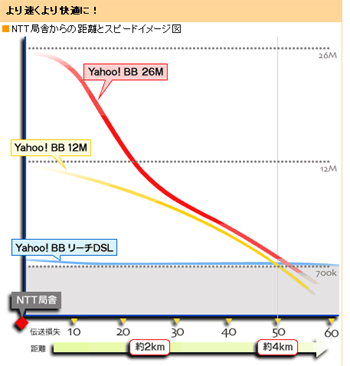
oops. forgot the image..... Dunno how excited everyone else would be by looking at this since everyone else is in another country but thought i'd post it.

-
check out this graph i found about a new service. Too bad its only for new customers so I have to wait until August it seems!!!
-
WOW!!! And here I am complaining... I get 5.8 Mbps out of my 12M service right now but that's only with Japanese sites it seems. I'm usually browsing through non-Japanese sites and stuff and it only gives me about 1.8Mbps I think. So all in all, about the same I guess with you guys. I also just found out that my provider is going to have a 26Mbps ADSL service starting today, for about US$31... I think I'll sign up.. There are about 4 major ISPs right now and are trying hard to get customers so the competition is very high. Anybody in Korea?? would love to know about the services there...
-
I've been reading a few posts recently about "6Mbps service in the UK", the poll about "sallelite vs. cable" and "Korea, Japan having faster connections" to name a few, and just got wondering. What's the "normal" connection speed in your country? "Normal" is very ambigious so let me define it as a broadband service under US$40-$50. There was a poll about a year ago on this site (yea, I've been around a year... just never posted much ) regarding this and I think a lot of people here were 512k or 1.5M?? I'm from the US (in Japan the last 3 years) and am out of touch with the US market. I had a 1.5Mbps cable service 4 years ago, if I remember correctly, for about $45 and would like to know what I'm in for if I were to just pack up and leave right now. I have a 12Mbps ADSL service for about $27 right now and would hate to pay that amount again!