
tistou77
Content Type
Profiles
Forums
Events
Everything posted by tistou77
-
French translation (not updated since 2.9.92) FR.txt
-
Bug with explorer.exe and SAB 3.6.6, when copying folders (22621.1702) explorer.exe - Error system Exception Processing Message 0xc0000005 - Unexpected paramters Back to version 3.6.5 PS: 512kb to attach a file is really small
-
Yeah, ONE option have been added to SAB, so why not this one
-
+1 for classic drive grouping option
-
I looked too quickly I'm looking for an option, soft, or something else to have the title bar of the color chosen in the Windows theme for explorer with tabs but just the title bar (as well as for the new Notepad with tabs) I don't like this "mica" (if that's it)
-
Ok thanks for you reply Too bad not to have the choice (the hand) on the modifications made by SAB (we did not make any modifications on the hard disks design or something related in SAB) We didn't even know SAB had an impact on this For aero.msstyles, some settings are modified with the registry, which does not work with a theme name modified (xxxxx.msstyles) The registry applying the changes only on aero.msstyles it would seem (color of inactive title bar, eg) Nevermind, we will stay with 3.5.7 which does not affect this design and see what to do when 3.5.7 will no longer support new versions of Windows Or if we find how to change this in the theme but not yet found EDIT : Or if it's possible with SAB to have color in inactive title bar (same as active title tbar), But I don't think, it's already not possible to have options of ONE
-
There is an option in SAB which has an impact on the design of hard drives (modification between 3.5.7 and 3.6) ? Know if it can be disabled I don't see anything in the changelog that modifies this and in SAB Thanks
-
Ah ok, I did not know that SAB "overwrites" Aero.msstyles file, thanks
-
A theme with just small changes, I can send you the Aero.msstyles file if you want
-
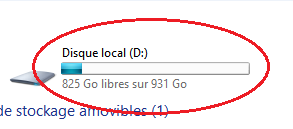
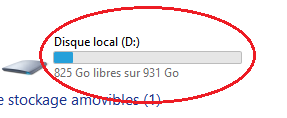
Yet, as you can see with the pictures, SAB does it Design "uses" SAB and no more Aero.msstyles with SAB 3.6 I did several tests, with SAB 3.5.7, with SAB 3.6, without SAB, and only SAB 3.6 modifies the "theme" (OK without SAB and SAB 3.5.7) Thanks for your help
-
Hello With this version, some designs have changed in the explorer It looks like it's using W11's default theme, while we're using a custom theme SAB 3.5.7 (Custom theme) : SAB 3.6 (default theme ?) : How to have the custom theme with 3.6 ? In the meantime, me, I'm going back with 3.5.7 Thanks

-
Oops, indeed it works with the classic taskbar (by default) Thanks, for a long time I wanted to replace with Command Prompt
-
Thanks so much Indeed, it does not work [HKEY_CURRENT_USER\Software\StartIsBack] "DontUsePowerShellOnWinX"=dword:00000001 @Tihiy Possible to resolve this ? Thanks
-
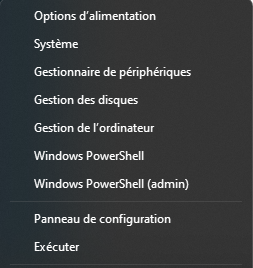
Hello How to replace Powershell shortcuts with Command Prompt in Start Menu right-click ? SAB put Powershell shortcuts automatically (without SAB, I don't have Powershell shortcuts) and it's really annoying Thanks
-
It is no longer possible to expand (or shrink) columns with W11 22h2 Same for you ?
-
@JFX ONE does it very well (classical drive grouping) but on occasion I would watch I only asked once, however if anyone else asks on the topic, I tell them it's already been asked but no response
-
In the best of worlds "YES", but sometimes we have to use several software For example, I (and others) always use ONE to have the "groups" option Asked several times by several people if it is possible to integrate it into SAB but never had an answer
-
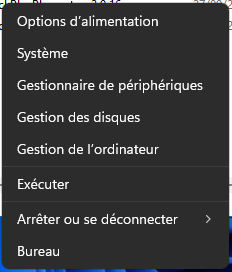
To confirm that SAB does not behave "correctly" with Windows Without SAB : With SAB : And if we add a 'shortcut' in this menu, sometimes some do not appear It would be better if SAB could just read the contents of the corresponding folders (like before)
-
If you are talking about the option also present in ONE, I asked it quite a while ago, never got an answer Like the weird bug (or novelty of SAB), to add Powershell entries in the right click of the Start Menu while not present when SAB is uninstalled (this menu is custom), So this is not a new Windows behavior
-
Not possible ? Thanks
-
Possible with SAB to have the classic context menu in the task manager (W11 22h2) ? Thanks
-
Hello Is there an option to disable the available update popup (systray) on every boot ?
-
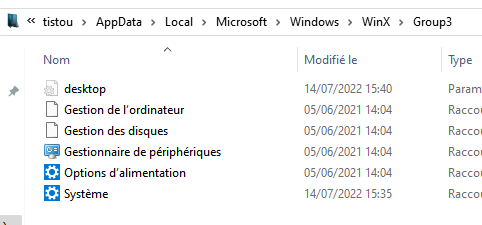
Ok So there is no possibility in SAB to modify this behavior ? If in the "Group 3" directory I do not have these entries It bothers us to have these entries when we had removed them
-
Arf, I'll stick with 3.4.4 for now. Not possible for SAB to just "read" the contents of group directories 1, 2 and 3 ? Or be able to remove PowerShell (manually myself) ? Thanks
-
I customize Win-X menu But I have Windows Powershell shortcut It's OK with 3.4.4 Thanks