Ascii2
Content Type
Profiles
Forums
Events
Everything posted by Ascii2
-
With operating systems prior to Windows XP family (such as Windows 2000 family), selecting a range of icons on the Desktop could be done by holding the [shift] key and using the arrows to select the desired area of icons. With Windows XP, the behavior for the desktop changed. When [shift] + Arrows are used to select icons, icons outside of the range of icons traversed, are selected. How can the classic Desktop selection behavior by made to occur for the Windows XP Desktop?
-
Try setting "UnattendSwitch" in [unattended] section to "No" instead of "Yes". When an answer exists to skip something in Windows 2000 setup, setup continues skiping what was meant to be skipped, but still applies parameters specified in the answer file for the skipped section. Perhaps the Windows XP setup differs with this respect; it may skip sections but not apply the skipped sections' answer (could also be a bug).
-
Need help with Windows 2000 RunOnceEx.cmd
Ascii2 replied to taotaolu's topic in Unattended Windows 2000/XP/2003
Windows 2000 does indeed support RunnOnceEx; I can verify this to be true.The original poster should rename his RunOnceEx.cmd to something that follows the 8.3 short filename format (like "logon.cmd"); add REG.EXE from DEPLOY.CAB to the $OEM$ directory; and, either remove the "\" "from SET PP=%cdrom%\", or proceeding the %cdrom% variable in his script with exception to the definition of the variable. After those modifications, RunOnceEx should run. EDIT: Also on the line: REG ADD %KEY%\200 /V 1 /D "\"%systemdrive%\Program Files\WinZip\winzip32.exe \" /noqp /autoinstall" /fAn extra space seems to exist after winzip32.exe (although this may not be a problem). -
IE7 RunOnceEx problem solved! Finally!
Ascii2 replied to chon_'s topic in Unattended Windows 2000/XP/2003
The installer fix does not seem to be available.Please make the installer available. -
Instead of using a patch to update to JVM build 3810, the full installer may be downloaded at http://download.windowsupdate.com/msdownlo...2a04af2b34d.exe (Rename to "MSJavWU.exe"). That full installer specifies that it can only update, however. To full install, the package may be extracted and run with command line switches (I forgot which) to full install. I usually install Microsoft Java Virtual Machine Build 5.00.3809 fist and use no reboot switch(/R:N), then Microsoft Java Virtual Machine Build 5.00.3810. Actually, Microsoft Java Virtual Machine Build 5.00.3810 (not older builds) is quite stable, fast (for Java), and without apparent security problems. Its problem is that it does not run newer versions of Java or older versions that specifically require the Sun Microsystems Java virtual machine.In contrast, the Sun Microsystems Java Virtual Machine had always been inferior in every respect (speed, security, stability, ability to correctly function) during the lifetime of development of the Microsoft Java Virtual Machine (if this were not so greatly the case, I wonder if Sun Microsystems would have bothered to sue Microsoft Corporation regarding Virtual Machine technology). After the settlement of the Sun Microsystems v. Microsoft Corporation lawsuit, the Sun Microsystems Java machine has unfortunately (as it is the only real developer of Java Virtual Machine product for Windows) gotten worse in quality of design. For myself, the only Java Virtual machine I use is the Microsoft Java Virtual Machine. On some client computers, I had managed to install and use both the Microsoft Java Virtual Machine and Sun Microsystems Java Virtual Machines. The Microsoft machine would run the it was capable of running, while the Sun machine would run the rest. Both machines would not function simultaneously—A most efficient configuration that supported the current Java version. I was hoping that Microsoft Java Virtual Machine update existed supporting a newer version of Java (even slightly) and was acquirable.
-
what would be the entries to make in cmdlines.txt? I had taken note the the modification can be done around the time. Microsoft Corporation had an articleThe current time zone information is maintained at [HKEY_LOCAL_MACHINE\SYSTEM\CurrentControlSet\Control\TimeZoneInformation] in the registry. Specific time zone information may be found at [HKEY_LOCAL_MACHINE\SOFTWARE\Microsoft\Windows NT\CurrentVersion\Time Zones].
-
So, what order does Windows setup install that fixes?
-
I am looking for a tweak to "Show icon in taskbar when connected" I have found a thread which seems to describe a similar issue and is located (note posts #2 and #4): http://www.msfn.org/board/REQ-Show-icon-notifica-t91064.htmlThe thread seems to give a solution for existing Network adapters, but not (from what I can tell) for any future added adapters. I want "Show icon in taskbar when connected" to be check as a default behavior; that is, all current and future adapters should have "Show icon in taskbar when connected" check and display an icon in the system tray. How can this be done?
-
Windows XP Professional seems to support two values for the [Fax] heading in the WINNT.SIF answer file that seem to have the same function: SuppressConfigurationWizard SkipConfigWizardDeviceSettingsBoth items may take of the following values: True Skips service setting pages of the Configuration Wizard when the end user runs Fax for the first time. False Displays service setting pages of the Configuration Wizard when the end user runs Fax for the first time.Do both items really have the same function?
-
It may be a defect in the design of Windows setup in the handling of items in the answer file (it would not be the only one). Try adjusting the Time Zone at execution of CMDLINES.TXT or SetupParams.
-
I have examined MSFN.org guides and threads for the use of RunOneEx for installations on Windows 2000/XP at first logon. EDIT: Two of the guides may be found http://unattended.msfn.org/unattended.xp/view/web/31/ and http://gosh.msfn.org/using_runonceex.htm . The RunOnceEx commands run in alphabetical order of its nested keys. Simply adding items to RunOnceEx (as the guides describe) may not yield a desirable installation. RunOnceEx may already contain entries, and adding new entries without checking for existing entries may result in having a previously existing entry overwritten, or installations failing due to an incompatibility with the order items are installed. How can items be added to RunOnceEx such that added entries run after the any preexisting RunOnceEx entries and that no entries are overwritten? I believe some check of the RunOnceEx key must occur; then, items should be added to RunOnceEx such the they occur after the pre-existing entries (or the preexisting entries could be reordered so that they occur before the newly added entries). Any comments, questions, and suggestions welcome. EDIT: What would happen at RunOnceEx runtime if RunOnceEx entries are added to the RunOnceEx key during RunOnceEx runtime? - - - - - Second (bump) post deleted - - - - - - - - - - Third post appended - - - - - This topic contains an issue that may have been encountered before (although likely for those who have prepared unattended installation of Windows 2000 family operating system). Internet Explorer 6 with Service Pack 1 installer uses RunOnceEx to finish installing Internet Explorer and is an example of a program that uses may modify RunOneEx prior to or during execution of RunOnceEx.
-
It seems that the registration widow is placed such that it may not be on only a single monitor, for a setup with multiple monitors.
-
I had tried the shortcut.exe utility some time ago. I opted not to use it because it generated invalid shortcuts (Windows often corrected the shortcut problems on run, however).If you want a utility to generated shortcuts, I would recommend XXMKLINK ( http://www.xxcopy.com/xxcopy38.htm ). It uses double a "%" charcter on each side of an evironmental variable to include the variable in the shortcut (example %%SystemDrive%% or %%SystemRoot%%).
-
Batch file not running as expected
Ascii2 replied to Ascii2's topic in Unattended Windows 2000/XP/2003
By the way Nois3, does the short file name requirement also apply to SVCPACK.INF and SVCPACK directory? When the /integrate switch is used with updates to integrate the updates to the installation source, hotfixes tend to be renamed. Most patch installers tend to be renamed to short file names, others (like "IE5.01sp4-KB916281-Windows2000sp4-x86-ENU.exe", "IE6.0sp1-KB905495-Windows2000-x86-ENU.exe", and "IE6.0sp1-KB918439-Windows-2000-XP-x86-ENU.exe") tend to be given much longer file names, and update rollups are given long file names including spaces. After installation it seems that the update rollups install fine with the long file names with spaces, while the patches with much longer file names (like those beginning "IE") do not appear installed (although this does not mean that they truly are not installed). -
Quite a high price. Where did you find the price information?
-
Batch file not running as expected
Ascii2 replied to Ascii2's topic in Unattended Windows 2000/XP/2003
I have tried using short filenames, and the installations except for DirectX performed as they should.I managed to get the DirectX install to invoke and install. The problem seemed to be that Windows setup was really unable to find the path to it. To test my unattended source as run via a CD, I used a virtual machine for which an ISO image file containing the Windows installation source was used to install Windows. While testing CMDLINES.TXT, I had created a restore point before execution of CMDLINES.TXT and would revert to it to test new changes. To inject new changes, I stopped the virtual machine, modified the ISO of the installation source and continued the virtual machine at the point before execution of CMDLINES.TXT. This seemed to work well for changes that were made to the batch file invoking different actions and installations. One time, I had changed the directory name on the ISO for the DirectX installation directory, both in the batch file and the directory itself (I had forgotten about this). After the change, and running the virtual machine Windows 2000 setup was unable to find the path to the DirectX installation directory. This seems to imply that Windows setup indexes the contents of the installation source and uses it during the CMDLINES.TXT execution (perhaps the scope is the entire GUI Windows setup), and does not check for the path on the actual installation source at runtime. After, starting the virtual machine from the beginning, the problem did do occur. Thank you Nois3. The long file names seems to have been the main problem. -
Batch file not running as expected
Ascii2 replied to Ascii2's topic in Unattended Windows 2000/XP/2003
A CD-R is being used. The file system of the Windows installation disc is a CDFS file system (the same used on Windows installation CDs from Microsoft). The CDFS file system does not differenciate cases (every file on CD appears uppercase). The problem may be due to using paths and filenames not compatible with the CDFS file system used by Microsoft Corporation (which I do not know the limitations; mabye it does not like hypens in the file names or directory names with multiple underscores). -
I have added the feature request to the MSFN Feature Request thread at http://www.msfn.org/board/Universal-Extrac...tu-t124535.html .
-
nitro322, in post #9 from thread http://www.msfn.org/board/Halt-Extract-t121770.html , you recommended I post a feature request to remind you to investigate a workaround to extract encrypted Inno Setup installers. I believe you had referred to the following thread as having a workaround method: http://forum.exetools.com/showthread.php?t=9137
-
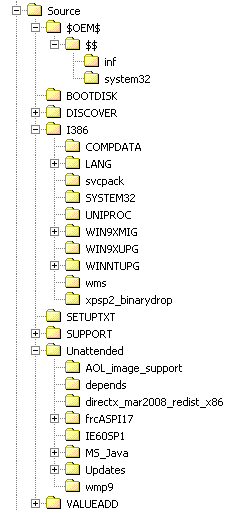
I have prepared a batch file (.CMD file) to run at time of execution by CMDLINES.TXT (CMDLINES.TXT calls the batch file) during Windows 2000 Professional with Service Pack 4 setup. The batch file is located within a "Unattended" directory at the root of the installation source. The problem is that many of the lines to be executed in the batch file are not running applications. When running of the applications fails, a message is returned, either "The system cannot find the path specified." or "'[Executable]' is not recognized as an internal or external command, operable program or batch file.". This seems odd; some things run fine others do not run at all when no error exists in the path to the .EXE files (I test ran the test batch file in Windows 2000, logged in as Administrator and had no problem). I quote some of my test batch file below (including all parts with problem, bolding for emphasis): The commands that are failing to work have been bolded in the quoted text; everything else seems to work correctly. What is wrong? How may the problem be fixed? The Windows 2000 installation is being performed from a disc, and the directory structure is the following:

-
The most recent released version of Microsoft Corporation's Microsoft Java Virtual Machine seemed to be build 5.00.3812. The main Java webpage at the Microsoft Corporation website ( http://www.microsoft.com/mscorp/java/default.mspx ) specifies a build number 3812. The build number 3812 is greater than 3810, which seemed to be the most recent released version of Microsoft Java Virtual Machine. Does the build 3812 of Microsoft Java Virtual Machine exist? Is or was build 3812 of Microsoft Java Virtual Machine publicly available? Where may build 3812 of Microsoft Java Virtual Machine be acquired?
-
Other than replacing a file completely (which is not desireable for boot.ini), I am uncertain about methods to edit a text file other than via a GUI.How can it be done via CMD file? Here: http://www.msfn.org/board/Hand-BOOTINI-t66101.html http://www.msfn.org/board/Hand-BOOTINI-t66101.html&st=15 NIRCMD is great, but remember: "jaclaz Thanks, jaclaz.I note the posts in the referenced threads.
-
I have attempted to create an unattended installation (with exception for partitioning) for Windows 2000 Professional with Service Pack 4. It failed. The GUI part of the install was unattended as expected for a prompt to select a workgroup or domain. According to Page 42 of Microsoft® Windows® 2000 Guide to Unattended Setup (attached to this post): Given that, I had created an answer file without the [identification] section in the WINNT.SIF file to have setup automatically assign a value for a workgroup. It seems to not have worked. What went wrong? What should be done to fix the problem? The following is the contents of my WINNT.SIF answer file: ; Windows 2000 Professional with Service Pack 4 [Data] MsDosInitiated="0" UnattendedInstall="Yes" [Unattended] UnattendMode=DefaultHide OemSkipEula=Yes OemPreinstall=Yes TargetPath=* [GuiUnattended] AdminPassword=* AutoLogon=Yes AutoLogonCount=1 OEMSkipRegional=1 TimeZone=020 OemSkipWelcome=1 [UserData] FullName=" " ComputerName=* [RegionalSettings] LanguageGroup=13,17,3,2,5,16,4,12,15,7,8,10,11,9,6,14,1 [Networking] InstallDefaultComponents=Yes ;[GuiRunOnce] [Components] chat=On iisdbg=On indexsrv_system=Off unattend.zip
-
Thank you OuTmAn. Your suggestion performed as expected; boot.ini was correctly modified. I have added NirCMD to my utilities set.
-
Other than replacing a file completely (which is not desireable for boot.ini), I am uncertain about methods to edit a text file other than via a GUI.How can it be done via CMD file?