Mackhack
Content Type
Profiles
Forums
Events
Everything posted by Mackhack
-
Perfectly fine questions need to be answered perfectly fine as well Because we're tired of putting the keys in manually every single time + some settings that we put in place that way. We manage over 3k Windows machines and this would make our job a hell of a lot easier.
-
It COPIES THE Office files to the c:\Install dir!!! Office install WILL NOT look for your "network drive" without extra steps So what are the extra steps?
-
Just did, still the same issue
-
So is that case sensitive? Attached is a screenshot of the directory.

-
What name? From the unattended.mst file? I double checked that already. F2 on the file, copied the file name and pasted it into the batch file.
-
Thanks for your reply, but the installation files aren't on the C:\ drive. They are on network drive.
-
I know this is quite an old thread, but I thought why opening a new one since this is the same problem I have now. My batch file looks like that and is taken from the above mentioned website: ECHO. ECHO Installing Office 2003 Professional ECHO Please wait... start /wait "f:\Desktop Support\XPCD\$OEM$\$1\install\Applications\Office2003\setup.exe" TRANSFORMS=Unattended.MST /qb- What is wrong that it won't allow me to install Office 2003? Below is the error message. Could someone please post the correct batch file content? Thank you very much in advance for your help.
-
HI there, is there a way to disable the Enable AutomaticWindows Update page that will come up in the OOBE sequence when the user turns on his machine the very first time? I have a customer here who wants a plain Windows XP Home from us without any updates installed at all and does not want that his clients can turn on the Automatic Windows Update function while walking through OOBE! Is there a way to disable this in Audit Mode with the help of the registry or so? Thanks!
-
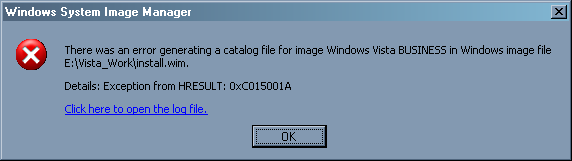
Hi, has anyone an idea why I receive this error message (image is attached) after I slipstreamed the updates into the Business version of Vista!
-
I need to push here since this is an important thing for us and I def. need help from you guys in order to be able to PXE boot those machines!
-
HI Zeher, do you have a direct link that would help me on one of those two sites?
-
Wow, 80 Hits and no one could give me a helping hand!
-
Hi there, I need some help here. Problem: I need to slipstream/add the network adapter drivers from the INTEL DG33BU desktop board into our WDS Boot Image that we can apply Vista/XP images from the WDS server onto PCs with that board. Right now we can't because we get a WDS error message saying that there are no network adapter drivers. Can anybody tell me how to do this? Thank you!
-
User Profile creation script
Mackhack replied to martin26uk's topic in Programming (C++, Delphi, VB/VBS, CMD/batch, etc.)
I can highly recommend Michael Puff's XP User Manager.. http://www.michael-puff.de/Programme/UserManager/ German Homepage but I believe the program is also available with English language file. If not let me know I could talk to the guy since we are in the same German Delphi Forum! -
I'm using the standard config.xml file which is in the same directory as the setup.exe If I manually start the setup.exe the installation goes through without any errors... Edit: I finally found a way: <RunSynchronous> <RunSynchronousCommand wcm:action="add"> <Order>1</Order> <Credentials> <Domain>domain\servername\</Domain> <Password>password</Password> <Username>username</Username> </Credentials> <Path>\\domain\servername\Office12OPK\CD\setup.exe</Path> <Description>Office 12 installation</Description> </RunSynchronousCommand> </RunSynchronous>
-
Hi folks, here is my unattend file. Does anyone sees the error why we can't install Office 2007 during the Vista installation? Thanks! <?xml version="1.0" encoding="utf-8"?> <unattend xmlns="urn:schemas-microsoft-com:unattend"> <settings pass="windowsPE"> <component name="Microsoft-Windows-International-Core-WinPE" processorArchitecture="x86" publicKeyToken="31bf3856ad364e35" language="neutral" versionScope="nonSxS" xmlns:wcm="http://schemas.microsoft.com/WMIConfig/2002/State" xmlns:xsi="http://www.w3.org/2001/XMLSchema-instance"> <SetupUILanguage> <UILanguage>en-US</UILanguage> </SetupUILanguage> <InputLocale>0409:0000409</InputLocale> <SystemLocale>en-US</SystemLocale> <UILanguage>en-US</UILanguage> <UILanguageFallback>en-US</UILanguageFallback> <UserLocale>en-US</UserLocale> </component> <component name="Microsoft-Windows-Setup" processorArchitecture="x86" publicKeyToken="31bf3856ad364e35" language="neutral" versionScope="nonSxS" xmlns:wcm="http://schemas.microsoft.com/WMIConfig/2002/State" xmlns:xsi="http://www.w3.org/2001/XMLSchema-instance"> <DiskConfiguration> <Disk wcm:action="add"> <CreatePartitions> <CreatePartition wcm:action="add"> <Extend>true</Extend> <Order>1</Order> <Type>Primary</Type> </CreatePartition> </CreatePartitions> <ModifyPartitions> <ModifyPartition wcm:action="add"> <Active>true</Active> <Format>NTFS</Format> <Label>Vista</Label> <Letter>C</Letter> <Order>1</Order> <PartitionID>1</PartitionID> </ModifyPartition> </ModifyPartitions> <DiskID>0</DiskID> <WillWipeDisk>true</WillWipeDisk> </Disk> <WillShowUI>OnError</WillShowUI> </DiskConfiguration> <ImageInstall> <OSImage> <InstallTo> <DiskID>0</DiskID> <PartitionID>1</PartitionID> </InstallTo> <WillShowUI>OnError</WillShowUI> </OSImage> </ImageInstall> <UserData> <ProductKey> <Key>VMCB9-FDRV6-6CDQM-RV23K-RP8F7</Key> <WillShowUI>OnError</WillShowUI> </ProductKey> <AcceptEula>true</AcceptEula> <FullName>Owner</FullName> <Organization>[None]</Organization> </UserData> <UseConfigurationSet>true</UseConfigurationSet> </component> </settings> <settings pass="oobeSystem"> <component name="Microsoft-Windows-Shell-Setup" processorArchitecture="x86" publicKeyToken="31bf3856ad364e35" language="neutral" versionScope="nonSxS" xmlns:wcm="http://schemas.microsoft.com/WMIConfig/2002/State" xmlns:xsi="http://www.w3.org/2001/XMLSchema-instance"> <AutoLogon> <Enabled>true</Enabled> <LogonCount>5</LogonCount> </AutoLogon> <OOBE> <HideEULAPage>true</HideEULAPage> <ProtectYourPC>1</ProtectYourPC> <SkipMachineOOBE>true</SkipMachineOOBE> <SkipUserOOBE>true</SkipUserOOBE> </OOBE> <RegisteredOrganization>Owner</RegisteredOrganization> <RegisteredOwner>[None]</RegisteredOwner> <Display> <ColorDepth>32</ColorDepth> <HorizontalResolution>1024</HorizontalResolution> <RefreshRate>72</RefreshRate> <VerticalResolution>768</VerticalResolution> </Display> </component> <component name="Microsoft-Windows-Deployment" processorArchitecture="x86" publicKeyToken="31bf3856ad364e35" language="neutral" versionScope="nonSxS" xmlns:wcm="http://schemas.microsoft.com/WMIConfig/2002/State" xmlns:xsi="http://www.w3.org/2001/XMLSchema-instance"> <Reseal> <Mode>Audit</Mode> </Reseal> </component> </settings> <settings pass="specialize"> <component name="Microsoft-Windows-Shell-Setup" processorArchitecture="x86" publicKeyToken="31bf3856ad364e35" language="neutral" versionScope="nonSxS" xmlns:wcm="http://schemas.microsoft.com/WMIConfig/2002/State" xmlns:xsi="http://www.w3.org/2001/XMLSchema-instance"> <OEMInformation> <HelpCustomized>false</HelpCustomized> <Logo>c:\Windows\system32\oobe\info\enanoVista.bmp</Logo> <Manufacturer>enano computers</Manufacturer> <SupportHours>M-F 8am-6pm</SupportHours> <SupportPhone>800-426-6375</SupportPhone> <SupportURL>http://www.enanocomputers.com</SupportURL> </OEMInformation> <RegisteredOrganization>Owner</RegisteredOrganization> <RegisteredOwner>[None]</RegisteredOwner> </component> <component name="Microsoft-Windows-IE-InternetExplorer" processorArchitecture="x86" publicKeyToken="31bf3856ad364e35" language="neutral" versionScope="nonSxS" xmlns:wcm="http://schemas.microsoft.com/WMIConfig/2002/State" xmlns:xsi="http://www.w3.org/2001/XMLSchema-instance"> <FavoritesList> <FavoriteItem wcm:action="add"> <FavID>enano Computers</FavID> <FavTitle>The Chip Merchant\enano Computers</FavTitle> <FavURL>http://www.enanocomputers.com</FavURL> </FavoriteItem> <FavoriteItem wcm:action="add"> <FavID>The Chip Merchant</FavID> <FavTitle>The Chip Merchant\The Chip Merchant</FavTitle> <FavURL>http://www.thechipmerchant.com</FavURL> </FavoriteItem> </FavoritesList> <SearchScopes> <Scope wcm:action="add"> <ScopeDefault>true</ScopeDefault> <ScopeDisplayName>Google.com</ScopeDisplayName> <ScopeKey>Google</ScopeKey> <ScopeUrl>http://www.google.com</ScopeUrl> </Scope> </SearchScopes> <Home_Page>http://www.google.com</Home_Page> </component> <component name="Microsoft-Windows-Deployment" processorArchitecture="x86" publicKeyToken="31bf3856ad364e35" language="neutral" versionScope="nonSxS" xmlns:wcm="http://schemas.microsoft.com/WMIConfig/2002/State" xmlns:xsi="http://www.w3.org/2001/XMLSchema-instance"> <RunAsynchronous> <RunAsynchronousCommand wcm:action="add"> <Description>Sets Up Monitor Standby</Description> <Order>1</Order> <Path>cmd /c powercfg -change -monitor-timeout-ac 15</Path> </RunAsynchronousCommand> <RunAsynchronousCommand wcm:action="add"> <Order>2</Order> <Description>Sets Up Standby Time</Description> <Path>cmd /c powercfg -change -standby-timeout-ac 30</Path> </RunAsynchronousCommand> </RunAsynchronous> <RunSynchronous> <RunSynchronousCommand wcm:action="add"> <Description>Install Office 2007</Description> <Order>1</Order> <Path>\\vistaopk\Office12OPK\CD\Setup.exe</Path> </RunSynchronousCommand> </RunSynchronous> </component> </settings> <settings pass="auditSystem"> <component name="Microsoft-Windows-PnpCustomizationsNonWinPE" processorArchitecture="x86" publicKeyToken="31bf3856ad364e35" language="neutral" versionScope="nonSxS" xmlns:wcm="http://schemas.microsoft.com/WMIConfig/2002/State" xmlns:xsi="http://www.w3.org/2001/XMLSchema-instance"> <DriverPaths> <PathAndCredentials wcm:action="add" wcm:keyValue="Intel RAID"> <Path>c:\F6</Path> </PathAndCredentials> </DriverPaths> </component> </settings> <cpi:offlineImage cpi:source="catalog://vistaopk/winbits/vista/sources/install_windows vista ultimate.clg" xmlns:cpi="urn:schemas-microsoft-com:cpi" /> </unattend>
-
Has someone DVDBurn.exe for me? I just have cdburn.exe. I don't wanna install the whole Resource Kit just to get that file out! Thanks.
-
Hi, yes I saw that OSCDIMG makes a iso file. But I just haven't seen the wood for the trees. So right now I'm buring the first DVD and see what the output will be. And about my question about how to burn that wim file with those 2 images in it onto a DVD was basically answered with OSCDIMG
-
Thanks for trying to help me out here with that mess. I'm trying to explain it again. We have a custom PC which is our own product. We installed Windows Vista Home Premium on it over WDS with all applications and setups as we want it. Then we sysprepped it. Before I created the WinRE.wim file which is nothing more then some kind of a Recovery Boot Manager (right???). From the MS OPK Support I received an eMail that I can capture now the c: partition which contains our sysprepped Home Premium into the existing WinRE.wim file? When I use imagex /info... I can actually see both images: The WinRE.wim and the sysprepped image I just appended with imagex /append... But now my problem is how can I burn that wim file containing the WinRE and c: image onto a DVD. The reason we wanna have everything on one DVD is so if our customer wants to reinstall Windows he just has to pop in the DVD the boot menu will start (hopefully) and he can select the image which is on the DVD and after that he will have a clean Windows as it was as he bought the PC from us. What we don't want to have is a restore partition on the hard drive. ::Edit:: What I did now is I created a WinRE.wim and mounted it. I placed my sysprepped c: drive image into c:\winpe_x86\iso\recovery. Now I used the OSCDIMG tool and hope it will create some sort of a recovery DVD
-
Hi, thanks for the little tutorial. I'm even more confused now than before. If I use the boot.wim which will be created when I run copype.cmd where or how can I put then my WinRE and the image from the master computer which is combined right now as a .wim file to copy it onto a DVD? It is just not clear for me.
-
Yes sir :-)
-
It has 2 images inside. One is a WinRE image for the recovery options and the second one is the appended c: image. Total file size is approximately 2.2 GB
-
Hi Folks, hope this is the right subforum. My question is pretty straight forward. I combined 2 images into one .wim file and want to know now: How can I burn this wim file onto a DVD? Thanks!
-
Hi, I just got an email from the MS OPK guy and he told me a way of creating an iso file (200 mb) with the WinRE image in it and some weired way of combining the ~ 4 gb Vista.wim file with our actual Vista image. But I just can't figure it out how to combine those two files. Here is the content of the eMail just for all of you guys who have the same problem and may want to give it a shot. ::Edit// Here is another eMail form the MS OKP Support dude:
-
Thanks. I'm aware of the backup function but we need it as a simple restore DVD for our customers. We wanna provide a DVD in case they wanna format their system and reinstall Vista so they have the same configuration as they bought it from us.