




Everything posted by JaKSLaP
-
Thanks everyone for your help. Installing Media Player 9.1 worked like a charm! :-) i always thought 7.1 was the latest version for Win98
-
i have 7.1 version installed as i assumed that was the latest version for Windows 98. I will try to install Version9. Do you guy recommend i uninstall 7 first?
-
Hi Guys; i am trying to get Midway Arcade Tresures Deluxe working on Windows 98SE, i can confirm it works flawlessy as i had it installed before doing a re-format. I tried installing the game, reset computer tried to open, it was greeted with an error message "unable to locate WMVCore.dll" i then installed Windows Media Player which comes with that Dll file. After installation i had a new error now "The MCR2_3.exe file is linked to missing export WMVCore.dll:WMCreateReader" Does anyone know what this means or how i can fix it. Thanks
-
-
I am not to sure to be honest i just used the VXD cabinet file to install the sound card. Link is below for the Install CD. Just located the VXD file. Sound Blaster Audigy 2 ZS Install CD Instructions: 1. Download the Audigy ZS Install CD ISO 2. Extract the ISO and locate Audio\Drivers\VxD 3. Extract the VXD cabinet file and install your drivers via Device Manager. If you want send me your email and i will send you just the VxD file.
-
-
I got it working :-) For anyone having issues getting it working with 98 the download link is here. Sound Blaster Audigy 2 ZS Install CD Instructions: 1. Download the Audigy ZS Install CD ISO 2. Extract the ISO and locate Audio\Drivers\VxD 3. Extract the VXD cabinet file and install your drivers via Device Manager. If you want send me your email and i will send you just the VxD file.
-
Hey Guys; I recently upgraded from my Sound Blaster Live to the Audigy ZS in my Windows 98 Machine. I am currently having alot of issues getting the card to run, so far i have installed the WDM drivers manually from a Driver CD i found on Vogans, but the sound keeps cutting out. I was wondering has anyone got he Audigy ZS successfully running in Windows 98, if so what drivers and if you could provide a link. Thanks
-
it might be faster and easy to do a re-install of Windows 98. i find very difficult to troubleshoot windows98 issues. But if you dont want to format your machine i will suggest to start looking into the IRQ Channels of your devices.
-
put a good graphics card in it and it should be fine.
-
i also experienced this issue with 5600 ultra and 7600 GT. after installing the drivers, the monitor stays in suspended mode, and have to force shutdown the PC, then it goes away.
-
Hey Guys; i am currently looking for the latest verison of Intel Management Engine Interface. on the gigabyte site for my motherboard the version they have is from mid 2015 ver 11.0.0.1158. Does anyone know where i can get the latest verison from, i tried Official intel website but didnt find it.
-
Nice Work, does it work in Windows 98
-
You need to disable in the system BIOS
-
I am using the latest forceware drivers from NVidia 81.98, from the geforce website.
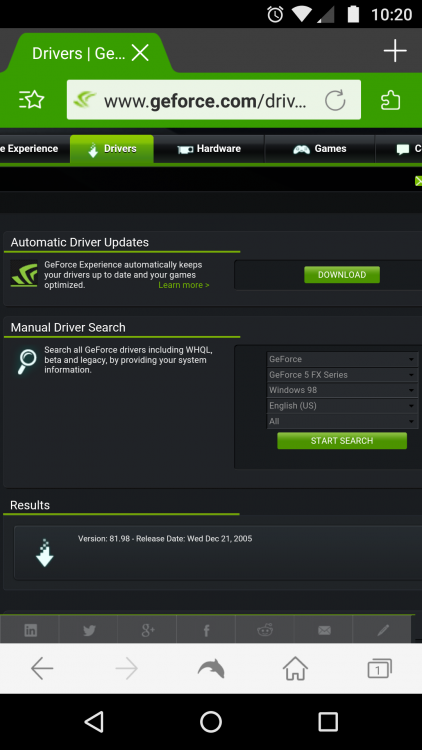
-
Hey guys I am currently having a issue with my resolution in Windows 98, when I connect my GPU to monitor via VGA I can utilize my monitors maximum resolution which is 1600x1200. But when I have it connected via DVI the max resolution is 1280x1024. I have installed my monitor drivers analog and digital. Uninstalled graphics card driver, unplugged the VGA cable, factory reset my monitor. But no success. Can anyone please help me with this issue My system Gigabyte 81865gm 775, Pentium 4 3.6ghz, 2x512mb RAM, 120gb 2.5" 5200 laptop HDD, geforce 5600 ultra, Samsung 204b
-
Hey guys I am having a weird issue while gaming, I am getting a 1 second pause then everything goes back to normal. While playing I will be getting a solid 60fps then it will slightly freeze, drop to 45fps then go back to normal. I checked the HDD led light when I haopens, and the light doesn't come on, cause I thought maybe it's loading something. I have tried, disabling page file, lowering performance in sound card, turning off various sleep and idle settings in BIOS. Re installing video card drivers. I have no background apps running. My system Gigabyte 81865gm 775, Pentium 4 3.6ghz, 2x512mb RAM, 120gb 2.5" 5200 laptop HDD, geforce 5600 ultra, creative ct4830 sound blaster.
-
Welcome to MSFN. i am guessing your new to all this, your best bet is to find an old Pentium4 and install Windows98 on it, that is the cheapest, easiest to find, and still relatively modern when compared to older pentium 3 or 2's. Like the others said your hardware is way to new, even running windows 98 on some duals cores have issues. I suggested to find a cheap pentium 4 for like $20 and start from there. Here a few Tips; Pentium 4 - disbale hyper threading 512mb of Ram Max 120gb MAX HDD Geforce 7000 series max, must be 256mb of ram. If you still dont want to use your main rig for windows 98 install VMWare, these are you only options. This video would help alot
-
Hey Guys i am currently having difficulties finding working native dos drivers for my Creative SoundBlaster Live Value CT4830. i have tried the ones in the sticky but they dont work, i have also tried other ones from vogons but no luck. Has anyone got the CT4830 working in dos. the games i am trying work fine in Windows98 but when i click restart in msdos mode there is no sound. any help much appreciated.
-
Hey Guys; i am currently having alot of issues getting need for speed high stakes to work on my Windows 98 machine. it works fine in software render but not when i choose 3ddevice. i have installed the latest patch and also the spot patch for nvidia cards. when i installed the spot patch my graphics card got detected in the 3d setup GPU: Nvidia 5600 Ultra, running latest drivers
-
Thanks i will give it a shot, what about a program to monitor fps like Fraps
-
Hey Guys; Does anyone know any goof diagnostic software that works with Windows98. I need HWMonitor, GPU-Z, Furmark etc, or any other good programs all the version i have dont work for Win98
-
What Wifi Dongle are you using
-
i was looking on around and noticed a few different versions of DX8, 8.1, 8.1b, 8.2. which one do you recommend?
-
No i thought the latest DX9 contains all the DX versions.
