justacruzr2
Content Type
Profiles
Forums
Events
Everything posted by justacruzr2
-
to clarify further. my keyboard and mouse are PS2. you plug the keyboard and mouse into the front jacks of the KVM. the video cable (15 pin DIN) is a combination cable. it includes 2 cables that have PS2 jacks on the end and they plug into the normal PS2 jacks on the computer. But they are not used for the keyboard and mouse. They supply power to the KVM. It's the usb cable that comes out from the KVM that passes the keyboard and mouse signals to the computer. I know that sounds like a weird way to do it. So it's the whole USB part of this that is giving me trouble.
-
first, thanks for your reply. It is the TrendNet TK210-K. It has the TI chip in it. It should be viewed by the OS as a composite device. The TI chip is considered a USB hub. and after that it presents itself as a composite device that has 2 more functions. The keyboard and mouse. I don't know if this will help but here are the registry entries I have tried already. This might give you an idea of what the OS is expecting.under the \enum key. REGEDIT4 ; ================================================================ ; 1. FORCE THE TWO TI HUB INSTANCES (INST_0 AND INST_1) ; ================================================================ [HKEY_LOCAL_MACHINE\Enum\USB\VID_0451&PID_2046] [HKEY_LOCAL_MACHINE\Enum\USB\VID_0451&PID_2046\INST_0] "Capabilities"=hex:b4,00,00,00 "HardwareID"="USB\\VID_0451&PID_2046&REV_0125,USB\\VID_0451&PID_2046" "CompatibleIDs"="USB\\CLASS_09&SUBCLASS_00&PROT_00,USB\\CLASS_09&SUBCLASS_00,USB\\CLASS_09" "DeviceDesc"="Generic USB Hub" "ClassGUID"="{36FC9E60-C465-11CF-8056-444553540000}" "Class"="USB" "Driver"="USB\\0011" "Mfg"="(Generic USB Hub)" "ConfigFlags"=hex:00,00,00,00 "Serial"=hex:14,00,00,00,00,00,00,00 "SymbolicName"="\\DosDevices\\0000000000000029#{f18a0e88-c30c-11d0-8815-00a0c906bed8}" [HKEY_LOCAL_MACHINE\Enum\USB\VID_0451&PID_2046\INST_1] "Capabilities"=hex:b4,00,00,00 "HardwareID"="USB\\VID_0451&PID_2046&REV_0125,USB\\VID_0451&PID_2046" "CompatibleIDs"="USB\\CLASS_09&SUBCLASS_00&PROT_00,USB\\CLASS_09&SUBCLASS_00,USB\\CLASS_09" "DeviceDesc"="Generic USB Hub" "ClassGUID"="{36FC9E60-C465-11CF-8056-444553540000}" "Class"="USB" "Driver"="USB\\0012" "Mfg"="(Generic USB Hub)" "ConfigFlags"=hex:00,00,00,00 "Serial"=hex:15,00,00,00,00,00,00,00 "SymbolicName"="\\DosDevices\\000000000000002a#{f18a0e88-c30c-11d0-8815-00a0c906bed8}" ; ================================================================= ; 2. BASE COMPOSITE DEVICE ROUTING (FORCING USB CORE CLASS) ; ================================================================= [HKEY_LOCAL_MACHINE\Enum\USB\VID_10D5&PID_0001] [HKEY_LOCAL_MACHINE\Enum\USB\VID_10D5&PID_0001\INST_0] "Capabilities"=hex:b4,00,00,00 "HardwareID"="USB\\VID_10D5&PID_0001&REV_0100,USB\\VID_10D5&PID_0001" "CompatibleIDs"="USB\\DEVCLASS_00&SUBCLASS_00&PROT_00,USB\\DEVCLASS_00&SUBCLASS_00,USB\\DEVCLASS_00,USB\\COMPOSITE" "DeviceDesc"="USB Composite Device" "ClassGUID"="{36FC9E60-C465-11CF-8056-444553540000}" "Class"="USB" "Driver"="USB\\0013" "Mfg"="(Standard USB Host Controller)" "ConfigFlags"=hex:00,00,00,00 "Serial"=hex:16,00,00,00,00,00,00,00 "SymbolicName"="\\DosDevices\\000000000000002b#{a5dcbf10-6530-11d2-901f-00c04fb951ed}" ; ================================================================= ; 3. SUB-INTERFACES (FORCING GENERIC CLEAN HIDClass PATHS) ; ================================================================= [HKEY_LOCAL_MACHINE\Enum\USB\VID_10D5&PID_0001&MI_00] [HKEY_LOCAL_MACHINE\Enum\USB\VID_10D5&PID_0001&MI_00\0USB&VID_10D5&PID_0001&INST_0] "Capabilities"=hex:80,00,00,00 "HardwareID"="USB\\VID_10D5&PID_0001&REV_0100&MI_00,USB\\VID_10D5&PID_0001&MI_00" "CompatibleIDs"="USB\\CLASS_03&SUBCLASS_01&PROT_01,USB\\CLASS_03&SUBCLASS_01,USB\\CLASS_03" "DeviceDesc"="USB Human Interface Device" "ClassGUID"="{745a17a0-74d3-11d0-b6fe-00a0c90f57da}" "Class"="HIDClass" "Driver"="HIDClass\\0000" "Mfg"="(Standard device)" "ConfigFlags"=hex:00,00,00,00 [HKEY_LOCAL_MACHINE\Enum\USB\VID_10D5&PID_0001&MI_01] [HKEY_LOCAL_MACHINE\Enum\USB\VID_10D5&PID_0001&MI_01\1USB&VID_10D5&PID_0001&INST_0] "Capabilities"=hex:80,00,00,00 "HardwareID"="USB\\VID_10D5&PID_0001&REV_0100&MI_01,USB\\VID_10D5&PID_0001&MI_01" "CompatibleIDs"="USB\\CLASS_03&SUBCLASS_01&PROT_02,USB\\CLASS_03&SUBCLASS_01,USB\\CLASS_03" "DeviceDesc"="USB Human Interface Device" "ClassGUID"="{745a17a0-74d3-11d0-b6fe-00a0c90f57da}" "Class"="HIDClass" "Driver"="HIDClass\\0001" "Mfg"="(Standard device)" "ConfigFlags"=hex:00,00,00,00 The VID_0451&PID_2046 key is the TI chip. The VID_10D5&PID_0001 key is the composite device. And the VID_10D5&PID_0001&MI_00 & _01 keys are the Keyboard and mouse ports. Since I also have 98se on this computer I looked at how 98se did it. It's somewhat helpful in understanding how it is setup but 98se uses a completely different way of setting up USB than ME. The problem, according to Googles AI, is that ME was born in that transition era between the older, 95 & 98, way and the just being introduced WDM way that ME uses. And what this KVM does is take your PS2 inputs for the keyboard and mouse and translates them into USB packets sent out thru the supplied USB cable that you plug into the back of the computer. So it is not a simple pass-thru. It is pass-thru for the monitor and audio. I hope that's enough for you to understand and if it's not just reply and let me know what else you need. Thanks.
-
Anybody ever install a KVM in Millennium. Unsuccessful so far even with AI help with registry entries. Cannot do it the normal PnP way. Millennium's PnP is broken when it comes to this kind of device. Have 2 computers that I would like to share without swapping cables all the time. this one computer has 98se Millennium and xp pro on it. both 98se and xp pro have installed it without a problem but millennium refuses. Any help appreciated.
-
Thanks for the heads up. What add blocker do you recommend that will work with Chromium? I just went to that add blocker test site and got a 52/100. That's still not good.
-
It's one of the things i hate. almost every download site wants to download and install some download helper app or something. It wasn't always that way. i remember when you could just download the file and be done with it. I'm using Supermium (Chrome) and i thought add blocking was built in. isn't it?
-
the reason it requires .net 4 is that helge was transitioning from win32 to .net coding. version 2.1.3 is win32 and supports xp. version 3 is all .net but has a bug problem with the os so it doesn't work on xp
-
No problems. Is there some other way to transfer that file over? Thanks. I downloaded 2 files because I thought after that it would let me proceed to what I was really after but I know better than to install anything that doesn't look right. So I deleted them. There was no other download button other than that green one.
-
Yes. The SetACL suite I downloaded does. When I clicked on it to install it I got the message that .net Framework 4.0 needs to be installed first. Can't tell you the version because it didn't install. but this is the date on the certificate: Monday May 27, 2013 10:21:06 AM So i would expect that it was the version that was released on or near that date.
-
Thanks. Sorry for delayed reply. I've been dealing with a sewer backup into my basement from all the rain we've had here both Saturday and Sunday. Anyway, Do I need to register to download the file? The website wants to install something that is not SetACL. So just for the heck of it I followed it thru and it first downloaded a free VPN, app then something else which I downloaded just to get past all the hurdles but it wouldn't go any farther. The files were 19MB. I know SetACL isn't that big. Here's what it was : Application Application Handsome 19.0 MB (19,957,832 bytes) So that;s why I ask if I have to register to download the real deal without all that other stuff.
-
Sounds like you did everything I did too. Everything just lead to a dead end. But thanks for trying.
-
The SetACL Suite at that link requires .net framework 4.0 to be installed. i was hoping to pull the standalone executable out with WinRAR but it's an MSI. The standalone version I was looking for doesn't require .net framework installed. So I guess I may have to install .net 4 just to use it for this project. I can always uninstall it when I'm done. You're probably right but I have no experience writing scripts.
-
Yeah it did! That's the same thing I got when I went to the Wayback Machine. It just dead-ended there. I checked every Google search result and couldn't find a link to it. Usually I can find what I'm looking for. And usually someone here knows where to find it or has it and makes it available. I just went to the link you provided and downloaded it. Hopefully the specific command I need to use is in that version. What I need to do is change the "OWNER" field of every occurance of an orphaned SID in the "OWNER" field to the Administrator account. Subinacl can't do that. It can't target just the "OWNER" field based on the orphaned SID and replace it with the Administrator account. What I need is something that can do this logic: Look at the "OWNER" field of every file/folder If the field contains an orphaned SID then replace the orphaned SID with the Administrator account Endif I want to avoid replacing the "OWNER" if it's owned by "NT AUTHORITY/SYSTEM" That's what Subinacl can't do but SetACL can. I'm also going to contact Helge and see if he can make available the version 2.1.3.for me. Thanks for the help.
-
Anyone know where I can download the zip file for SetACL 2.1.3? i downloaded the version 3.0 zip which doesn't work on XP. Something about a bug in the OS check. It was the only one I could find. Everything else Googles AI suggested dead ended. You'd think somewhere out there is an archived copy.
-
Thanks. I'll check it out.
-
I found some orphaned SIDs' in my xp pro system and I'd like to get rid of them. Using acceschk if found that some of them are the owners of some files/folders. Is there a way to use SetACL to locate the invalid (orphaned) SID as the "OWNER" and replace it with the Administrator account. I know I can use subinacl to delete all the occurances of the orphaned SID with the cleandeletedsidsfrom= command but this will also remove them from the "OWNER" field as well and will leave the file/folder with no owner. That might cause problems so I would like to avoid that. This is the logic of the command I would like to do: Look at the "OWNER" field in every file/folder If the "OWNER" field contains the orphaned SID Then Replace it with the Administrator account Endif Can this be done with SetACL? If so could you provide the proper syntax for the command? This is the command that Google's AI gave me but it doesn't look right: SetACL -on "D:\Program Files" -ot file -actn setowner -ownr "n:S-1-5-21-299502267-113007714-1177238915-1004;s:y" -rec cont_obj .-on: The object name (your path) .-ot: Object type (file/directory) .-actn setowner: Targets only the owner field .-ownr: The "n:" denotes the new owner (or you can use "n:Administrators") .-rec cont_obj: Recursively applies this to files and subfolders. I don't see where it's replacing the orphaned SID with the Administrator account. It looks more like a global replace of all "OWNERS" with the orphaned SID or the administrator account. That's not what I want since that will also replace "NT AUTHORITY/SYSTEM" on files that are rightfully owned by the system.
-
Upgrading XP Pro to Media Center Edition
justacruzr2 replied to justacruzr2's topic in Windows XP Media Center Edition
OK. Got it to work. But it also installed IE7 and WMP11. Wasn't sure if it would do that during a repair install. So I've downloaded nLite and .net framework 2.0 (only had 1 and 1.1 installed and nLite requires 2.0) so I can eliminate the installation of IE7 and WMP11. When I've created that custom XP Media Center Edition 2005 installation disk I will do this again. It really wasn't that hard and MS winPE was what really helped by allowing me to change the HKLM\System|WPA reg key by importing the WPA reg key from the clean install I did on a spare HDD. Of course there were some other modifications done as well to HKLM\Local Machine\Microsoft\Windows\CurrentVersion and HKLM\Local Machine\Microsoft\WindowsNT\CurrentVersion and copying the medctroc.inf over. Thanks to License Crawler for that. -
Upgrading XP Pro to Media Center Edition
justacruzr2 replied to justacruzr2's topic in Windows XP Media Center Edition
Sorry. Everything I see on the web says there never was a retail version of MCE. Is there a way to trick the install disk into thinking MCE is already installed and then do a repair from the setup disk via the repair option? -
Does anyone know if there's an upgrade version of MCE 2005 out there? I have a version of MCE 2005 that I tried to use to upgrade my XP Pro but it didn't offer the option to upgrade. I was doing this the normal way by putting in the install disk and then rebooting the computer which takes you into the blue screen setup. I also tried it by putting the disk in after I had already booted into XP and then clicking on Setup in the root folder of the MCE 2005 disk and selecting install Windows XP from the Welcome to Setup screen. The first message I got was "The option to upgrade will not be available at this time because Setup was unable to load the file F:\WINNTUPG\NETUPGRD.DLL" (F: is the name of the CD drive the disk was in). I looked at the folders on the disk and yep, there wasn't any folder named \WINNTUPG. When I was doing it the normal way and got to the agree to the EULA screen, I scrolled down to the bottom where I got a valuable piece of information. Don't know if this is the version number of the disk or the EULA but here it is: MCE_05_RTM_OEM_EN. I'm assuming that the "OEM" part means it's the OEM version and I suppose that the upgrade option wasn't offered on that version since the OEM wouldn't be upgrading, they would be doing fresh installs. So is there a retail version available for downloading out there? I want to upgrade my XP Pro SP3 version to MCE without losing any of my apps or their registry entries. And will I need to temporarily remove SP3 in order to upgrade?
-
Actually I restored it to IE6 (what it came with pre-installed in XP Pro SP2). Had to do this from scratch I had originally installed IE7 and then IE8 and deleted the IE7 and IE8 uninstall folders in Windows because at that time, why would I want to go back to IE6. right? IE6 doesn't support HTTPS or HTML5 which is what the internet switched to. At this point IE is dead anyway and all I need is an installed Internet Explorer for the files that other Windows apps use and share with it. However over the past 2 months I was discovering several issues with some Windows apps. Help and Support Center would not let me type text into the search box (not even a blinking cursor), I wouldn't get the Index when clicking on the Index button, and clicking on any of the Related Topics links would get me the "There is an error in this dialog" message. Also, when opening Computer Management from the Control Panel and selecting Services I would get the same message. Also, with the Indexing Service, Query the Catalog, the box that you type your search query into had no blinking cursor and the Sort By and Order By drop down boxes had only question marks in them. Also, User Accounts in the Control Panel failed to display the little question mark icons "?" And after getting IE6 back up I was getting that same error message when I would click on "About Internet Explorer" from the Help tab. It wouldn't display the information (ie. version number, cypher strength, product ID and updates). So after several weeks of trying to figure it out, and Google searches, I realized it had something to do with Internet Explorer. So I re-registered all the dll's that have to do with displaying HTML etc and voila, everything is now back to how it should be. The unusual folder behaviour was the last thing to fix. So before I used your suggestion I thought what if I just rename the Local Service folder and see what happens. So I did, from the parallel installation, and re-booted back into the system that had that problem. I was expecting Windows to either complain about it missing or even hang up but it didn't. The boot was as smooth as always. So I opened Explorer and chose Folder view and opened the Documents and Setting folder and there was a fresh new copy of the Local Service folder with everything in it. So it must be built into Windows to repair that. There was only one difference between it and the original Local Settings folder. The NTUser.dat file was 740Kb whereas the original one was 240Kb. So it would seem that it was corrupted somehow and caused that strange behaviour because it didn't create those extra folders in the wrong place after doing this. So everything is working correctly now and thanks to everyone who replied with suggestions.
-
Thanks. I'll try your suggestions. Still, I would like to find out what's causing this in the first place. I did look at the Profile List in the registry for S-1-5-19 and did find one difference for the LocalService\ entry. I have a 3rd drive with a fresh copy of XP Pro installed on it right from the install disk with absolutely no changes to it. I use this as my base reference point when trying to figure out any problems. The entry for LocalService (S-1-5-19) in that Profile List is a little different and when I export it and import it into this registry, it gets changed back to what it originally was. So I'm not sure if that difference is the reason why this is happening.
-
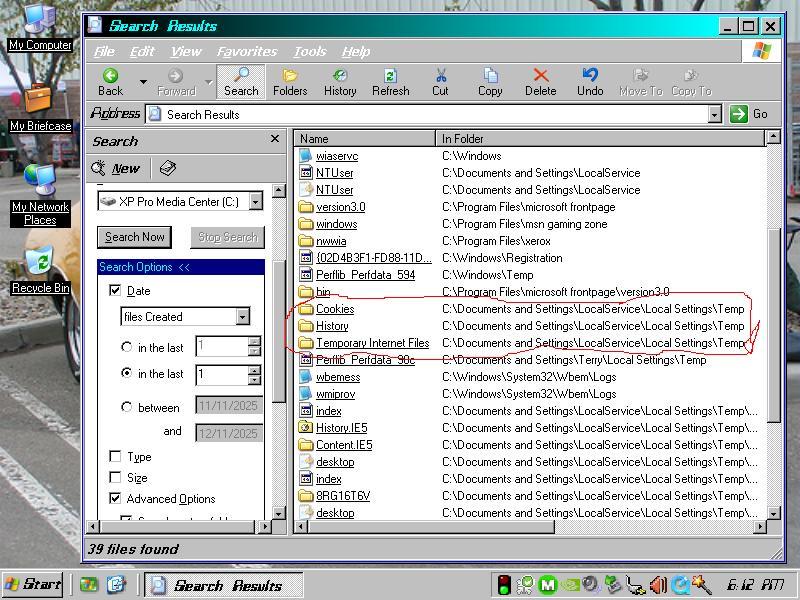
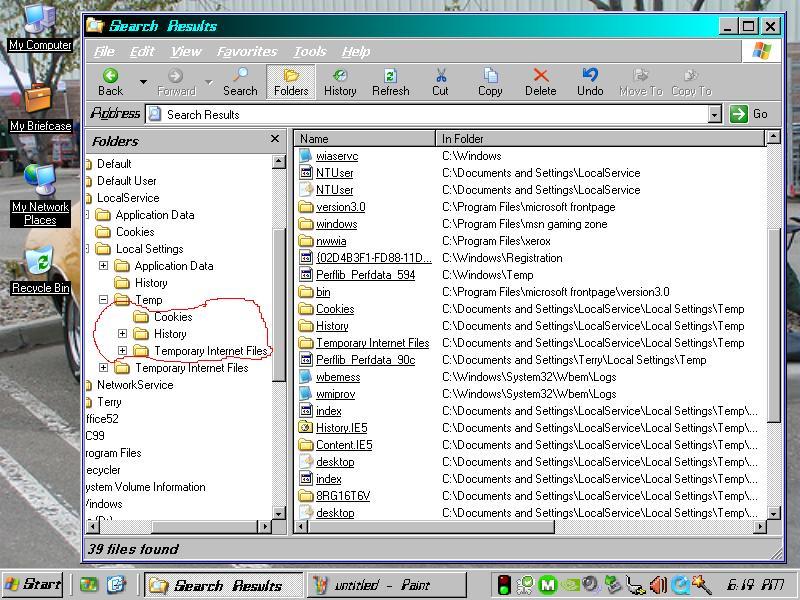
I've had this strange folder behaviour in XP Pro MCE for some time and I'm trying to correct it. Although it's currently Media Center Edition, it was doing this when it was only XP Pro so I hope no one minds me posting this in the XP forum. I added the MCE ability later. Anyway, here's what's happening. The system creates extra Cookies, History and Temporary Internet Files folders in C:\Documents and Settings\LocalService\Local Settings\Temp. Those folders already exist under C:\Documents and Settings\LocalService\Cookies and C:\Documents and Settings\LocalService\Local Settings\History and Temporary Internet Files. That's where they're supposed to be. So I'm trying to figure out why they're being duplicated in C:\Documents and Settings\LocalService\Local Settings\Temp which is not where they're supposed to be. I checked the registry for any LocalService\Local Settings entries but nothing looked wrong. Yet, something is telling Explorer to create those folders there. I can delete them but they are re-created on every boot. The snapshots show 2 views of this. Anyone have any ideas? Thanks.

-
I've had this problem for a long time. The Help and Support Center does not let me enter any text into the search box in the upper left hand corner of the window. It doesn't even have a blinking cursor in the search box. Also, when I press the Index button on the task bar, the Index pane comes up on the left side but there is nothing there except for a placeholder in the upper left corner of the pane. The "Home" window, which is the first window you see when you first start the Help and Support Center does show the items "Pick a Help Topic", "Ask for Assistance", "Pick a Task" and "Did You Know" with their associated items under them except that "Did You Know" shows nothing under it. All the links under them work. I might be wrong but I seem to remember there was a security update for the Help and Support Center due to MS finding a security vulnerability in it that would let a hacker take control of your computer. Is this true, and if so, can it be undone or is this problem something else going on? This is in my XP Pro SP3 MCE version and I have the same problem in my XP Pro SP3 (non MCE) version on my other drive except that on that drive the problem is even worse as nothing is displayed in the Help and Support Center window other than the title and the task bar buttons and the Search box which has the same problem. My system is a parallel installation with both drives having XP Pro SP3 with the exception that one is MCE and the other is not. Here is what the Help Center log says: 2025/10/18 16:51:36 ############################################################ 2025/10/18 16:51:36 2025/10/18 16:51:36 Script error: 2025/10/18 16:51:36 2025/10/18 16:51:36 Message : Unspecified error. 2025/10/18 16:51:36 Url : hcp://system/panels/NavBar.htm 2025/10/18 16:51:36 Line : 708 2025/10/18 16:51:36 Character: 2 2025/10/18 16:51:36 Code : 0 2025/10/18 16:51:36 2025/10/18 16:52:09 ############################################################ 2025/10/18 16:52:09 2025/10/18 16:52:09 Script error: 2025/10/18 16:52:09 2025/10/18 16:52:09 Message : Unspecified error. 2025/10/18 16:52:09 Url : hcp://system/panels/NavBar.htm 2025/10/18 16:52:09 Line : 708 2025/10/18 16:52:09 Character: 2 2025/10/18 16:52:09 Code : 0 2025/10/18 16:52:09 2025/10/18 16:55:38 ############################################################ 2025/10/18 16:55:38 2025/10/18 16:55:38 Script error: 2025/10/18 16:55:38 2025/10/18 16:55:38 Message : Unspecified error. 2025/10/18 16:55:38 Url : hcp://system/panels/NavBar.htm 2025/10/18 16:55:38 Line : 708 2025/10/18 16:55:38 Character: 2 2025/10/18 16:55:38 Code : 0 2025/10/18 16:55:38 2025/10/18 17:13:45 ############################################################ 2025/10/18 17:13:45 2025/10/18 17:13:45 Script error: 2025/10/18 17:13:45 2025/10/18 17:13:45 Message : Unspecified error. 2025/10/18 17:13:45 Url : hcp://system/panels/NavBar.htm 2025/10/18 17:13:45 Line : 708 2025/10/18 17:13:45 Character: 2 2025/10/18 17:13:45 Code : 0 2025/10/18 17:13:45 2025/10/18 17:30:27 ############################################################ 2025/10/18 17:30:27 2025/10/18 17:30:27 Script error: 2025/10/18 17:30:27 2025/10/18 17:30:27 Message : Unspecified error. 2025/10/18 17:30:27 Url : hcp://system/panels/NavBar.htm 2025/10/18 17:30:27 Line : 708 2025/10/18 17:30:27 Character: 2 2025/10/18 17:30:27 Code : 0 2025/10/18 17:30:27 2025/10/18 17:32:08 ############################################################ 2025/10/18 17:32:08 2025/10/18 17:32:08 Script error: 2025/10/18 17:32:08 2025/10/18 17:32:08 Message : Unspecified error. 2025/10/18 17:32:08 Url : hcp://system/panels/NavBar.htm 2025/10/18 17:32:08 Line : 708 2025/10/18 17:32:08 Character: 2 2025/10/18 17:32:08 Code : 0 2025/10/18 17:32:08 2025/10/18 17:49:53 ############################################################ 2025/10/18 17:49:53 2025/10/18 17:49:53 Script error: 2025/10/18 17:49:53 2025/10/18 17:49:53 Message : Unspecified error. 2025/10/18 17:49:53 Url : hcp://system/panels/NavBar.htm 2025/10/18 17:49:53 Line : 708 2025/10/18 17:49:53 Character: 2 2025/10/18 17:49:53 Code : 0 2025/10/18 17:49:53 2025/10/18 17:50:16 ############################################################ 2025/10/18 17:50:16 2025/10/18 17:50:16 Script error: 2025/10/18 17:50:16 2025/10/18 17:50:16 Message : Unspecified error. 2025/10/18 17:50:16 Url : hcp://system/panels/NavBar.htm 2025/10/18 17:50:16 Line : 708 2025/10/18 17:50:16 Character: 2 2025/10/18 17:50:16 Code : 0 2025/10/18 17:50:16 2025/10/18 18:01:34 ############################################################ 2025/10/18 18:01:34 2025/10/18 18:01:34 Script error: 2025/10/18 18:01:34 2025/10/18 18:01:34 Message : Unspecified error. 2025/10/18 18:01:34 Url : hcp://system/panels/NavBar.htm 2025/10/18 18:01:34 Line : 708 2025/10/18 18:01:34 Character: 2 2025/10/18 18:01:34 Code : 0 2025/10/18 18:01:34 2025/10/18 18:30:45 ############################################################ 2025/10/18 18:30:45 2025/10/18 18:30:45 Script error: 2025/10/18 18:30:45 2025/10/18 18:30:45 Message : Unspecified error. 2025/10/18 18:30:45 Url : hcp://system/panels/NavBar.htm 2025/10/18 18:30:45 Line : 708 2025/10/18 18:30:45 Character: 2 2025/10/18 18:30:45 Code : 0 2025/10/18 18:30:45
-
I know it's been almost 2 months since the last reply but I wanted to mention what the problem with the lag was. It was a RealTek file/process/service called RTLDHCP.exe. When I disabled it in Administrative Tools/Services the lag and the problem disappeared. Don't know what it's purpose is but disabling it has had no effect on the Wi-Fi or my system.
-
My parallel installation on the other drive in the system has XP Pro SP3 (but not MCE) does not duplicate those folders in "/Documents and Settings/Local Service/Local Settings/Temp". They're only in the place they're supposed to be.
-
I've been meaning to ask about this for awhile. Every time I boot into XP Pro MCE SP3 the system creates additional Cookies, History and Temporary Internet Files folders in "/Documents and Settings/Local Service/Local Settings/Temp". They're also in the normal place (where they're supposed to be) "/Documents and Settings/(my name)/Cookies", "/Documents and Settings/Local Settings/History" and "/Documents and Settings/Local Settings/Temporary Internet Files". Any ideas why it's creating these additional 3 folders in "/Documents and Settings/Local Service/Local Settings/Temp"?