-
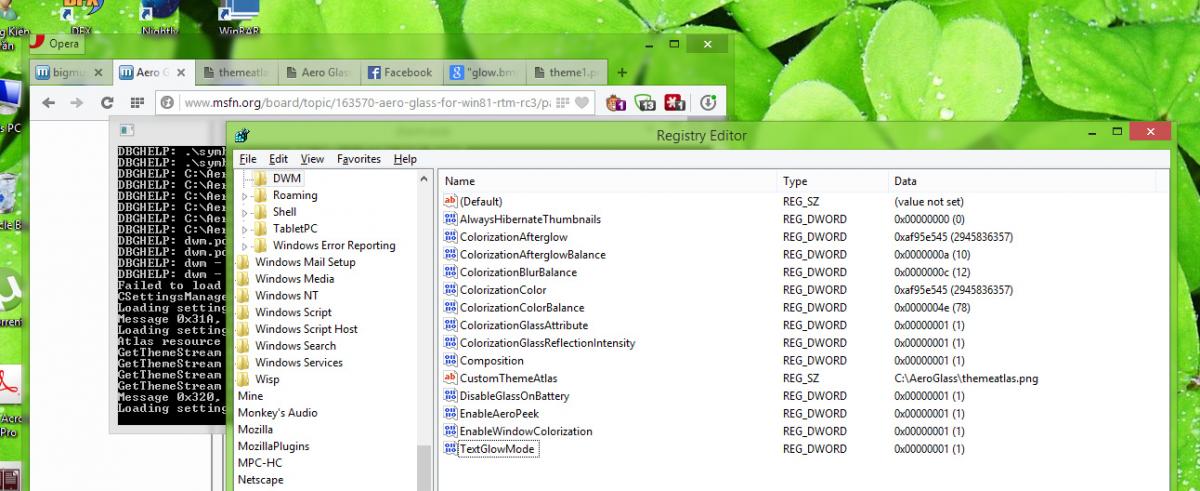
I've been using AeroGlass from the very first beta for Windows 8. Now I've moved to Windows 8.1 and still been using it, a really nice piece of software however, even with the most recent version I cannot understand how to get window titles glow effect and aero stripes as seen in all the screenshots here, I've got the transparency, yes, but nothing else I've downloaded some theme resources pngs, noelc's glow.bmp, put them all in the AeroGlass folder, even played with AeroConfigurator but to no avail. Can anyone help me with this? Thanks in advance
-
I'm a little new to all this. How can I enable text glow effect like in Windows 7, even using the newest AeroGlass (RC1)? I tried every mode in the Configurator but to no avail, I guess it has something to do with theme atlas, but I really have no idea what it is, can you help me with it? Thanks in advance
-
i have the same problem. the latest bigmuscle archive for x64 system contains only DWMGlass.dll? (previous ones contain both DWMGlass64.dll AND DWMGlass.dll. I was tempted to rename the file and edit the registry...but I got cold feet..