Skip to content
View in the app

A better way to browse. Learn more.

MSFN

A full-screen app on your home screen with push notifications, badges and more.

To install this app on iOS and iPadOS
  1. Tap the Share icon in Safari
  2. Scroll the menu and tap Add to Home Screen.
  3. Tap Add in the top-right corner.
To install this app on Android
  1. Tap the 3-dot menu (⋮) in the top-right corner of the browser.
  2. Tap Add to Home screen or Install app.
  3. Confirm by tapping Install.

CrazyPresea

Member
  • Joined

  • Last visited

  • Country

    United States
  1. amazingly that test build works on nt3.51 on my fresh install haven't installed sp5 or anything, I tried standard retrozilla and firefox 2 and both gave the same errors though. "Dynamic link library MSVCRT.DLL could not be found in the specified path. C:\retrozilla; C:\WINNT35; C:\WINNT35\SYSTEM32" also that unofficial update pack is here http://bearwindows.zcm.com.au/winnt351.htm#4
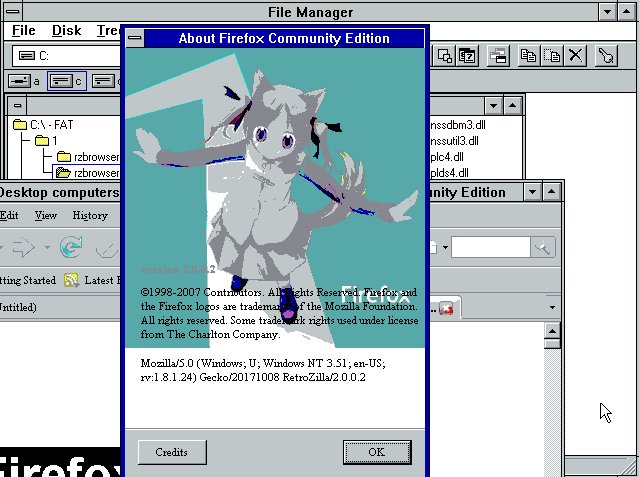
  2. i've managed to run that test build? and retrozilla 2.1 (just now). It's nt 3.51 with newshell and a few unofficial updates(superpack 7 and a few others) anyways both seem to work fine lol
  3. nice to see this project is still active, just tried this on my (slightly modded) install of nt 3.51, haven't had any issues so far.
  4. Delta Heavy - Ghost

Account

Navigation

Configure browser push notifications

Chrome (Android)
  1. Tap the lock icon next to the address bar.
  2. Tap Permissions → Notifications.
  3. Adjust your preference.
Chrome (Desktop)
  1. Click the padlock icon in the address bar.
  2. Select Site settings.
  3. Find Notifications and adjust your preference.