naaloh
Content Type
Profiles
Forums
Events
Everything posted by naaloh
-
Thank you for this; I was actually looking to update the Python installation to run an OS-independent package of yt-dlp, but you you've the job already.
-
OK, I now understand that after you enter the OS Ver parameters and use CompatSave in fcwin2k you can run the executable from anywhere with any command-line options, but it still doesn't help, as after setting the parameters to Windows VIsta, I still get the same "This program does not support the version of Windows your computer is running" and the installation log file still reports "Windows version: 5.1.2600 SP3 (NT platform: Yes)". UPDATE: It looks like fcwin2k is not able to emulate for a file named Setup.exe (perhaps because there's a system file of the same name). After I renamed the installation file and set it up in fcwin2k, the installation started to crash just like with Application Verifier. I wonder what's causing it to crash and if it's possible to fix it... I attached the archived log of the Process Monitor, which list the file system and registry calls of the temporary Setup executable, to this message in case anyone want to research it. Logfile.7z
-
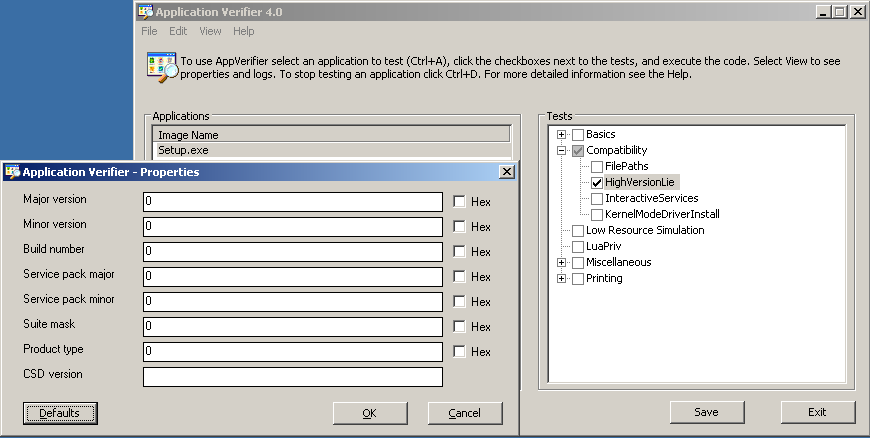
Thanks a lot (wonder why nobody mentioned this application before). So I installed the Microsoft Application Verifier version 4.0.0665, which seems to be the last one to support Windows XP (correct me if I'm wrong), but when I added the temporary Setup executable and enabled the HighVersionLie test, the executable just crashed when I tried to run it. Are there any specific values I should have entered as Properties for the HighVersionLie test (see the attached screenshot) to simulate Vista? When I looked up Application Verifier here, I also saw fcwin2k (Force Compatibler For Windows 2000) mentioned. I got that one to try and was able to run the temporary Setup executable, but apparently, fcwin2k does not allow to specify the command line parameters for the executable (when I enter them into the "File" field, all the relevant buttons become inactive). I tried executing the original Setup.exe with fcwin2k (see the second screenshot attached), repeating all steps described in the first post, but I just got the usual "This program does not support the version of Windows your computer is running". Since I cannot enable logging without command line parameters, I don't know which OS version was passes to the child process Setup.tmp that gives the error message. Any advice?

-
The issue is, apparently, with the installation script that requests Windows version 6.0 at least. The question is, can the script be edited without recompiling the whole installation package? Or, is there any way to make Windows report a higher version than it actually is (kind of like the compatibility mode does, even though it reports a lower one)?
-
Can the manifest be edited? Anyway, I doubt the manifest plays any part here because, as I have said, the manifest in this case is the same as on the older version, which does run on XP, and I do have the Microsoft .NET Framework 1.1 to 4.0 installed. The files are in the original Setup.exe (links to download multiple-part archive: 1 2 3 4), which contains the installation script and other installer files. It has to be modified somehow to allow installation on Windows XP. There's also an InnoSetup archive next to it (400+ MB), which contains some of the program files, and the rest are in the directory structure on the DVD.
-
The parts 1 to 5 are attached to the first post in this topic; like I said, I had to split due to the size limit. No, the Setup.tmp file cannot be read with Innounp Repackage with what, the Inno Setup installation builder?
-
It might indeed be the install script (the archive with which I attached to this message, after extracting it with innounp). Every entry under the [Files] section contains the "MinVersion: 0.0,6.0" parameter, which according to https://jrsoftware.org/ishelp/index.php?topic=setup_minversion means that it would require Windows to report at least version 6.0 and XP is, obviously, below that. Only question is, what can be done about it? install_script.7z
-
Apparently it is, at least it looks similar (and supports Inno Setup command line). I attached the first volumes of the archive with it (unmodified) to the first message and the last to this one (I had to split due to the size limit). I also attached the installation log to this message. The manifest in this case is the same as on the older version, which does run on XP, so I don't think it's the case. The install script - maybe, but it's not possible to modify it, is it? That is unless it can be done directly in the operating memory. What is this script supposed to look like? Setup.tmp.part06.rar Setup.tmp.part07.rar Setup.tmp.part08.rar Setup.tmp.part09.rar Setup Log 2020-09-08 #002.txt
-
Facing the same problem as many other people on this forum, namely trying to install software that would most likely work on Windows XP, but being hindered by the Inno Setup installer that would not run, I was, it seems, able to get farther than other people who posted, but still unable to install. When I first ran the Setup.exe file, the "Setup.exe is not a valid Win32 application" message popped up. As advised on this forum, I changed the vaules of "OS Major Version" and "SubSys Major Version" in the executable from 06 to 05 (there are many tools that can do it and in fact it can be done with any hex editor, as the values seem to always be at 148 and 150 hexadecimal respectively). That still didn't help much because running the patched executable just caused the box with the lines "Unable to execute file in the temporary directory. Setup aborted." and "Error 193: %1 is not a valid Win32 application." to appear. Using Process Monitor, it's possible see how the original Inno Setup executable creates a temporary executable in the temporary directory and using a file undelete tool (I used R-Studio, but I think any other would perform equally well), it's possible to recover the file after it's deleted when the setup is aborted. That Setup.tmp file, too, needs to have the "OS Major Version" and "SubSys Major Version" changed to 05, but even after patching you cannot just run it without any command line, as it gives the "Messages file "...\Setup.msg" is missing. Please correct the problem or obtain a new copy of the program." error. The temporary setup file, I believe, is assembled from the data stored (in compressed form) inside the original setup file, so you cannot just patch the original setup file to fix the temporary one. The best thing I could do to work around it was to suspend the process of the original Setup.exe before the temporary Setup.tmp is executed with the AutoIt script given at https://www.autoitscript.com/forum/topic/180996-set-application-in-idle-state/?tab=comments#comment-1299592 (obviously, modified to run the Setup.exe executable and leave it suspended until commanded to resume it, see in the attachment) and then, using WinHex, open the Entire memory of the Setup.exe process and then modify the "OS Major Version" and "SubSys Major Version" values of the temporary file while it's still in RAM (it has to be done in two places). That still brought no joy because the original Setup.exe, apparently, verifies the checksum of the temporary Setup.tmp after extracting it to RAM and before it's written to disk, so after resuming the patched process I just got "The setup files are corrupted. Please obtain a new copy of the program.". That still didn't cause me to give up, as I began searching for the checksum of the unmodified Setup.tmp in the original Setup.exe and to my joy was able to find out that it's stored as CRC32 in the "inverted" form (e. g. 05975E97 as 975E9705). So I patched that value in memory as well (it, obviously, can also be done on the Setup.exe file itself), changing it to the CRC32 of the modified Setup.tmp and it caused the CRC check to succeed. You'd think that after all that effort I would be rewarded with the install wizard, but alas... The temporary temporary Setup.tmp did finally execute, but only to display "This program does not support the version of Windows your computer is running.". Having executed it once, it was no longer necessary for me to go through all the initial steps to do it again, as I could now see the command line with which it ran (I used Advanced Process Termination for that, but I think Process Explorer would do as well), in my case it was Setup.tmp /SL5="$360218,804352,0,O:\Install\Setup.exe" so I could simply rename Setup.tmp to Setup.exe and run it manually, but I couldn't make any further progress and I feel that I have to give up now. If anyone can figure out a way past that (probably last) obstacle, I'd be extremely grateful, as I do need the software. I think it's some value stored somewhere in the original Setup.exe that can be modified, or perhaps there's a way to get Windows XP to report a higher version than it normally does, as one can certainly get it to report a lower version by setting it in the Compatibility tab or an executable's properties, so any advice would be appreciated. Setup.exe.au3 Setup.tmp.part01.rar Setup.tmp.part02.rar Setup.tmp.part03.rar Setup.tmp.part04.rar Setup.tmp.part05.rar
-
Something shall happen if you just find enough patience to wait... or at least to read this thread.
-
The bottom line is if you just wait long enough you'll get your list of updates and when you install them the trouble will be gone, so there's zero need to install anything unofficial. Patience is a virtue.
-
Huawei HiLink UMTS USB modems - any chance to run on WinME?
naaloh replied to naaloh's topic in Windows 9x/ME
Well, I tried it and, not surprisingly, it didn't work. There is an exclamation mark on top of the adapter sign in the device manager and a massage that says "This device is either not present, not working properly, or does not have all the drivers installed. (Code 10.) Try upgrading the device drivers for this device." The .inf is, probably, OK, but the modem needs newer versions of drivers, which are available only for Windows XP and above. -
I'd say... If your primary concern is being able run relatively recent applications, use Win2000. If you have some applications that require real-mode DOS (most DOS apps do not require it and can be safely run from Windows) and you need to run them often, use Win98. In other cases use WinME, you can still run DOS apps that require real-mode, but you'll have to reboot your machine before and after that, which is much less than convenient. In all other aspects working under WinME will most likely be far more rewarding than under Win98, unless you want to run it on a machine with 32 MB of memory.
-
Huawei HiLink UMTS USB modems - any chance to run on WinME?
naaloh replied to naaloh's topic in Windows 9x/ME
I can answer that question now, as I found that I did save this information, it's USB\Vid_12d1&Pid_14db\5&1f8fd7d0&0&1 I have rewritten the INF file to the best of my abilities in order to make it work under WinME (and Win98, too). I am attaching the rewritten INF to this message, if anyone with a substantial knowledge of Microsoft INF files can check it for mistakes, I would appreciate it, because soon I'm going to borrow the modem again and try to make it work under Windows Millenium Edition. It's very frustrating that so few modern USB devices have drivers for the legacy OSes even when it doesn't cost anything for the manufacturer to provide them (all that's needed in case of this modem is a properly written INF, since the drivers themselves are from Microsoft). I imagine having a working WinME driver for such modems would help a lot of people, e. g. those who would like to use an old notebook that can't handle XP as a netbook. In case anyone is interested, I used Microsoft INF template for USB Remote NDIS Device for Win98/ME, Microsoft INF template for USB Remote NDIS Device for Win2000/XP, ZyXEL USB ADSL Modem INF for Win98/ME and ZyXEL USB ADSL Modem INF for Win2000/XP as a reference. The Microsoft templates are in the packages submix8c much helpfully pointed me to: RNDIS-USB-Kit_05.exe and rndisusb1-1.exe. WceIS.inf -
How to extract info about PCI devices from Registry files?
naaloh replied to naaloh's topic in Windows 9x/ME
It's nice to see so many replies with so much information, I do appreciate this Upon examining the contents of the "HKEY_LOCAL_MACHINE/Enum/PCI" key I came to the same conclusion as CharlotteTheHarlot, i. e. that the number of the slot can be determined by the hex digit subkey. In my case there are the following subkeys. 000800 - Video Card , both the one present at the time of the backup and the one installed before that, they were actually in the AGP slot, not PCI 30F000 - DVB Card 38F000 - Sound Card 48F000 - Network Card, it was removed before backup 48F000, 49F000, 4AF000 - USB2.0 Controller, to the best of my recollection, it was indeed installed in place of the removed network card 50F000 - Modem 58F000 - IEEE 1394 Controller This could be translated into AGP - Video Card PCI1 - DVB Card PCI2 - Sound Card PCI3 - USB2.0 Controller, previously Network Card PCI4 - Modem PCI5 - IEEE 1394 Controller Which is plausible, because as far as I remember, IEEE 1394 Controller was, indeed at the bottom, however, it's strange that there is no 40F000 subkey and the USB2.0 Controller has three different subkeys. The latter is probably due to the controller being a composite device, but I see no explanation for the former. I do have access to it, but it's running under WinXP now. To ensure I was right in my interpretation, I could place devices in the order I deduced, install WinME and see it the results are the same. -
I have a registry backup from a WinME machine. I want to know which PCI device was in which slot at the time of the backup being made. Would anyone be so kind as to tell me which keys I should examine to determine this? Thanks in advance.
-
Huawei HiLink UMTS USB modems - any chance to run on WinME?
naaloh replied to naaloh's topic in Windows 9x/ME
submix8c, are you referring to the modem as "SIM card"? I suppose so, since I don't believe you would seriously think it's possible to burn the CD image to a SIM card. The virtual CD image is stored in the modem firmware, so it's contents can be changed when re-flashing the firmware. But that's not really important, the real problem is making the virtual network adapter work on OSes below XP SP3 (WinME in my case). The modem I experimented with is a Huawei E303. It is probably SIM-locked, thought I didn't try using it with any SIM-card other than the one it came with. Can't tell, since I currently don't have the modem and didn't save the state of the virtual machine I installed it onto. But why would it matter? Anyway, thanks for all the links. I think it's worth trying to make it work with the driver from Remote NDIS USB Driver Kit, although it's possible it will only work with newer versions that are only available for 2000 and XP. HiLink modems are controlled via web interface (browser), like DSL modems, for example. The only "client app" is the one that autoruns from the virtual CD to switch the modem state. -
Several cellular operators sell those Huawei HiLink modems (for example Huawei E303) advertising them as "requiring no drivers". This is, of course, not true for very obvious reasons. What really happens when such a modem is plugged into a Windows PC is its identification as a USB CD-ROM drive with a CD in it. After that this "CD" autoruns, the autorun program switches the modem state, the modem identifies itself as a virtual network adapter, for which the driver is then installed. The virtual network adapter shows as Windows Mobile-based Internet Sharing Device in the Device Manager. The driver it uses comes from the virtual CD mentioned earlier. It's in the MobileBrServ\data.bin ZIP archive, in the driver folder. Two files: wceis.cat and WceIS.inf. It seems to be made by Microsoft for one of their Windows Mobile based devices. The modem installs and works on Windows XP SP3, but not on SP2. However, since it uses standart Microsoft drivers, I wonder if it can be made to work on OSes below XP SP3, particularly Windows ME. Maybe if we identified the device, for which the Microsoft-written driver that this modem uses was intended, we could find out more about it. The driver file is attached to the post. The virtual CD image is uploaded to [url=]http://d01.megashares.com/dl/6uuqPbd/HiLink.ISO. Anyone is welcome to share his thoughts on the subject. WceIS.inf
-
So the drives themselves always have PATA interface, while LPT1, USB, PCMCIA, etc. are the possible interfaces of their enclosures. Was it not possible to produce LS120/240 drives with FDD interface, so that they could be installed in place of a regular floppy drive? Surely, the read/write speed of LS120/240 drives would not exceed the bandwidth of the FDD interface, so it must be some other limitation, any idea what it was?
-
I noticed that this page of the MDGx website ends with the following passage: This is not exactly correct. On Windows ME I was able to add DWORD values in accordance with this MSDN article, namely by using the 0x00010001 flag. I don't know if it works on Windows 95/98, but Windows ME entries like HKLM,Software\Microsoft\Windows\CurrentVersion\SharedDLLs,%11%\atl70.dll,65537,01,00,00,00 do produce the desired DWORD values in the registry (0x00000001 in the sample entry). The MSDN artice is also useful because it lists all possible flags. For instance, you can use 65539 instead of 65537 to keep any existing value in the registry instead of replacing it.
-
Hi, Multibooter. Thank you for the thread it was very interesting, if only for academic purposes I want to ask the following question: which types of interface can an LS120/LS240 drive have? I've seen "parallel" and "ATAPI/IDE" mentioned in this thread. Am I correct to assume that the first means LPT parallel port, commonly used to connect graphical printers, and the second means Parallel ATA interface, commonly used for HDDs, CD and DVD drives? Are those two the only types available natively (not counting USB bridges)?
-
Runtimes of Visual C++ 2005 SP1 & Up on Windows ME (or 95/98)
naaloh replied to naaloh's topic in Windows 9x/ME
What abot the updated runtimes of Visual C++ 2003 SP1 from Visual Studio 2003 SP1 MFC Security Update? Were they intentionally not included in your service pack or are there some problems with those updated files? -
Runtimes of Visual C++ 2005 SP1 & Up on Windows ME (or 95/98)
naaloh replied to naaloh's topic in Windows 9x/ME
Can you tell me how thoroughly your service pack is tested? I mean, should ATL80.DLL v. 8.0.50727.6195 cause any problems on Windows 98, how likely is it to be reported? Although I don't use Windows 98, I could use your service pack as a reference regarding the most recent versions of dlls to work on Windows ME, unless it includes KernelEx, which I'm not planning to use. -
Runtimes of Visual C++ 2005 SP1 & Up on Windows ME (or 95/98)
naaloh replied to naaloh's topic in Windows 9x/ME
So there's an even newer version 8.0.50727.6195 of Visual C++ 2005 runtimes: Visual C++ 2005 SP1 MFC Security Update. But why didn't they include ATL80.DLL from this update into their "98 SE SP 3.4"? The post you point to lists ATL80.DLL as 8.0.50727.4053 while everything else is 8.0.50727.6195. Did they found some problems with ATL80.DLL v. 8.0.50727.6195? I don't know. Just wanted to have the most recent working runtimes just in case. -
So, XML4 SP3 needs KernelEx to run on Windows 95/98/98SE/ME, unless msxml4.dll is patched?