Everything posted by calios
-
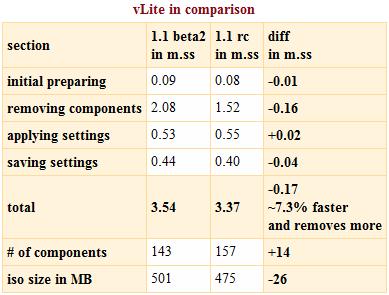
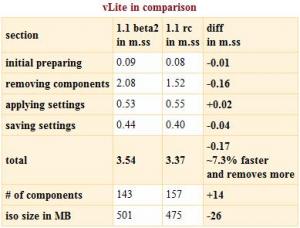
what a x-mas gift - nice :-) in case you didn't know - nuhi worked hard to improve performance of vLite even more. and making vLite over 7% faster while removing more components i call a success if you need details look at the attached image note on the attached image: the size of german mui files is larger - on v32 its roughly 10MB ... [calios] 03:58:07: read avatar signature [nuhi] 03:58:34: heh why maniac [calios] 03:59:41: well who seriously clocks this????! [nuhi] 03:59:51: hehehe [nuhi] 03:59:55: point taken ... CENSORED
-
I never had any issues with installing from USB-Stick - but there are 2 things that might be the issue for you: #1 make sure you partition your stick manually using diskpart diskpart select disk 1 clean create partition primary select partition 1 active format fs=fat32 assign exit be carefull - the disk 1 is for the usbstick - use disk list if youre not sure which is your usb-stick #2 make sure you remove all Vista DVDs from all drives before you do a reinstall - i had autounattended fail when original dvd was left in the drive. hope this helps :-)
-
hehe - nice one - Hammer - but vLite is more like a surgeon in removing - but the reduction in size you get could be called "Hammer"
-
i had to help myself once in order to test some ie thing I DO NOT RECOMMEND THIS - nevertheless it worked for me md c:\IE expand d:\iexplore.ex_ c:\IE\iexplore.exe expand d:\mshtml.dl_ c:\IE\mshtml.dll expand d:\mshtml.tl_ c:\IE\mshtml.tlb regsvr32 c:\IE\mshtml.dll then you should be able to launch iexplore.exe from C:\IE dir CAUTION!!!! the thing you will get with this trick wont be a secure browser! it will only be a workaround for you to give you more time to redo your iso - what i strongly recommend (this isnt full listing just quickhelp)
-
below 50mb - nice - i stopped at 56mb iso size beeing around 121mb installed. goind under 50mb is getting tricky and very hardware-dependant - i just say: dont rip the kernel
-
maybe a little bit off topic - but a saw the same behaviour of xp-setup tody, when i was building a new nlited cd the problem literally vanished into thin air when i freed up some diskspace on my c:\ drive - somehow cd-building with nlite was faulty (the entire process) when my c-drive ran out of storeage. i also noticed missing button-descriptions in nlite (0.99.3) untill the remove-components-dialog opened. just guessing - could framework be responsible? punishing my poor harddiskspace with this oddity?