




Everything posted by Nihility
-
I'm using a key for the public beta that I got off MSs website. They run the activation server. If MS did not want anyone using it they would set the activation server to not activate a 7022 build with the public beta key, which they did not. "This is not a warez site! Links/Requests to warez and/or illegal material (porn, cracks, serials, etc..) will not be tolerated" No links here "Discussion of circumventing WGA/activation/timebombs/license restrictions, use of keygens or any other illegal activity will also not be tolerated" No circumvention, no keygens and only your word on the illegality of any of what we're discussing about this PUBLIC beta. "and can also get MSFN in trouble" Really? trouble? You honestly believe that? The absolute worst that would ever happen is MSFN gets a lovely letter from MS to shut down whatever posts they don't like which MSFN could easily ignore because no one is doing anything illegal here.
-
Still legal, so what's your point?
-
We all have a legal license to run it... It's not cracked software.
-
Links: http://www.sevenforums.com/34884-post9.html http://forums.hardwarezone.com.sg/showpost...mp;postcount=21 This is a repair install in vista: http://www.vistax64.com/tutorials/88236-re...tall-vista.html I have no idea which upgrade you are referring to or which repair install you think you're referring to. There is no other option. edit: Maybe you got confused by the word "upgrade". I'm just talking about an "upgrade install" NOT an actual upgrade. So if you got Vista/7 Ultimate and you do an upgrade install to the same version obviously that's not an upgrade but performs pretty much the same function as a repair install.
-
That's a hell of a mess you got there I want to create toolbars like that (and like in vista) in 7 but I can't find any way to do it.
-
Someone posted about successfully updating 7000 to 7022 by doing an upgrade install. I believe it's possible since you can also do an upgrade install of the same version of vista to itself (i.e a repair install). I might give it a shot later however I don't like all the stability concerns with 7022.
-
Why has this not happened to me? Can you try to recreate the exact steps you were doing/ specific files so I can see if I have the same bug?
-
edit: I made a mess of things. In 7 you can only drag links and "pin to start menu" after which it'll be pinned to the top of the white part. However, there is a way to change the name of a folder that you don't use and use that for your own purposes: http://stuff.seans.com/2009/01/25/hijackin...-on-start-menu/ Here's how to do it in windows XP: http://www.askvg.com/how-to-use-the-free-s...-xp-start-menu/ Maybe you can figure out how to do it in vista/7 from it. (do not run the regkey)
-
I think it was done to consolidate the server and desktop version into one compatible build. While they were at it they got rid of the too long name the old one had. They did have the sense to put the shortcut icon on it so it's actually possible to figure out what the heck they did there. If you really really really want to click on that shortcut you can do it by giving yourself permissions to it in the usual way. Currently it's set to system only so programs looking for it can find it (badly coded programs, that is).
-
Because that's not a folder, it's a hard link. A link that looks like a folder for compatibility purposes. The folder is named AppData in Vista/7. Look inside the Roaming Data folder.
-
It's odd that they don't allow you to change the polling rate for the 518. See if this tutorial for 64 bit works: http://forum.overclock3d.net/showthread.php?t=8561
-
There already is a tips and tweaks thread, do we really need yet another one? http://www.msfn.org/board/index.php?showtopic=129792
-
The only version of 7022 out is x86 (32 bit). While I know for a fact you can't install the x64 version over the x86m, I'm not completely sure what happens the other way around. Generally you would insert the DVD (or mount) and choose the "upgrade" option. You would then retain all your data and programs. There have been almost no updates to the beta through windows update. 7022 fixes several bugs but also might introduce new ones. It also changes some menu's and icons and other small things, adds some new themes etc. You can find the full list of changes on win7 review sites. I've noticed several posts with complaints about 7022 breaking functionality that existed in 7000 so keep that in mind after you make the switch.
-
Sysoft virtual clonedrive and powerISO work on win7 as well.
-
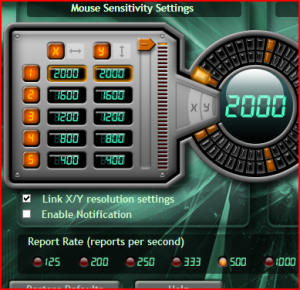
You don't have the bottom section? I suggest you download the latest setpoint and see if that fixes it. I'm running 4.7.2
-
You can't say ****? You're all forgetting that win98 (pre SE) used to BSOD like crazy.
-
I don't think you need that patch if you're running logitech setpoint. In the "game" options within the menu you have the option of setting the USB polling rate. It didn't work on 64 bit because the driver is unsigned and only signed drivers may be installed on Vista/7 x64.
-
I suggest you run msconfig and see if the installaion created a process that returns the .exe to aid the installation, as some programs do. Did you turn UAC off all the way? That's known to be buggy with some software. It causes a lot of permission problems in my experience.
-
I'm interested in knowing which programs support PAE. Any idea which do? I understand RAMDISKS are great with PAE, anything else?
-
Out of sheer curiosity, why?
-
An .exe file that returns after you delete it? Sounds like you got a virus.
-
There's a tweak to get the actual quicklaunch toolbar back. I'm not sure what happens to the winkey+number shortcut when you do. I'm not sure why you would want it back, you could just have the programs you want pinned to the taskbar. The feature I'm missing is the option to create toolbars that are separate from the taskbar and put those on the other edges of the desktop. This is how you do it: http://windows7news.com/2009/01/29/enable-...launch-toolbar/ edit: looks like that tutorial no longer works as of 7xxx: http://www.sevenforums.com/tutorials/888-q...le-disable.html
-
Rumors have been anywhere from July 09 to Jan 10. The only official date is Q1 2010 and Microsoft has no reason to change that. If they finish early (when do you ever finish an OS anyway? You can keep tweaking forever) they'll release it. Keep in mind that Windows 7 is coming out with DirectX11 which will require a lot of testing before it comes out. Right now the beta seems really close to finished but even if it's 99% finished, getting that last 1% could easily be just as much work as the previous 99%.
-
Which build? Which browser?
-
Excellent, thanks.
