Everything posted by BenjaminKalytta
-
Yes, but don't forget to specify elapse time otherwise it won't work. /autoinstall=<time> Benjamin
-
No, thx Next time just show entire command line But hey, great to find this bug. The less the better. I've learned from this bug not to add global things into local window procedure ... I said this /SkipXxx switches are critical benjamin
-
wihu.exe /SkipSettigns /SkipRestart /ini-test.ini should be wihu.exe /SkipSettigns /verbose /SkipRestart /ini=test.ini To test it. And if /SkipSettigns is used, I found out that environment isn't loaded. (because settings is skiped ... but I changed this because it is confusing) Please just redownload this exe and test it again ... don't forget /verbose switch. benjamin
-
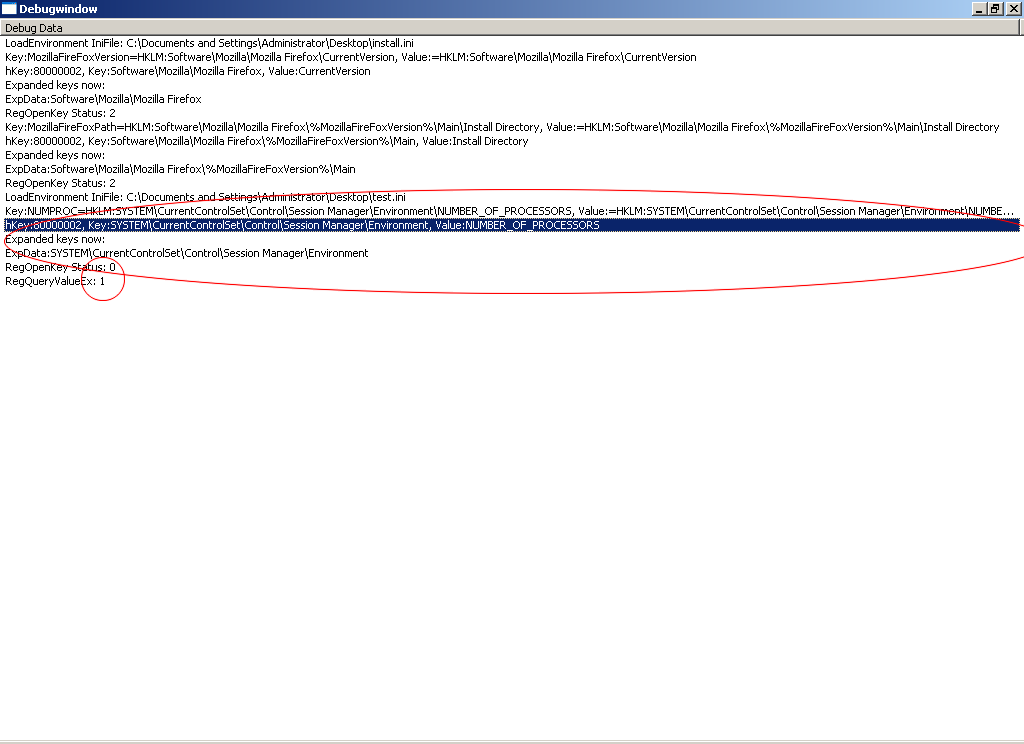
Did you load your test.ini for example? May I get access to your system with "Windows Remote Desktop"? I can't imagine why this could happen. Are there 2 debug windows opened or did you start wihu twice? It should show something like this:
-
@Alanoll: Please try this one and send me a screenshot of this debug output. (Please use /verbose switch) Benjamin
-
Tested again, an no problem here ... very strange. I'll create a very verbose wihu.exe to show detailed information which may be helps me to find the problem. Benjamin
-
Yes thats my pause.cmd: @echo %1 pause You say this will not work at your system? May be you are using some old version of WIHU ... please redownload it again. Or may be you are using an invalid (old) pause.cmd from somewhere else. benjamin
-
It works here: 1 D:\Entwicklung\wihu\2.0\Release>pause Please press any key . . . You mean starting this in GuiRunOnce don't work? Btw. this environment variables are only valid while wihu is running. Btw2: Which GuiRunOnce do you mean ... this in winnt.sif (unattended installation) or windows autoistart key RunOnce (RunOnceEx) ? Please describe how you did start WIHU, and which switches are used. Benjamin
-
@Alanoll: NUMPROC=HKLM:System\CurrentControlSet\Control\Sesion Manager\Environment\NUMBER_OF_PROCESSORS ... is misspelled ... should be "Session Manager" ... than it works. Btw. why don't you use exsiting environment variable NUMBER_OF_PROCESSORS? @Osmosis Jones: As I said, may be in future I'll use XML. Benjamin
-
It don't let me sleep not be able to a create user which name is identical to computer name. I researched a bit and find a solution for that ... is possibel again in future ... without error I'll rewrite software component list code now. I don't use XML yet, but instead I'll allow sub command (3 levels instead of 2). Ini file syntax will be: [section] description.0="command 1" command.0=... subdescription.0.0="sub command 1" subcommand.0.0=... subdescription.0.1="sub command 2" subcommand.0.1=... subdescription.0.2="sub command 3" subcommand.0.2=... description.1="command 1" command.1=... which will be showed as: Section "command 1" "sub command 1" "sub command 2" "sub command 3" "command 2" @Alanoll: I'll try to find the problem. Benjamin
-
@simo1234: If the section only has one command (which is hidden) entire section will disappear. WIHU will not hang, but WIHU waits for nero to exit. It means nero never exits which causes WIHU to wait. Just start both manually in command line and take a look at the taskmanager ... Nero shouldn't be terminated ... (stay resident) Benjamin
-
You can't start a batchfile directly. This may work in already installed Windows, but not after newly installed windows. Please use "cmd.exe /c pause.cmd %NUMPROC%". I tested it and it works fine. Benjamin
-
Ok I found it. Some time ago I added /RestartWait=<seconds> switch which allow to specify WIHU to wait for specified amount of time to restart. Unfortunately Windows didn't behaves as expexted, i.e. PropSheet_PressButton(GetParent(hWnd), PSBTN_FINISH); don't call PSN_WIZFINISH notification so that restart didn't work. Please redownload it, it works now ... I've tested it Intention of /AutoExit=<seconds> was only not to interrupt unattended windows installation if no user input is made. This switch is a remnant (leftover) of one of the first WIHU releases where /autoinstall didn't exists yet. Edit: Some words to tree structure: As I said it will take some time because I've to rewrite entire INI things to be XML ... and believe me handling XML files in C (language) isn't that easy to program. I also have to rewrite software component selection control to allow tree structure. Benjamin
-
@Alanoll: I said that before. This /SkipXxx settings will make life harder I fixed this bug now. /Autoinstall=<time> will now exit by it self. Yes this is intended. I've to do some research to clarify Restart thing. Benjamin
-
@Osmosis Jones: Example: [This Section, Winrar for example] command.0=blabla description.0=Installing Winrar selected.0=1 command.1=blabla description.1=Registering Winrar selected.1=1 hide.1=1 You will only see first command in software component list. If you uncheck it there it will NOT uncheck command.1 because it is hidden and will always be executed. May be I could change it in this way that also hidden entries will be unselected if section is unchecked. Benjamin
-
@all: I fixed this bug in this way that user will be warned if computername and user name are identical. No seems not to be true. Creation of both works well but I've got a problem later to retrieve user SID which will prevent me to call NetLocalGroupAddMembers (adding user to local group).Why don't you use /skiprestart switch to prevent restarting in combination with /autoinstall=0? /Autoexit=<time> should terminate WIHU if no user input is made within specified time. I think I know what you mean. You don't want to press "Finish" Button but also don't WIHU to do auto install ... in this case just specify /autoinstall=3600 or such which will causes to wait 1 hour for input and then do auto installation. If you cancel this autoinstallation by pressing any key, or mousebutton ..., it will then exits without waiting for "Finish" to be pressed. Benjamin
-
Update: The bugs seems to be following: If the username created is the same as the computer name, Windows will not find the right USER SID ... i.e. adding user to administrators/users group is not possible. So I have to ensure in WIHU that username and computername is different. What is special using a tree structure, I can't understand this. I don't understand this, please explain it a bit in detail. I always run WIHu in GUIRunOnce and everything works fine. I initially added restart button to ensure that newly created user will be logged on after installation, which requires restart. Benjamin
-
Please note: I just did unattended installation test and find out that new created user didn't moved to any group (no administrators/users) ... which means user has no privileges. I don't know yet why this happens or if this always happens. In Windows everything works fine ... I've to find it out soon. @Alanoll: Thx btw. for the ini files. If I've found the bug I'll test it. Benjamin
-
@all: I added %SRCDRIVE% environment variable which points to installation source (CDROM) drive. It is also available at command line. Was no bug ... refixed it Great! Please can someone share their install.ini with me ... cause I'll also create an unattended CD. Would be nice to use exsiting tested install.ini Benjamin
-
@Alanoll: indeed there was a bug in %WIHU% variable (wihu.exe was not removed from path) ... but don't know if this causes your problem. I added /verbose swtich, please try it with this switch. Each expanded command will be listed then. Benjamin
-
@all: I fixed a minor bug in registry key version comparison (only > and < comparison). @Alanoll: Wihu will start setup.exe, but it then is up to the setup.exe to find the correct path. I added %WIHU% for this purpose, may be it helps. As environment variable you can specify those predefined by windows (yes %WINDIR% should work) and those which are specified in [environment] section also users.ini specified shellfolders (for each user only, not global). %WIHU% points to the path of WIHU application directory. This can also be specified in command line. Benjamin
-
%KEY%?="Hitachi" compare against "Hitachi" string (case sensitive), and if found it will install software (select it in software component list for example) and %KEY%?!"Hitachi" will install software if key is not "Hitachi". Benjamin
-
Could someone test it please in unattended installation with some users in users.ini? -What I want to know is if each user is created (should be) -If each shellfolder specified in users.ini is created (should be) -If new created user can login also if NO user password was specified. Thx Benjamin
-
@midiboy: I decided to add user specific shell folders. Add this in users.ini like "My Video.0=path" as in install.ini. users.ini shell folders overrides install.ini's global environment which will be used as default if no user specific shellfolder is set. @Cretak: Autoscroll was added. I also fixed some critical bugs. Benjamin
-
Please redownload the wihu zip file. I'v listed all status flags there now. Benjamin