kahlil88
Content Type
Profiles
Forums
Events
Everything posted by kahlil88
-
New user account sort of fixed the problem. Most files could be moved, renamed, etc without issue but several were still giving me UAC prompts. Ended up doing a clean install and no more errors, but with my luck I'll probably encounter the issue again down the road :P
-
Someone brought me a Win 8 system that gives a UAC prompt when moving files within the user directory, say from Pictures to a subfolder or the Desktop. It would seem ownership/permissions have been screwed up. I ran the Tweaking.com repair tool to reset permissions (only option was the entirety of C:\ so it took forever) and it seemed to fix the problem temporarily, but must have un-fixed after a reboot. Malware scans are coming up clean, starting to suspect the user account has been corrupted but need a second opinion.
-
Couldn't find a way to contact him on GitHub but I sent him a private message on Voat.
-
I've had great luck with the aegis tool mentioned in the original post. No longer being maintained due to some beef the creator has with Voat, which is a strange place for it. Perhaps someone wants to invite him over to this thread?
-
Is there a command or tool for blacklisting updates without waiting literally HOURS for Windows Update to just give the list of what's available and manually hiding them?
-
Just did a clean install of Windows XP Pro SP3 on an older HP laptop...it's got at least a 2GHz P4 and less than 512MB of RAM (will have to post back with the exact amount). Nevertheless, I was able to reduce memory usage by disabling non-critical services, and it runs great until the svchost process suddenly overloads the CPU and I have to terminate it in task manager. I understand svchost is a service host process, which leads me to wonder if tweaking the services is what created the problem in the first place. It's weird though, because I've done it on a dozen machines with great results and never once had this problem. Is there a way to see which particular service is causing this CPU overload, or a fix that I'm unaware of?
-
Setup doesn't detect hard drive
kahlil88 replied to kahlil88's topic in Unattended Windows 7/Server 2008R2
without further details, normally implies that the replacement hard disk was a brand new, unpartitioned and unformatted one. The evolution of the thread seems to imply - strangely enough - that not only the "replacement" hard disk was an used/recycled one, but also an "untested" one . Additionally, the "replacement" disk evidently had some failure of some kind (of whatever extents/relevance cannot obviously say) as besides being partitioned/formatted it was left with the filesystem in a "dirty" state. If the disk was actually replaced under warranty I would - before anything else - question the provider of the warranty, give them back the "replacement" hard disk and downright require a brand new (in a sealed box) hard disk or a refurbished AND certified one (depending on what the warranty covers, and how it covers it). Pretty sure I partitioned and formatted it beforehand, however this machine was having some odd power issues and I may have unplugged it on my first attempt not knowing that it wasn't recognizing the battery, thereby flagging the partition as dirty. -
Setup doesn't detect hard drive
kahlil88 replied to kahlil88's topic in Unattended Windows 7/Server 2008R2
Ah, solved it. Booted into Linux and discovered there was a dirty NTFS partition, so I reformatted and now it's installing. Still, it seems like setup should at least show me the partition layout. -
Setup doesn't detect hard drive
kahlil88 replied to kahlil88's topic in Unattended Windows 7/Server 2008R2
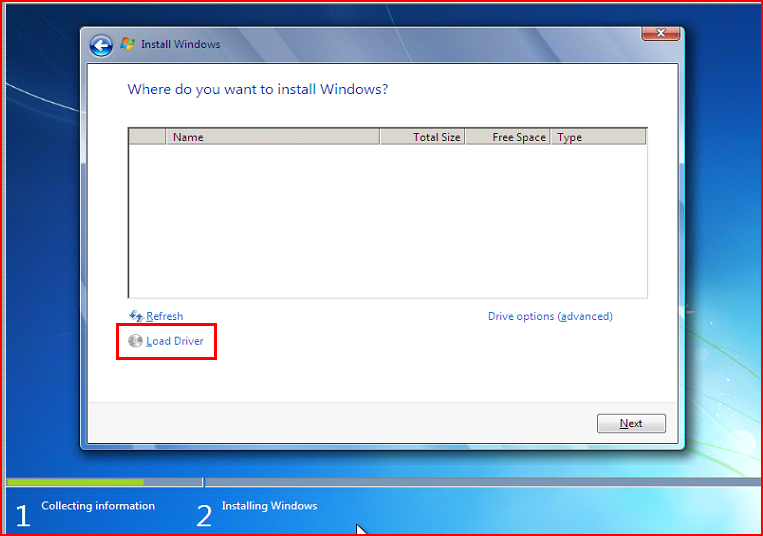
The window that asks where to install the operating system has a "Load Driver" option below the (empty) list of hard drives. I extracted the SATA AHCI drivers to a flash drive but since they are unsigned, it won't allow me to install them.
-
Setup doesn't detect hard drive
kahlil88 replied to kahlil88's topic in Unattended Windows 7/Server 2008R2
Yes, I tried that one and a driver direct from Intel. That article assumes that Window is already installed, but I'm getting stuck at the initial OS install. I'm installing Windows 7 from a flash drive, is it possible to modify boot options for setup to allow unsigned drivers? -
Trying to do a clean install of Win7 x64 on an Acer Aspire 8951G for a friend whose hard drive crashed and was replaced under warranty. Stuck at square one, however, since the installer refuses to see the hard drive. I've tried setting it to IDE mode in the BIOS and attempted to install the Intel SATA drivers from within setup, which gives me unsigned driver errors and won't allow me to force install.
-
Technically the system requirements specify 32MB minimum, 128MB recommended. In my experience, Win2k runs pretty decently on that amount of RAM (unless you try to run the newest Firefox or LibreOffice) but it's definitely worth checking which services can be disabled to really make it fly.
-
Had to use Dam Small Linux since this Compaq Armada 3500 has only 128MB of RAM. I tried to USB boot with PLOP, which I have on floppy and the UBCD but it just locks up. Thanks for the feedback, I'll have a look at those links.
-
Trying to upgrade a customer's laptop from Windows 98 to 2000. I got past the initial pre-setup stage, but when it reboots to the actual setup to copy files from the disc, it won't read ANY of them and I keep getting "setup cannot copy the file..." errors. I booted into Linux and copied the contents of the install CD from a flash drive to a folder on the hard drive but it doesn't give me the option to select it as the source. So I need some kind of no CD workaround, perhaps just re-creating the directory the setup files get copied to and just telling it to skip when it gives an error.
-
Here ya go.http://dl.dropbox.com/u/20800787/Vista_Logs.zip
-
Trying to install system updates on a machine running Vista Home Premium and getting error 80070490 during the SP2 update. A quick Google search brought me to the Update Readiness Tool, but even after that installs successfully I get the same error when attempting to install SP2. I tried resetting Windows Update with Tweaking.com Windows Repair hoping to see some missed prerequisites show up but nada.
-
I just did a "quick and dirty" hard drive clone, in other words the machine had a failing hard drive and normal cloning software (HDClone and Clonezilla) couldn't clone it, which only left me with the option of copying the files to an NTFS partition on the new drive. It's booting but unfortunately this method has broken some system shortcuts, such as "All Users" and "Default User" in the C:\Users directory, as well as the ones in user directories (Cookies, Application Data, Local Settings, Start Menu, NetHood, etc.). Is there any sort of utility or Windows function that can automatically repair these?
-
"Insert your Windows XP Professional CD2 now."
-
At one point SFC asked me for XP Pro SP2 and took the disc no problem, but at the very end of the scan it wants XP Pro CD2. Doesn't specify a version and I've tried single DVD as well as two-CD sets of MCE.
-
Yes, I was referring to a system running MCE 2002 that has been updated to SP3. It seems a bit odd that it would ask for the original disc instead of just accepting one with newer versions of the system files.
-
The most recent machine I'm getting stuck on is running version 2002 with SP3.
-
It seems every time I run system file checker (SFC) on a machine running Windows Media Center, at some point I get prompted to insert "Windows XP Professional CD2" which to my knowledge doesn't exist. I've tried various XP MCE discs as well as XP Pro discs and it rejects all of them.
-
Did a virus removal on a netbook that came into the computer repair shop I work at. Can't get online because the DHCP Client service won't start: Error 1075: The dependency services does not exist or has been marked for deletion. The machine is running Norton Internet Security and a quick look at the logs showed it had removed an infected TDX.SYS file shortly before they brought it in for repair. Looked at the event log and saw that Tdx was the specific dependency service it's stumbling on. The file was still in C:\Windows\System32\Drivers so I deleted it and ran System File Checker but it still fails to start DHCP.
-
I'm getting errors in Messenger saying that I need to install the latest Adobe Flash (I have 11.1 installed). When I click "install" it takes me to a broken download page for Flash 10. Webcam seems to still work though it warns I may lose functionality if I don't "upgrade". Any solution or do I just have to press cancel every single time I run the program?
-
Just did a clean install of Windows XP Pro SP3 on an IBM ThinkPad that was previously having boot problems. Suddenly it's been freezing any time I shut it down -- at the "Windows is shutting down" screen. Shuts down just fine in Safe Mode, and the hard disk passed a SeaTools long test, which should effectively rule out a hardware problem. My thought was that it might be one of the IBM programs or maybe a bad driver?