RUSerious
Content Type
Profiles
Forums
Events
Everything posted by RUSerious
-
I'm stuck with Removable since no firmware available for my SanDisk Extreme for flipping that RMB bit. Also, there is supposed to be a way to do this, from what I understand so far, via an image of 8.1 WTG. Here: http://reboot.pro/topic/19868-ultimate-super-smart-secret-removable-usb-drive-with-mega-booting/#entry186023
-
Very nice installer. Did a search of this topic for "Windows to Go" in quotes, but only got the top post, where it says "Support "Windows to Go" for Windows 7 and later installs". Don't see any options for creating a Windows to Go install. How does WinNTSetup do this? Will WinNTSetup create a Windows to Go install on a 'removable' stick drive? The "Windows to Go" creator -- via Win8.1's Control Panel -- will not do this on 'removable' stick drives. Thanks
-
Thanks for the link. Another great little app from Nirsoft. MS had to have known that ppl would want access to those locations and do the next logical thing. Maybe MS meant this as kind of a practical joke...
-
Great Tip: A quick way to find and open the real folder you are looking for is to do a search for that folder. All the "links" to that folder will show up in the search, plus the real thing. Right drag a shortcut of the real thing (in the search results) to wherever you want to have real access to that folder from.
-
Those first links were great. Thanks for addititional links. This is a good thing to discover early on in one's win7 usage. Looks like win8 is the same way. Thanks again.
-
Was wondering why I kept getting shuffled from one shortcut to another -- with some needing "ownership".
-
Thanks for the great links jaclaz. I added "Application Data Loop" to the title.
-
I'm new to win7, so sorry if this is normal for this OS. Mentioned the stuff about number of users, reg imports, and themes since didn't know if relevant. Just trying NOT to get off to a messed up start with win7 Thanks
-
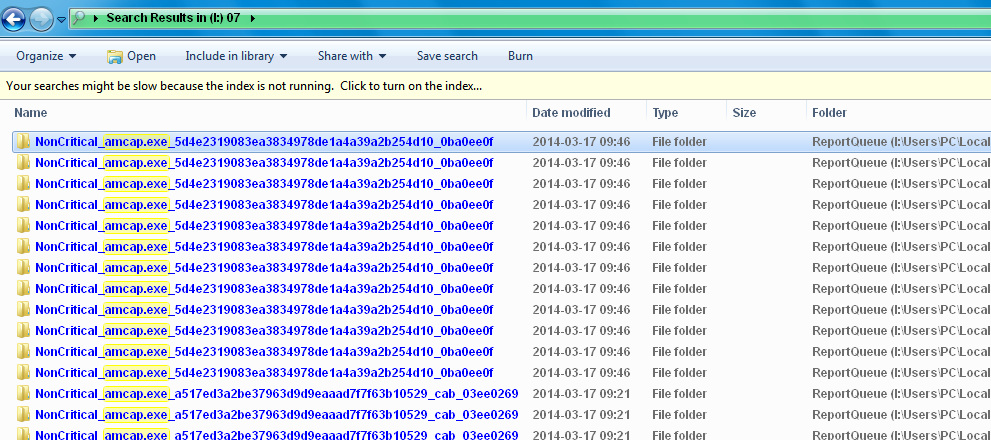
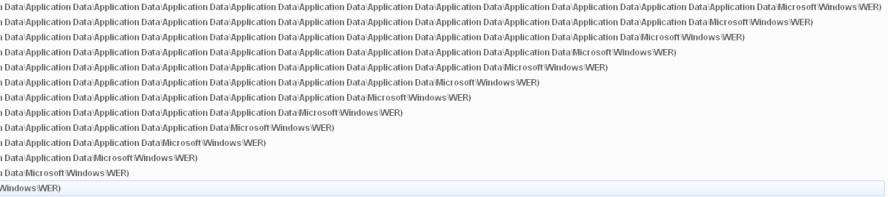
This pic is the left side of some of the same search results: Also attached one of the Report.wer files and they all appear to be the same (if created at same time). Added txt ext to be able to attach here. Thanks Report.wer.txt

-
Oppened the win7 root (I) and used the search box in upper right corner of that root window. Searched for that app and got the result pictured (details view of search results). Better pic uploaded showing the folder column of details view. I was trying to keep the pic small -- sorry for the lack of detail. I assumed that WER folder is for Windows Error Reporting (WER). Yes all on that volume -- hopefully better pic will show this. Thanks
-
Still have XP on my boot partition. Win7 installed to an extended partition (same hdd). Both 32 bit. Working with only one win7 account for now -- the admin -- to keep simple as possible. And there is only one account if I log on ' off. In process of transferring apps ' settings to win7. Tried to do reg imports into current user, but not picked up by win7. Tried a theme from MS site, but installed in I:\Users\PC\AppData\Local\Microsoft\Windows\Themes not in I:\Windows\Resources\Themes Was having trouble with one app in win7 (not imprtant, will junk it) so did a search on win7 partition and got this bazarr result of redudnent entries -- see pic. And that is just for one error report. This is the kind of junk I would include in a batch file cleaner, but there is obviously something wrong here. This all seems really scitzoid. Did I do something to my win7 install that needs to be fixed? Any clues? Thanks
-
Yes, but why 2 winbuilder versions? Is there some advantage to one over the other? I'm guessing one helpfile is for one version, and the other for the other (hard to tell which). ... this is likely obvious to someone keeping up with Winbuilder, but discouraging for others.
-
This looks like an awsome project; but a simple readme file would be nice. For starters: What are the different versions used for? Thanks
-
Ask your Seven xml ? here
RUSerious replied to maxXPsoft's topic in Unattended Windows 7/Server 2008R2
I also had added that short 3 line <DiskConfiguration> section to the <settings pass="oobeSystem"> and I think that was causing some problems when it got to "Setup Is checking video performance". Using VMware Player and finally got it to finish after a few modifications. Should have just left it out completely, but didn't want to take the chance of not having the choice. I don't know why I had everything in both 32 & 64 bit. I used WinToolkit to make it and must have missed a setting somewhere. @DosProbie Sorry, but don't understand what the code above is meant to show? Thanks for the replies. -
Ask your Seven xml ? here
RUSerious replied to maxXPsoft's topic in Unattended Windows 7/Server 2008R2
Just trying to keep this thread clean. Added the DiskConfiguration before the Display (both places, x86 & amd64): <DiskConfiguration> <WillShowUI>Always</WillShowUI> </DiskConfiguration> <Display> And there are no lines in my Autounattend.xml file for CreatePartitions or Wipe. Thanks edit= Trying to install Win7 Ultimate 64bit -
Ask your Seven xml ? here
RUSerious replied to maxXPsoft's topic in Unattended Windows 7/Server 2008R2
Hopefully a couple simple questions: Exact lines needed in the Autounattend.xml file to make sure I can choose which partition to format & install to. Want to install to a partition other than my first partition and make sure that other partitions are not formatted. Are these the only lines needed, and where placed?: <DiskConfiguration> <WillShowUI>Always</WillShowUI> </DiskConfiguration> Are there any disk wipe options I can search for in Autounattend.xml to make sure the disk wipe options are not set yes or set off? The "off" settings needed or just remove? When I use VMware Player to install, it seems to not give a choice; but then it only has one “Virtual HDD” it is installing to and seems to be doing its own install thing (also asks for license key). Thanks -
WLnotify.DLL, Mounted Devices, Boot Sector
RUSerious replied to RUSerious's topic in Unattended Windows 2000/XP/2003
Thanks for the great info jaclaz, I now have a migrate.inf folder… :<) And some studying to do. The only other info I had on migrate.inf is that it needs to be removed as part of a source reduction process. If I wanted to put both install and PE on the same CD (my next goal), would relying on migrate.inf cause problems? Thanks -
WLnotify.DLL, Mounted Devices, Boot Sector
RUSerious replied to RUSerious's topic in Unattended Windows 2000/XP/2003
Hey jaclaz, >>How are the HD(s) partitoned formatted? >>Which partitions are Active/Primary, which ones are Logical Volumes inside Extended? 2 HDDs (0 & 1), 4 partitions each (1,2,3,4), ALL Primary, ALL NTFS. I use these volume labels: 01,02,03,04 &11,12,13,14 (C,D,E,F,G,H,I,J). 01 = System, 02 = Page File, 11 & 13 = used for test installs and XP makes active whichever one it installs to. Use boot.ini to choose which one I try to boot to. Fresh install on 13, installs & boots the same as 01. Fresh install on 11, appears to install fine, but boots to a “load user / log off loop”. >> How is the MountedDevices key loaded/generated/what it contains? This reg is imported to the fresh install on its first boot via a RUNONCE batch file. This batch file also defines Page File location AND ends with a restart. MountedDevices key (HKEY_LOCAL_MACHINE\SYSTEM\MountedDevices) is exported from 01 (System) and trimmed down to a minimum needed to get desired letters (USB & CD-ROMs left in, so likely could use less). >> what it contains ########### Windows Registry Editor Version 5.00 [-HKEY_LOCAL_MACHINE\SYSTEM\MountedDevices] [HKEY_LOCAL_MACHINE\SYSTEM\MountedDevices] "\\DosDevices\\Q:"=hex:bf,4e,dc,ea,00,7e,00,00,00,00,00,00 "\\DosDevices\\A:"=hex:5c,00,3f,00,3f,00,5c,00,46,00,44,00,43,00,23,00,47,00,\ 45,00,4e,00,45,00,52,00,49,00,43,00,5f,00,46,00,4c,00,4f,00,50,00,50,00,59,\ 00,5f,00,44,00,52,00,49,00,56,00,45,00,23,00,36,00,26,00,32,00,38,00,35,00,\ 37,00,65,00,35,00,32,00,31,00,26,00,30,00,26,00,30,00,23,00,7b,00,35,00,33,\ 00,66,00,35,00,36,00,33,00,30,00,64,00,2d,00,62,00,36,00,62,00,66,00,2d,00,\ 31,00,31,00,64,00,30,00,2d,00,39,00,34,00,66,00,32,00,2d,00,30,00,30,00,61,\ 00,30,00,63,00,39,00,31,00,65,00,66,00,62,00,38,00,62,00,7d,00 "\\DosDevices\\L:"=hex:5c,00,3f,00,3f,00,5c,00,49,00,44,00,45,00,23,00,43,00,\ 64,00,52,00,6f,00,6d,00,43,00,79,00,62,00,65,00,72,00,44,00,72,00,76,00,5f,\ 00,43,00,57,00,30,00,36,00,38,00,44,00,5f,00,43,00,44,00,2d,00,52,00,23,00,\ 52,00,57,00,5f,00,5f,00,5f,00,5f,00,5f,00,5f,00,5f,00,5f,00,5f,00,5f,00,5f,\ 00,5f,00,5f,00,5f,00,5f,00,5f,00,5f,00,31,00,35,00,30,00,44,00,5f,00,5f,00,\ 5f,00,5f,00,23,00,35,00,26,00,33,00,35,00,63,00,36,00,63,00,61,00,31,00,31,\ 00,26,00,30,00,26,00,30,00,2e,00,31,00,2e,00,30,00,23,00,7b,00,35,00,33,00,\ 66,00,35,00,36,00,33,00,30,00,64,00,2d,00,62,00,36,00,62,00,66,00,2d,00,31,\ 00,31,00,64,00,30,00,2d,00,39,00,34,00,66,00,32,00,2d,00,30,00,30,00,61,00,\ 30,00,63,00,39,00,31,00,65,00,66,00,62,00,38,00,62,00,7d,00 "\\DosDevices\\K:"=hex:5c,00,3f,00,3f,00,5c,00,49,00,44,00,45,00,23,00,43,00,\ 64,00,52,00,6f,00,6d,00,43,00,4f,00,4d,00,50,00,41,00,51,00,5f,00,44,00,56,\ 00,44,00,2d,00,52,00,4f,00,4d,00,5f,00,47,00,44,00,2d,00,32,00,30,00,30,00,\ 30,00,5f,00,5f,00,5f,00,5f,00,5f,00,5f,00,5f,00,5f,00,5f,00,5f,00,5f,00,5f,\ 00,5f,00,5f,00,5f,00,5f,00,5f,00,5f,00,30,00,30,00,35,00,36,00,5f,00,5f,00,\ 5f,00,5f,00,23,00,35,00,26,00,33,00,35,00,63,00,36,00,63,00,61,00,31,00,31,\ 00,26,00,30,00,26,00,30,00,2e,00,30,00,2e,00,30,00,23,00,7b,00,35,00,33,00,\ 66,00,35,00,36,00,33,00,30,00,64,00,2d,00,62,00,36,00,62,00,66,00,2d,00,31,\ 00,31,00,64,00,30,00,2d,00,39,00,34,00,66,00,32,00,2d,00,30,00,30,00,61,00,\ 30,00,63,00,39,00,31,00,65,00,66,00,62,00,38,00,62,00,7d,00 "\\DosDevices\\C:"=hex:6f,92,6f,92,00,7e,00,00,00,00,00,00 "\\DosDevices\\D:"=hex:6f,92,6f,92,00,ba,f8,4c,00,00,00,00 "\\DosDevices\\E:"=hex:6f,92,6f,92,00,46,4a,6f,00,00,00,00 "\\DosDevices\\F:"=hex:6f,92,6f,92,00,c0,96,a7,01,00,00,00 "\\DosDevices\\G:"=hex:75,62,b1,22,00,7e,00,00,00,00,00,00 "\\DosDevices\\H:"=hex:75,62,b1,22,00,88,17,60,00,00,00,00 "\\DosDevices\\I:"=hex:75,62,b1,22,00,08,78,7f,00,00,00,00 "\\DosDevices\\J:"=hex:75,62,b1,22,00,90,8f,df,00,00,00,00 ########### >> Have you tried with migrate.inf? I searched my build folders and could not find any migrate.inf file. Does nLite use anything like that? Thanks -
WLnotify.DLL, Mounted Devices, Boot Sector
RUSerious replied to RUSerious's topic in Unattended Windows 2000/XP/2003
I realize this is long past where Boot Sector comes into play, but it almost acts like its booting to the wrong set of files: like it can't find the profile it's looking for. Any ideas? -
Currently have an XPPro UA that installs flawlessly on both first partition of first HDD and third partition of second HDD. When attempt to install on first partition of second HDD (with first partition of first HDD install in place), I get a boot to that fresh install that has a long delay when it gets to WLnotify.DLL and then gets into a loop where it appears to be trying to shut down. This UA imports a fresh Mounted Devices key at first RunOnce to reset drive letter order. Could this Mounted Devices key not be importing soon enough for the first partition of the second HDD? I've tried loading that hive and replacing its Mounted Devices key, but same result. OR Could this have something to do with first partition of the second HDD having no First Sector Boot Sector files? OR Maybe a problem with bad sectors being used after the install format? Any ideas?
-
The second workaround is about keeping a backup of your updated I386 (before experimenting with component removal) and thus have an easy way to start over with another set of experimental settings / removals (or any one of your many custom cumulative session files). Yes, if one has a good archiver that can extract their I386 from an ISO, then making an ISO of your updated I386 (before experimenting with component removal) would be a good way to back up your updated I386. Some also use their archiver to zip their updated I386 and have reported that extracting this I386 from zip is faster than copying it.
-
Added Tip For fresh build from your latest main cumulative preset, you only need replace your I386 folder with I386 from your updated backup. And if you only need your native language, you can also clear out your updated\I386\LANG folder – will save about 100 MB of copying.
-
The first thing you ask people to do is a keyword search -- something that should of course be second nature. Yet your search page http://www.msfn.org/board/search.html is NOT nearly as user friendly as it should be. At a minimum, the required syntax could simply be noted on that page. Better, have a tick box to Include ALL -- which many might assume, but NOT true. Best, have text boxes for Any, Include, Exclude, Exact Phrase. Worse than all the above options is to have to enable scripting to see the syntax required. Which is what msfn does.
-
There is close to 200 MB needed for this .NET BLOAT, not to mention what it does to your registry. For the sake of all the added time for regular maintenance, .NET BLOAT should be avoided (unless you really have to have it).
-
This would be a nifty little tool if it didn't require the huge overhead of .NET ... Thanks for the warning.