mikep56
Content Type
Profiles
Forums
Events
Everything posted by mikep56
-
Unwanted Search Engine Hijacked My 'home' Button In Firefox
mikep56 replied to mikep56's topic in Networks and the Internet
Hi submix8c, Yes it took a lot of cleaning up and following your links. Thanks for your help! Regards, Mike -
Hi All, An unwanted search engine has hijacked my home button in Firefox 28.0 running on Windows XP SP3. I removed the rogue (Search conduit) from the 'manage search engine' dropdown, but if I hit the home button on the navigation bar, the browser still takes me to search conduit. Any ideas on how to rid myself of this PITA? Thanks for any answers in advance. regards, Mike
-
Hi puntoMX, Quote from original post: "There was a yellow question mark and exclamation mark next to the "Audio device on High Definition Audio Bus" and an entry for NVIDIA HDMI Audio is missing, which is present in another PC that I have using this same exact mobo. I tried to reinstall the drivers from the manufacturer's driver disk, but the "Audio device on High Definition Audio Bus" still has the yellow marks, and the NVIDIA entry is still missing." So somehow it appears that the HDMI audio has been damaged on the mobo. This alternate setup works just fine, and I don't need to trash an otherwise serviceable mobo. Regards, Mike
-
Hi Tripredacus and puntoMX, The solution is simple and as is so often, a human screwup. The line out audio goes to the audio input jacks labeled SA-SA/CD on the multimedia receiver, and DVD is selected as the video source and SA-SA/CD as the audio source, and all is well. Thanks for both of your responses. Mike
-
Hi puntoMX, Thanks for the info. I will try again this weekend and report back. Thanks again. Mike
-
Hi Tripredacus, I am pretty sure that I had the audio cables correct, but I will try again...probably not till next weekend. Thanks for the response. Mike
-
Hi All, I have used these forums extensively in the past for both questions and answers, and this time I have a problem. I have used this same motherboard in 3 PCs, so I have something to compare with. I have a TF7050-M2 motherboard that I am using to watch ripped DVDs. This is my HTPC system. The system has Windows XP3 w/SP3 and WinDVD to watch movies. The way my home TV system is set up is via a multmedia receiver and switching system that selects satellite (SAT), DVD (DVD), Blu-Ray, etc. sources and sends the video and audio to the TV. The HTPC in has a 500GB internal HD. I recently removed the PC from it's setup to add an external USB hard drive to it for more storage. When I went to replace the HTPC, the videos were displayed properly, but there was no audio. Now comes the tricky part. I tried different settings for the audio because I didn't remember exactly what the audio settings were. My nephews who watched a lot more movies than I did said that when they set it up the way they remember, there was still no audio. The HTPC connected to my multimedia receiver with an HDMI cable and 2 RCA cables. The receiver was set to "DVD" to watch the HTPC. I removed the PC to my workbench and opened up Device Manager. There was a yellow question mark and exclamation mark next to the "Audio device on High Definition Audio Bus" and an entry for NVIDIA HDMI Audio is missing, which is present in another PC that I have using this same exact mobo. I tried to reinstall the drivers from the manufacturer's driver disk, but the "Audio device on High Definition Audio Bus" still has the yellow marks, and the NVIDIA entry is still missing. So my questions are: 1) Is the motherboard defective? I still have audio coming out of the "line out" connector, which is the one that is connected to the 2 RCA plugs via a stereo plug to RCA adapter. 2) Does the HDMI cable carry audio and video, or just video? If just video, then maybe I haven't stumbled onto the correct settings yet to get the audio output. 3) If the mobo is defective as far as the "High Definition Audio Bus" is concerned, will a discrete sound card work? And if so, what kind would I need? Sorry for being long winded and jumping around topics. Any help and comments are welcome. Thanks. Mike
-
Hi submix8c, Thanks for the links; I will check them out. Regards, Mike EDIT: Hi submix8c, It is because of the new version of facebook, it is a new "feature". Thanks for your time. Mike
-
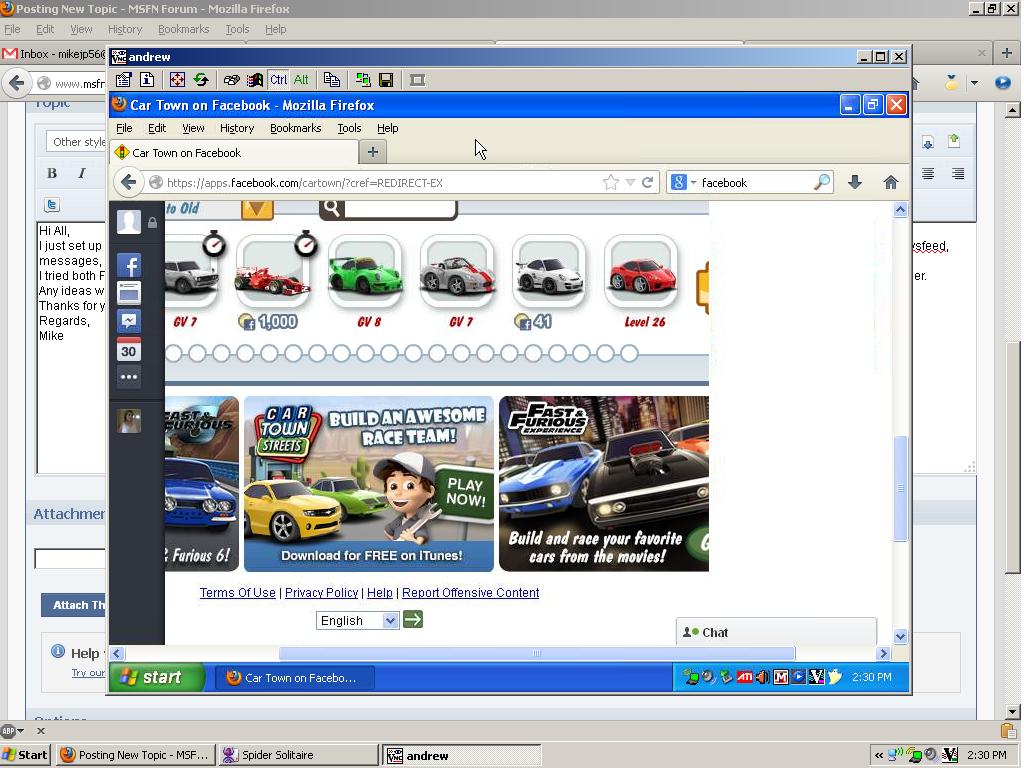
Hi All, I just set up Facebook on my nephew's PC running Windows XP Pro SP3. When he runs Facebook the left hand side has a gray bar with icons for Facebook, newsfeed, messages, events, etc. On mine the left hand side is white with icons and words for newsfeed, messages, events, etc. I tried both Firefox and Chrome browsers, but I cannot find a setting for this. I also changed screen resolutions hoping to fit it on the screen, but this didn't fix it either. Any ideas would be helpful. I have attached a jpg of the screen capture. Thanks for your time. Regards, Mike

-
Maximum hard drive size for my motherboard?
mikep56 replied to mikep56's topic in Hard Drive and Removable Media
Hi dencorso, I have 6 PCs running Windows XP Pro. Long live XP! Mike -
Maximum hard drive size for my motherboard?
mikep56 replied to mikep56's topic in Hard Drive and Removable Media
Hi dencorso, Thanks for the explanation. It is exactly what I was looking for. I have a PC in our den that my nephews watch movies that were ripped to. The HDD in it is getting full, and I just wanted to add the largest one that it would recognize. Thanks again for your help. Mike -
Maximum hard drive size for my motherboard?
mikep56 replied to mikep56's topic in Hard Drive and Removable Media
Hi dencorso, Thanks for the info; where did you find that? Regards, Mike -
Maximum hard drive size for my motherboard?
mikep56 posted a topic in Hard Drive and Removable Media
Hi All, I have a TF7050-M2 motherboard running Windows XP Pro SP3. This PC is rock solid, although it is 5 years old. It has a 500GB SATA hard drive that is getting full, and I want to add a few more HDD. This mobo has both SATA and IDE controllers. I have the manual and have read it from cover to cover several times, but I cannot find the answer to my question: What is the maximum hard drive size (per HDD) that will be recognized by this motherboard? I checked the website and about all it has is the manual that I have. Any help would be appreciated. Regards, Mike -
Hi Ponch, Yeah, me too. Nothing worse than a problem that should be simple to solve that just won't go away. Regards, Mike
-
Hi Guys and Gals, Sorry that I was away from this for a while; there were other things more pressing to take care of. Anyway the problem is solved. I installed Sumatra PDF as recommended by erpdudeB and GrofLuigi. The problem was persisting, but then I checked under Tools, Add-Ons, and I had PDFDownload 3.0.0.2 also installed. I changed the settings for "When Opening PDF Files" from "Use this viewer", which was pointing to Adobe Acrobat 7, to "Use PDF Plug-In". and now the browser opens the pdf link in it's own window. Thanks for all the help from all of the forum members. Regards, Mike
-
Hi Tripredacus, The XP driver is already on the XP PCs and the printer PC. The problem is with printing from the Windows 7 PC. Just a thought; could this somehow be 'workgroup' related? Although the entire local system is named 'workgroup' could the problem be XP-Windows 7 related? Mike
-
Hi All, So in addition to Acrobat Standard 7.1.0, I also had Adobe Reader 11and Adobe Reader 9.5.3. I was able to uninstall Reader 11.0.02, but Reader 9.5.3 gives me an error message:"This patch package could not be opened. Verify that the patch package exists and that you can access it, or contact the application vendor to verify that this is a valid Windows installer patch package". It sounds like some corruption is causing my problem, but how to uninstall 9.5.3? Thanks. Mike EDIT: I also had pdflite and PrimoPDF installed. These are now gone, yet the problem persists.
-
Hi Tripredacus, The HP website doesn't seem to have Windows 7 drivers for this printer. They have 3 Universal Print Drivers listed; 1 for Windows PCL5, 1 for Windows PCL6, and 1 for Windows PostScript. Which one of these would I use, and would they install on Windows XP 32 bit? Thanks for help and patience T. Regards, Mike EDIT: The webpage that you pointed out seems to suggest older versions of Windows drivers to be installed instead of newer ones, and ones with different bit lengths. Would it help to install the 64 bit universal driver on the 64 bit PC? If so then does that mean that nothing else needs to be installed on the printer PC?
-
Hi Ponch, That is a brilliant idea! When I open the link in IE a message box pops up saying that "There is a problem with Adobe Acrobat/Reader. If it is running please exit and try again (1014:1014)". Do you have any idea what those numbers refer to? Oh and the browser page stays blank. Mike EDIT: The page in IE stays blank whereas the page in Firefox does nothing; it stays where it is like nothing has been done.
-
Hi CharlotteTheHarlot, I am using Acrobat 7 Standard, not Acrobat Reader. Shortcuts to PDFs that I have on my desktop that point to locally stored files open normally in Acrobat 7. It is links to PDFs in Firefox that do nothing. I have a pretty good level of understanding and I am not afraid to use the registry editor. Hi jaclaz, I can use regedit, should I still download registrar? Thanks both for your responses. Mike
-
Hi Tripredacus, The printers PC has 32 bit Windows XP Pro SP3 on it. All the PCs except the one that doesn't print are 32 bit Windows XP Pro SP3; the PC that doesn't print is Windows 7 64 bit. The printers PC obviously has the 32 bit driver for Windows XP on it. If I try to install the 64 bit version on the PC that doesn't print I get an error message that Windows 7 doesn't need a driver for this printer. So the Windows 7 PC sees the printer that I want, but doesn't have drivers for it. I hope that this is clearer. Regards, Mike
-
Hi CharlotteTheHarlot, I never knew about the programs settings in Firefox; that is my browser of choice. I changed it from "Preview in Firefox" to "Use Adobe Acrobat 7". I will reboot and let you know if it helps. Mike EDIT: Hi CharlotteTheHarlot, No luck, it still the same way it was before. I am running Firefox 19.0.2
-
Hi All, I have a peculiar problem with my Windows XP Pro SP3 box. It has had many versions of Adobe Acrobat and various other pdf readers installed and removed. Along the way something peculiar has happened that even removing and reinstalling will not fix. If I am on a webpage that has a link to a pdf document, normally clicking on the link will open the default pdf reader and open the file in it. In my case, the pdf reader will not open and the page just stays where it is, as if the link was never clicked. However I have to open Acrobat and then drop the link onto it for the document to appear. Does anybody have any idea about this? Regards, Mike
-
Hi All, I have an interesting problem. I have a spare PC that is running as a printer server. The PC is named Printers and shows up in my wireless home network. I have 3 printers that are attached by USB to this PC; an HP LaserJet 2300dn, a Canon S900 inkjet, and a Canon iP1700 photo printer. These 3 printers are available from the 1 Vista and 4 XP Pro w SP3 PCs that are wirelessly connected in my house. The 3 printers are all visible at //Printers. The problem is that I cannot print from a Windows 7 PC to the networked printers. I can do Add Printer and Windows 7 will go to Windows Update to find a driver, but comes back saying that it cannot find a suitable .inf file. The driver file that I used for the Windows XP installations is lj2300prnsyswin-en.exe. This is a 32 bit driver, and the HP website says that Windows 7 has a suitable driver built in, but it is not found. Any help would be appreciated. Thanks, Mike
-
Automatically Select to Hibernate instead of Shutdown
mikep56 replied to mikep56's topic in Windows XP
Hi GrofLuigi, I tried that reg tweak out...it works great! Thank you. Mike