troy
Content Type
Profiles
Forums
Events
Everything posted by troy
-
Hi all... I run a repair shop, and the Vista jobs are starting to pick up. Currently, for XP, I have an all-in-one CD that installs the proper OEMBIOS files for each vendor, bypassing the need to uninstall OEM garbage, applying service packs, etc... when using the original recovery media. I would like to do the same thing for Vista. Does anyone have any information on how to create a multi-boot DVD for vista that will allow me to install pre-activated versions of Vista (basic, premium, business, ultimate) for Royalty OEMs, generic OEM, retail, and upgrade versions? I've been searching both these forums and google, but the only information on this I seem to turn up, is how to exploit the SLP/SLIC thingies, which I do not want to do. I just want to be able to have a single DVD that I can use to restore OEM machines from Dell, GW, Asus, HP, etc... (as well as generic OEM, retail, & upgrades). Thanks,
-
All, I'm installing Vista Business on my Toshiba Satellite P25-S507, and everything went smoothly until I installed the nVidia drivers for the Go 5200 video card. Now, when the computer starts up, I get the funky green background image, but it never gives me a login screen. I can tap the power button to put the computer into hibernation, and when it comes out of hibernation, I get the login screen and everything works as expected until the next reboot. Anyone know what's causing this issue and how to resolve it? Thanks, -Troy
-
Yes, people have been complaining about it for a while now. http://www.google.com/search?q=ie7+iernonce+broken You can rename the v6 dll, but it won't be used unless you call it manually with RunDLL32, which is what we're doing for some things, but is useless for the startup process. BTW, check out v7's behavior... it's weird. It'll run, remove the values (title, flags) from the RunOnceEx key, but will not process any of the sub keys. If the format/syntax of the RunOnceEx registry entries have changed, that's fine, but I've been unable to locate any documentation so far.
-
Great work TC, I just got a good build of both Pro and Home using 1.0.4rc6. Tested both in VMWare without issue. However, I do have one request: can we keep the older version of iernonce.dll or find a way to emulate this behavior so that things can run from RunOnceEx on first boot? I have a few things, including .Net 2.0 some registry hacks that I really want to keep automated if at all possible. I suppose I can use that gui run thing to launch a script that will do what I need, but I'd rather keep it simple if I can. Much thanks!
-
Killgore, FWIW, I agree with you 100%. I too would like to see something to make it easier to maintain multiple sources. In my case (as indicated in another thread), I need both Home and Pro, SP2 only, but I need OEM, Retail, Upgrade, and possibly others for an all-in-1 CD. The only files to be taken into consideration, are the SETUPP.INI and TXTSETUP.SIF, and after editing 6 of them, I often find myself going back to double and even triple check to make sure I got all of them.
-
Yeah, I used the multiboot guides to create my setup. It's a very simple and easy process, but very tedius. My background in shell scripting on unix boxes tells me that much of this can be automated, but I do not have the experience with windows command scripting to make modifications to HFSLIP myself. In fact, I got a headache within about 2 minutes of looking at the source. I would expect that slipstreaming Home and Pro at the same would be a trivial excercise in repetition, as would creating muliple copies of each with seperate SEUTPP.INI files and copying over fixed versions of TXTSETUP.SIF files to the appropriate boot folders. Yes, this is an extension to what HFSIP currently handles, but I'd hardly call it bloat anymore than I'd call any of the other extended features bloat. I would agree, however, that the creation of the appropriate boot images and folders falls quite far from the scope of HFSLIP.
-
Ok, while working on my 7th or 8th HFSILP 6-in-1 CD, I'm trying to figure out how to simplify the process. The biggest time saver, would be to extend HFSLIP to look for PRO and HOME subfolders within the SOURCE folder, and to slip both at the same time, and skip the DRIVER.CAB options and automaticly create the SPX.CAB (otherwise, you can't fit into a single CD). (this would also be good for Windows 2000 folks) This would be more than enough, and I'd imagine it would be fairly trivial to implement (I don't write CMD scripts, so I really don't know). But, to take this a bit further, have HFSLIP look for a MULTIBOOT folder, which might look something like this: If found, HFSLIP would then create a similar directory structure under the SOURCESS folder, and: put the appropriate I386 folders in each generate an appropriate SETUPP.INI file for each put $OEM$ next to every I386 folder copy TXTSETUP.SIF to each of the appropriate boot folders with a fixed SetupSourcePath directive If we can at least get to the point of being able to slip multiple versions of the same OS at the same time, I'll send $20 to whomever. If we can do it all, I'll send $50.
-
All, I'm trying to launch a series of INF files from CD. They're only half-working, and I'm at the limit of my experience to get them working all the way. Here's a snippit from one such INF: [VERSION] AdvancedINF=2.5, %AdvPackWarn% signature=$CHICAGO$ [DefaultInstall] RunPostSetupCommands = Do.Install AddReg = Set.Next [Do.Install] %01%\WU\904706.EXE /q:u /r:n ;... "runonce -q" [Set.Next] HKLM,"%KEY_RUNONCEEX%\",Title,0,"Getting to the good stuff..." HKLM,"%KEY_RUNONCEEX%\100",,,"7-Zip 4.32" HKLM,"%KEY_RUNONCEEX%\100",1,,"%01%\PKG\7z432.exe /S" [Strings] KEY_RUNONCEEX="SOFTWARE\Microsoft\Windows\CurrentVersion\RunOnceEx" ;Localizable strings AdvPackWarn="You need a newer version of advpack.dll." Ok, %01% is the DIRID for the full path to where the INF is installed from. In this case, it's D:\SOFTWARE\ In the first instance, in the [Do.Install] section, the DIRID is not getting expanded correctly. In the second instance, where it's creating a RunOnceEx entry, it works fine. Anyone have any tips or suggestions on how I can identify the CDROM drive letter? TIA,
-
This isn't a problem. Your 2 SETUPLDR.BIN files are different (you replaced I386 in each with your alternate boot folders). cdimage is simply warning you in case this was not a desired result. To avoid seeing these warnings, use the -yd switch to cdimage.
-
Was the latter also the case with 60310 or is that something you don't know given the path problems you were having before? Does it still happen if you only include hotfixes in the HF folder? Grr... this is going to be a serious PITA. Apparently, the boot folder needed for a multiboot has it's own TXTSETUP.SIF, which has a reference to HFSLP255.INF. I was using an old boot folder. For my next test image, I guess I copy over the TXTSETUP.SIF to the boot folder and see how it goes. There has got to be an easier way to build and maintain a multiboot disk. Maybe I'll try constructing my own boot folder without having to run setup, and see how it goes.
-
Testing HFSLIP_60313a SVCPACK\HFSLIP.CMD seems to be in good order On setup, there was a copy problem with HFSLP255.INF - It's not in the I386 folder
-
Ok, I'm totally in love with HFSLIP, but I was wondering how difficult it would be to allow users to create multiple SOURCE folders so that multiple versions of the same OS can be HFSLIP'ed at the same time, conserving both time and HDD space. This should be completely optional, but allow the user to create SOURCE.HOME and SOURCE.PRO folders for XP or .PRO, .SRV, and .ADV for 2000. Maybe even a SOURCE.ALL folder for common things, such as an $OEM$ folder to be copied over to every SOURCESS folder. Anyways, just a thought...
-
Thanks man, a search for OOBE didn't turn up anything useful. Hopefully now it will. I'm going to try to slap that hotfix into SVCPACK to be installed late in the installation process. Will report back with results.
-
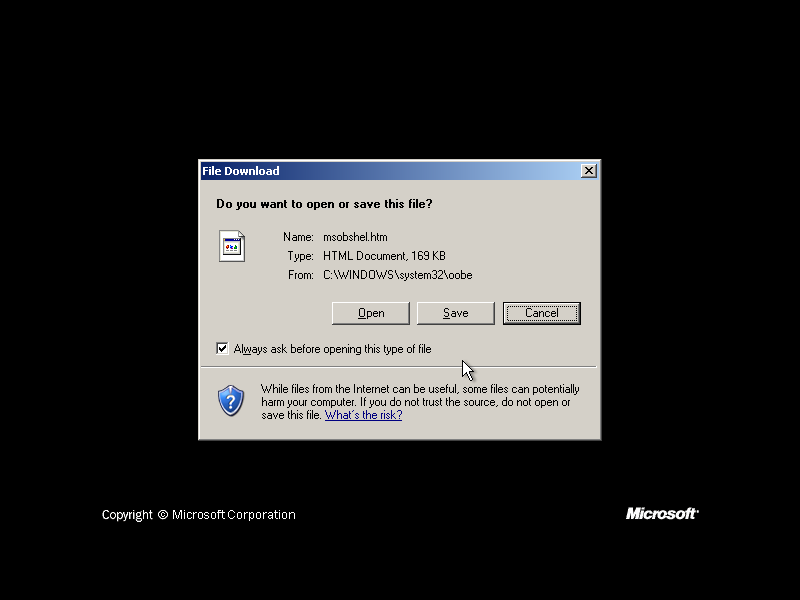
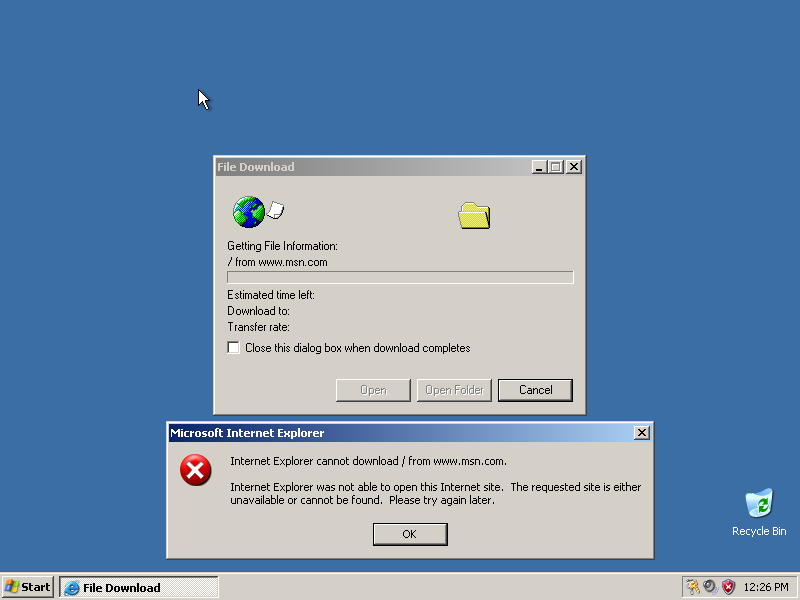
Hey all, I'm working on my 3rd unattended HFSLIP'ed rig. This time, I'm shooting for a multi-boot DVD with 2kPRO and both XP's. I'm trying to follow the directions at http://flyakite.msfnhosting.com, which everyone seems to point to. This setup is very similar to what's described at http://gosh.msfnhosting.com. After HFSLIP, 2kPRO works fine on a CD by itself, but if I prepare it for multiboot using the instructions on flyakite, setup thinks it's an upgrade version, though my SETUPP.INI disagrees. So, rather than fighting this battle, I decided to let 2kPRO have \I386. Now, I'm preparing XP Home for multiboot. Everything is working great, except the OOBE on first boot: If I click Open, IE comes up with a blank window. Either way, OOBE never comes up, and I have to reset the machine. On 2nd boot, RunOnceEx runs as expected, Windows is launched with default user information (owner), and IE is unable to load any HTML page, and HTA files also will not run. Here's what happens when I launch IE: Here's my WINNT.SIF, which has worked flawless on my last 3 semi-unattended CDs. I'm sure I'm missing something, but... [Data] Autopartition = 0 MsDosInitiated = 0 UnattendedInstall = Yes AutomaticUpdates = Yes [Unattended] UnattendMode = DefaultHide UnattendSwitch = No OemPreinstall = Yes OemSkipEula = Yes FileSystem = * WaitForReboot = No NoWaitAfterTextMode = 1 NoWaitAfterGUIMode = 1 DriverSigningPolicy = Ignore NonDriverSigningPolicy = Ignore Hibernation = No [GuiUnattended] TimeZone = 035 OEMSkipRegional = 1 OemSkipWelcome = 1 [RegionalSettings] LanguageGroup = 1 SystemLocale = 00000409 UserLocale = 00000409 InputLocale = 0409:00000409 [Networking] InstallDefaultComponents = Yes [Identification] JoinWorkgroup = Workgroup Much thanks to anyone who can help me out with this...

-
I haven't tried creating a multiboot w/o hfslip yet, but will do so before pulling all my hair out. The BSOD/Upgrade issue with Win2k doesn't appear to be HFSLIP related, it seems to be a Microsoft quirk (gee, who woulda thunk it?). As for XP, I did put the path in, exactly as prompted. I think I know what the problem is though, it's the code that generates HFSLIP.CMD: @ECHO OFF IF EXIST %SYSTEMROOT%\SYSTEM32\CMDOW.EXE cmdow @ /HID Title HFSLIP FOR %%i IN (D E F G H I J K L M N O P Q R S T U V W X Y Z) DO IF EXIST %%i:\WINXPHOME\I386\SVCPACK SET HFSLIP=%%i:\I386 start /wait %HFSLIP%\SVCPACK\MP10SETUP.EXE /C:"setup_wm.exe /Q:A /R:N /DisallowSystemRestore" FOR /F %%I IN ('DIR /B %SYSTEMROOT%\*.TMP') DO ( ATTRIB -R %SYSTEMROOT%\%%I DEL /F /Q %SYSTEMROOT%\%%I ) SET PREP=%~dp0 CD /D %HFSLIP% EXIT %HFSLIP% Is getting set to "D:\I386", and not "D:\WINXPHOME\I386\" What I don't know (yet), is if this will resolve the entire issue or not, though this is the only reference I've been able to find in the entire slipstreamed source. Oh, I guess I should mention that I also got an error regarding SP2.CAB while preparing both versions of XP for the multiboot. This was while running WINNT32.EXE /noreboot from within both XP and 2K environments. I know SP2.CAB was merged into another cab file, but there are still references to it it in DOSNET.INF, LAYOUT.INF, and NTPRINT.INF. I did not check through any of the compressed files.
-
Ok, until now, I've been maintaining 3 seperate CDs (not counting 98/me and various support disks), which has been a huge PITA to keep up with, so I'm now working on building my first all-in-one DVD. I'm up to about 2.8GB (wonder what Vista and MCE is going to do to this). Anyways, I've been having some wonderful luck with XP, with the exception of a path problem with mp10setup in HFSVPK_SW (I'm about to give up and slipstream it from HF instead). The problem is coming from 2K Pro. If I build a straight CD with 2k in i386, it works awesomely. However, if I follow the multiboot directions (which take me to flyakite.msfnhosting.com), things go south real quick. 1) When using the boot disks from the SP3 OEM CD to boot a fully slipstreamed/updated install, I get a BSOD real quick. 2) I installed from a single-boot HFSLIP'ed CD, then ran "winnt32.exe /norestart" to get a good boot folder. BSOD problem solved, but now setup thinks it's a friggin upgrade and not an OEM, as clearly indicated in my SETUPP.INI: [Pid] ExtraData=64766769766D6B766768820497EA44 Pid=51873OEM It's not my WINNT.SIF, since that works flawlessly if I boot straight to the I386 folder on the root fo the CD/DVD. While this is a reasonable solution, I would like a cleaner solution. Can anyone offer any guidance or help me understand why setup thinks my slipstreamed OEM source is an upgrade version? much thanks for any help!
-
Ok, so here I am having fun with automatic setups. I'm all but done. In my msbatch.inf, I'm calling an AddReg to load up RunOnceEx with all the stuff I want to install. Here's the list: USP21a (reboot) IE6SP1 WMP9 Codecs98 DX9c (reboot) dotNet 1.1 + SP + KB dotNet 2.0 (reboot) mdac 2.8 Sp1 Hotfix 837009 Hotfix 885492 Hotfix 891711 Hotfix 904706 Hotfix 905915 Euro Patch (just to clear windows updates) MS Agent (to clear windows updates) MS Java VM update Critical Update 4.0 thingie (reboot) When preparing this list, I installed everything in the exact same order, except that the SP was installed after DirectX (I moved it because of a filecopy version error on HHCTRLUI.EXE). Other than that, the manual install worked flawlessly and Windows Update was completely cleared (except for the Language options). When automating the process with RunOnceEx, everything completes without error, but there are 2 updates still showing in Windows Updates: KB905915 "Security Update, March 7, 2002" (Q313829) The 905915 somehow cleared itself after another reboot, but the "Security Update" is persistant. Is this not something that should be taken care of by the Service Pack? This item did /not/ come up at all when I was going through a manual install of all these components, I'm not sure why it's wanting to install now (perhaps something funky one of the listed packages is doing?). If I have to, I can install this up around item 12, but I'd rather figure out the difference between the manual run and the RunOnceEx run of all these updates and packages. Is there a better order for installing all of these things or certain things that absolutely require a reboot? I'm not too concerned about how many reboots it takes, though I'd like to keep it to a minimum, as reboots take time, and time is money. Once I get this perfected, my next step is to bring in the 3rd party apps, such as mozilla, ad-aware, spybot, adobe, quicktime, winzip, etc... but not until I have a full unattended install that completely clears the Windows Update. Thanks in advanced for any assistance anyone can offer, -Troy