Everything posted by ptrut
-
The snippet by Tripredacus can be translated in batch easily: IF EXIST d:\music ( custom.exe ) else ( normal.exe ) So can i use this in a batch or .cmd file and run as shell? Peter
-
@ jaclaz Thanks again for your reply Mabe i nead to be more clear. Ok i already have a jukebox program ( sk jukebox ) perfect for what i want. I already got windows to start with skjukebox.exe as shell working perfect after help from you guys. The program you sugested as far as i can see only works after windows is fully loaded and then cheacks for your program to start. Which is an avenue im am thinking of mabe taking. What i realy wanted is like i said that if any usb sevice is plugged into the pc at boottime with a folder named MUSIC is should boot to my custom menu program and not skjukebox. Thanks Peter
-
Thank you this sounds like what i need. But please forgive for my stupidity how do i create this program what do i use. Some links ext would be fine just point me in the right direction Thanks Peter
-
Yes I want the system to inspect any inserted usbstor device for a music folder, and if present, display an admin console allowing file transfer? No i dont want to boot from the usb device. I want to plug in any USB drive and as long as it has a directory called Music it must boot into my custom menu in stead of my shell. Hope this makes sense. Peter
-
Thank you all for this realy good and humerous help. I will try this and post a reply Thanks Peter
-
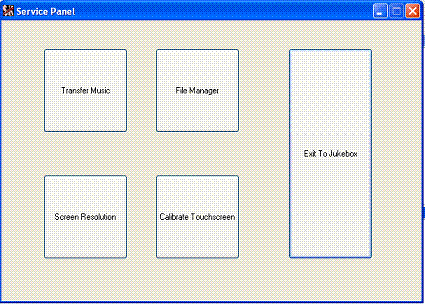
Anyone have a slow reply to my next Question. My next big Question ( I have seen this done ) If i boot computer with USB drive that has a directory named Music the computer must boot into a custom menu i made for admin of song transfer ext.
-
Thanks for the slow reply sometimes all of us are not all that bright. Anyway is doesnt matter how i get the answers as long as i get them Thank you Peter
-
Thank you for the replies but i realy want to know . How to start with no Shell at all and my jukebox application to start automaticaly.
-
Hi All I need some help been googling days and nothing. Im biulding a jukebox and want to start windows with no desktop. the jukebox must load automaticaly at startup. My next big Question ( I have seen this done ) If i boot computer with usb drive that hase a directory named Music the computer must boot into a custom menu i made for admin of song transfer exe. Any help would be apreciated Thanks Peter
-
Would help if you say where it moved to. Thks
-
Very nice Where can i get this and info on how to for dvd Thanks Peter
-
-
Please how do i stop the xpise bootscreen vrom being installed into windows iso so it uses the default bootscreen Thanks
-
Thank u this solved my problem.
-
Can someopne please help When Create XPize Windows ISO install i get this error [Error decompressing Data! Corrupt Installer] But when i Choose Normal Installation no errors. Thanks.
-
Thanks I came right
-
To damin Cannot go to pagr 2 and 3 Thanks
-
Where do I find the New Posts Application Installs ?
-
I think he wants all to put silent install switches for all programs possable Would be nice to have all in one spot
-
Guys thanks for all the good work. I know for myself that i like something apealing to the eye, even if it is just a frontend to starting some appz