-
Thanks, Zorphnog. I appreciate the pointer. I finally had a chance to try what you suggested and it worked like a champ. I appreciate the assist.
-
Zorphnog, I tried what you suggested (took the reboot command out and changed it in the Tools to an Execute After) but it still opened WPI after the reboot and gave me the script error. Do you have any other ideas I could try?
-
Here are my files. All righty, then. I included the shutdown file that I have been using. (Can't remember where I got it from) Zorphnog, thanks for the explanation. That would explain part of the problem. I did try the included reboot commands but they weren't working the way I wanted them to. Maybe I just have to break down and figure it out. I have it working but I would really like to be using the newer version. Thanks for your help so far. config.js REBOOT.CMD CLEANUP.CMD shutdown.exe
-
I am getting an Internet Explorer Script Error that is driving me crazy. I use WPI like this: I have Ghost images that I load and first off the machines run through sysprep to install drivers for hardware, join the domain, etc. Then at the first login WPI runs (RunOnceEx) from the hard drive. You choose what you want installed and then the last three commands are Convert (to NTFS) Cleanup (removes the install directory that holds the install packages) and Reboot (reboot calls to shutdown.exe but not the one that comes with XP) After the reboot it should come up and just load the desktop. This setup has worked for a long time (way back to WPI 4.3 with minor tweaking). Now instead of loading the desktop WPI comes back up but I get the script error with this text: Line: 457 Char: 2 Error: Object Expected Code: 0 URL: file://c:\winnt\system32\tools\wpi\common\installer.hta Anybody have any ideas how to fix this?
-
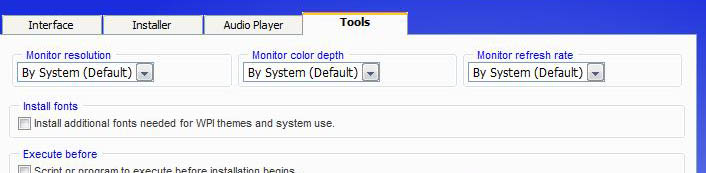
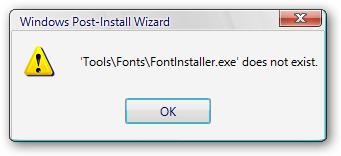
With a completely clean extraction of the rar file (none of my files or settings), if I check the box "Install additional fonts needed for WPI Themes and system use" I get the error in the pic in my first post. Anyone have any ideas?
-
I moved over my useroptions.js and my config.js but when I try to start WPI I am getting this error (file should be attached) I checked and the file is there. Help? EDIT: It's probably something simple but I have no idea where to look.
-
I knew I forgot to add something into my explanation. Yes I did try that. That wasn't working either. Maybe I should put this up in the office forum. I redid the admin install from scratch and tried it again and it still didn't work. The thing that kills me is some of these patches worked before and now they don't. Any insight would be appreciated.
-
I am trying to load up the new office hotfixes right after Office 2003 loads, but I am getting wierd problems. WPI reports that they install correctly. They don't show up in Add/Remove Programs (with the show updates checked). They also show up in Windows update as not being installed. Also in Update Expert (program we use to remotely install patches). But when trying to install them manually after WPI runs it says that they are already installed. Anybody have any ideas? Office entry in config.js prog[pn]=['Microsoft Office 2003']; ordr[pn]=[20]; desc[pn]=['Microsoft Office 2003']; uid[pn]=['MICROSOFTOFFICE2003']; dflt[pn]=['no']; cat[pn]=['HQ Apps']; forc[pn]=['no']; configs[pn]=['default']; gcond[pn]=['FileExists(\'%programfiles%\\\')']; cmd1[pn]=['\\\\XXXX\\Packages\\Office2003\\setup.cmd']; cmd2[pn]=['%systemdrive%\\install\\patches\\kb905756.exe /Q:A /R:N']; cmd3[pn]=['%systemdrive%\\install\\patches\\kb907417.exe /Q:A /R:N']; cmd4[pn]=['%systemdrive%\\install\\patches\\kb913807.exe /Q:A /R:N']; cmd5[pn]=['%systemdrive%\\install\\patches\\kb916518.exe /Q:A /R:N']; cmd6[pn]=['%systemdrive%\\install\\patches\\kb917149.exe /Q:A /R:N']; pn++; (XXXX replaced the server the Office admin install resides, not a typo)
-
How old are you children? They had deathmatch way back in the original Doom and Quake games.
-
Um. . . . That's not free. Ya gotta pay for that. However, if you do a search for Bart PE or XPE that should give you the equivalent but free!
-
I had some trouble with this and I ended up making a .cmd file that I called instead of directly calling the transform. Text of my setup.cmd cmdow @ /HID @echo off start /wait \\"server"\Packages\Office2003\setup.exe TRANSFORMS=Office2003_NoAcc.MST /qb- exit If you modify it with your path it may work.
-
Makes sense. Most likely windows doesn't need as much ram as the games. I would guess that you have one bad dimm like I did. Don't know if a memtest will work. I tested mine and it kept passing, but the problem finally went away after I switched the ram out.
-
If I had to guess I would say it is your RAM. I had some Nanya Ram a while back and I had the same problems. Ended up that one of the dimms was bad. If you have any spare ram laying around I would switch it out and then run your games and see what happens.
-
Best bet is to get a hold of Ghost or Acronis Drive image. Haven't used Acronis but heard lots of good things about it. They both allow you to make an exact image of your drive across a network (even a small peer to peer job) and then via network boot disk bring it back down to a clean hard drive. Hope this helps.
-
Return Merchandise Authorization - Basically they give you a number that links to a case that says you have their ok to send it back.