Skip to content
View in the app

A better way to browse. Learn more.

MSFN

A full-screen app on your home screen with push notifications, badges and more.

To install this app on iOS and iPadOS
  1. Tap the Share icon in Safari
  2. Scroll the menu and tap Add to Home Screen.
  3. Tap Add in the top-right corner.
To install this app on Android
  1. Tap the 3-dot menu (⋮) in the top-right corner of the browser.
  2. Tap Add to Home screen or Install app.
  3. Confirm by tapping Install.

zwatotem

Member
  • Joined

  • Last visited

  • Country

    Poland

Everything posted by zwatotem

  1. I feel Mandela effected right now... Are you sure that is also true for cases, when labels are enabled? Because on this old screenshot I found, I seem to have a lot thinner margins and more place for the starting letters of the caption. => Could it have been just different default behavior then?
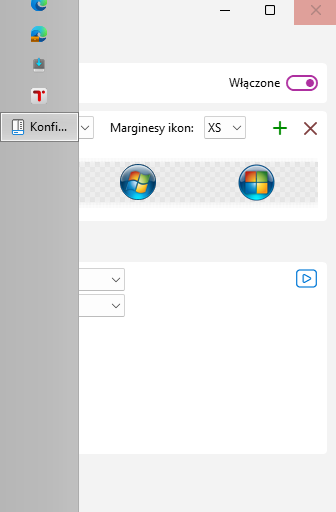
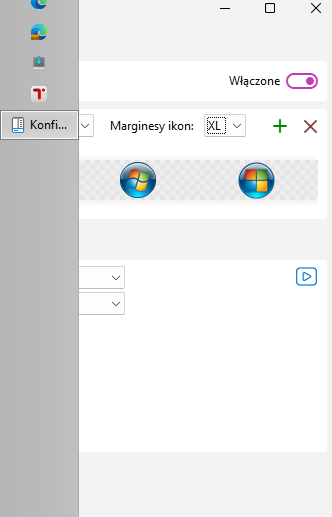
  2. Found out, that icon margin size looks to be unimplemented. I don't know, if this is known/intentional or a bug, or an oversight. Anyway, here is comparison between margin sizes XS and XL. No difference whatsoever. I tried restarting the taskbar (off, restart explorer, on, restart explorer), but to no effect. As far, as I can remember in 3.7.11 it refreshed right away though. I'm now on 24H2 (build 26120.1252), so can't roll back and check. Anyway, thanks for making this awesome program and continuous support. Very appreciated.

Account

Navigation

Configure browser push notifications

Chrome (Android)
  1. Tap the lock icon next to the address bar.
  2. Tap Permissions → Notifications.
  3. Adjust your preference.
Chrome (Desktop)
  1. Click the padlock icon in the address bar.
  2. Select Site settings.
  3. Find Notifications and adjust your preference.