




Everything posted by JJC
-
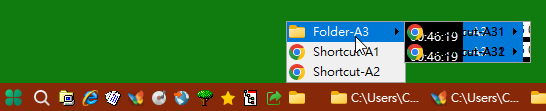
Looks like a background refresh issue. Is there a solution to this problem?
-
Thanks for the update! Quick Launch bar submenu "Text not displaying correctly" ( Looks like a background refresh issue ) This problem still exists in version 3.8 Beta. Example: ( Toolbar: Links ) [FolderA] Shortcut-A1 Shortcut-A2 [Folder-A3] Shortcut-A31 Shortcut-A32 [FolderB] Shortcut-B1 Shortcut-B2 "Shortcut-A31" and "Shortcut-A32" is "Text not displaying correctly". ( Looks like a background refresh issue ) I hope this problem can be solved, Thank you.
-
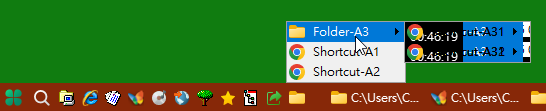
StartAllBack 3.7.11 Report a problem: (Win Pro 11 23H2 22631.3880) Quick Launch bar submenu "Text not displaying correctly". Example: [FolderA] Shortcut-A1 Shortcut-A2 [Folder-A3] Shortcut-A31 Shortcut-A32 [FolderB] Shortcut-B1 Shortcut-B2 "Shortcut-A31" and "Shortcut-A32" is "Text not displaying correctly". In addition, I have encountered the same problem in the start menu.