Skip to content
View in the app

A better way to browse. Learn more.

MSFN

A full-screen app on your home screen with push notifications, badges and more.

To install this app on iOS and iPadOS
  1. Tap the Share icon in Safari
  2. Scroll the menu and tap Add to Home Screen.
  3. Tap Add in the top-right corner.
To install this app on Android
  1. Tap the 3-dot menu (⋮) in the top-right corner of the browser.
  2. Tap Add to Home screen or Install app.
  3. Confirm by tapping Install.

RewRTC

Member
  • Joined

  • Last visited

  • Country

    Kazakhstan
  1. And I know that the HD 7450M is re-branded HD 6450M, but drivers for 6450M and 7450M are same, so problems are too same.
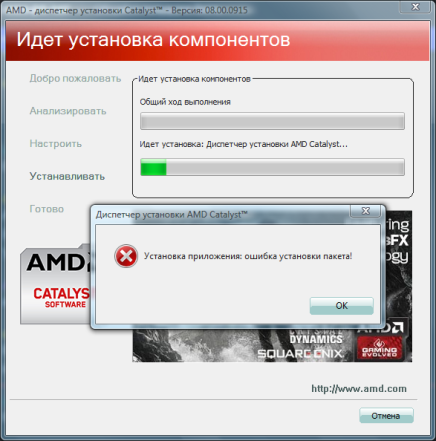
  2. Hello everyone! I had (and have right now) many problems of installing drivers for AMD Radeon HD 7450M for 64-bit Windows Vista Edition, and even after one-two week of searching normal driver, it still doesn't work! If driver from AMD website says "App install: package installing error!", the drivers from third-party source "driver.ru" says nothing and driver kind of installed, but after reboot, I understand that driver not installed. So how can I be?! The laptop (yes it's laptop by HP) main specs is here: Intel Core i3-2350M. 4 GB RAM. Intel HD Graphics 3000 or AMD Radeon HD 7450M.

Account

Navigation

Search

Search

Configure browser push notifications

Chrome (Android)
  1. Tap the lock icon next to the address bar.
  2. Tap Permissions → Notifications.
  3. Adjust your preference.
Chrome (Desktop)
  1. Click the padlock icon in the address bar.
  2. Select Site settings.
  3. Find Notifications and adjust your preference.