Skip to content
View in the app

A better way to browse. Learn more.

MSFN

A full-screen app on your home screen with push notifications, badges and more.

To install this app on iOS and iPadOS
  1. Tap the Share icon in Safari
  2. Scroll the menu and tap Add to Home Screen.
  3. Tap Add in the top-right corner.
To install this app on Android
  1. Tap the 3-dot menu (⋮) in the top-right corner of the browser.
  2. Tap Add to Home screen or Install app.
  3. Confirm by tapping Install.

Cant Lose

Member
  • Joined

  • Last visited

  • Country

    Hong Kong

Everything posted by Cant Lose

  1. Then is there any chances which xp might works? (whether x86/64) although a bit off-topic tho..
  2. So topic like this: https://msfn.org/board/topic/182660-intel-hd-haswell-drivers-modded-for-vista/ wont work?
  3. Like if I really want to use then I need x86?
  4. Hi , May I ask if my gpu can work on windows vista? specs: Intel PENTIUM 3556U + Haswell Graphics GT1ULT
  5. Welp it will also encounter blue screen of death tho.. (if I disable driver enforcement)
  6. Tested on Pentium G3556U with Intel Haswell Graphics GT1ULT and it works! but sadly after reboot it shows that it is unsigned driver and would not allow me to use it//
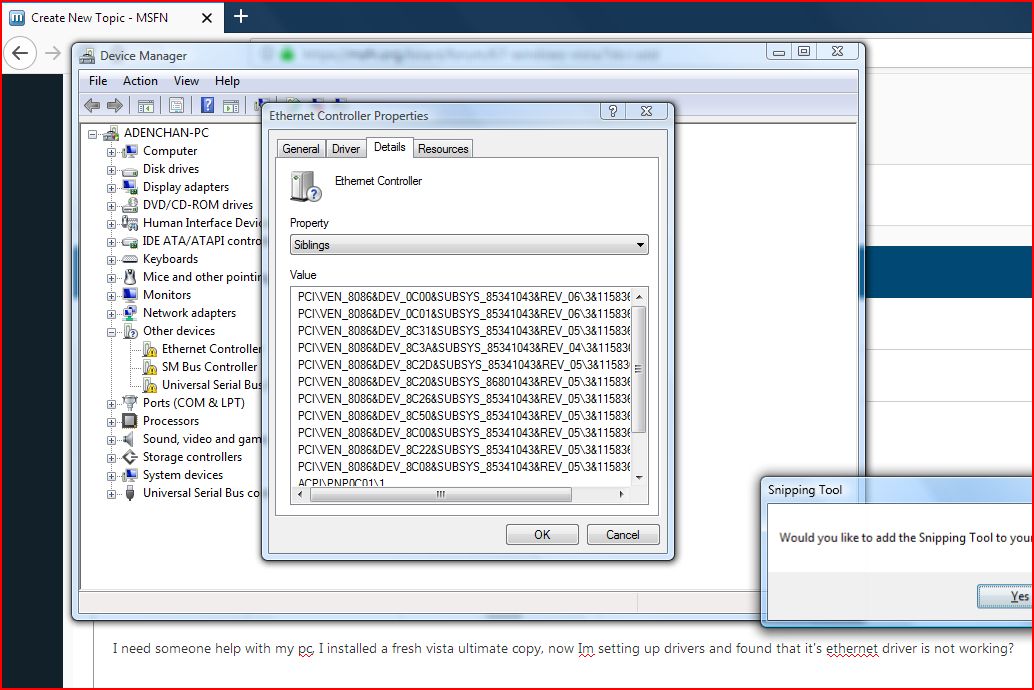
  7. I need someone help with my pc, I installed a fresh vista ultimate copy, now Im setting up drivers and found that it's ethernet driver is not working?

Account

Navigation

Search

Search

Configure browser push notifications

Chrome (Android)
  1. Tap the lock icon next to the address bar.
  2. Tap Permissions → Notifications.
  3. Adjust your preference.
Chrome (Desktop)
  1. Click the padlock icon in the address bar.
  2. Select Site settings.
  3. Find Notifications and adjust your preference.