

Everything posted by chermany4ever
-
Wow man, I didn't know X-Lite had caused so many problems. What an unpleasant way to make a name for itself. It's a good thing I didn't have those experiences, otherwise I might not even be using it. I had actually been using Win7 miniOS, but those ISOs are never smaller than 5gb, so the freshly installed system is always bigger than what I search for. I remember same thing happening when XP came out. Already had Win98 working perfectly, completely sorted... and then I had to learn everything from scratch again with an OS that seemed designed for id i o t s. And now look... I could hardly let it go..! Transitions aren't easy. The rule that newer is always better seems to hold true. In this case, we waited 20 years... just to be sure.
-
It was very difficult for me to abandon XP 'cause I had customized it so much -another reason why I'm so happy most of the software that worked on XP is now working on Windows 11- and I'd been using it since it was released. It was a tough decision. I also admit that during these past couple of months I struggled quite a bit to adapt to the new OS. Now, seeing all the benefits I've gained, I'm satisfied. A conversation with a friend was decisive. He uses Windows at work but Linux in his personal life. He thought I should try Windows 10 or 11 'cause learning Linux at this point would be very tedious for me. In that same conversation, he told me that Windows 11 is Windows 10 in disguise and I verified this myself. I thought Windows 10 was lighter but comparing these X-Lite versions which have no extra cheese, Windows 10 and Windows 11 consume exactly the same resources. Only differences are cosmetic improvements.
-
I recommend you to try KillProcess. It works very well. However, it's like all those types of programs. When your PC has already frozen and is unresponsive... it won't help. Best thing to do is try to identify the problematic processes and kill them beforehand. I suffered from that kind of freeze for a long time. I can also tell you that thanks to programs like ProcessLasso, I was able to achieve a very good performance with Windows 11 on my 2010 machine with only 4gb of ram. ProcessLasso isn't free but it also allows you to kill processes and manage them as you please. As I said before, choosing to run as many x86 programs also helped a lot. They don't consume as much memory. For example, if you use a browser and you can choose the 32-bit version your PC will definitely see some relief.
-
Many times these modified versions come with tweaks and third-party apps. I'm used to it so the first thing I do is disable and delete anything I don't need... to free up space! Indeed, my friend.
-
That's certainly curious. Boycotting the boycotter. In my case, one of the things I'm heavily looking for with these modified versions is minimal space usage. There are many available these days, most for gamers. Many deliver incredible results compared to the official versions. But again, when I tried to "clean up" a Windows 11 myself, couldn't get it below 5gb. So when I found that, for example, Windows X-Lite Atomic 11 takes up about 2.7gb freshly installed... I could not resist! I have to use it. Don't wanna invest time to research what I can and can't delete. I trust Conan and his years of experience.
-
Hi guys. Couple months ago finally got tired of struggling with XP and I'm now using Windows 11 (X-Lite). Have folders with a lot of files that I sync frequently and every now and then I like to do a thorough comparison to ensure consistency. The program I've always used for this task is FreeFileSync and it works very well. Problem is, when you compare for content many folders and the total size exceeds 500gb total comparison time can be around... 6 hours! That's why, as always, did some research on other programs that might offer an intermediate solution. Tried many of the well-known alternatives like WinMerge and Beyond Compare. Saw that when comparing files they offer other methods -that I understand don't involve opening the files- which, in theory, should save time. At first I thought I'd found the solution but finally -after some testing- realized that the time they took was almost the same: around six hours. I was hoping to find some program that would give reliable results improving the wait time. Since I haven't found one, thought I'd ask. Perhaps one of you has found a solution? Most of the files I compare are video and music. Again, I've tried MANY of these programs but when the comparison goes beyond name/date/size the times increase far beyond what I'd like.
-
I'm super surprised that most of the programs worked right out of the box in portable mode. And since I only have 4gb of ram, it's really convenient for me to use all those x86 programs 'cause they use almost no ram and take up very little space. They do the job just as well as ever, giving me the results I need. Windows 11 is proving to be robust, predictable in its downsides and unpredictable in its upsides.
-
Hello tekkaman. A little late but since I see your thread: a couple months ago wanted to finally stop fighting with XP and I'm using now a modified version of win11 (x-lite) and what I can tell you is that 80% of the programs that I used daily in XP worked perfectly in portable mode. Something I couldn't achieve even with win7. I just copied the .exe files and most of them worked. The program that I always used to do what you asked for is KillProcess -from Orange Lamp- which allows you to kill any program and also edit a list of programs to kill automatically if one of the list were to run. The version I use is 2.44. It is very effective and lightweight.
-
Went back to the 2021 image to check... and IDM is installed. Guess I was so happy I made an image lol. So I don't have a clean system image. My system is messed up and can't be fixed. You're right again. I've been trying all day with the ISO of Windows UE 6 SP3 hoping to at least take a step forward and customize my entire system from scratch. I think I remember how to do it but after struggling all day, realized my Maya audio card wasn't properly connected to the motherboard after several crashes and freezes. So I'll try again tomorrow. As I recall, SP3 is "harder" to customize, although many have told me it's superior to SP2, including yourself.
-
Used FDM for a long time. It was my fav for a long time. But back then downloads sometimes failed and speeds were very slow compared to today. As I recall FDM sometimes failed to resume downloads. At the time it was said that IDM had a much more polished download resumming feature. That's why I also used IDM for a long time and although it is true that it takes its time to grab links and then assemble the file, it was much better at resuming downloads. It even allowed you to do it using completely different links IF they corresponded to the same file (impossible to do this with FDM back then). Of course now with all these problems I think IDM will be going on my blacklist. I agree with you on this. On Windows 11 (aka X-Lite Micro 11) I use a portable version of FDM for everything. FDM has also worked as a torrent client for a long time. The newer versions do everything well.
-
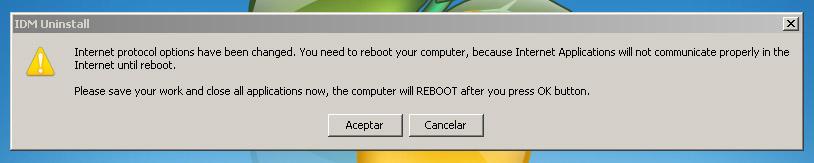
(sorry it took me so long to reply but I was busy for many days; now I'll have plenty of rainy days here) They offer an uninstaller that's quite similar to the one that comes with the program. I ran it, and it did little more than create a mess on my system and nothing was fixed. I've attached a screenshot of the message the uninstaller displays when it finishes. Thanks my friend. I'll look into this and see if I can figure something out. The problem is that at this point I'm feeling frustrated and I'd rather go back to the 2021 image or do a clean install of UE6. Music is the most important thing to me. I've always used separate sound cards 'cause I don't like the ones that come with motherboards. The one I have doesn't have drivers for Win11 aka X-Lite Micro 11. So for a while I went back to using the motherboard's integrated sound card but I could never fix some hiccups I get when playing audio. Going back to the 2021 image perhaps would solve the FDM issue and also allow me to listen to music properly again. I'll look into this and see if I can fix anything. Also tried a scan with IObit Uninstaller which removes remnants of old programs and checks for errors. Although it found many old crap it did not fix the FDM problem.
-
I'm looking at several websites that explain how to get rid of IDM and the remnants it leaves on the system but I don't see anything like an uninstaller. I don't think they're interested in solving the problems of anyone who's never paid them a penny. I've already cleaned up the remnants and registry keys but FDM still doesn't work. It's strange that all other programs connect without any problems. Maybe the fix I used back then wasn't so harmless. It was a simple resetter. Anyway, I should go to sleep now. It was a very long day. I'll continue later and I'll let you know if anything comes up.
-
I searched for information about IDM corrupting a system and found nothing. I'll keep looking for info. Decided to stick with IDM 'cause I liked its speed when it was working properly. I have a system image from 2021. I'll have to go back to it to check if I had already installed IDM or not. Then I'll run some tests. Thanks so far, NHTPG. You're a genius. If anything comes up, I'll let you know.
-
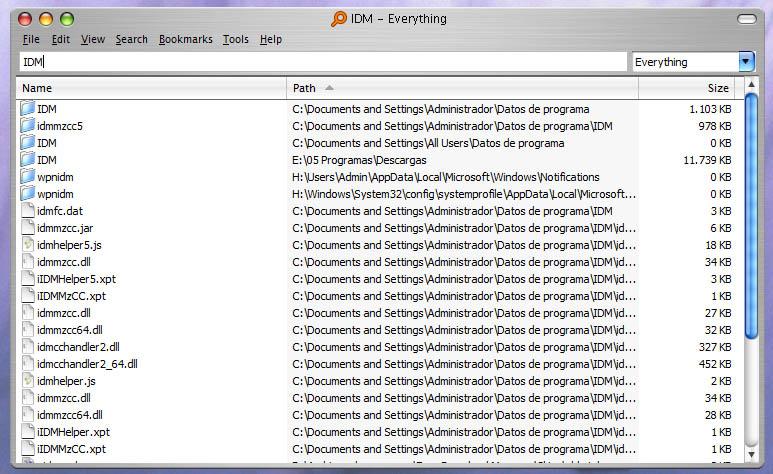
I was about to but on the same page that said where to find it they explained how to fix it and I did. It had many lines of programs that I used "on trial mode" if you know what I mean and several lines related to IDM. Deleted everything and cleaned it like it's supposed to but nothing changed. Still can't download anything with FDM. Seeing so many IDM lines in the hosts file made me think maybe that program modified something and that's why FDM doesn't work? Uninstalled IDM recently 'cause it was no longer downloading from many links and was constantly nagging about updates and that it was just a trial blah blah blah. Just did an "IDM" search and some folders and files related to it still appeared. Should I delete everything? Or maybe they will serve as a clue to try to fix FDM? Capture attached. Tried several links. Especially from sites like Mediafire where I have my files uploaded without any type of blocking. Mediafire works great. I always download from there at full speed. Also tried other files from various other sites but FDM refuses. As soon as the download should start the download box turns Red which indicates precisely that it is not connecting and automatically stops the downloads.
-
It is mandatory to use the patch in the same language as the OS. The patch in English: https://www.mediafire.com/file/vgh30uwy5b67jw8/WindowsXP-KB893357-v2-x86-ENU.exe/file If you prefer to install UE6 in Spanish and give it a try: https://www.mediafire.com/file/enr0r9fxs1htwcq/WindowsXP-KB893357-v2-x86-ESN.exe/file Don't get mad at me: remember that these patches are for SP2 only. I think you said earlier that the UE version you found in English was already SP3. Just in case. Another thing I noticed since installing this patch is that some links do not download at maximum speed. Here there is internet with 5 MB speed and some links do download at that speed but many others do not exceed 0.700 MB/s. Never complained 'cause it already seemed incredible to be able to use high speed and my breaking wall WiFi antenna in XP SP2 aka UE6. The upload speeds are also super slow. That's why I still switch to Windows 11 aka X-Lite Micro 11 to be able to upload stuff. I agree with everything you said about Comodo Firewall and I thank you for all the information you give me. Didn't put much emphasis on that 'cause I'm still focused on solving what's happening with FDM but I surely noticed that it is far superior to Sphinx. Although more complex it offers much more.
-
Here I am again. Had to go back a few pages to get back on track. First thing I did was uninstall Sphinx. Right then and there I tried downloading files with FDM without a firewall but couldn't. Next installed Comodo Firewall 2.4.16.174. I liked it; it's quite lightweight. Comodo asked to define rules for system processes which I obviously allowed. Was happy when upon running FDM, Comodo asked for permissions about five times! Sphinx would ask one time to Enable or Disable and that was it. So thought maybe this time it would work... but no luck. Couldn't download anything with FDM. Maybe my system is just so dirty that FDM can't work? Maybe it's that SP3 patch to get the WPA2 security protocol working in SP2? Perhaps the hosts file? I took screenshots but one of the download managers I tried that day was a portable version of FlashGet 2.0 which completely wrecked my system when I ran it. Without thinking, reverted using a backup image sadly forgetting that I would lose the screenshots.
-
Thanks. Not contradicting you, just as I told you, had a bad experience with Comodo and it's the first time Sphinx has caused a very particular problem. Been using it for 4 years now and everything was normal. Does its thing, not intrusive, super light. Anyway, now I have couple more programs to test! Reality is I need to go "fishing" and also start collecting firewood 'cause winter is coming. I'll let you know as I progress. Thanks again, I'm humbled.
-
Couldn't say. It was so long ago. If you remember any lightweight version of Comodo Firewall please let me know and I'll try it if I decide to stick with FDM.
-
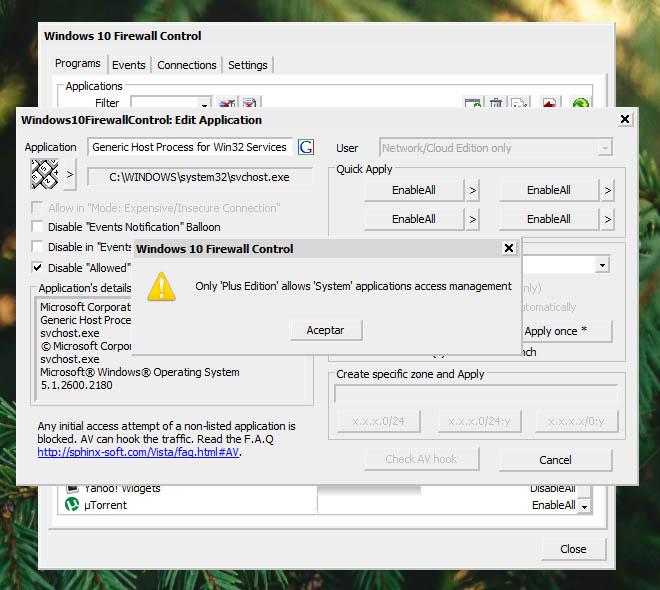
Perfect. Understood. Hats off to you, NHTPG. Did the same here but this version of Sphinx tells me that only the Plus Edition allows "System" apps access management. Won't let me edit those rules and if I delete them they reappear. FDM still blocked. This means I'll have to decide whether to change the firewall or discard FDM. Still have several download managers to try. Want to see which one gives me the best experience. Such outdated versions. They all seem to have some bug or missing some feature. Not that I've stopped loving FDM. Need to try them all and decide. I remember back in the day many people recommended Comodo Firewall. They said it was very good, so I tried it. While I liked it, I remember my machine became slow. Was like it started carrying a load I hadn't noticed before. So I uninstalled it but was incredibly difficult to uninstall and when I finally managed to it completely wrecked my system. At that time I wasn't using hdd images and I remember I had to format, reinstall, and customize EVERYTHING from scrap. So I hated it! lol I like my system to be snappy fast and responsive. If no other download manager surpasses FDM think I'll try an older version of TinyWall or one of those other simple and lightweight firewalls that had a good reputation back then. I'll let you know.
-
Back to the topic now. Was just thinking about this when you mentioned it. Did one last test before going to bed and it didn't work. Only disabled the firewall. Not going to uninstall it. It works fine with all other programs. Uninstalling it'll be leaving the floodgates open which doesn't seem advisable. Think would be more sensible to try and figure out what's wrong with FDM.
-
Good strategy. Here when talking to English speakers they want to speak Spanish so everyone understands and no one gets left out of the conversation. But the Spanish they speak is awful lol. Just the other day I had to read the drummer from The Doors praising Bad Bunny on Facebook. The world went down the drain, man.
-
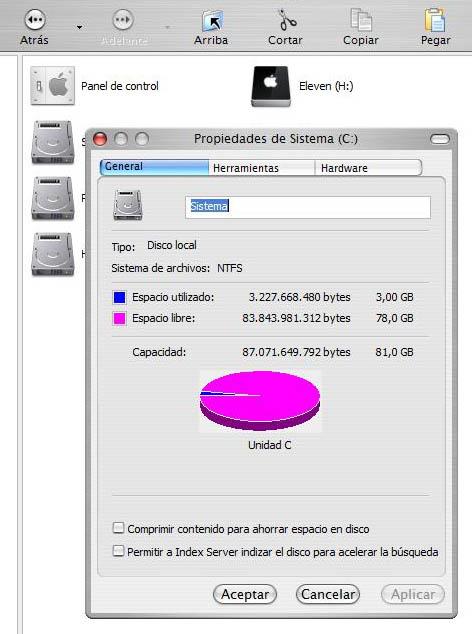
Actually I think it takes 1gb or maybe 1.2... so let's say 1.3gb since I have no way to prove it right now. What I can confirm is that my UE6 fully loaded takes up 3gb.
-
<OT> I call "BS" I call it "BM"... bad memory! It's been a long time! You're right again NHTPG, a freshly installed UE6 takes around 1.3gb. Sorry for the mistakes. It wasn't intentional. Here's another one: just realized I said something wrong a few posts back. The version FDM's official site recommends for XP is 3.9.7. That's the one I can't install or run portable. The one we3fan recommended is 3.9.4; now understand why I was able to install it.
-
It's called Sphinx Windows Firewall Control Free 7.5.100.200. One of the lightest ones that still work on XP. Think someone here on the forum recommended it. Works well. It does the job. I liked the idea of blocking at hardware level. Looked for information and found it as web filtering? If you could summarize it a bit I might try. Can't promise I'll implement it thou.
-
I've been testing xp-AntiSpy. It's a tool for disabling unnecessary, intrusive, and annoying Microsoft features. In most unbloated versions these are disabled by default and if any persist this type of tool is used. I don't think it has anything to do with the FDM connection problem. We were chatting about XP and the WPA2 issue here when asked for help getting the antenna working on my XP SP2 aka UE6.