isolar
Content Type
Profiles
Forums
Events
Everything posted by isolar
-
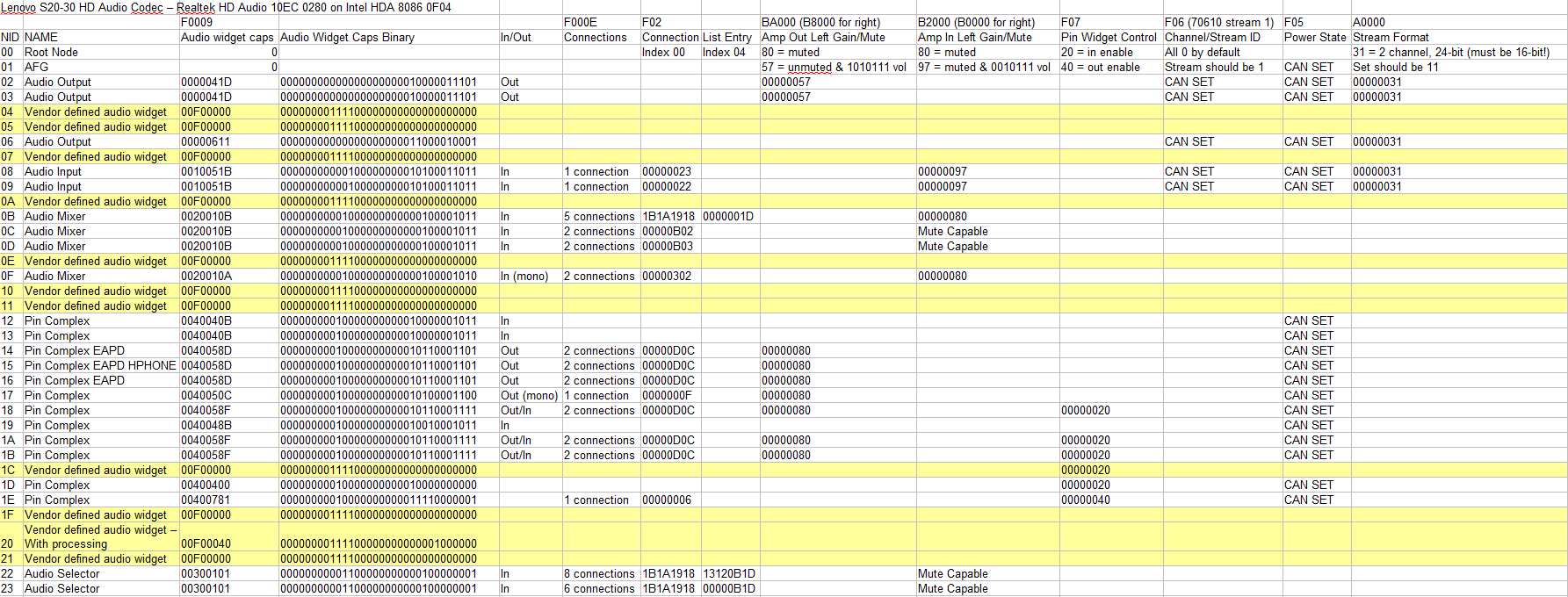
I hope he sees this thread and contacts you to advise. His work here is fantastic and there is not much more to do to make it fully universal. Full respect to his amazing work! For EAPD enable it is simply: {Enable External Amplifier (EAPD)} hda_codec_write(x,0,AC_VERB_SET_EAPD_BTLENABLE,$02); tgdelay (2); inserted between 'Enable pin output' and 'unmute pin amp' in the HDAenablecircularbuffer function. For verb and codec identify timing fixes: There are many additions to: jhda_reset, HDA_resetCORBRIRB, and HDA_CORBout256 functions. I checked HDA spec for correct initialization timings and found the ResetCorb procedure should be: Clear CORB RUN bit Set CORBRP reset bit (bit 15) Poll until reset bit clears Program CORB base address Set CORB size Enable CORB RUN With this particular BayTrail laptop the wait times are quite picky so slightly longer timings in that listed order of events enabled correct codec detection and HDAICIN to be received without missing any verbs and all on the correct line. For unlimited verbs in HDAICOUT: The ('x') limit has been removed from HDAloadcommands function. If it is permissible to share the amended source code files with you I will be more than happy so you can compare to the original. Let me know if that is a possibility. I found on this BayTrail laptop that corb/rirb was not always efficient, however with immediate command (and then adding a check that IC sent verb was confirmed) that it was very fast and nothing was ever missed. I then changed Verinterface to $0 and tried wait1 and wait2 both at $0 with success. Although I haven't tested yet if wait1 and wait2 are actually active when Verbinterface is $0.. do you happen to know? This is true when HDAICOUT is renamed/removed. The code attempts to run an auto configure of the codec when this is not present and the 3 volumewidget/sleepingwidget/outputwidget are set correctly. Therefore the EAPD addition to the HDAenablecircularbuffer function I listed above works on all pin widgets for this codec specifically that have EAPD function (and for most Realtek codecs by the look of your list). So by default this also sets EAPD for the headphone widget, however when using Verbinterface $0 I had to unmute the headphone widget to get sound. I also for good measure set connect select to index 1 based on: sent $015F0200; got $00000D0C Connected to NID 0C, 0D (0C is index 0, 0D is index 1) and sent $00DF0200; got $00000B03 Connected to NID 03, 0B - meaning NID$03 is outputting to headphone while NID$02 is outputting to speaker - this can be confirmed in the connection lists in my codec dump and spreadsheet chart I posted a while back. Headphone output for this codec is $15. Best identifier for this can be seen in: sent $015F1C00; got $0421401F Jack External, Right, HP Out, 1/8", Green, jack detect, association 1, sequence F. Although in this case the jack is actually black not green.. Speaker output also identified this way: sent $014F1C00; got $90170110 Fixed Internal, N/A, Speaker, Other analog, unknown, no jack detect, association 1, sequence 0 Correct, this dump has any responses that were $00000000 removed, therefore assume all missing responses are this. The catch? That this runs so fast that the responses received may be before the codec has fully initialized, which leads me to think the F05 responses are D3cold because codec is still initializing. As above when I notice verb responses may be before codec has initialized when using the better timing plus Verbinterface $0, I believe after fully initialized the codec powers on the nodes as I identified in earlier tests, so 705 verbs not required for this codec. Yes also a viable option. I am unsure if 7F may break or have unknown effects if the codecs max volume does not go this high. But the method I plan to implement will read the steps and 0dB reading for any codec with verb F0012 responses, and set to 80% of 0dB setting, so all codecs should in theory all start at the same volume (80% of 0dB). Not sure if this is correct but I think it could be okay..?
-
Okay some updates I have applied. HDA2.DLL can now: -Initialize and detect audio codec correctly with correct timings (patched timing and structure of HDA_RESETCORBRIRB, CORBRIRBGET1, and JHDA_RESET FUNCTIONS) -With verb interface set to $0, wait 1 and 2 set to $0: Loads almost instantly at boot and audio is clear. No HDAICOUT.HDA required. -(currently disabled) Ask for the codec index at boot and lock on to it. -Send unlimited verbs through HDAICOUT.HDA and receive all responses with no timing issues to HDAICIN.TXT. (See latest response file below with full decode). -Automatically enable EAPD (02 payload) on nodes 12 to 1C if HDAICOUT.HDA is not present. (I will update this to search and activate only nodes with EAPD capability for universal usage - will test on inverted EAPD AD1981HD codec). -Volume set to 3F on speaker and headphones rather than 7F which was usually too loud on my codecs. (I want to update this to auto-find step values and set volume to 80%). -(currently disabled) show a message at boot for which codec indexes are detected. Interesting responses in file below are $00000400 for power settings F05 indicating a D3cold power setting, this only shows when using verb interface=$0 (Immediate command). According to HDA spec, running the double power reset $0007FF00 brings these out of D3cold state - yet to test. EDIT: Double reset 7FF did not change the D3 cold status response, however once HDAICOUT.HDA is removed audio is quick and efficient. Onward and upward! HDAICIN_ALL_0280_IC.TXT
-
Fatal exception OE at 0028:C001545A on Bay Trail N2840 system confirmed here.
-
Small update: 256 verb limit is now unlocked, successful base test ran with 816 verbs to send all possible F00 parameters to all widgets range from 00-32h and all responses captured in HDAICIN. My timing is still off so some readings incorrectly show $00000000, plus not sure if the error exists where it puts the response on the wrong line like I had with some earlier tests. I will investigate more and report back. My goal is create a HDAICIN response for the entire codec for all possibilities. Next step in HDA.PAS to send only necessary get verbs to necessary widgets and get full codec dump. Once I have the full dump I will send you all responses for this codec. UPDATE) 2958 verbs sent via HDAICOUT and logged with HDAICIN attached. I have started to label the HDAICIN file with verb titles and some of the results. There are definitely timing issues and some missed responses similar to the initial results. Just a test to see if possible. Next step to minimise the verbs to only the necessary widgets! HDAICIN_ALL_0280.TXT
-
WAHEEEYYY!! This list is impressive! I believe if we can get the PCI/VEN Id's of all of these then I believe I can set a function to split the widget initialization per codec and call the necessary NID values to get sound working using a single HDA2.DLL file for all of these.. it will take some time but my enjoyment to do this has a lot of charge. Thank you for this! I happen to have a laptop with AD1981HD codec so I can revisit the HDAICOUT file I made for that years ago (the 1st one I messaged you about years ago) and see if there's a way to identify if it is inverted. Why twice? Timing related? I found a hardcoded 256 verb limit in HDA.PAS so I will try to expand that to 512 which should be able to cover an entire codec dump of necessary codecs at least for plain audio output... unsure if at all possible so stay tuned on that.. it will change the game if possible. Yes, this is a perfect example, we can use the input and output amp caps get verbs (F000D/12) to find which step is 0dB and then set that step minus about 20% to always set a nice volume on any codec. Can do, is the list you posted earlier the only known ones so far? Should be an easy fix - currently it is trying to apply to the root node which payload 05 does not deal with, so $001F0005 (AFG, not root) is definitely correct and not $000F0005 which it currently sends. Many many many many....many times I have poked the baubles Once I managed to hardcode index 0 on this laptop it was very useful. Yes my goal is to get HDA2.DLL universal without the need for HDAICOUT.HDA, but still be able to utilize HDAICOUT for any codecs not listed or not working. I think In/Out does need to be kept separate so no way around that. Keen to test anyway. I will give it a go haha! But for this purpose to get the codec as active as it was made to be.
-
EAPD ADDED Small steps while learning the code. I have managed to add EAPD power on to the initial startup verbs (70C02) when no HDAICOUT.HDA is present, so it now scans all widgets from 12 to 1C (although this range can be adjusted) and attempts to set EAPD power on. A good side effect of this is that now speakers and headphones are automatically working, but not individually, always together. I think unsolicited and pin sense control the feature of muting speakers when headphones plugged in? I will investigate. This will currently not work if EAPD is inverted as you mentioned.. possible that a get verb can resolve that by analyzing the response and set accordingly. WAIT 1 & 2 SETTINGS Timer settings in hdacfg.ini are now set to 40 and all is working fast and hdalog is fine. VOLUME I changed it so volume is now set to 3F by default on volumewidget rather than 7F which is too loud. Are there any known codecs where 3F may be too low to hear? Or maybe some too loud? NOSNOOP I have located the nosnoop section and think it can be set to detect and automatically set the correct pci register byte if detected. I will investigate. There are settings for Intel, ATI and Nvidia. TO FIX: - Remove the rogue $000F0005 sent at startup. - See if duplicate stream setting and volume settings sent at initialization can be removed. - Use get verbs to determine max volume and automatically set to 80% or thereabouts. - Auto detect and set PCIPatchB if needed. - Fix the timings!! - Try one verb for volume setting 3F03F to set out and in and left and right. Currently it sets left and right individually. - Try getting microphones active and recording.
-
HDAcfg Settings) Okay interesting results with using my codec selector version of HDA2.DLL, turning off HDAICOUT, Enabling PCIPatchB=$7900 (specific for this PCI device) and setting sleepingwidget/volumewidget/outputwidget correctly. My sleepingwidget can be anything as AFG and DAC nodes are already powered at reset (and to note the HDALOG shows AFG power on 705 sent automatically directly after F00 verbs - therefore setting sleeping widget to $02 means BOTH AFG and DAC if DAC is $02 to power on if that is required - no harm in leaving this set), my volume widget and output widget are both set to $02 DAC where it sets stream as 44.1kHz, 16 bit, 2ch - 0+1, stream 1, BUT automatically sets volume to 7F. I note your log above reports volume set to 32 so unsure if this is a codec specific setting it detects or is hard coded in your version of HDADRV? ... I will investigate. Results) I receive ALMOST the same HDALOG results as you posted above. From your responses I ascertain you have sleepingwidget/volumewidget/outputwidget all set to $02. Verb 707) Verb 707 with payload C0 is optimal (better than 707 40 which is output only and does not enable headphones) to enable output AND headphone on a pin widget. This is good as if there is no headphone then the headphone bit is ignored and output is enabled. This does not help with input widgets... but maybe this could be coded into it so output widgets are all set to out and input widgets set to in, payload 20? Vref settings required to be set if input is enabled. Verb 3xxx) It is unmuting all mixers and pin widgets Out Left & Right at index 0 (which can be read from the get payload bits 0 to 3) from node 0C through to 1B. If a mixer or pin widget needs input set it does not address this - maybe my idea of using 3Fxxx verb could cover this? I will investigate? The only missing verb for my codec to produce sound) Is EAPD enable verb 70C payload 02 on pin widget 14 LINEOUT. Shouldn't be too hard to add this in! Therefore this codec can potentially produce sound with no HDAICOUT file as long as HDAcfg settings are correct and the codec 0 is correctly identified. So my theory is.. if the above topics can be added to HDA2.DLL code it is entirely possible to compile a version that could work with many codecs and no HDAICOUT file. Most realtek codecs seem to use a similar audio widget path (or node range for that path) as i'm sure other vendors would do. I am interested to investigate this! Do you think this is plausible?
-
Aha that makes sense! I did notice in the code a lot of widgets being activated and set but could not see the trigger. The $000F0005 sent me on the hunt as it didn't make sense. I will try without HDAICOUT tonight and check the HDALOG. I will look into these. Which version of HDADRV are the logs you posted above from? I forgot to mention I am working with version 9L. Yes same to report here. I had read about it in this thread but never experienced it until this one. It seems to jump away from codec 0 far too quickly on this laptop. Out of interest - What does mytimer=1 do in hdacfg?
-
Thank you! Some of this confirms what little I understand of the structure. Specifically sections 3.8 I have been looking into and 3.11 I have been attacking. I believe the 521ms wait listed in 3.11 problem 2 is a huge clue.. I also notice in HDALOG with the versions I made to force or select codec 0 specifically, it polls verb $000F0004 (with 0 response) straight after the PCI/VEN ID returned from $000F0000 = 10EC0280, but then polls $000F0005 which is pointless as 05 parameter applies only to AFG, not root node? Then it polls $000F0000 again and gets 10EC0280, but next it polls $000F0002 for Revision ID with success and so on, correctly initializing codec 0. The timing here will be most helpful to know using the fixed codec version, then implement those timings maybe..
-
Yes, a good temporary step to trial a hard lock on to the codec index for now.. but to automate it and bypass the timing bug would be much better which I am looking into. Yes I realised that there are actually 2 codec initialization functions present and the first one (myHDAreset) is never called, so the 2nd one (jhda_reset) is being used. Changing as far as 'i : =400' (i := 100 is default for this function) has no success. Next I attempted to loop through the codec index init 4 times and check the mixer init - starting at index 0 and moving up 1 each time, however HDAlog then started failing 4 times on index 0 and then settled on index 2 so no luck there. As overkill I tested loop through the index 10 times (!!) but this produced 10 codec index 0 init fails... so the required timing fix is elsewhere. I managed to code in a temporary messagebox that pops up and displays HDA_STATESTS result so I can see which codecs are detected prior to initialization and both 0 and 2 are detected.. so possibly CORB/RIRB reset timing may need to be investigated? Ouch, that makes it tough! Multiple reboots required for full readings of a codec. Noted for future! I believe that index 0 in the connection list for connection select is default according to HDA spec. In all codecs i've worked with to find the simplest route for audio out the default connections were always okay. I am trying a few more ideas to fix the timing and will report back with any success or things to note.
-
I figured a mild workaround for the codec index selection. As the codec initializes I have implemented a text box that pops up asking for the codec index, then sets the codec index value 'i' to what is typed. This allows the correct codec index to be selected at startup rather than it may miss it and initialize the modem of HDMI Audio or other possibility. Although this is a manual way to do it temporarily it is proof it can work, so i'm hoping can eventually be automated by receiving a callback from STATESTS to see which codecs are available and auto selecting the correct one. To achieve this: At the start of function jhda_reset:boolean; in HDA.PAS add a line at the bottom of the var section just before begin;- s: string; Then replace the lines: {// hardware init mixer for first detected codec (bits 0, 1, 2, etc)} i:=0; while i<=HDA_MAX_CODECS do begin {for i := 0 to HDA_MAX_CODECS do begin} if (audio_pci.codec_mask and (1 shl i))=(1 shl i) then begin audio_pci.codec_index := i; if (hda_mixer_init>0)then break; end; inc(i); end; result:= TRUE; end; end; With {// hardware init mixer for first detected codec (bits 0, 1, 2, etc)} s := InputBox( 'HDA Codec Selection', 'Enter codec index (0, 1, or 2):', '0'); i := StrToInt(s); audio_pci.codec_index := i; if hda_mixer_init > 0 then result := TRUE; end; end; At next boot you can type any codec index and it will initialize that codec. I don't think i'm allowed to post the modified HDA2.DLL here.. is that correct?
-
About volume) Possibly 57h is still the max when I listen as I can't hear a difference between this and 7Fh. Seems 7F can be set although loudest volume produced is 57h 0dB. The stepsize in ALC231 matches this codec 0.75dB steps. I always thought 7F would always be max set as all bits of volume set to 1 - 1111111=7F then it works down 7E, 7D, 7C etc and ach drop is the step size until 0, so 127 total possibilities. About HDA.PAS) Correct it is in HDA.PAS. Here is where to hard code the index: {// hardware init mixer for first detected codec (bits 0, 1, 2, etc)} i:=0; while i<=HDA_MAX_CODECS do begin {for i := 0 to HDA_MAX_CODECS do begin} if (audio_pci.codec_mask and (1 shl i))=(1 shl i) then begin audio_pci.codec_index := i; if (hda_mixer_init>0)then break; end; inc(i); end; Simply change highlighted line to: audio_pci.codec_index := 0; This locks onto codec $0 and loops through it for initialization until it responds. Then initializes the mixer? HDALOG seems to show 3 to 4 passes until it responds, so to keep this universal maybe changing the timing of initialization will work. I believe timing should be set in this function, possibly one of the highlighted lines below: function myHDAreset:byte; var i:word; var L:longint; begin { // disable global controller interrupts CIE and GIE if enabled} hda_OUTL (HDA_INTCTL,longint( hda_INL (HDA_INTCTL) and $3FFFFFFF{(not(HDA_INT_CTRL_EN or HDA_INT_GLOBAL_EN))})); { // --------------------- // reset controller // --------------------- } L := hda_INL (HDA_GCTL); {AZBAR + HDA_GCTL} L :=L and (not(CRST)); hda_OUTL(HDA_GCTL, L); { reset bit0 of GCTL} i := 50; while (hda_INL (HDA_GCTL)=1)and(I>1) do begin i:=i-1; delay1(1); {1 ms delay?} end; delay1(10);{ // must read 0 to verify the controller is in reset} {bring controller out of reset} L := hda_INL (HDA_GCTL); { AZBAR + HDA_GCTL} L :=L or CRST; hda_OUTL (HDA_GCTL, L); { set bit0 of GCTL} i := 50; while (hda_INL(HDA_GCTL)<1)and(I>1) do begin i:=i-1; delay1(1); {1 ms delay?} end; {counted down to about 18 for me before turning back to 1} delay1(10);{must read 1 before accessing controller registers} end;
-
Small final test and observation on this - setting SleepingWidget and VolumeWidget to $00 to disable them proves AFG does not need powering on at boot, and also DAC is set to Volume 57h at boot - volume checked with widget parser again confirming 57 response. Sound is working. The true minimal configuration. Maybe the initialization timing in Watlers HDA.PAS can be adjusted so codec 0 initializes properly, just like Hoffman is trying to achieve.. Add a small delay after setting GCTL.CRST? For now I will keep the modified HDA2.DLL forcing codec $0 until a different codec index comes my way.
-
Okay 1st test to try and get the minimal amount of verbs in HDAICOUT combined with PCIPatchB=$7900, SleepingWidget=$01, VolumeWidget=$02, OutputWidget=$02, with Codec Index forced to $0.. only 3 verbs required! Wait time set to $100 - seems okay with minimal settings such as this - however occasionally the welcome to windows sound does not play so maybe just on the threshold. Full sound produced with just the following 3 verbs in HDAICOUT: $01470C02 = LINEOUT_EAPD_ENABLE $0143F000 = LINEOUT_IN&OUT_L&R_INDEX0_UNMUTE_VOL00 (Volume is carried through from DAC $02 which gets set to 7F in VolumeWidget setting) - Proves the theory of using 3F000 verb is working! $01470740 = LINEOUT_OUTPUT_ENABLE SleepingWidget=$01 - Powers up AFG $00170500 (Although not required as AFG already powered to D0 at reboot cold and warm) VolumeWidget=$02 - Sends verbs $0023A07F and $0023907F to DAC $02 - Sets L&R Out on DAC Index0 Unmute Vol7F. Confirmed 7F set by checking the widget parser in QUERYHDA app. It appears 7F CAN be set on this codec, not 57 as the limit.. 57 is just 0dB. OutputWidget=$02 - Sends verbs $00224011 and $00270610 to DAC $02 - Sets Stream to PCM, 44.1kHz, 16Bit, 2Channels (L&R), and Stream 1/Channel 0 (Note channel 0 on stereo widget also automatically uses channel0+1 to get L&R) NOTES: 7FF reset twice verbs not required. 705 Power on verbs not required. Widgets in D0 state at reboot (strange for a laptop). 701 Connect Select verbs not required - automatically index 0 is connected at reboot for NID $0C (connect index 0=$02 DAC) and NID $14 (connect index 0=$0C MIXER) which is fine for direct analogue audio out path. NID MIXER $0C - Input already unmuted at reboot - although not always the case on other codecs and pc's/laptops. --Next test I will report with Deomsh last HDAICOUT.-- SIDE NOTE: Regarding IDT Audio codec.. I think I recall getting IDT 92HD75B3X5 Codec operational and one of the stream verbs required a 09 set as payload in either 706xx verb or 2xxxx instead of 10 or 11 (sorry I can't recall which one but might be the trick to getting IDT audio unlocked in Hoffman's driver?) --EDIT: Sorry for IDT - not stream verb, these are set as per usual.. it was GPI/O on this codec set to 09 payload that woke things up but I will need to refresh this one as I spent some time on it.. I will try to locate the HDAICOUT for it to assist you.
-
YES!! Nosnoop PCIPatchB=$7900 = Sound!! So force codec to $0 in Watler's then set nosnoop was the fix.. with correct audio routing of course $01 AFG to $02 DAC to $0C Mixer to $14 LineOut. I will test with your HDAICOUT and post the results. Very happy! Thank you!
-
Small update.. I found in Watler's source code where the codec index is discovered and managed to force it to codec $0 and recompile. So now Hdacfg shows Codec Index=$0. Now further testing to route the audio! Hdacfg and log files attached for reference. Any ideas greatly welcome!! HDALOG_forced.TXT HDAcfg_forced.ini
-
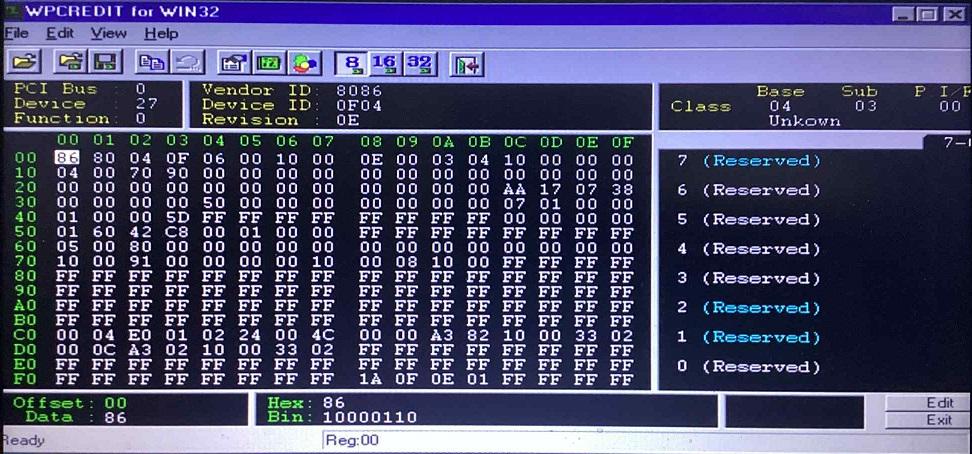
Okay I have managed to do much more testing in between a crazy weekend! 1) As requested WPCREdit attached. Chipset is unknown (so far) as it is SoC. Model is Lenovo S20-30 with Intel N2840 processor. 2) I went over the awhooley thread to wrap my head around it but not sure this is what is required here as Drew Hoffman's driver does not appear to deal with GPI/O either. Nevertheless, I did try all 5 options you presented, one at a time to no avail sadly. When you say 'payload 1F will activate all 5 GPI/O pins together, which verb would I use to try that? I will give it a go. 3) Please let me know what you think, I can run some tests to see if it is plausible if you like, just let me know what you would like to see. I guess setting the out and in values on both the AFG and the mixer could test this as AFG should be output and mixer should be input? Therefore running a get command after setting these should show in HDACIN with volume still set on AFG to the value, in this case $57. However mixer will show 00 as input so hard to tell unless I maybe mute to 80? Sleeping Widget) I tried Verbinterface $0 and checked HDAICIN. First thing I noticed is all of the power get verbs F05 showed a response of $00000400, which according to HDA spec is D3 cold mode. Unsure why this only shows using Verbinterface $0 but not on CORB/RIRB $1? Volume) Correct, I ran a lot more tests trying to set volume $57 on the mixer and pin widgets but always show as 0 if unmuted or 80 if muted, never 57. Therefore unmuting these with payload 00 at the end should be sufficient. Vendor Defined Widgets) Audio processing you are correct with here, it appears to be for filters and such that can be applied to an audio stream. There is one Vendor Defined Widget with processing control on my codec that I believe has something to do with this - NID $20 also. About testing) Noted! I will try wav files 44.1kHz CD audio quality. For now seems to be the slider moves with no sound. About output pin) Noted! Since reading this I have tried all output pin widgets for completion sake and tried speaker and headphone jack, sadly no result. Something else is at play here.. Timing/Wait settings) I tried $50, $25, $10, $5 but things got worse as I went lower to the point of all 0's in HDAICIN! So I tried higher and went to $800 (probably overkill) and found all HDAICIN results now stable. Sticking with $800 for now.. not optimal but all results shown until solved. Stream 5) Interesting to note the Linux dump for ALC3220 (The Dell T7610 dump) codec is identical to my codec! I noticed DAC $2 and $3 set to stream 5! I did try this on Watler's but no result.. any idea why stream 5 used? Andy Hoffman's driver) Investigating Hoffman's driver, it seems it disables unsolicited response, and also disables processing on all widgets (??). This is something I have not tried but will give it a go.. unsure if it will make any difference. I am still leaning towards Hoffman's driver initializing codec 0, it stays active and then Watler's initializes codec $2, however the verbs sent through HDAICOUT can be received by codec 0 as it has been successfully initialized by Hoffman's.. therefore sound works with the correct verbs. From what I read with Watler's driver the source code is using a language that few are fluent in so hard to reprogram, however surely not too hard to find in the source code where the codec selection happens and hard code it to codec $0? I might have a try although this is entirely new to me.. More to come!

-
Thanks for this! I have tested this debug file with HDA.SYS disabled but unfortunately no sound. I re-enabled HDA.SYS and there is sound and this time no high pitched squeal and audio is sounding more stable than with my initial HDAICOUT. Investigation required as to what makes the difference.. "You have the Real Spirit!" - just a crazy brain that likes to solve puzzles. 1) No change detected in the PCI registers with and without HDA.SYS enabled for WPCREdit. I guess that rules out nosnoop here? 2) Excellent find! I ran through the codec dump and think you are correct for the GPI/O pins here.. Interesting I found the ALC269 datasheet and noticed node $14 has SPK-OUT+ and SPK-OUT - which I assume is GPI/O controlled? Unsure how to set this though. The same path of $02 to $0C to $14 can be found here and on most ALC codecs that I have looked at, which is why I have been working specifically with $14. I checked out ALC231 and looks very similar indeed! - much more simplified than ALC269. Do you have a HDAICOUT working file for ALC231 I could test on this codec? 3) Looking into the set amplifier payload format I wondered if possible to set 'both in and out' plus L and R which in hex is F07F, so using 3F07F was a test for that which I could use on all pin widgets whether they were out or in. I believe if one is not possible it ignores it, but possibly ignores the entire verb if one doesn't exist..? So I used your advice using 37xxx and 3Bxxx instead for further testing. Sleeping Widget) That is interesting to know.. Yes it is the HDMI codec being detected - see my HDACFG file below - In HDALOG it identifies the 10EC 0280 codec first, but as it gets no response at the next check it switches to codec $2 which is HDMI. Volume) Yes 57hex is max volume and 0dB setting for this DAC. My mistake was looking to find hex 57 in responses also on 0C and 14, but I see now that they change from muted response to a plain $00000000 response when unmuted, not $57.. I think? Power) Yes I thought it was strange to receive D0 response before any settings are applied.. so I have gone back to setting 70500 setting on all widgets in the path for now. No problem as they will be ignored if not needed, just not economical for the HDAICOUT file verb limit. Vendor Defined Widgets) Yes still a mystery even after combing through the linux dumps... I wonder what they are? In answer to your questions: 1) I am testing using the 'sounds' in control panel and playing the available ones. If the play button can be pressed, but no sound is heard, then reverts to stop mode, I assume this is telling me the sound is playing and audio output path is correct but blocked as something is muted.. would that be correct? When the audio path is incorrectly connected I can still press play but it never reverts back to stop mode so the path needs fixing. 2) I use $14 as most ALC codec datasheets I have studied use this port for speaker out on the notebooks I have tested (hardwired to the speakers). Also the connection list pointed me to use this as it is the 1st option (not always correct though!). I have since tried opening all possible output paths up but still no results to show with just Watler's driver enabled. Thank you very much for the debug file. I ran it and the amount of codecs is good, no room for more! Please see HDAICIN results attached below. I have noticed now that there is possibly a timing issue in the verb responses being recorded as '4011' which is audio stream setting is sometimes shown as the result of an amplifier gain setting request (Bxxxx payload).. and sometimes no response at all, just 0's until the check is repeated.. any idea how to stabilize these results? My wait times as you can see in HDACFG file below is set to $400. I tried running the get command 3 times in a row to see this and you can clearly see it misses some of them. HDAcfg.iniHDAICIN2.TXTHDAICIN3.TXTHDALOG.TXTHDAICIN.TXT
-
@deomsh thank you for all of this info! Notes below with @Drew Hoffman HDA.SYS renamed HDA.BAK for testing purely Watler's. 1) Noted! I will leave the PCI registers alone for now. 2) The AFG reports some GPI/O - please see codec response log file attached below for full verb parameter responses. Response on AFG is $40000005 (reports 5 GPI/O's). 3) Until now I only unmuted outputs, but tested also with combined output and input payloads as you mentioned using $00C3F03F (F:Set out+In_L+R, 0: Index 0, 3F: Unmute and volume to 3F). Also $0143F03F. No change with these. Sleeping Widget) I tried $02. No change with this. Volume) According to DAC1 at reset AmpOut is set to $57 which when checking steps settings is 0dB and unmuted. I maybe read somewhere that amp gain is added together if you also set it on mixer and pin widget (but maybe I am imagining this and instead it adds L+R channels?). I thought if I set $57 also on Mixer and Pin Widget the amp gain becomes $57 + $57 + $57 at LineOut.. I think I am wrong here maybe..? Power Verbs) At the beginning of testing I set $00170500 and also $0C and $14 to 70500 to power on the nodes to D0 state, however checking F05 readings in HDAICIN without 705 set at reset: all nodes showing $00000000 (D0 power state) so I assume not needed to be set. Maybe I am wrong here and reading $00000000 could also mean no reading at all, therefore the 705 verbs are required? So I tested with that but no difference in result. Further) That is great you have a quasi-universal HDAICOUT.HDA that works on multiple codecs! Hopefully I can help confirm some more codecs for this. Please see image here with quick lookup reference I made from GET verbs and the responses that helped me map this codec. I am lost at what the vendor defined audio widgets could be. Any idea for these? CODEC RESPONSES.TXT
-
Thanks Drew, more than happy to provide any info that can help. What you suggest is happening seems logical here, i'm not 100% sure how the HDA.SYS driver functions and what verbs it sends on enumeration (could you please advise?), but definitely when I rename HDA.SYS to HDA.BAK then sound stops. Renaming back to HDA.SYS - sound returns again. Deomsh has advised possibly your driver enumerates GPIO pins which I am not touching in the HDAICOUT file.. yet.. but currently investigating. And/Or nosnoop bit set on audio controller.. also under investigation but this is brand new info for me . The main mystery is how HDACfg.ini maps codec $2 instead of $0 (Codec $2 is HDMI audio out.. so Watler's should be doing nothing to get sound possible here). Chipset I am struggling to identify due to the nature of this motherboard (without installing Win8+ that has drivers to identify).. it is a Lenovo S20-30 with Lenovo Edonis 2A1 motherboard, Baytrail-M CPU Intel Celeron N2840 and Valleyview integrated graphics. The audio controller is Intel 8086 0F04. Codec is Realtek HD Audio 10EC 0280. For chipset if you know any hardware identifier progs that work on win98SE and can identify newer chipsets then I will be happy to try. Currently HWInfo32 shows 'unknown' chipset. Wishing you a speedy recovery and hope to hear from you soon!
-
Thanks Deomsh, great to be back with you again! I am looking into these options now. 1)I have WPCREdit 1.4 and have located the registers for the HD Audio device 8086 0F04. How can I tell (if it exists) which bit is nosnoop and what to set it to? 2)I have currently sent verbs (via HDAICOUT) to map all of these except GPIO. Suspect number 1.. I will investigate further and let you know findings. 3)Side thought.. what does PCIPATCHB do and how can I tell if I should adjust it? Current verb list is (please advise if ordering of verbs could be wrong?): No double reset or power verbs - I had these in initially but found on reset that the codec sets power states to D0 - this seems to happen when Hoffman's driver is disabled too so not included. $01470C02 - Enable EAPD on Lineout $00C3B000 - Unmute Audio Mixer $0143B000 - Unmute LineOut $00270610 - DAC stream and channel set to stream 1 channel 0 (stream 1 as HDA specs say stream 0 is reserved as unused) $00220011 - DAC stream 48khz 16bit 2 channels $00C70100 - Audio Mixer connected to DAC $01470100 - LineOut connected to Audio Mixer $01470740 - LineOut Output enabled SleepingWidget=$01 (AFG) VolumeWidget=$02 (DAC - DAC at reset has volume set to 0dB so simply unmuting Audio Mixer and LineOut should still produce 0dB?) OutputWidget=$02 (DAC - is this correct?) Thanks hope to hear from you soon!
-
Hi Deomsh! I was on this thread about 5 years ago and you assisted me to get audio working on a Soundmax AD1981HD codec. Since then I have also managed to get audio working on IDT 92HD75B3X5 codec and a Realtek ALC272 codec. I'm currently working on a 10EC 0280 codec which I have had limited success with so far, seemingly by using a mix of Watler's driver and Drew Hoffman's driver he is developing. If there's any info I can provide to assist your database please let me know and I'll be happy to assist. To note: the 10EC 0280 codec using Watler's is having the codec index mapping issue (it is mapped as index $2 which is actually the HDMI audio out, and the codec index should be $0), but with a combination of Hoffman's driver I am able to get sound - but no idea why. If you have any theories here I would be keen to know. Thank you and all the best!
-
Hi Drew, With initial help from Deomsh over at the 'Audio driver for Realtek HD Audio' thread, I have been using Watler's driver to get HD Audio working on Windows 98 laptops for a while, and came across one that I had some trouble with. Currently I have managed to get SoundMax AD1981HD working on a HP6710b laptop, IDT 92HD75B3X5 working on a HP 6550b laptop, and Realtek ALC272 working on a Lenovo S10-3 laptop with Watler's. Attempting a Lenovo S20-30 proved difficult as the codec was identified as 10EC 0280 of which I could not locate a datasheet for. I used HDAICIN responses to identify all NID's/CAPS and found the connection path to be the same as ALC 272 (and most other Realtek codecs from the looks of things) with $01 = AFG, $02 = DAC, $0C = Audio Out connected to NID $14, and NID $14 = Line Out. I managed to create a working HDAICOUT.HDA file but no sound. I had stumbled across your driver (great work I can see this being invaluable in the future!) and trialed v16, but sadly no sound to start with. So I re-installed Watler's to try some other options. What I notice is that your driver, although removed from device manager and 're-installed' to Watler's, is maybe still using the registry entries, so when I go to multimedia settings I can see the WDM driver still listed as an option, along with the midi/volume control, however Watler's is selected and installed. The HDA.SYS driver file still exists in windows\system32. The veeeery interesting thing here is that this combination has helped me to get sound working (although buggy) on the S20-30 laptop! I have no idea how or why this works but hoping you could shed some light on it, or I can provide you some more info that may be able to help you with development? I did try to rename HDA.SYS to HDA.BAK and rebooted but got no sound at reboot which indicates to me that although Watler's driver is installed it is still somehow using HDA.SYS in combination with HDA2.DLL to route the sound to the speaker - I am good with verbs but not with codec initialization, CORB, RIRB etc. To note: HDAcfg.ini from Watler's driver shows codec index $2 is active, which is incorrect (this is the HDMI audio out, whereas the 10EC 0280 codec is on index $0) so how I am getting any sound at all is a mystery.. At boot I get a high pitched squeal through the speakers until the initial windows start sound finishes, then I can go to sounds and play the sound samples. DirectX 9C is installed and runs the tests all okay. Happy to assist here with any information I can provide to get you further and help me understand why sound works with this combination, just let me know if anything is required. All the best and I will be following your progress. Cheers!
-
Awesome thanks for clarifying the settings from HDAConfig.ini, that makes more sense now. I will try the outputs you recommend. Correct it can all seemingly be routed directly from the DAC to Mono Out ($07). I have had no success with that so far as it seems that one of the outputs may be hardwired to the speakers, being its running in a laptop with no actual line-out port. Just a headphone jack and a mic-in jack for ports which i'm testing too. As it passes through selector widget ($0B) there is an option listed in the notes of the datasheet to redirect the stream to the analog mixer ($0E) - which I have set in HDAICOUT, although the diagram does not show this path, there is just a greyed out arrow coming out of selector widget ($0B) and into sum widget ($0F) which I assume indicates this. I notice the path from DAC splits down to the Analog Mixer ($0E) but passes through amp ($11) and then a mute before hitting the sum widget. At the moment I have Mono Out ($07) set to 'not connected' so might be possible that ($11) - Amp going into Analog Mixer ($0E) is a candidate for Waveout.exe... unless the greyed out arrow on the datasheet is indicating to use ($0F) as the volume control. Lots to try!! Sure thing! Attached here \m/ VDMS.INI
-
This is why you are now the HDA sensei! Ah sorry I meant to control the volume using Waveout.exe - Which widget to set in hdaconfig.ini. Still to test but it should be either $11 (The amplifier between DAC and Analog mixer), or the analog mixer itself $0E according to the 1981HD datasheet. The physical volume buttons on the laptop DID work with Judas but only the mute button works in 9x. I'll have to have a look at the laptop datasheet to see how the volume button is wired to the speakers to see what controls it. Just for clarity in HDAConfig.ini - Sleeping Widget = The DAC? Volume Widget = The Amp connected to DAC OR the Analog mixer? Output Widget = The Amp connected to DAC OR the Analog mixer? There's a version of VDMS called 'Alpha3' and it seems to handle midi - to the point where the games are detecting the port at 0x330 and allowing me to select soundblaster pro, and then playing it. As for whether these are true midi sounds or how good the emulation is I can't say (I'll leave that to the midi critics) but certainly playing with no stutters. There's another item on my 'to test' list which is MUNT for 9x which seems to have had some success over at Vogons - Can handle Roland MT-32 in a 9x dos window apparently?