

Jaguarek62
Content Type
Profiles
Forums
Events
Posts posted by Jaguarek62
-
-
On 7/6/2026 at 4:08 PM, AstragonQC said:
I'm digging up this question, but the fact is no backport is even needed.
The latest version (and even the latest snapshot) perfectly works on Windows 7 (see images)
The only detail to note is that the Vulkan rendering does not work, falling back to OpenGL. And it seems this is related to drivers (a look in the logs shows that it requires 'VK_KHR_dynamic_rendering' and 'dynamic_rendering').
[15:39:33] [Render thread/INFO]: Backend library: LWJGL version 3.4.1+2
[15:39:33] [Render thread/WARN]: Device [NVIDIA GeForce GTX 1050 Ti] does not support required extensions, missing: [VK_KHR_dynamic_rendering]
[15:39:33] [Render thread/WARN]: Device [NVIDIA GeForce GTX 1050 Ti] does not have required feature [dynamicRendering]
[15:39:33] [Render thread/ERROR]: Failed to create backend Vulkan
com.mojang.blaze3d.systems.BackendCreationException: Device missing capabilities
	at com.mojang.blaze3d.vulkan.VulkanBackend.throwForMissingRequrements(VulkanBackend.java:298)
	at com.mojang.blaze3d.vulkan.VulkanBackend.findPhysicalDevice(VulkanBackend.java:190)
	at com.mojang.blaze3d.vulkan.VulkanBackend.createDevice(VulkanBackend.java:105)
	at net.minecraft.client.Minecraft.<init>(Minecraft.java:487)
	at net.minecraft.client.main.Main.main(Main.java:267)
[15:39:34] [Render thread/INFO]: Using graphics backend OpenGL, using drivers: 3.3.0 NVIDIA 475.14
[15:39:34] [Render thread/INFO]: Using graphics device: NVIDIA GeForce GTX 1050 Ti/PCIe/SSE2 (NVIDIA Corporation)
So for now the latest version can run thanks to OpenGL, but as they plan to remove it once the Vulkan implementation will be stable enough for their expectations, unless this requirement is fixed, maybe it'll be required to have a wrapper that add the missing Vulkan functions in order to run later versions of the game.

I managed to fix it. If anyone is interested. Windows 7 will need further debugging, but I can help you with working wrapper.
0 -
# [Windows 8.1 x64] Cyberpunk 2077 2.31 Steam compatibility patch
I am publishing an experimental compatibility package for **Cyberpunk 2077
2.31 on Windows 8.1 x64**, tested against the Steam public build `20383525`.** Download has been taken down
**ZIP SHA-256:** `5D8543335269D86B7456B60B6E6A3908C6C296B186DB93F8EF25EA38D371745E`
> This release was tested only on **Windows 8.1 x64**, so that is the only
> operating system for which it is currently recommended. The installer rejects
> other Windows versions and unsupported game files.## What it fixes
The package provides a D3D12On7 raster path for the tested Steam build and fixes the
known presentation problem where Cyberpunk appears frozen and updates only when
another window is dragged over it. The game can be launched normally with
Steam's **Play** button after adding the launch option printed by the installer.## Performance
On my tested machine, performance is close to running the game on Windows 10.
It is dramatically better than my older Cyberpunk 1.63 compatibility setup,
which delivered roughly half performance on the same machine.This is an observed real-world comparison, **not a controlled or standardized
benchmark**. Results will vary with GPU, driver, settings and system setup.## Tested setup
- Windows 8.1 x64
- Cyberpunk 2077 2.31, Steam build `20383525`
- GeForce RTX 2060
- NVIDIA driver `474.11`
- 1920 x 1080
- Raster rendering onlyOther GPUs and drivers, GOG/Epic releases, hybrid graphics and other operating
systems have not been tested.## Required: official D3D12On7 1.1.0 package
Download Microsoft's official
[`Microsoft.Direct3D.D3D12On7` 1.1.0 NuGet package](https://www.nuget.org/packages/Microsoft.Direct3D.D3D12On7/1.1.0)
separately and save the unchanged file next to `Install.cmd` as:`Microsoft.Direct3D.D3D12On7.1.1.0.nupkg`
Expected package SHA-256:
`C0C4D597537ECC1C777FA3B5523E5CCDE0B9984B88FB9F37B2385E1D687BF536`The Microsoft package is not bundled with this patch.
## Required: SecondSystem
SecondSystem must already be installed and active. **It is not bundled with the
patch.** Obtain it separately here:[SecondSystem from win32's Patreon](https://patreon.com/win32?utm_medium=clipboard_copy&utm_source=copyLink&utm_campaign=creatorshare_fan&utm_content=join_link)
Please support its developer and follow the terms provided with it.
## Installation
1. Extract the complete ZIP.
2. Download the official D3D12On7 package above and place it beside
`Install.cmd`.
3. Install and activate SecondSystem.
4. Exit both Cyberpunk 2077 and Steam completely.
5. Run `Install.cmd`.
6. Copy the exact Steam Launch Options value printed at the end.
7. Paste it into **Steam > Cyberpunk 2077 > Properties > General > Launch
Options**.
8. Start the game with Steam's **Play** button.Do not append custom arguments; the included launcher intentionally uses only
the fixed, validated command line.The installer validates the exact game/runtime hashes and stops before changing
anything if the files are unsupported. It keeps all compatibility files local
to the game directory and creates a verified uninstall record.## Important limitations
The following features must remain disabled:
- Ray tracing and path tracing
- DLSS
- NVIDIA Reflex
- Frame Generation, including XeSS Frame GenerationThis release is for raster rendering. Cyberpunk 2.31's newer Agility SDK path is
not a Windows 8.1 target, so modern features that depend on it are outside this
patch's scope.## Removal and game updates
Close the game and Steam, run `Uninstall.cmd`, then clear Steam Launch Options.
The uninstaller restores any files it backed up and reverses its SecondSystem
mappings.The package is locked to Steam build `20383525`. The launcher compares the full
contents of the current executable with its validated local copy and refuses a
mismatch. After a Steam update, uninstall this release and wait for a version
explicitly validated for the new build; do not remove the version/hash safety
checks.## What is and is not included
The ZIP contains the original open-source proxy, launcher, installer scripts,
source code, documentation and notices. It does **not** include:- Cyberpunk 2077 files
- Microsoft D3D12On7 or D3D11On12 binaries
- SecondSystem
- Steam files
- any DRM bypassA legal Steam copy of the game is required. The installer extracts the runtime
inputs from the official NuGet package separately supplied by the user and
creates a local working copy. Microsoft terms still apply and may restrict this
use or modification; this is not legal advice.Full installation, troubleshooting, technical and checksum information is in
the included `README.md`.
3 -
On 11/29/2025 at 4:03 PM, TheFighterJetDude said:
Firefox 115.30ESR officially, or there is the firefox-for-windows-7 fork on github, that allows for 147 nightly on 7 and 8.x.
As of now, the latest stable Steam version has been ported to at least work on 8 and 8.1 without extended kernel, but a few more DLLs need to be patched for 7
Is there a download link ?
0 -
There is a project called second system, it's made by win32 on his patreon and the support is not experimental
1 -
On 10/28/2025 at 2:20 PM, yoltboy01 said:
In case anyone was wondering how the current Office status is on Windows 8.1:
I installed the latest Microsoft 365 (v2509) on Windows 8.1,which indeed is the 31th Post-EOL Feature Update (v2301) for this System and ... Surprise -> it works!
The new icons match very well with the OS. I like them. Look for yourself tho:
imgur.com/a/kR2cdyl
In terms of stability, I would recommend using Office 2024 LTSC. It is supported until 2029 (when Premium Assurance ends for NT 6.3) and includes modern standards yet excluding Copilot (which is great in my opinion)
does outlook work?
for me it crashes upon opening any email
0 -
Greetings,
I had some health issues and personal as well, so I only used my work pc that has windows 11. Now I finally was able to just sit down and enjoy my pc. I wanted to do a clean install, so I did. The thing is I quickly discovered, that a lot of things have changed.
Steam
Still works, but downloading pretty much anything ends up with download data is corrupted. Only thing that works is to download the game on windows 11 pc and transfer it over to windows 8.1. Annoyingly, windows 7 works thanks to vxkex next.
Firefox
I've personally seen on this forum that some of you were able to run the latest version of firefox, but I could not do it myself. Since the reinstall I wanted to switch to firefox mainly thanks to google's stupid decision about manifest v2. Can anyone guide me through running firefox on 8.1?
Beamng.Drive
@mjd79 was really kind at the start of this year and gave me his modified version of libcef.dll that made Beamng 0.35 working under 8.1, unfortunately, starting with 0.36 beamng executable itself is not working and I could not figure out why. This is the only game I still care about and I really enjoy it on Windows 8.1 (yes, I'm weird
 ). So if anyone here has knowledge about a possible fix, I'd even pay you.
Thanks for any help, so glad to finally do something that I really enjoy
0 -
2 hours ago, D.Draker said:
The OP asked about 7, not 8.1. The latest version works only on 8.1 (maybe) and 10.
The old version, I'm afraid, won't suffice for the updated 15 Pro with iOS 18.
even newest version can run on windows 7, just need dxgi from windows 10, please read it all..
1 -
It can be done if you use newer itunes version. refer to my tutorial
0 -
2 hours ago, mjd79 said:
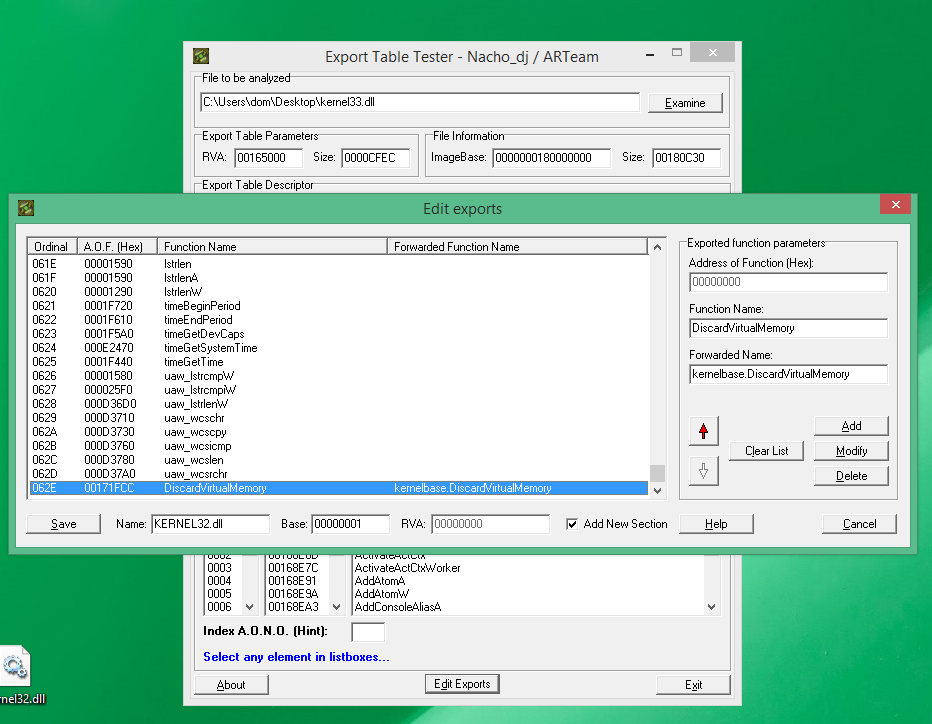
Opera will probably work up to around version 110 (Chromium 125?) with DWrite.dll from Windows 10, replacing DiscardVirtualMemory with VirtualAlloc (or what I also recently discovered, DiscardVirtualMemory is in 8.1 in kernelbase.dll, so you can add by ExportTableTester redirection to this function in kernel32.dll exports and using it for opera_browser.dll e.g. as kernel33.dll) and with --no-sandbox. This is completely pointless due to depriving the browser of security, but for viewing DRM content you can do so. In my case, interestingly enough, DRM works on 8.1 after copying the widvine from Firefox to any compatible browser on Chromium.
Does it work without --no-sandbox? If so, the differences are unfortunately much greater than DWrite and DiscardVirtualMemory. The biggest problem of Windows versions lower than 10 is the Set/GetProcessMigitationPolicy functions. 8.0 and 8.1 have them, but their implentation is insufficient for Chromium.
this is really interesting.. and yes on windows "10" build 9888 it works without --no-sandbox flag, just needs the virtualalloc hack. will definitely try the widevine method you mentioned. really cool.
0 -
On 12/8/2024 at 11:47 AM, j7n said:
Would the result of fixing Chrome be much different than Supermium, which has already been fixed? There is not much difference between vairous Chrome-variants.
Actually yeah, I have been forced to use windows 11 to watch netflix etc.. DRM does not work under supermium or firefox
1 -
23 minutes ago, Klemper said:
Most of my extensions simply won't load. Like it was before, if you remember, in 2021.
I don't know, I got ublock origin working in chrome 114 on windows 8.1 as that is the last chrome version I'm able to run. on windows 10 9888 all extensions work just fine
0 -
I know that we have supermium browser and that it works flawlessly, I myself use it on daily basis, but I was bored the other day and discovered, that the newest chrome works on Windows "10" 9888, so how hard is it really to fix it for 8.1?
0 -
I tried patching firefox nightly build, but I'm missing something and I don't have enough experience to debug this any further unfortunately, but it seems to attempt to launch.
0 -
On 10/3/2024 at 3:35 AM, TheFighterJetDude said:
So my laptop has 7 and server 2016 dual booted, and I booted to the 2016 install, and appearantly the October 2nd build switched to Chromium 126, which means no more updates for stock 7 and 8.x, but at least Valve is not actively forcing the update on people's machines if they are running 7 or 8.x, as far as I know.
It's in beta phase atm, but the end of updates is near
0 -
I was able to bypass even the newest version of the launcher, social club and confirmed that battleye anticheat is working on windows 8.1. It just simply does not run on Windows 7 unfortunately.
0 -
Hi,
Today, I broke rockstar launcher artificial block. Since I can't link you anything, you need to do the modification yourself. Get your hands on rockstar games launcher version 1-0-83 and install it. DO NOT open it! Make the folder read-only and restrict yourself and all Administrators from write permissions. Delete launcherpatcher.exe and run the launcher.exe, let it install socialclub and if for some reason it gets stuck on installing social club, just download the latest one and install it. We are not done, now you'll see an error complaining about missing dependencies. Download CEF explorer and locate social club folder. open socialclubhelper head into import directory and select user32.dll change adjustwindowrectexfordpi to adjustwindowrectex. and that's everything. To be able to play gta v for example, you need to locate playgtav.exe before the artificial block, even versions from 2020 works since the are just a stub.
4 -
11 hours ago, Nonstopmaximum said:
Rockstar Games Launcher since January 30 is Windows 10 only and refuses to install or function on 7. A few games like Grand Theft Auto V and Red Dead Redemption II that previously had 7/8/8.1 compatibility and require RGL are no longer functional on these OS as a result.
There IS a way to bypass that. I discovered a method myself, though I never shared it anywhere, cause I don't want rockstar to close that loophole. https://prnt.sc/aEyLJ1GypD5b
0 -
14 hours ago, superleiw said:
I'm wondering that as well, does Auto-Update work after this modification?
for me it is stuck at "installing updates" https://ctrlv.cz/VWKw
2 -
3 hours ago, TSNH said:
The client works but I can no longer launch games after the last update
The steam ui displays that they are running for a few seconds, but no game's exe is launched
it works for me on 8.1. latest beta client
0 -
2 hours ago, Sampei.Nihira said:
Follow the instructions in the link I included.
Over "Balanced" you should have the option of choosing "High" or "Ultimate".P.S.
This is my PC where I chose "Ultimate" but I would also have "High":
P.S.
I would not want MS to prevent the Ultimate power plan in laptops.But you should be able to select at least "High".
Follow the instructions in this link (if they seem easier to implement):
there is only balanced and from what I've seen it has to do something with modern standby
0 -
19 hours ago, Sampei.Nihira said:
Try to activate the Ultimate Performance plan.
only balanced is shown in classic control panel. even after I ran the command
0 -
28 minutes ago, Klemper said:
windows 8.1 is a lot faster, 100 percent agree! The question is whether the employer lets you use it.
yeah well that's not happening, we just began to phase out windows 10, because the support is nearing the end. The funnies thing about that is that we have 3 windows server 2012 r2 running the surveilance system, remote desktop etc..
0 -
50 minutes ago, Dixel said:
Looks like the OP won't be allowed to reduce, modify those 10 OS at work.
Unfortunately, I can't do much with the bloat. we have teamviewer running in the background with teams,outlook,edge and onedrive. There are some dell programs and I tried to get them removed, but ultimately was not allowed to do so. It seems to be related to the cpu frequency though, cause the cpu is underclocking to 1.1-1.8 Ghz and the temperature is around 40-58 degrees so I don't quite get it.
0 -
Btw 4th gen i5 with 8gb of ram running windows 8.1 is a lot faster than this piece of crap...
0



cyberpunk 2077 on 8.1 with almost native performance
in Windows 8
Posted
Are you kidding me?
I’m an active member of this forum for the past 7 years.
alright, that’s it. I’ll never post anything on msfn again. This community is so ungrateful. No one has bothered to fix that damn driver overhead for years btw.
link deleted