Skip to content
View in the app

A better way to browse. Learn more.

MSFN

A full-screen app on your home screen with push notifications, badges and more.

To install this app on iOS and iPadOS
  1. Tap the Share icon in Safari
  2. Scroll the menu and tap Add to Home Screen.
  3. Tap Add in the top-right corner.
To install this app on Android
  1. Tap the 3-dot menu (⋮) in the top-right corner of the browser.
  2. Tap Add to Home screen or Install app.
  3. Confirm by tapping Install.

jscarano

Member
  • Joined

  • Last visited

  • Country

    United States
  1. Genecooper, Thanks for the guide. My windows look fantastic now!
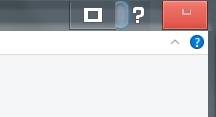
  2. My buttons look like this . How do I fix ? thanks
  3. Would we get that on version 1607 Build 14393.10 that is not RS? thanks
  4. It never asked to download symbols. I guess I should just block dwm in the firewall. I have to do all this in safemode because as soon as I installed it my screen and computer go crazy and I cant use the computer at all
  5. Sweet I'm gonna try this thanks! Edit: which folders or files do we delete? I deleted the whole symbols folder in aeroglass folder but still have the flickering ugh
  6. Oh yea same issue here. Hopefully they can find a fix for it . I finally got a paid version earlier this year and I would love to get a working version for Win 10 Anniversary edition .
Account

Navigation

Search

Search

Configure browser push notifications

Chrome (Android)
  1. Tap the lock icon next to the address bar.
  2. Tap Permissions → Notifications.
  3. Adjust your preference.
Chrome (Desktop)
  1. Click the padlock icon in the address bar.
  2. Select Site settings.
  3. Find Notifications and adjust your preference.