



Skip to content
View in the app

A better way to browse. Learn more.

MSFN

A full-screen app on your home screen with push notifications, badges and more.

To install this app on iOS and iPadOS
  1. Tap the Share icon in Safari
  2. Scroll the menu and tap Add to Home Screen.
  3. Tap Add in the top-right corner.
To install this app on Android
  1. Tap the 3-dot menu (⋮) in the top-right corner of the browser.
  2. Tap Add to Home screen or Install app.
  3. Confirm by tapping Install.

vnagrand

Member
  1. No layout files? Use the win8rp.png.layout provided with aeroglass, works fine for me. I have no win8rp.png.layout on my both machines, can you upload it please?
  2. Thank you! It worked, no error message anymore.
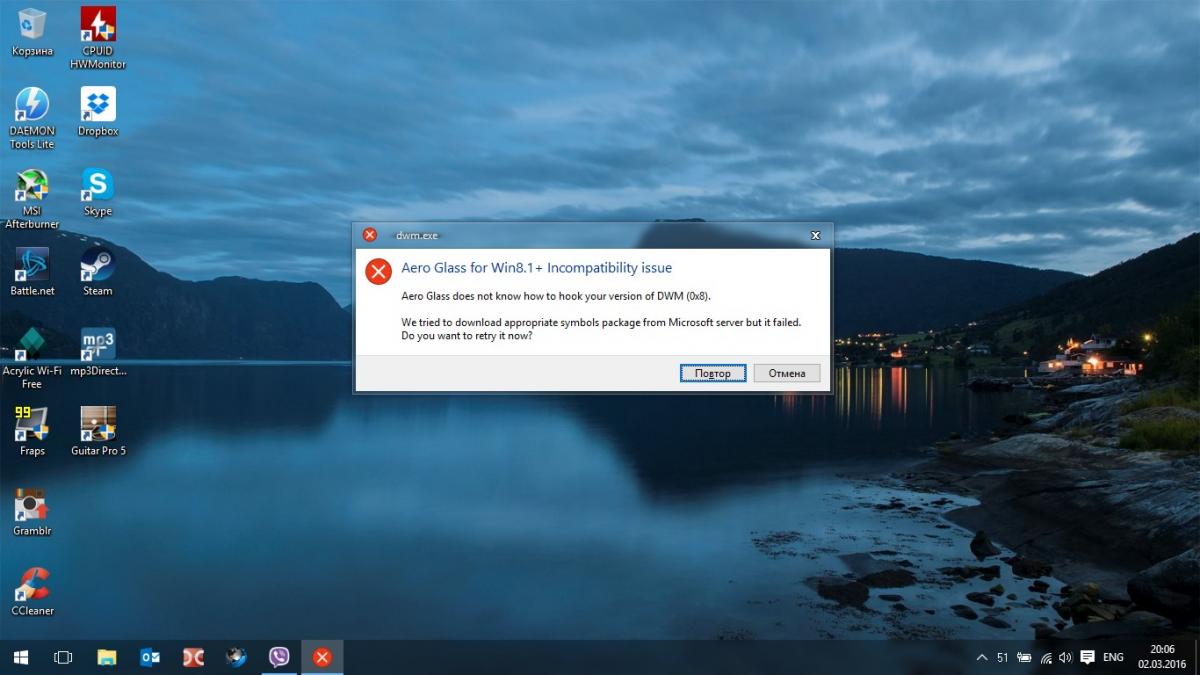
  3. Got this too after update to 10586.122 build. Aero glass works but this message exists. Any ways to fix this or I just should wait till it will be fixed by itself?

Account

Navigation

Configure browser push notifications

Chrome (Android)
  1. Tap the lock icon next to the address bar.
  2. Tap Permissions → Notifications.
  3. Adjust your preference.
Chrome (Desktop)
  1. Click the padlock icon in the address bar.
  2. Select Site settings.
  3. Find Notifications and adjust your preference.