



Skip to content
View in the app

A better way to browse. Learn more.

MSFN

A full-screen app on your home screen with push notifications, badges and more.

To install this app on iOS and iPadOS
  1. Tap the Share icon in Safari
  2. Scroll the menu and tap Add to Home Screen.
  3. Tap Add in the top-right corner.
To install this app on Android
  1. Tap the 3-dot menu (⋮) in the top-right corner of the browser.
  2. Tap Add to Home screen or Install app.
  3. Confirm by tapping Install.

Flashmann

Member
  • Joined

  • Last visited

  • Country

    Spain
  1. Seagate FreeAgent Go 500 Gb, first partition is 15,8 Gb (which is used for setup files) and second is 450 Gb for my files.
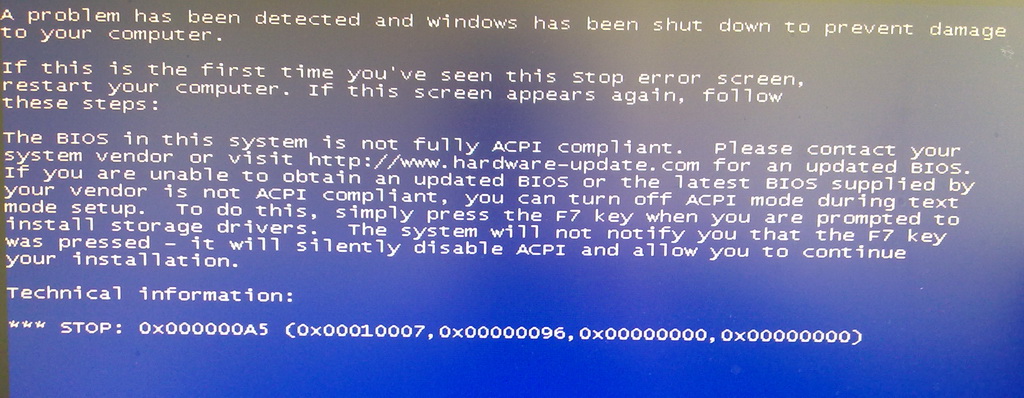
  2. @ilko_t QEMU doesn't work at all, seems to me. I checked "Test in QEMU", then "GO" button. Nothing appears in next 5~7 seconds, and then it says "Job done". Renaming migrate.inf has caused BSOD, image attached.
  3. Hi everyone! Please, help me! Here is my problem. I've made USB stick with Win XP SP3 (using 1.0.7 beta) and USB HDD from one windows source. Weird, but stick works fine, except USB HDD. Here is my TXTSETUP files. P. S. Please, forgive my bad english Oh, sorry, almost forgot - it says "cannot load KBDUS.DLL" TXTSETUP.7z
Account

Navigation

Configure browser push notifications

Chrome (Android)
  1. Tap the lock icon next to the address bar.
  2. Tap Permissions → Notifications.
  3. Adjust your preference.
Chrome (Desktop)
  1. Click the padlock icon in the address bar.
  2. Select Site settings.
  3. Find Notifications and adjust your preference.