




-
Same here
-
Hi, I get this error when installing latest startallback v.3.9.16 on win11 24H2 build 6584 TIA
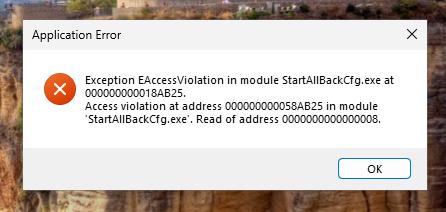
-
Hi @Tihiy Can you tell me what registry key to make "always show all app icons" option always active? Thanks.

-
Hi @Tihiy I'm integrated latest SAB 3.8.1 into win11 24H2 b1301 image (also tested with w11 23H2 b3880) with setupcomplete.cmd (/elevated /silent) , file explorer shortcut is gone from taskbar file explorer shortcut back again if i uninstall SAB please fix. Thanks


-
I have pack it with winrar and make it as exe. And my install.bat looks like this thanks my friend,but "/silent" switch only for one user installation,,i need install for all user on my computer,,any command switch for this? thanks.
-
anyone was make autoit script for this starisback? please upload your scripts,,thanks
-
thanks,,solved,,i was update autolt version to 3.3.8.1 :
-
i hope this ktool can work on windows 8,,i was add on code WIN_8 and not working, so i try the @OSVersion macro: MsgBox (0, "OS Version", @OSVersion),,and "UNKNOWN" Message Appear,,
-
'UNKNOWN" on windows 8

