Skip to content
View in the app

A better way to browse. Learn more.

MSFN

A full-screen app on your home screen with push notifications, badges and more.

To install this app on iOS and iPadOS
  1. Tap the Share icon in Safari
  2. Scroll the menu and tap Add to Home Screen.
  3. Tap Add in the top-right corner.
To install this app on Android
  1. Tap the 3-dot menu (⋮) in the top-right corner of the browser.
  2. Tap Add to Home screen or Install app.
  3. Confirm by tapping Install.

nyvicky

Member

Everything posted by nyvicky

  1. that blog has many good stuff for windows 2000 too thnxz
  2. this method works flawless, have fun! http://toastytech.com/evil/lab.html and so installing IE5.5 along with active desktop: Installing Active Desktop Update While installing IE 5.5 SP2 Monday, 7. March, 05:34 me, windows, 7, seven ... without any IE version installed. (on a pure and clean system). Installing the Active Desktop Update along with IE 5.5 SP2 You can install the Active Desktop Update on Windows 95 along with IE 5.5 SP2. The option exists, but has been hidden because it must not be installed on Windows 98 or newer (already included). Here's how to proceed: 1- Download and run ie5setup.exe (or run that file from your downloaded package or CD). 2- When the License Agreement appears, a folder \Windows\temp\ixp000.tmp will be created. Download iesetup.inf in that folder, overwriting the existing file. This step is necessary to update the location of the files needed from the net to proceeded (but not if you are working from a full package or CD). 3- Locate iesetup.cif in the \Windows\temp\ixp000.tmp folder and open it in notepad. 4- Under the item [iE4Shell_Win], find the line that says UIVISIBLE=0 and change it to read UIVISIBLE=1, then save the file. This will enable the hidden Active Desktop Update checkbox in IE's installation program. 5- Go back to License Agreement, check "accept" and click the Next Button, then choose Install Minimal or customize your browser and click [Next] again. 6- You will now see the Windows Desktop Update option immediately under Internet Explorer 5.5 Web Browser. Check both and select the other components you want, then proceed with the installation as usual.

  3. Hi, i slepstream CPUFiX in both windows 95 b and c in english wthout and with internet explorer 3 for default and all go good. but when install unofficial sp1.05 an restart just before desktop shows windows says que vxd is corrupt or missing and windows must be reinstalled. i try this: http://www.easydesksoftware.com/news/news10.htm and this: http://support.microsoft.com/kb/194679 but the problem still remains. I make a clean install on vmware 7.13, the software installed before restart was 7zip 9.20 and IE5.5SP2 with active deskptop and unfficial SP1.05 FULL. or nothing, just SP1.05 my pc espec: 521 mb ram ( 2x256) hard disc 20 gb ide, video intel 8215. 1gb hard virtual disc + 128 mb ram the file is in the folder system so i supose is broken. :-l my other virtual pc no present this problem. Maybe i should test it in a real machine...
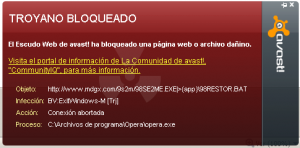
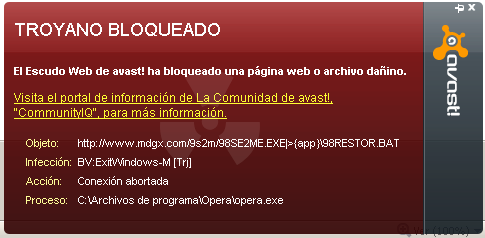
  4. Avast 5.1.835 warning me about a trojan horse

Account

Navigation

Configure browser push notifications

Chrome (Android)
  1. Tap the lock icon next to the address bar.
  2. Tap Permissions → Notifications.
  3. Adjust your preference.
Chrome (Desktop)
  1. Click the padlock icon in the address bar.
  2. Select Site settings.
  3. Find Notifications and adjust your preference.