-
I've always had My Documents on its own drive/partition. Favourites (not used), My Music, My Videos and My Pictures. Yesterday, I went to change a background, and lo and behold, rundll32.exe would hang (Display Properties/Desktop Tab). And only, this tab. Not only that, I'd lost the ability to right click an image and select Set as Background, it simply wasn't there. ??? I'd installed a new game (Chaos Theory), didn't make sense that a game would do that, right? Still, out it came, no change. Still couldn't change the background. I restored my original image (all updates - at the time, and all drivers). All was well. Okay then, reinstall here we come. All drivers and SP2 (slipped) - forgot the updates. No problem. Tab was accessible. Install all the updates. I change the location, and boom, Desktop Tab would hang. I revert to the image, bingo, no problem. I install Powertoys, change the My Pictures location, boom... tab inaccessible. I move the folder back to its default location, bingo.. tab would work. I move it manually (via regedit), tab wouldn't work. I revert, no problem. ??? Ideas? Resolved A freakin' jpg!!! No a virus, nor a trojan... a worm or malware. A bloody jpg. Grrr
-
Yup, randoms do happen. Having said that, there is no way this could/should survive an image. Which means, it must be something else. Edit... K, I've just restored my original image (all updates and drivers only). Working again. This, does not make sense. Gonna open up 10GB and leave unallocated. Hmmm
-
XP Pro SP2. Display Properties Desktop Tab... does not respond. I can drag the window around (and system won't lock). I can 'use' any other tab but Desktop. I've also lost the ability to right click an image and 'Set as Desktop Background'. I run SAV, TrojanHunter... etc. Nightly Scans. Adaware, SpywareBlaster, etc. No virii. No trojans. No malware. HiJack this (whiich one would think it may be) is absolutely clean. That rig is NOT used for ANY downloading (other than email - which is prescanned with Mailwasher Pro). I run Firefox 1.06 when I do venture online on that rig (its for gaming and editing only). Here's the kicker, System Restore will not. What happens is, after the OS shuts down, the System Restore window will open, and the bar will speed across. Of course, the Restore fails. Any restore I choose. My image (any Image I choose) done with Acronis 8 (only the OS partition is imaged) does not "fix" the problem with the display tab. That tells me the problem lays elsewhere. Question is, where else can it lay? I've replaced winnint.dll, no fix. I've deleted and rebooted user/windows/current verions/policy/system.. no fix. I am stumped. Ideas?
-
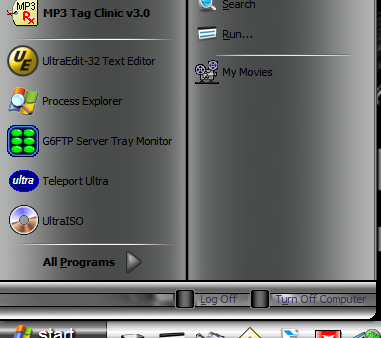
I've only ever been able to add one. Using a key that is not used regularly, I created "My Video's". Problem is, its below the other ones. Can't place it where you want. Can't recall where I got this from, apologies... Naturally, you'd have to change the values accordingly. Save the above as a .reg file, and import it into your registry. As shown here...

-
Fire up regedit... Navigate to... My Computer\HKEY_CURRENT_USER\Software\Microsoft\Windows\ShellNoRoam... Delete the keys BagMRU and Bags. You'll have to reset each to your liking.
-
In English... http://mitglied.lycos.de/lvllord/EvID4226Patch223d-en.zip Changelog... v2.23d - 2005-05-01 • Bug: Wrong position position to patch in final SP1 for Server 2003 32bit's TCPIP.SYS detected • Feature: Advanced detection of wrong position v2.23c - 2005-04-25 • Bug: On a few systems the patched TCPIP.SYS was not installed (should be fixed) v2.23b - 2005-04-21 • Bug: Bug in processing the SfcDLLCacheDir registrykey v2.23 - 2005-04-21 • Feature: Now also on 64-bit systems (till SP1) the TCPIP.SYS can be accessed (thx to Pyr0!) v2.22 - 2005-04-20 • Bug: Renaming did not work ... • ToDo: Detection of original XP 64 TCPIP.SYS won't work during restriction of 32bit programs. Will be fixed when time comes. v2.21 - 2005-04-20 • Feature: AMD64 files are supported • Feature: Itanium 64 file detection (but cannot be patched yet, due to missing files for testing) • Feature: Installation of TCPIP.SYS improved (recheck after patching if it's still the right version) • Feature: Automatic renaming of files, which might disable successful patching • Bug: Wrong shown versionnumer in program (2.11a instead of 2.12, now 2.21 of course;-) • ToDo: Detection of original XP 64 TCPIP.SYS won't work on all system v2.12 - 2004-09-22 • Feature: It's now possible to copy back the safety-copy • Bug: Wrong versioninformations shown on Windows XP prior to SP2 (There is no repatching needed on already patched TCPIP.SYS's) v2.11a - 2004-08-31 • Feature: It's now possible to change the limit during runtime (There is no repatching needed on already patched TCPIP.SYS's) v2.10a - 2004-08-20 • Feature: Support added for Windows 2003 SP1 beta • Feature: If no limit is given with the parameter /L, it will be asked for during runtime • General: Big codechange (There is no repatching needed on already patched TCPIP.SYS's) v2.0c2 (Forum) • Bug: Added checkk, if WFP restored in the short time the original version • Feature: Errormessage on read-only WFP-safetycopies added (There is no repatching needed on already patched TCPIP.SYS's) v2.0c • Bug: A limit has been found, altough no limit exists • General: Small codechanges (There is no repatching needed on already patched TCPIP.SYS's) v2.0b • Added parameter /F to patch a specific file instead of whole Windows (There is no repatching needed on already patched TCPIP.SYS's) v2.0a • General: Completely rewritten program • Feature: Automatic detection of Windowsdirectory • Feature: Automatic patching of files in Windows-directory (no more manual copy needed) • Feature: Added parameter /W to force a Windowsdirectory • Feature: Added parameter /L to manually set a limit (10-16777214) • Feature: Automatic detection of the limits on known and unknown build's possible (There is no repatching needed on already patched TCPIP.SYS's) v1.0 • General: First published version • Feature: Set the limit to 50 of the TCPIP.SYS in current directory. Manual copy needed
-
Yup, buggers. I'd "heard", that the old fix won't work even if rehacked. Any word on this?
-
I haven't had any problems with this at all. Running on SP1 and SP2. There are suggestions here to find a "better" one, yet... neither of you can come up with one. I use the edit fundtion all the time. What is it you are trying to do?
-
Was brave, and I answered my own question. Again, thanks goes out to those involved in fixing this very useful tweak.
-
Okay then, first off, thanks to all for getting this working. This tweak has been around for quite a while, and I am surprised that this hadn't been tended to before. Next... can someone explain to me, please, the following... I don't do an unattended setup, so, have no bat file to add this to. Can I simply add the .dll to system32, and then register it? Is copyto.zip and ContMenuExt.zip no longer needed then? Will it add both copy/move? Or is it still just copy? /too many questions.
-
1. Yup, can't get it there either. 2. Well, aren't "they" all shortcuts in the start menu folders. Don't know, and don't think so, given the above didn't work. I did mention you'd have to customize it to suit your system. Whatever icon you point the reg hack to, is the one that will appear in the start menu. Insofar as the File and Settings Transfer Wizard, don't know m8, I haven't used it, nor do I ever intend to. One final note though, asking the same question (basically) in multiple posts will actually slow down the help you receive (people have to bounce back and forth to follow along). Try to keep the same issue to a single post. Hope this helps. Edit for clarity
-
Jason wrote the script for it... You can find the download, and the info here... http://www.jasons-toolbox.com/programs.asp...To%20Extensions
-
'nuther vote for SAV Corp.
-
emule, bar none.
-