-
The only way I've found is to slipstream a ".REG file" BEFORE the first BOOT. Is there anybody knowing how to do that ? Is it just possible ?
-
I'm trying on a VM... it doesn't work for the moment...
-
Has somebody allready find a way to do REAL silent VolumeID change ? without the Licence agrement POPUP ? Is there another way to silently change a VolumeId ?
-
It's working fine, thank you for all, here is the change in BOLD Sp0iLedBrAt, here is my Custum.reg :
-
Thank you Sp0iLedBrAt, I think you're so right with the path !! I've allready hear it : that path must be absolute path in the RunOnce. The .reg file is only containing 3 keys to : - Disable the "startup windows" sound - Disable the "shutdown windows" sound - Disable the "Explorer : Start navigation" sound I'll try to modify path tonight at home ! Sev.
-
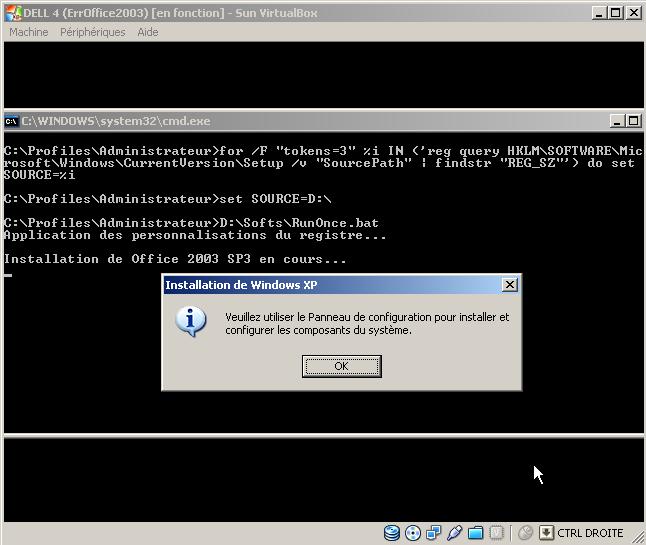
Hello, I've a new problem, this time is with RunOnce function. (see attached JPEG) Here is my RunOnce.cmd : @echo off echo Application des personnalisations du registre... regedit.exe /s Custom.reg echo. echo Installation de Office 2003 SP3 en cours... setup.exe TRANSFORMS=office.MST /qb- echo. echo Installation de Outlook Connector en cours... OutlookConnector.exe /passive echo. echo Installation d'Acrobat Reader 9.3... AdbeRdr930_fr_FR.exe /sPB echo. echo Installation de Internet Explorer 8 en cours... IE8-WindowsXP-x86-FRA.exe /passive /update-no Can somebody please help me with that ?
-
I found it ! This is the nVidia driver, I downloaded the lastest and I installed it manually and it truely change the theme back to XP theme !! Is there somebody using this kind of drivers ? DETAILS : Verde Notebook Release 197 Version : 197.16 WHQL Date de réalisation : 2010.03.29 Système d’exploitation : Windows XP Langue : Français Taille : 106 MB Sev
-
And what about DVD-RAM ? could they be bootable ? Could make XP CD install with DVD-RAM ? Maybe burn the files and not an ISO...
-
Thank you Sp0iLedBrAt, for your answer, I'll now use DVD. And what about RW DVD and CD ? For the Virtual Machine, I've just tried it (VirtualBox) and some results are diferent on the real machine and on the VirtualBox. Few examples : - I'm encountering a bug with XP theme that comes back after the first reboot (I've open a specific topic about it) - Display config (resolution...) - Specific machine drivers - Drivers not usable without specific programs Sev
-
I've got a newbee question : Is it possible to do nLite the XP CD to a DVD ? With this way there will be no more avaliable storage probleme ? In the same way, is it possible to do a bootable DVD-RW ? or a bootable CD-RW ? To do not have to burn a new CD just for testing drivers install ! Sev.
-
The XP that's working well is the older release (Twice nLited !!) This is the new one, that I was trying to make perfercly, that is occuring the "theme bug".
-
Hello, I hope this question can be posted here... I have a sticker on my machine (XP Pro FR), where can I find a French XP Pro CD, must I buy it ? Sev
-
Here are the LastSession.ini from my previous release... in this version everything is okay, and I don't understand the difference with the new one. This version (previous) is made with 2 step, the second one is just to add a bluetooth driver. The most noticable difference between the 2 release is about services : DERNIÈRE SESSION (205604.06-21.04.45).INI DERNIÈRE SESSION.INI
-
After the first reboot, when the XP theme comes back, if I setup it again to Classic, it's okay. I always do completely my nLite from an original, I never touch it twice. The strangest thing is that my previous version had no problem with that ! (I'll post the LastSession.ini)
-
Hello, A problem is occuring with my last release (XP Pro FR), when the installation is finished, the classical theme is Okay but after a reboot, XP theme is coming back ! My lastsession.ini is attached. I've already tested this release in a virtual box and this is not hapening, maybe nVidia Driver is faulty ? Sev. DERNIÈRE SESSION.INI