-
Thanks!
-
I'm having problems downloading the Nero 7 Lite Update Available Prompt Fix: it is not a referer-related issue as I can download the micro package with no problems at all. Tried with Firefox 1.5, 2.0 RC3 and IE6. Could anybody who succeeded in downloading this reg file attach it here, please? Thanks Venator
-
Thank you men... problem solved!
-
Hi, I can no longer drag and drop programs to the MFU section of the Start panel. I don't use the dynamically generated list of most used programs, but I drag-and-drop my own links in the same area, after having set the option "Number of programs on Start" in the start panel options. I suspect the tweak "Disable Tracking of most used programs" is responsible of that. Is this correct? If yes, how can I disable this tweak? Thanks for your help. Venator
-
SUPER-great!!! Been waiting for this for a loooong time! Thanks! Venator
-
Super-interested here!!! It would be great! Thanks again Venator
-
Hey LaptoniC, your little proggie is great! Lovely work! I'd want to suggest a minor enhancement: add an option to set the compression level of 7zip, as with the present setting it eats _too_ RAM . Is it possible to bypass the 7zip compression and, for example, create a WinRAR SFX archive? What to launch after files extraction? Thanks and best regards Venator
-
Do you know if it's possible to install Windows XP to my hard drive from a USB pen drive (instead of using a CD-ROM as source)? My motherboard supports USB devices booting. How can I make the pen drive bootable prior to copy the files from Windows CD? Thanks for your suggestions. Bye Venator
-
Any clues?
-
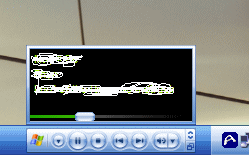
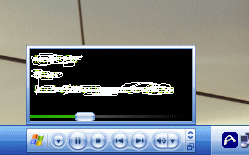
Hi guys, does anobody know how to disable this annoying "little window" from popping up whenever I pass with my mouse over the Windows Media Player bar in the taskbar? I'd want to continue to use the bar in the taskbar, as it is very handy. I'm talking about this: Thanks for your help Bye Venator
-
The site doesn't work. Could you please send it to rawbox@virgilio.it? Thanks in advance Venator
-
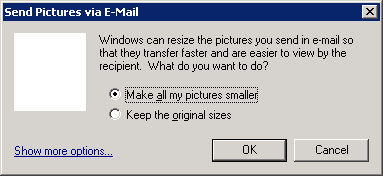
Thanks for your answer, but this disables only windows image viewer and not that annoying windows for emails. Edit: FOUND!!! Use this registry file: Windows Registry Editor Version 5.00 [HKEY_CLASSES_ROOT\.bmp] "PerceivedType"="" [HKEY_CLASSES_ROOT\.jpg] "PerceivedType"="" [HKEY_CLASSES_ROOT\.jpeg] "PerceivedType"="" [HKEY_CLASSES_ROOT\.gif] "PerceivedType"="" [HKEY_CLASSES_ROOT\.png] "PerceivedType"="" Bye Venator B)
-
Nobody?
-
How to disable the linked dialog box so that Windows will always use "Keep the original sizes"? Thanks Venator
-
nothing useful there... (to me, at least, and not to solve my problem)