-
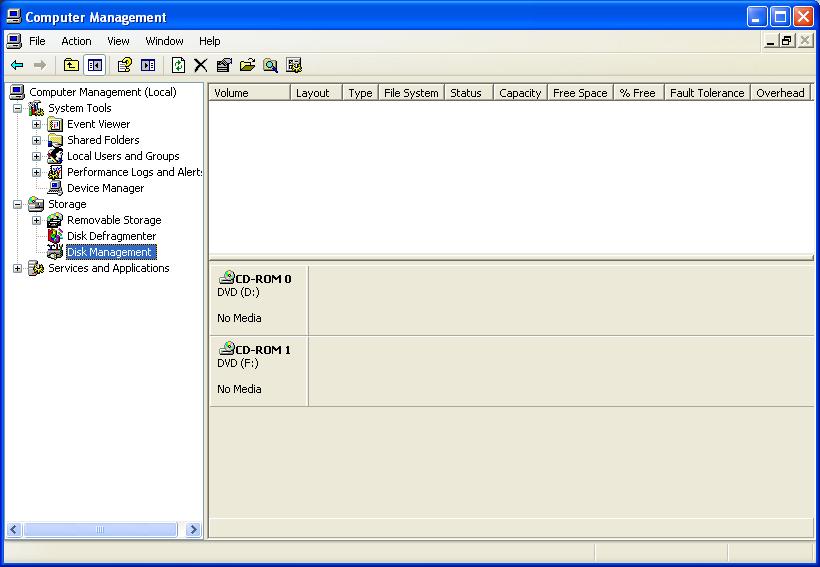
I don't think is hidden partition. I booted the PC with the old hard drive and the disk management could see all the drives. While it was working i ran 2 antivirus and Microsoft Windows Malicious Software Removal Tool. The removal tool found something and removed it but it didn't fix the problem. And now when I search for something on google the links sometimes send me to http://maybeask.info/search.php and other sites I didn't want. I think its time to reinstall windows.
-
It's sort of a new install. 2 or 3 weeks old with no problems. I just uninstalled slysoft Virtual CloneDrive and some other stuff. Didn't help. I just tried starting windows in safe mode. Same problem.
-
No storage media apart from opticail drives appear in Disk Management. Hard drives appear in my computer but not usb pen drive. Every thing appears in device manager. I use pen drive a lot. What can i do?
-
Could I add a vlited edition of vista the same way?
-
I'm trying to do the same thing but can't get Bcdedit to work.
-
You could try the dos floppy emulator e0x. I could't get it to work but I did't try very hard. I found this site http://sosordi.net/q30539.html but I could't translate it very well. To get ° type <Alt>+248
-
Have you tried right clicking on desktop/properties/appearance tab/advanced button. Its in the item pull down menu. Click on icon and change the size then ok apply.
-
Sorry about the mistake. Should be md "C:\Program Files\coverXP" Copy /y "%systemdrive%\Install\Applications\coverXP\Test.txt" "C:\Program Files\coverXP"
-
Skip the REG COPY %KEY%\005 /V 3 /D bit. Try md "C:\Program Files\coverXP" Copy /y "%systemdrive%\Install\Applications\coverXP\Test.txt"
-
You could try PeShutdown.exe. It was write WinPE but works on XP. http://home.t-online.de/home/520085154509/peshutdown.exe No countdown and a very quick splash screen.