


-
So, WinX is plunging down and M$ came up with great new idea. https://support.microsoft.com/en-us/kb/2952664
-
No, it wont pass sfc /verifyonly. Explorer.exe.mui is protected since 8.
-
Not in Serbia. https://www.microsoftstore.com/store/msmea/home/locale.sr_RS/ThemeID.27659900/mktp.RS/Currency.RSD
-
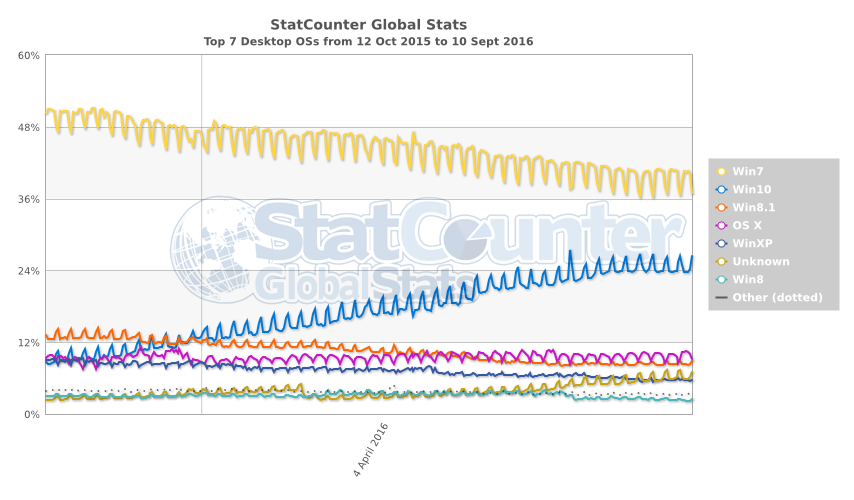
Doesn't look like that on Statcounter. You can clearly see stagnation after "suicide" offer ends. http://gs.statcounter.com/#desktop-os-ww-daily-20151012-20160910
-
Followed by full screen note: "Thank you for joining us, the exit gate is now closed. Welcome to your future as a target for advertising and a source for data."
-
Well, now it's time for obvious question: How much are they gonna pay us to take it? EDIT: If anyone misses "upgrade" you can do it for free and after deadline. https://blogs.msdn.microsoft.com/accessibility/2016/07/29/windows-10-free-upgrade-page-for-people-who-use-assistive-technologies/ https://www.microsoft.com/en-us/accessibility/windows10upgrade
-
Double strike http://news.softpedia.com/news/windows-phone-collapses-by-85-microsoft-sells-just-1-2m-phones-in-q2-506745.shtml
-
Just MS programs, e.g. IE. Office, Malicious Removal Tool, .NET. Not sure about Defender definitions.
-
Under Services right click on Windows update, properties , disable it. Under recovery tab in drop down menu's select Take no action. or paste this in notepad and save as whatever.bat sc config wuauserv start= disabled sc stop wuauserv REG ADD "HKEY_LOCAL_MACHINE\SYSTEM\CurrentControlSet\services\wuauserv" /v Start /t REG_DWORD /d "00000004" /f REG ADD "HKEY_LOCAL_MACHINE\SYSTEM\CurrentControlSet\services\wuauserv" /v FailureActions /t REG_BINARY /d "80510000000000000000000003000000140000000000000060ea000000000000000000000000000000000000" /f pause
-
Well, i installed it on VM and live system and on both did NOT see GWX or any other Win10 thing. However it re-enables DiagTrack service.
-
That's very clear to me. But i checked for updates after installing convenience rollup.
-
Thanks for sources. But something i don't get it. They specified five Windows 10 KB's and four of them (KB2952664 KB3021917 KB3035583 and KB3123862) i received as optional updates.
-
Where did you get that info? (note optional updates) I checked for updates after installation and get these (culprits are highlighted) From "wmic qfe get Caption,Description,HotFixID,InstalledOn" and "Dism.exe /online /Get-Packages" and BTW: Disabled tracking tasks stays same after update. Only noticed that DiagTrack service is re-enabled. That's all for now. Regards.
-
Too good to be true. Knowing MS behavior lately, smells like a trap. EDIT (couple of hours later): After clean install W7PRO SP1 and updated with April servicing stack and this. Looks like i was wrong. (for now)
-
I don't know exactly what is used for. But i have fair collection of scripts and programs which bock telemetry and every single one of them adds that address in hosts file. Hope it helps a bit.